Mô tả
Cảnh Báo Đường Xu Hướng
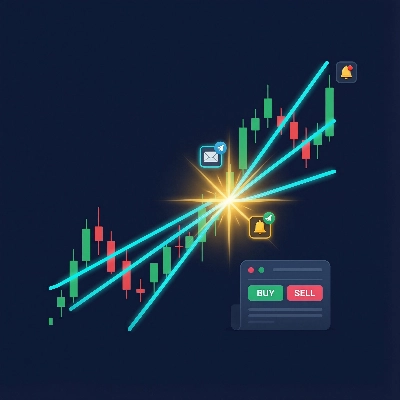
Một chỉ báo theo dõi các đường xu hướng vẽ tay trên biểu đồ giá và phát cảnh báo đa kênh — và tùy chọn đặt lệnh giao dịch — khi giá cắt qua đường xu hướng.
Nó Làm Gì
Bạn vẽ các đường xu hướng trên biểu đồ của mình. Chỉ báo sẽ theo dõi chúng. Khi giá cắt qua một đường, nó sẽ:
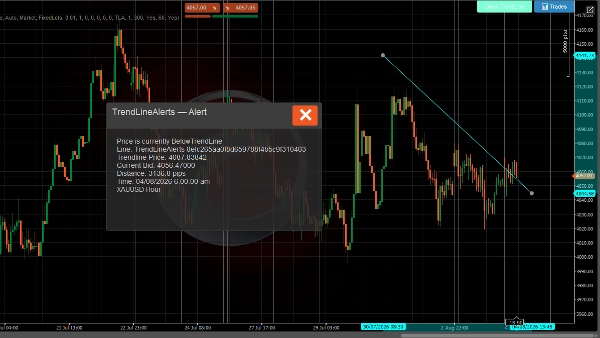
- Hiển thị một cửa sổ bật lên trên biểu đồ với chi tiết điểm cắt
- Phát âm thanh thông báo
- Gửi email (tùy chọn)
- Gửi tin nhắn Telegram qua bot (tùy chọn)
- Đặt lệnh giao dịch (tùy chọn — lệnh thị trường, giới hạn, dừng hoặc dừng-giới hạn)
Hệ Thống Cảnh Báo
- Phát hiện cắt đường xu hướng — phát cảnh báo trên mỗi tick khi giá cắt lên hoặc xuống dưới đường xu hướng được theo dõi
- Tin nhắn phong phú — bao gồm giá đường xu hướng, giá chào hiện tại, khoảng cách tính bằng pip, công cụ và khung thời gian
- Giới hạn tần suất — thời gian chờ cấu hình cho mỗi đường xu hướng ngăn cảnh báo trùng lặp
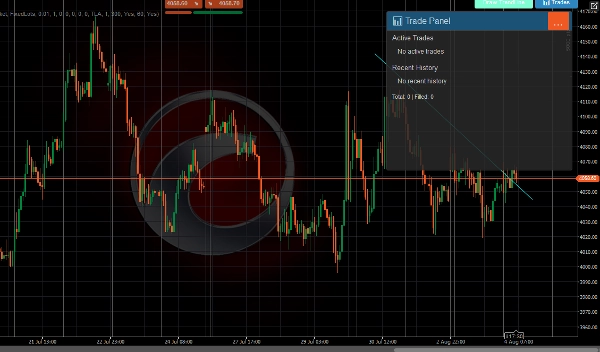
- Lịch sử cảnh báo — lưu trữ 500 cảnh báo gần nhất và có thể xem trong Bảng Giao Dịch
- Giao hàng đa kênh — cùng lúc qua cửa sổ bật lên, âm thanh, email và Telegram
Hệ Thống Giao Dịch
Khi bật giao dịch, sự kiện cắt cũng có thể đặt lệnh giao dịch:
- Tất cả loại lệnh C-Trader — lệnh thị trường, giới hạn mua/bán, dừng mua/bán, dừng-giới hạn mua/bán
- Hướng tự động — giá cắt xuống dưới → bán, cắt lên trên → mua (hoặc đặt thủ công cho từng đường)
- Dừng lỗ và chốt lời — xác định bằng pip, tự động chuyển đổi thành mức giá
- Hai chế độ khối lượng — lô cố định hoặc dựa trên rủi ro (% số dư tài khoản)
- Ghi đè theo từng đường xu hướng — mỗi đường xu hướng có thể có cài đặt giao dịch riêng (hướng, khối lượng, SL / TP, loại lệnh)
- Quản lý giao dịch — số lệnh tối đa trên mỗi đường, thời gian chờ giữa các lệnh, tự động hủy lệnh chờ khi đường xu hướng bị xóa
- Theo dõi vòng đời giao dịch — theo dõi khớp lệnh, SL/TP trúng, từ chối và hủy với thông báo cho từng sự kiện
Giao Diện Người Dùng
Thanh công cụ xuất hiện trên biểu đồ (vị trí có thể cấu hình) với:
- Vẽ Đường Xu Hướng — đặt một đường xu hướng tương tác mới trên biểu đồ
- 📊 Giao Dịch — mở bảng hiển thị các giao dịch đang hoạt động, lịch sử gần đây và thống kê
Thông Báo
Kênh Mô tả
Cửa sổ bật lên Hộp thoại trong biểu đồ với tiêu đề mã màu (xanh lá = trúng TP, đỏ = SL/từ chối, xanh dương = đã đặt lệnh)
Âm thanh Âm thanh thông báo của cTrader
Email Gửi qua hệ thống email tích hợp của cTrader
Telegram Gửi qua Telegram Bot API đến các kênh đã cấu hình
Tất cả các kênh nhận cùng định dạng tin nhắn phong phú bao gồm công cụ, khung thời gian, giá hiện tại, chi tiết đường xu hướng, và thông tin giao dịch khi có thể áp dụng.
CÁCH SỬ DỤNG
Vẽ Đường Xu Hướng
Sử dụng nút trên thanh công cụ
- Nhấp Vẽ Đường Xu Hướng trên thanh công cụ
- Một đường xu hướng màu xanh lam ngang xuất hiện trên biểu đồ
- Kéo các điểm cuối để đặt nó ở mức giá bạn muốn
- Chỉ báo tự động bắt đầu theo dõi để phát hiện điểm cắt
Vẽ thủ công
- Vẽ bất kỳ đường xu hướng nào bằng công cụ vẽ của cTrader
- Đặt tên với tiền tố
TrendLineAlertstheo sau là một dấu cách (ví dụ,TrendLineAlerts support1) - Chỉ báo sẽ nhận diện và bắt đầu theo dõi
Cấu hình Cảnh Báo
Vị trí nút
- Vị trí nút nhóm → chọn góc mà thanh công cụ xuất hiện (Trên trái, Trên phải, Dưới trái, Dưới phải)
Thông Báo Telegram
- Đặt Sử Dụng Thông Báo Telegram thành
true - Nhập Khóa Bot Telegram (từ @BotFather)
- Nhập Tên Kênh hoặc ID Chat (để trống để tự động phát hiện từ tương tác với bot)
Thông Báo Email
- Đặt Sử Dụng Thông Báo Email thành
true(mặc định) - Nhập Địa Chỉ Email
- Email được gửi qua hệ thống thông báo tích hợp của cTrader
Thời Gian Chờ Cảnh Báo
- Thời Gian Chờ Cảnh Báo (giây) — thời gian tối thiểu giữa các cảnh báo trùng lặp cho cùng một đường xu hướng (mặc định: 60s)
- Bật Lịch Sử Cảnh Báo — lưu trữ 500 cảnh báo gần nhất (mặc định: true)
Cấu Hình Giao Dịch
Bật Giao Dịch
- Đặt Bật Giao Dịch thành
true(mặc định: false) - Cấu hình các mặc định toàn cục bên dưới
Loại Lệnh
- Loại Lệnh Mặc Định — loại lệnh sẽ đặt khi cắt đường:
-
Market— thực thi ngay lập tức theo giá hiện tạiLimit— đặt lệnh giới hạn chờ tại giá đường xu hướng ± bù trừStop— đặt lệnh dừng chờ tại giá đường xu hướng ± bù trừStopLimit— đặt lệnh dừng-giới hạn chờ
Hướng
- Hướng Mặc Định:
-
Auto— giá cắt xuống dưới đường xu hướng → Bán, cắt lên trên → MuaBuy— luôn mua khi cắt đườngSell— luôn bán khi cắt đường
Khối Lượng
- Chế Độ Khối Lượng:
-
FixedLots— sử dụng trực tiếp giá trị Khối Lượng (lô) (ví dụ, 0.01)RiskPercent— tính kích thước lô dựa trên số dư tài khoản, % rủi ro và khoảng cách dừng lỗ
- Khối Lượng (lô) — kích thước lô cố định khi dùng chế độ FixedLots
- Phần Trăm Rủi Ro — phần trăm số dư tài khoản rủi ro cho mỗi giao dịch (ví dụ, 1.0 = 1%)
Dừng Lỗ / Chốt Lời
- Dừng Lỗ (pip) — khoảng cách từ điểm vào tính bằng pip (0 = không có SL)
- Chốt Lời (pip) — khoảng cách từ điểm vào tính bằng pip (0 = không có TP)
Cài Đặt Lệnh Chờ
Chỉ áp dụng cho loại lệnh Limit, Stop, và StopLimit:
- Bù Giá Limit (pip) — khoảng cách từ giá đường xu hướng cho lệnh giới hạn
- Bù Giá Stop (pip) — khoảng cách từ giá đường xu hướng cho lệnh dừng
- Hết Hạn (phút) — thời gian lệnh chờ hết hạn (0 = Giữ đến khi hủy)
Quản Lý Giao Dịch
- Nhãn Lệnh — tiền tố cho nhãn vị trí (mặc định:
TLA) - Số Lệnh Tối Đa Trên Mỗi Đường — số lệnh đồng thời tối đa trên mỗi đường xu hướng (mặc định: 1)
- Thời Gian Chờ (giây) — thời gian tối thiểu giữa các lệnh trên cùng một đường xu hướng (mặc định: 300)
Thông Báo Kết Quả Giao Dịch
- Thông Báo Kết Quả Giao Dịch — gửi cảnh báo khi lệnh được khớp, trúng SL/TP, hoặc bị từ chối (mặc định: true)
Ghi Đè Theo Đường Xu Hướng
Mặc định, tất cả các đường xu hướng sử dụng cài đặt giao dịch toàn cục ở trên.
Xem Giao Dịch
Nhấp vào nút 📊 Giao Dịch trên thanh công cụ để mở Bảng Giao Dịch:
- Giao Dịch Đang Hoạt Động — hiển thị tất cả vị trí mở và lệnh chờ liên kết với các đường xu hướng
- Lịch Sử Gần Đây — 5 giao dịch đóng/hủy/bị từ chối gần nhất với biểu tượng trạng thái:
-
- 🛑 Trúng Dừng Lỗ
- 🎯 Trúng Chốt Lời
- ❌ Bị Từ Chối
- ⚠️ Bị Hủy
- Thống Kê — tổng số giao dịch và số lần khớp lệnh
Vòng Đời Đường Xu Hướng
Sự kiện Điều Gì Xảy Ra
Đường được vẽ/cập nhật Chỉ báo tính toán trạng thái giá, đặt lại cảnh báo thành Đang Chờ
Giá cắt qua đường Cảnh báo phát (cửa sổ bật lên + âm thanh + email + Telegram), đặt lệnh nếu được bật
Đường bị xóa Dữ liệu theo dõi được xóa, mọi lệnh chờ cho đường đó bị hủy
Hướng Dẫn Màu Cửa Sổ Bật Lên
Màu Ý nghĩa
Xám đậm Cảnh báo cắt giá
Xanh dương Đã đặt lệnh
Xanh lá (xanh ngọc) Giao dịch đã khớp
Xanh lá Trúng chốt lời
Đỏ Dừng lỗ trúng hoặc giao dịch bị từ chối
Vàng Lệnh bị hủy
Giao dịch có rủi ro. Hiệu suất trong quá khứ không đảm bảo kết quả tương lai.
Tóm tắt
Key features include:
- Real-time detection of price crossing above or below tracked trend lines on every tick.
- Rich alert messages containing trend line price, current bid, distance in pips, instrument, and timeframe.
- Configurable alert cooldowns to prevent duplicate notifications.
- Storage and display of the last 500 alerts in a Trade Panel.
- Multi-channel alert delivery: popup, sound, email, and Telegram simultaneously.
When trading is enabled, the indicator supports all cTrader order types (market, limit, stop, stop-limit) with automatic direction setting based on price crossing (buy above, sell below) or manual configuration per trend line. It includes stop loss and take profit settings, two volume modes (fixed lots or risk-based), and per-trend line trade overrides. Trade management features include limits on concurrent trades per line, cooldowns between trades, and automatic cancellation of pending orders when a trend line is deleted. Trade lifecycle events such as fills, SL/TP hits, rejections, and cancellations generate notifications.
The user interface provides a configurable toolbar for drawing trend lines and accessing a Trade Panel that displays active trades, recent history, and statistics. Alerts use color-coded popups to indicate event types (e.g., order placed, trade filled, stop loss hit).



![Logo "[Stellar Strategies] MARSI Signal Plotter"](https://cdn.ctrader.com/image/webp/7b2b8da6-8f8e-4646-8d4a-4710c516c01e_25567)