ブローカー&プロップファーム
事業者向け
00
Days
:
00
Hours
:
00
Minutes
:
00
Seconds
インジケーター
Indices
Prop
Commodities
Stocks
Forex
Crypto
Universal Assistant Toolkit - UATKit
5.0
27/01/2026
35
Desktop
登録日 28/01/2025
無料インストール
1113
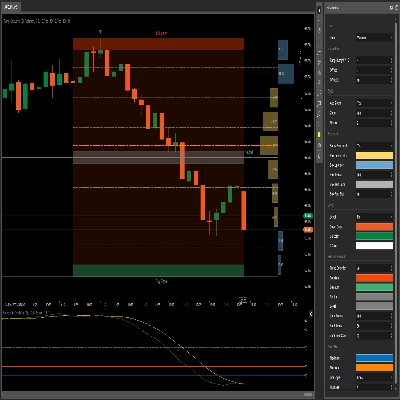
「Universal Assistant Toolkit - UATKit」アップロード画像「Universal Assistant Toolkit - UATKit」アップロード画像「Universal Assistant Toolkit - UATKit」アップロード画像「Universal Assistant Toolkit - UATKit」アップロード画像「Universal Assistant Toolkit - UATKit」アップロード画像「Universal Assistant Toolkit - UATKit」アップロード画像「Universal Assistant Toolkit - UATKit」アップロード画像「Universal Assistant Toolkit - UATKit」アップロード画像

✅ UATKit is provided free of charge as a goodwill contribution to the cTrader community, created by a professional trader who understands the day‑to‑day challenges of chart analysis and execution.

⚠️Please check the product page periodically for updates, as cTrader does not notify users when new versions of indicators are released.

⭐️ I would also be happy to receive your comments and feedback in the Customer Reviews and Discussion sections.


1. What This Product Is

A comprehensive workflow‑enhancement toolkit designed to make charting on cTrader smoother, clearer, and more efficient.
Universal Assistant Toolkit (UATKit) is a multi‑feature chart‑side companion for cTrader.
It brings together several practical tools - each designed to solve a specific workflow need - into one unified, lightweight indicator.
Every feature in UATKit is fully customizable and operates independently, giving traders complete control to adjust behavior, visuals, and hotkeys while enabling only the tools they need for a clean, responsive charting experience.

UATKit is provided free of charge as a goodwill contribution to the cTrader community, created by a professional trader who understands the day‑to‑day challenges of chart analysis and execution.


2. Who This Toolkit Is For

UATKit is built for traders who:

  • Spend significant time analyzing charts
  • Prefer clean, informative, and customizable chart layouts
  • Want faster access to common actions through hotkeys
  • Need visual clarity during fast‑moving markets
  • Appreciate tools that enhance workflow without adding noise

Whether you scalp, swing trade, or simply want a more organized charting environment, UATKit adapts to your style.


3. Feature Groups Overview


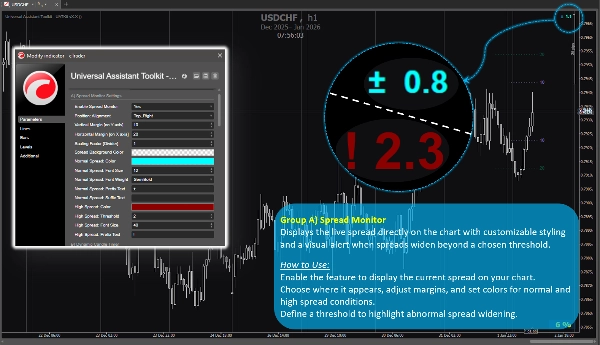
Feature Group A) 🔸 Spread Monitor

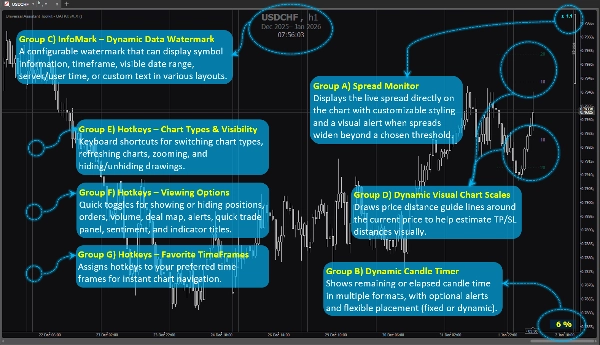
Displays the live spread directly on the chart with customizable styling and a visual alert when spreads widen beyond a chosen threshold.

How to Use:
Enable the feature to display the current spread on your chart.
Choose where it appears, adjust margins, and set colors for normal and high‑spread conditions.
Define a threshold to highlight abnormal spread widening.


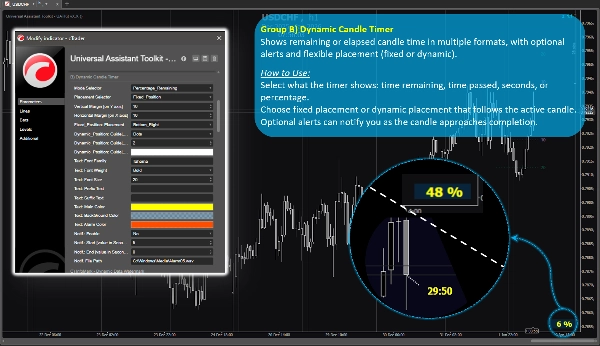
Feature Group B) 🔸 Dynamic Candle Timer

Shows remaining or elapsed candle time in multiple formats, with optional alerts and flexible placement (fixed or dynamic).

How to Use:
Select what the timer shows: time remaining, time passed, seconds, or percentage.
Choose fixed placement or dynamic placement that follows the active candle.
Optional alerts can notify you as the candle approaches completion.


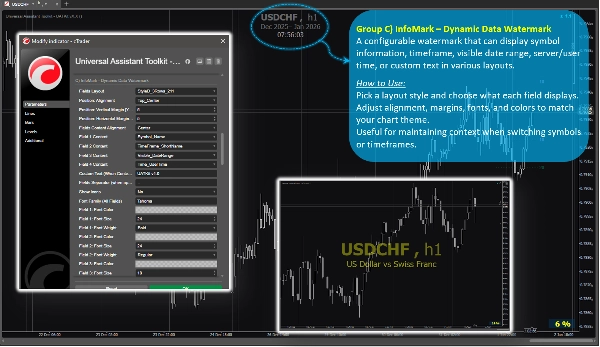
Feature Group C) 🔸 InfoMark – Dynamic Data Watermark

A configurable watermark that can display symbol information, timeframe, visible date range, server/user time, or custom text in various layouts.

How to Use:
Pick a layout style and choose what each field displays.
Adjust alignment, margins, fonts, and colors to match your chart theme.
Useful for maintaining context when switching symbols or timeframes.


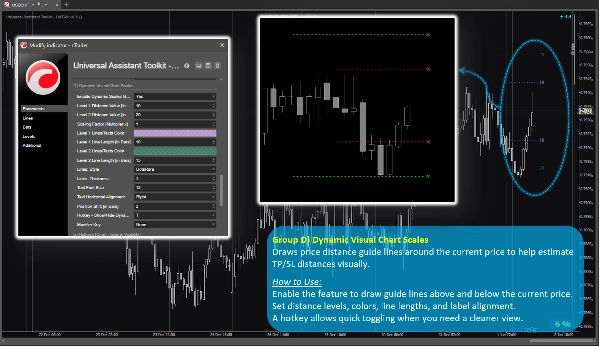
Feature Group D) 🔸 Dynamic Visual Chart Scales

Draws price‑distance guide lines around the current price to help estimate TP/SL distances visually.

How to Use:
Enable the feature to draw guide lines above and below the current price.
Set distance levels, colors, line lengths, and label alignment.
A hotkey allows quick toggling when you need a cleaner view.


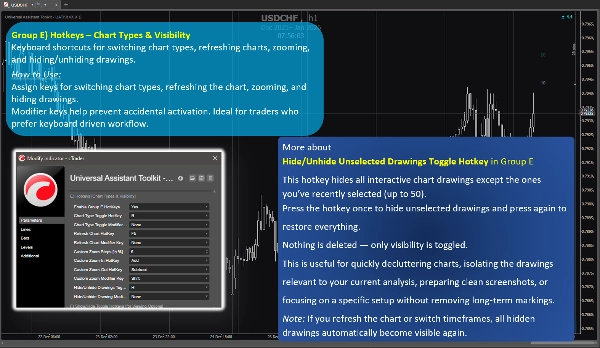
Feature Group E) 🔸 Hotkeys – Chart Types & Visibility

Keyboard shortcuts for switching chart types, refreshing charts, zooming, and hiding/unhiding drawings.

How to Use:
Assign keys for switching chart types, refreshing the chart, zooming, and hiding drawings.
Modifier keys help prevent accidental activation. Ideal for traders who prefer keyboard‑driven workflow.


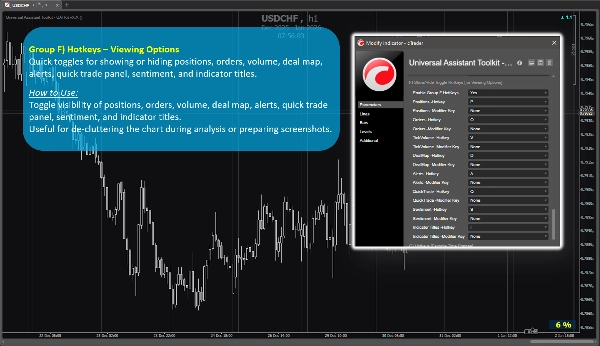
Feature Group F) 🔸 Hotkeys – Viewing Options

Quick toggles for showing or hiding positions, orders, volume, deal map, alerts, quick trade panel, sentiment, and indicator titles.

How to Use:
Toggle visibility of positions, orders, volume, deal map, alerts, quick trade panel, sentiment, and indicator titles.
Useful for de-cluttering the chart during analysis or preparing screenshots.


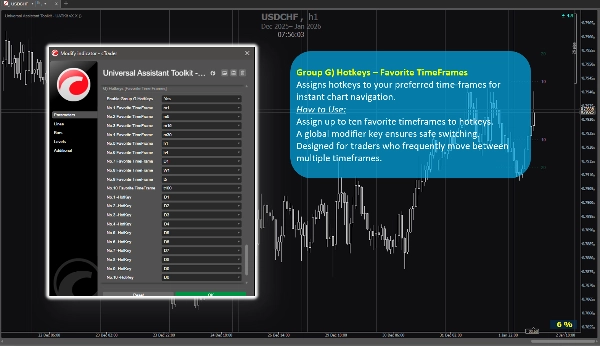
Feature Group G) 🔸 Hotkeys – Favorite TimeFrames

Assigns hotkeys to your preferred time-frames for instant chart navigation.

How to Use:
Assign up to ten favorite timeframes to hotkeys.
A global modifier key ensures safe switching.
Designed for traders who frequently move between multiple timeframes.


4. Additional Notes for Users

  • All features are optional and can be enabled or disabled individually.
  • The toolkit is optimized for performance and designed to avoid interfering with other indicators.
  • Most parameters include built‑in tooltips. Simply hover over any setting to view extra guidance and usage notes.
  • No external data sources are used; all information comes from the chart and platform.
  • This toolkit is provided free to support the cTrader community and improve everyday charting workflows.
  • Default settings are sensible, so users who don’t need special configurations can rely on the preset parameters without spending extra time on setup.
  • ⭐️ Feedback and suggestions are welcome to help refine future versions (use discussion section on this page).
  • ⚠️Please check the product page periodically for updates, as cTrader does not notify users when new versions of indicators are released.


5.0
レビュー: 1
5
100 %
4
0 %
3
0 %
2
0 %
1
0 %
カスタマーレビュー
January 28, 2026
🟢Absolutely brilliant. Thank you, MehranMZ, for such a generous contribution to the community. 🟢This package is genuinely valuable and addresses so many of the common charting needs within cTrader. 🟢I’ve gone through every feature, and each one is top-notch-practical, thoughtfully designed, and effortlessly customisable. 🟢It’s clear the developer is a trader themselves, with a real understanding of what cTrader users look for in their workflow.
この作成者の他の商品
インジケーター
Indices
Prop
Stocks
+3
Dynamic Candle Timer v1.5 2025
Dynamic Candle Timer is a fully customizable feature-packed indicator that offers multiple count-down/up modes and...
インジケーター
Indices
Stocks
Commodities
+2
XY Bar Info Panel v1.5
Overlay panel showing bar date/time, OHLC, tick Volume, percent change, and market session - fully customizable.
これも好きかも
Pips V4Final
Displays pips from daily open with high/low. Clean, customizable, perfect for quick daily price context.
インジケーター
Indices
Stocks
Commodities
+2
DayOfWeek - FXMaster
Day of Week Indicator for cTrader
E7 Correlation Dashboard
E7 Correlation Dashboard.
インジケーター
Indices
Prop
Stocks
+3
Fractals
Fractals is a precision-engineered trading indicator for cTrader that reveals the hidden architecture of price action.
インジケーター
NAS100
NZDUSD
XAUUSD
+13
Keylevels v1.1
Refined cleaner version of Key Levels indicator with broker UTC offset, styles & label alignment.
インジケーター
Indices
Prop
Stocks
+5
New Way Sar - Free
The Parabolic SAR, or "Stop and Reverse," is a dynamic technical analysis tool
インジケーター
Forex
EURUSD
SMC
AsiaSession
Visualize Asia session range with customizable lines for high, low, mid, start, and end.
インジケーター
Breakout
Stocks
Forex
+2
WaveWeisBarForce
Wave Weis Bar Force - is an indicator that applies the logic of Volume waves (Weis) to determine accumulation
インジケーター
NAS100
NZDUSD
Breakout
+12
Multi_TF Candlestick Chart Overlay
Perfect for traders who demand a clear overview of multiple timeframes at a glance.
インジケーター
NAS100
NZDUSD
Breakout
+12
VolumeColorBar
Color Volume Bars – Visualize Market Strength Instantly
インジケーター
Breakout
Scalping
KAMAKeltner
KAMA Keltner – Adaptive Volatility Channel for Precision Trading
インジケーター
RSI
Breakout
Supertrend
TrendMaster Pro MultiMA
Connects each moving average value from candle to candle, forming a fan-like structure of trendlines.
E7 Indicators Free Overlays
Bollinger Band Cloud, Heiken Ashi, Trend Follower and Parabolic SAR.
インジケーター
Indices
Commodities
Forex
LineHelper_Pro
LineHelper is your complete line-drawing assistant for setting up trading zones quickly
IR Macd + MacdLine
some user add moving average to macd to see better. in ctrader 4.3.11 there is a problem with this . I make a macd tha
インジケーター
Grid
NAS100
NZDUSD
+15
EMA UP&DOWN 2025
SectorIndex Dual Moving Average Indicator: Your Market Compass 🧭
インジケーター
NAS100
NZDUSD
XAUUSD
+10
Atlas Seasonal Returns Heatmap
🧭 See when your market tends to move—by Month, Day-of-Week, or Hour-of-Day🧭
Tiny_Aim_Trainer
trading stress-relief “mini-game”