
Beschreibung
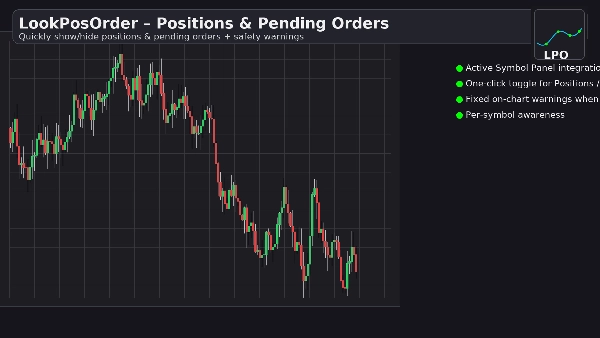
LookPosOrder hilft Ihnen, kostspielige Überraschungen zu vermeiden, indem es mühelos ermöglicht, Positionen und ausstehende Aufträge anzuzeigen oder zu verbergen – und indem es Sie klar warnt, wenn für das aktuelle Symbol etwas verborgen ist.
Was es tut
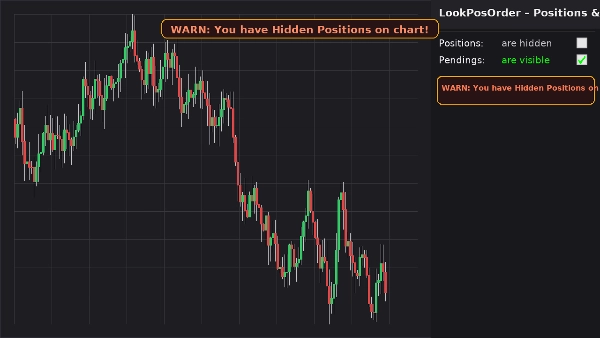
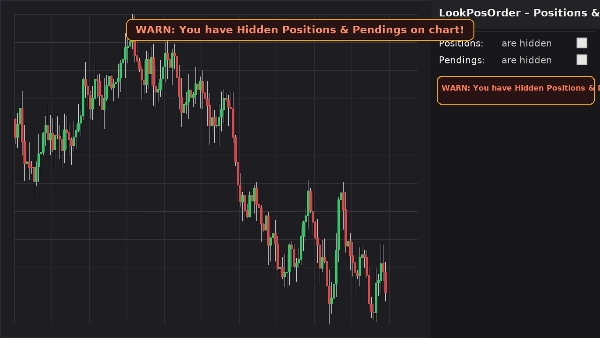
- Fügt einen sauberen Steuerblock im Active Symbol Panel (ASP) mit zwei Kontrollkästchen hinzu:
-
- Positionen: sind sichtbar / sind verborgen
- Ausstehende: sind sichtbar / sind verborgen
- Zeigt ein festes Warnbanner auf dem Chart (bewegt sich nicht beim Schwenken/Zoomen), wenn für das aktuelle Symbol verborgene Elemente existieren.
- Spiegelt dieselbe Warnung inline im ASP-Block wider.
- Erinnert sich an Ihre Einstellungen pro Symbol.
Warum Trader es lieben
- Fehler vermeiden: vergessen Sie nie, dass etwas auf Ihrem Chart verborgen ist.
- Schnelles Umschalten: kein langes Suchen durch Chart-Menüs.
- Symbolbezogenes Bewusstsein: warnt nur, wenn das aktuelle Symbol tatsächlich verborgene Elemente hat.
- Leicht & sauber: minimales UI, sofort reaktionsschnell.
Hauptmerkmale
- Integration des Active Symbol Panels
- Ein-Klick-Umschalter für Positionen und ausstehende Aufträge
- Festes Warnbanner auf dem Chart, wenn verborgene Elemente existieren
- Inline-Warnung im ASP-Block
- Symbolbezogenes Bewusstsein (filtert Positionen/Aufträge auf das aktuelle Symbol)
- Einstellungen bleiben erhalten (pro Symbol)
- Funktioniert neben den nativen Anzeigeeinstellungen (automatische Synchronisation bei Änderungen im Chart-Menü)
Anforderungen
- cTrader 5.4.9 oder höher empfohlen
- Desktop-Plattform
Installation
- Laden Sie die Plugin-Datei herunter.
- Öffnen Sie cTrader → Automate → Plugins → Importieren.
- Aktivieren Sie das LookPosOrder Plugin.
- Öffnen Sie ein Chart, wählen Sie das Symbol aus und verwenden Sie den LookPosOrder Block im rechten ASP.
Anwendung
- Schalten Sie Positionen und Ausstehende über Kontrollkästchen um.
- Wenn etwas verborgen und für das aktuelle Symbol existiert, sehen Sie eine Warnung:
-
- „WARNUNG: Sie haben verborgene Positionen im Chart!“
- „WARNUNG: Sie haben verborgene ausstehende Aufträge im Chart!“
- „WARNUNG: Sie haben verborgene Positionen & ausstehende Aufträge im Chart!“
FAQ
F: Ändert das Plugin meine Aufträge oder Positionen?
A: Nein. Es schaltet nur die Chart-Sichtbarkeit über die nativen Anzeigeeinstellungen um.
F: Warnt es mich für andere Symbole?
A: Nein. Warnungen werden nur angezeigt, wenn das aktuelle Symbol verborgene Elemente hat.
F: Was passiert, wenn ich die Sichtbarkeit über das eigene Menü des Charts ändere?
A: Das Plugin synchronisiert die Kontrollkästchen und Warnungen automatisch.
F: Leistungseinfluss?
A: Vernachlässigbar. Es ist eine leichte UI-Überlagerung und ein ASP-Block.
Rückerstattung
- Rückerstattungen: 14-tägige Geld-zurück-Garantie, wenn das Plugin auf Ihrer Einrichtung nicht wie beschrieben funktioniert.
Datenschutz
Das Plugin erhebt nicht oder überträgt persönliche Daten. Es interagiert nur mit dem lokalen Chart und der UI von cTrader.
Zusammenfassung
Diskussion
Kundenbewertungen
5 | 100 % | |
4 | 0 % | |
3 | 0 % | |
2 | 0 % | |
1 | 0 % |