Broker & Prop
Untuk perniagaan
00
Days
:
00
Hours
:
00
Minutes
:
00
Seconds
Indikator
NAS100
NZDUSD
Martingale
Forex
Fibonacci
EURUSD
MACD
BTCUSD
Indices
ATR
Stocks
Grid
RSI
Breakout
XAUUSD
FVG
Commodities
Signal
Bollinger
GBPUSD
AI
VWAP
ZigZag
Supertrend
Crypto
USDJPY
Scalping
LookPosOrderIndicator
01/10/2025
1
Desktop
Sejak 12/01/2025
Jualan
1
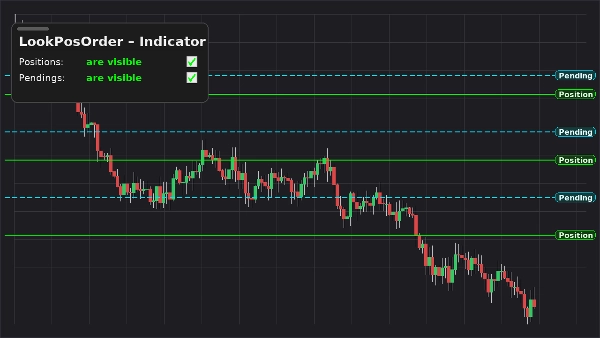
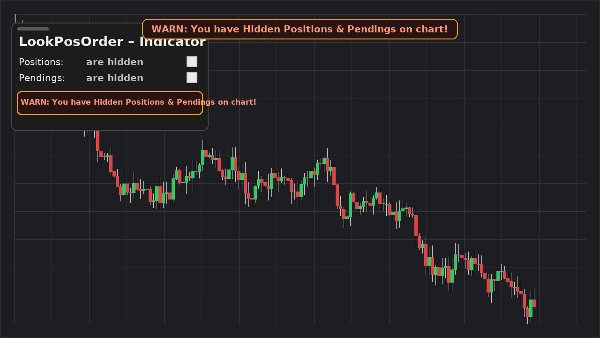
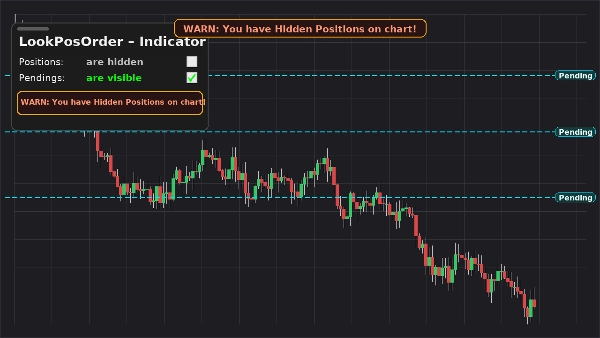
Imej yang dimuat naik "LookPosOrderIndicator"Imej yang dimuat naik "LookPosOrderIndicator"Imej yang dimuat naik "LookPosOrderIndicator"


LookPosOrder (Indicator) keeps you safe and fast: it adds a floating, draggable panel on your chart to show or hide Positions and Pending Orders—and raises a fixed, top-center warning banner whenever hidden items exist for the current symbol.

What it does

  • On-chart panel with two toggles:
    • Positions: are visible / are hidden
    • Pendings: are visible / are hidden
  • Fixed on-chart warning (does not move when you pan/zoom) if hidden items exist.
  • Same inline warning inside the panel.
  • Per-symbol awareness: only warns when the active symbol actually has items hidden.
  • Remembers your preferences per symbol.

Why traders love it

  • Avoid mistakes: don’t forget you’ve hidden orders/positions.
  • Instant toggling: no more drilling into chart menus.
  • Clean overlay: draggable, compact, and responsive.

Key Features

  • On-chart, draggable control panel
  • One-click toggles for Positions and Pending Orders
  • Fixed warning banner when hidden items exist
  • Inline warning inside the panel
  • Per-symbol awareness
  • Works alongside native Display Settings (auto-syncs if you change them elsewhere)

Requirements

  • cTrader 5.4.9 or later recommended
  • Desktop platform

Installation

  1. Download the indicator file.
  2. Open cTrader → AutomateIndicatorsImport.
  3. Add LookPosOrder – Indicator to your chart (overlay).
  4. Drag the panel where you like; use the two checkboxes to manage visibility.

How to Use

  • Toggle Positions and Pendings from the floating panel.
  • If something is hidden and exists for the current symbol, warnings appear:
    • WARN: You have Hidden Positions on chart!
    • WARN: You have Hidden Pendings on chart!
    • WARN: You have Hidden Positions & Pendings on chart!
  • The warning banner is fixed to the top center. Use the indicator parameter “Y offset Warning Text” to move it down if needed.

FAQ

Q: Does it modify my orders/positions?
A: No. It only toggles chart visibility (native Display Settings).

Q: Will it warn me for other symbols?
A: No. Warnings only appear when the current symbol has hidden items.

Q: What if I change visibility from the chart’s menu?
A: The indicator auto-syncs the panel and warnings.

Q: Performance impact?
A: Minimal—lightweight overlay and checks per symbol.


Support & Refund

  • 14-day money-back guarantee if it doesn’t work as described for you.
0.0
Ulasan: 0
Ulasan pelanggan
Belum ada ulasan untuk produk ini. Anda sudah mencuba produk tersebut? Jadilah yang pertama untuk berkongsi pendapat anda!
Lebih banyak produk daripada penulis ini
Plugin desktop
NAS100
NZDUSD
Martingale
+23
LookPosOrder
One-click toggle for Positions / Pending Orders on cTrader charts with fixed on-chart warnings and an ASP control panel
Anda juga mungkin suka
Indikator
NAS100
NZDUSD
Martingale
+26
MultiMA-display
This indicator is a powerful visualization tool 💡. Its design is flexible, robust, and solves a core problem for multi-
Indikator
RSI
Breakout
Supertrend
TrendMaster Pro MultiMA
Connects each moving average value from candle to candle, forming a fan-like structure of trendlines.
Indikator
Indices
Prop
Breakout
+8
MarketRegimeAI
A cutting‑edge trading indicator that fuses AI and mathematics with adaptive logic to classify market regimes.
Indikator
Grid
NAS100
RSI
+17
Sessions with OR
Session boxes with UTC offset, OR logic, adjustable opacity, and multi-day lookback.
Indikator
NAS100
NZDUSD
Breakout
+18
Free Smart Money Concepts (SMC) from TradingView
Free Smart Money Concepts from TradingView for cTrader: BOS/CHoCH, OB, FVG, liquidity, MTF levels, discount zones.
Indikator
NAS100
NZDUSD
Breakout
+14
ZIG ZAG Free
ZigZag Free is a clean swing-detection tool that marks significant pivot highs/lows
Indikator
Grid
NAS100
NZDUSD
+19
Trend Cycle
Trend Cycle – measure the life of your trends. See how long the current move has been running and how long similar trend
Indikator
Breakout
Fibonacci
Initial Balance
Track Initial Balance ranges across any period with optional Fibonacci levels and projections.
Indikator
NAS100
NZDUSD
Martingale
+26
Liquidity Shift Indicator
Want a cBot based on this indicator? Contact us!
Indikator
XAUUSD
Forex
EURUSD
+2
ALMA Smoothed Gaussian Moving Average
ALMA Smoothed Gaussian Moving Average (ASGMA) – by LudwigICT
IR CheckList
you could put your check list in your chart you could split your test with “,” you could put your checklist in indicat
Dinilai teratas
Percuma
Indikator
Indices
Stocks
Forex
+1
Daily Fibo
Daily Fibo
Side Volume Profile
Right-anchored cTrader Volume Profile with VAH/VAL/POC, LVZ, top volume+EMA, themes, and fast, readable visuals.
IR Multi Data
show symbol and time fram, daily net profit percent, daily net profit, and spread ln your chart. consider that timezone
Indikator
NAS100
NZDUSD
XAUUSD
+16
Candle Timer Toolbox
A multi-TF panel with candle timers, sessions, ticker, spread & 15+ themes. Fully customizable.
Indikator
Stocks
Forex
MACD
+1
SmartBot-Volume MACD
a revolutionary indicator that integrates volume into MACD.
Microchannels
Microchannels
ZigZagSmartAlert
ZigZag Smart Alert for cTrader Description: ZigZag Smart Alert is a next-generation swing indicator for cTrader, designe