
Penerangan
🚀 Session Breakout Prop
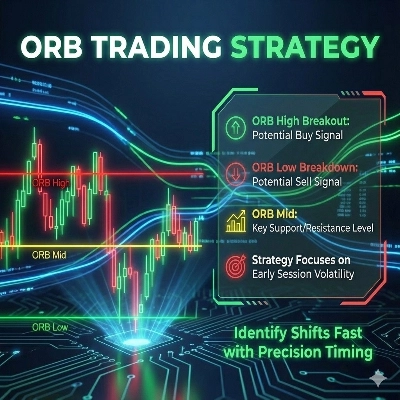
Session Breakout Prop trades the range of two independent sessions on the same chart. Each session has its own time zone, range, trade window, entry mode, number of trades and close time. Every trade has a stop loss. No grid, no martingale, no averaging.
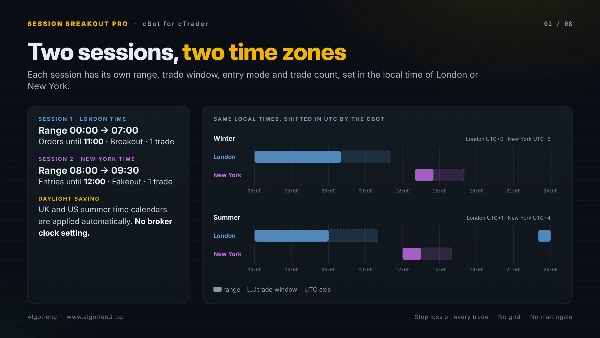
🕰 Sessions and time zones
Session 1 default → London, range 00:00 to 07:00 London time, orders until 11:00, Breakout mode, 1 trade per day
Session 2 default → New York, range 08:00 to 09:30 New York time, entries until 12:00, Fakeout mode, 1 trade per day
Daylight saving → London and New York times follow their own summer time calendars automatically. No broker clock setting is needed.
Overnight ranges → a range start later than the range end means the range begins the evening before
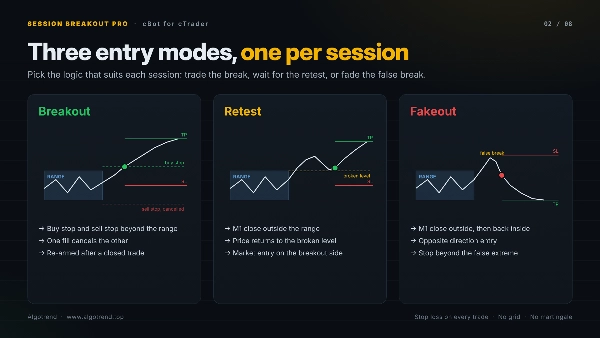
🎯 Three entry modes, one per session
Breakout → buy stop above and sell stop below the range, with a buffer as a percent of the range. One fill cancels the other. After a closed trade the orders are placed again if trades and time are left.
Retest → waits for an M1 close outside the range, then enters at market when price comes back to the broken level and closes on the breakout side
Fakeout → waits for an M1 close outside the range, then trades the return inside the range in the opposite direction, with the stop beyond the false extreme and the target on the other side of the range
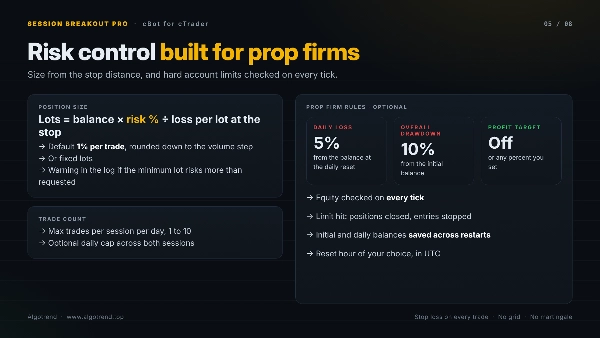
🛡 Prop firm rules
Daily loss → maximum loss per day from the balance at the reset hour
Overall drawdown → maximum drawdown from the initial balance
Profit target → optional, the cBot stops when it is reached
Protection → equity checked on every tick, positions closed and entries stopped when a limit is hit, balances saved across restarts
💰 Risk
Position size → percent risk from the stop distance, or fixed lots
Daily trade limit → per session and optionally across both sessions
🔍 Filters
Range size → between a minimum and a maximum percent of the daily ATR, so the same settings adapt to gold, indices and currencies
Spread → maximum spread as a percent of the range
Days and direction → choose the trading days and Both, Long Only or Short Only
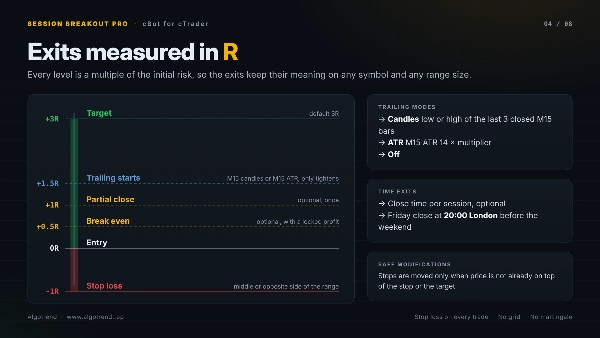
🚪 Exits
Stop loss → middle of the range or opposite side, for Breakout and Retest
Target → in R multiples, default 3R
Break even → at a chosen R, with a locked profit
Partial close → once, at a chosen R
Trailing → on M15 ATR or on the last M15 candles, starts at a chosen R and only tightens
Time exits → close time per session and Friday close before the weekend
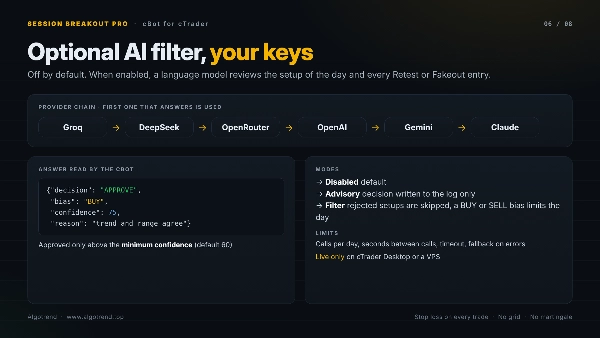
🤖 Optional AI filter
Modes → Disabled, Advisory (log only) or Filter
Providers → Groq, DeepSeek, OpenRouter, OpenAI, Gemini and Claude, tried in this order, with your own API keys
What it checks → the daily setup and every Retest or Fakeout entry, with an optional buy or sell bias for the day
Note → the AI works in live trading on cTrader Desktop or a VPS. It is not used in backtests or on cTrader Cloud. The rest of the cBot runs everywhere.
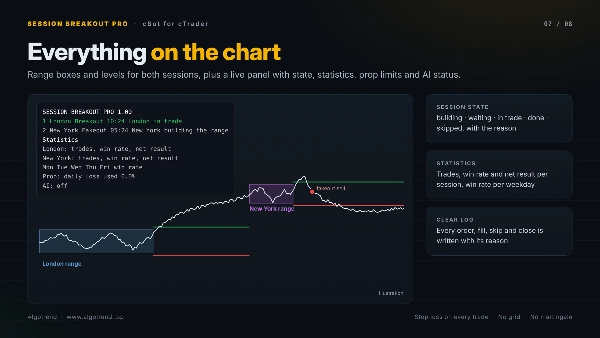
📊 On the chart
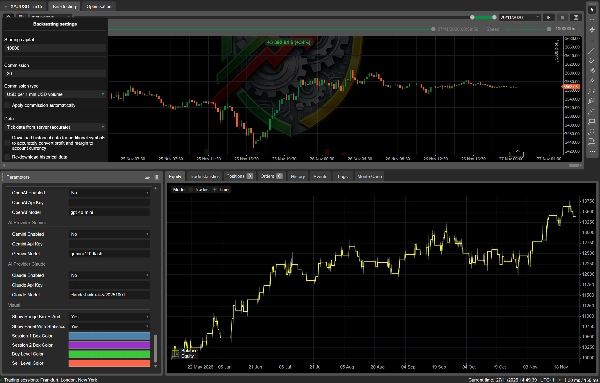
Range boxes and buy and sell levels for each session, a panel with the state of both sessions, statistics by session and by weekday, prop rule status and AI status.
📈 Backtest results
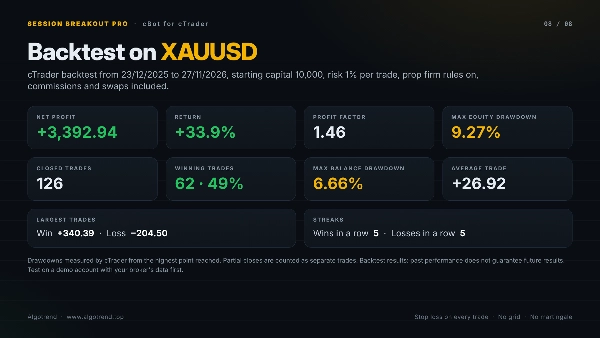
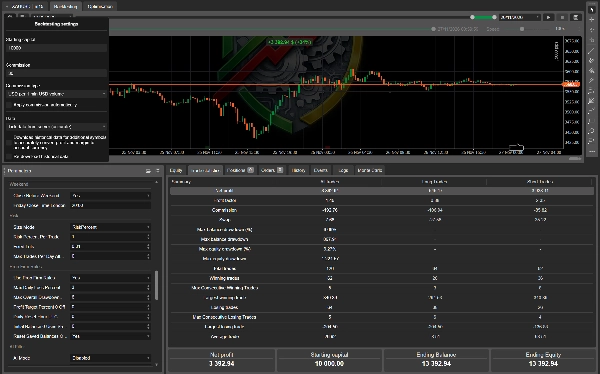
Symbol and period → XAUUSD, 23/12/2025 to 27/11/2026, starting capital 10,000, risk 1% per trade, prop firm rules on (daily loss 3%, overall drawdown 6%), commissions and swaps included
Net profit → +3,392.94, a return of +33.9%
Profit factor → 1.46
Max drawdown from the peak → 9.27% on equity, 6.66% on balance
Trades → 126 closed trades, 49% winners, average trade +26.92
Largest win and loss → +340.39 and −204.50
Streaks → 5 wins in a row, 5 losses in a row
⚙ Getting started
Step 1 → attach the cBot to any timeframe of the symbol. It reads M1, M15 and daily bars by itself.
Step 2 → keep the default sessions or set your own times, in local time of the chosen zone
Step 3 → set Risk Percent Per Trade and the prop firm limits of your challenge, then run a backtest on your broker's data before going live
🧩 Setting examples
Default → London Breakout plus New York Fakeout, 1 percent risk, target 3R, trailing on candles from 1.5R
London only → disable Session 2 for a classic London range breakout
Prop challenge → risk 0.5 to 1 percent, Use Prop Firm Rules on, daily loss and overall drawdown set below your firm's limits
❓ FAQ
Do I need to set my broker's time offset? → No. The cBot works in UTC and converts to London and New York time with daylight saving.
How is the drawdown limit measured? → from the initial balance, like most prop firms. The drawdown in cTrader statistics is measured from the highest point, so it can be larger.
Which symbols? → it was built on XAUUSD and the filters scale with the daily ATR, so it can be tested on indices and currencies too
Hedging or netting? → both. On netting accounts only one position at a time is held and pending orders are removed while a position is open.
What happens after a restart? → the cBot recognises the orders and trades of the day by their label and does not place them again
Can two copies run on the same account? → yes, with a different Magic Number for each copy, at least 2 apart
⚠ Trading involves risk. Backtest results do not guarantee future results. Always test on a demo account first.
Ringkasan
Key features include adaptive filters based on daily ATR for range size and spread, configurable trading days and directions, and comprehensive exit management with stop loss, take profit (default 3R), break-even, partial close, trailing stops, and time-based exits including Friday close. Risk management aligns with prop firm requirements, offering position sizing by risk percent or fixed lots, daily trade limits, max daily loss, overall drawdown, and profit targets, with real-time monitoring and enforcement.
An optional AI filter integrates with multiple providers (Groq, DeepSeek, OpenRouter, OpenAI, Gemini, Claude) to assess daily setups and entries, operating live on cTrader Desktop or VPS. The bot supports both hedging and netting accounts and maintains trade state across restarts. Visual aids include range boxes, session status panels, and detailed statistics by session and weekday. It is suitable for symbols like XAUUSD, indices, and currencies, and is compatible with prop firm trading rules.