Penerangan
1. Apa itu Hyper Trend dan untuk siapa ia
Hyper Trend adalah indikator overlay mengikuti tren untuk c Trader. Ia memberikan anda satu garis tren susulan yang mudah dibaca, zon rujukan untuk menyertai tren tersebut, penanda isyarat yang jelas, bingkai stop-loss / take-profit pilihan pada carta, dan sebuah panel interaktif supaya anda boleh melaraskan kebanyakan apa yang anda lihat secara langsung, tanpa membuka semula tetapan.
Matlamat reka bentuk adalah sengaja mudah: mengambil kaedah perdagangan yang sudah mantap dan menghasilkan tren serta isyarat yang benar-benar mudah dibaca — kemudian menjadikan keseluruhannya ringan, tidak mengganggu, dan cepat untuk disediakan.
Ia sesuai untuk setiap jenis pedagang, tanpa mengira pengalaman.
-
-
- Pemula mendapat bacaan yang jelas tentang arah dan risiko.
- Pedagang berpengalaman mendapat overlay yang pantas dan boleh dikonfigurasi yang tidak mengganggu bacaan harga mereka sendiri.
-
Ia dibina untuk menjadi mudah dan cekap di permukaan sambil berasaskan aplikasi yang dikaji di bawah, dan mudah untuk disediakan dan dilaras.
"Apa sahaja yang anda dagangkan dan walau berapa pun pengalaman anda, Hyper Trend direka untuk mudah dibaca, mudah disediakan, dan mudah dilaras."
2. Idea di sebaliknya
Purata bergerak, ATR, Super Trend, penapis pelicinan — ini adalah kaedah yang terkenal dan mantap
yang digunakan, dan ia wujud tepat untuk melakukan apa yang Hyper Trend lakukan: menukar harga mentah menjadi tren yang boleh dibaca dengan isyarat yang berguna.
trend dengan isyarat yang boleh digunakan.
Jadi mengapa alat lain? Kerana dalam praktiknya, kebanyakan indikator dalam ruang ini berkongsi masalah yang sama:
masalah:
-
-
- Pembungkusan semula. Banyak yang diterbitkan adalah logik yang sama atau lama, dinamakan semula dan
dikeluarkan semula berulang kali, dengan sedikit yang benar-benar baru di bawahnya. - Kekacauan Carta. Ramai yang menambah terlalu banyak pada carta sehingga membaca harga sendiri menjadi hampir
mustahil, dan logik dalaman mereka kadang-kadang bertentangan dengan niat sebenar pedagang.
niat sebenar pedagang. - Keunggulan yang pudar. Konsep asas kedengaran baik, tetapi dalam pasaran yang berkembang pesat hari ini
— terutamanya pada jangka masa yang lebih pantas — mereka sering gagal mengekalkan keunggulan sebenar.
- Pembungkusan semula. Banyak yang diterbitkan adalah logik yang sama atau lama, dinamakan semula dan
-
Hyper Trend bertujuan menentang ketiga-tiga perkara ini. Ia mengekalkan tulang belakang yang mantap (pelicinan,
jalur volatiliti, arah gaya Super Trend) tetapi menggunakan pendekatan baru untuk pemprosesan data
pra-pemprosesan, pelicinan harga, dan pengendalian isyarat — jenis teknik yang dibincangkan
dalam kertas saintifik, jurnal perdagangan, dan penyelidikan akademik. Semua pautan rujukan boleh didapati dalam keterangan video.
RUJUKAN SUMBER
- ECB: Penapis Kitaran-Tren(-Musiman)
- Penapis Kalman dijelaskan: dari intuisi ke model grafik probabilistik ke kes sebenar dalam pasaran kewangan
- Model Penetapan Harga Kewangan dalam Masa Berterusan dan Penapisan Kalman
- Penapis Holt-Winters dan penapis HP sebelah satu: Kesepadanan rapat
- Rangka Kerja Bayesian untuk Pemecahan Tren dan Musiman
- Pulangan Dana Lindung Nilai, Penapis Kalman, dan Ralat dalam Pembolehubah
- Purata Bergerak untuk Pelicinan Data Kewangan
- Mengoptimumkan Prestasi Strategi Purata Bergerak Adaptif Fraktal: Kes EUR/USD
- Penapis Kalman dan Pelicinan Optimum yang Diperoleh oleh Model Regresi
Tujuannya adalah untuk menguji satu soalan mudah dalam praktik: bolehkah konsep teori ini,
yang digunakan di atas alat yang sudah mantap, membawa keunggulan sebenar kembali kepada pedagang? Hyper Trend adalah
satu contoh konkrit usaha itu — kaedah mantap, dimodenkan di tempat yang penting, dengan
kebolehbacaan dianggap sebagai ciri utama dan bukan perkara sampingan.
"Asas yang dipercayai sama — purata, volatiliti, logik tren — tetapi dengan
pra-pemprosesan moden dan fokus tanpa henti untuk memastikan carta boleh dibaca."
3. Perkara utama — apa yang membezakannya
Overlay yang tidak mengganggu, mengikut reka bentuk. Ia mengekalkan keseimbangan sengaja antara menunjukkan apa yang benar-benar berguna di atas harga dan tidak mengganggu aliran harga yang anda baca.
Dioptimumkan untuk c Trader — pantas dan ringan. Ia direka untuk muat turun pantas dan penggunaan CPU rendah, dan direka untuk berjalan lancar walaupun dengan beberapa contoh yang dilampirkan dan berjalan serentak, merentasi beberapa carta atau simbol, supaya platform anda kekal responsif.
Saluran bersih di bawah hud.
-
-
- Pilih sumber harga. Anda memilih harga mana yang pengiraan dijalankan — tutup, satu
titik tengah seperti HL2, harga tipikal seperti HLC3, dan sebagainya (tetapan sumber). - Pra-pemprosesan pilihan. Anda boleh lalukan harga itu melalui lilin Heikin-Ashi dan/atau penapis Kalman sebelum apa-apa lagi, untuk melicinkan siri yang bising — ini adalah sebahagian daripada
idea "pemprosesan yang dimodenkan". - Asas tren yang dilicinkan. Sumber yang dipilih dilicinkan untuk membentuk asas tren yang dibina oleh logik lain — direka untuk mengesan pergerakan dominan.
- Jalur volatiliti. ATR yang dilicinkan Wilder menetapkan jalur di atas dan di bawah asas itu.
- Logik SuperTrend. "Kelekatan" SuperTrend standard kemudian menentukan sisi mana yang aktif:
dalam tren menaik jalur bawah menjadi garis susulan; dalam tren menurun jalur atas
yang menjadi garis susulan. Apabila harga tutup melalui jalur aktif, tren bertukar arah.
- Pilih sumber harga. Anda memilih harga mana yang pengiraan dijalankan — tutup, satu
-
"Ia dibina untuk duduk ringan di atas carta — menunjukkan apa yang membantu, menyembunyikan apa yang
tidak, dan tidak pernah mengganggu harga itu sendiri. Satu klik pada panel membawa anda kembali ke
harga bersih bila-bila masa anda mahu."
4. Membaca carta — visual teras
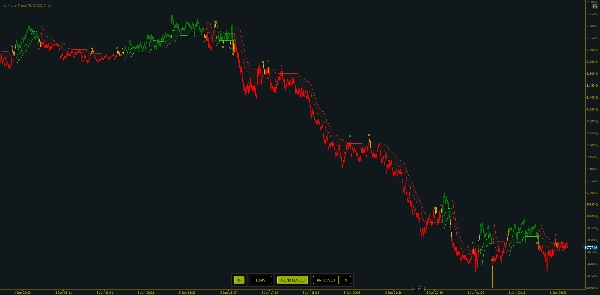
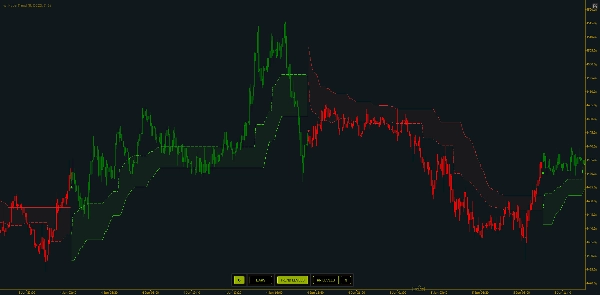
1. Garis susulan
-
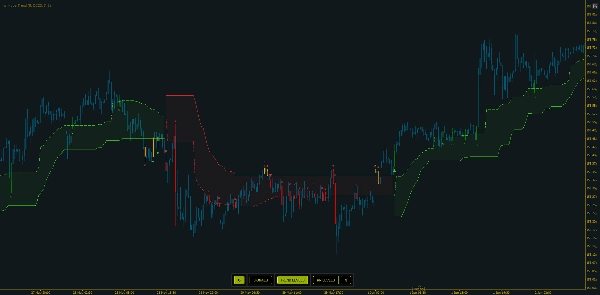
- Hijau = tren menaik (garis di bawah harga)
- Merah = tren menurun (garis di atas harga)
- Perubahan warna adalah pertukaran tren
2. Zon kemasukan
-
- Apabila diaktifkan, satu tahap bertitik duduk sedikit dari garis susulan ke arah jalur bertentangan — satu rujukan "tarikan balik ke nilai" di dalam tren semasa, bukan mengejar ekstrem.
Jarak Zon Kemasukanmengawal sejauh mana ia duduk.
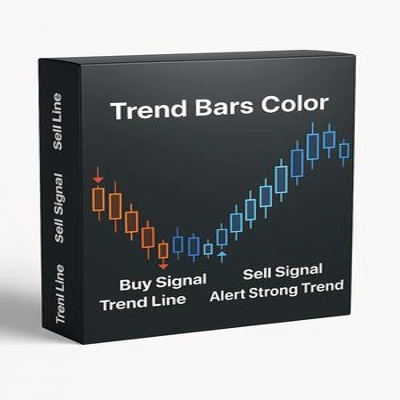
3. Pewarnaan bar
-
- Bar boleh diwarnakan berdasarkan arah aktif, dengan tiga gaya:
-
- Biasa (bull/bear mengikut arah),
- Mod 1, memberikan visualisasi berbeza dalam fasa peralihan
- Mod 2, yang juga menandakan bar peralihan neutral.
Garis susulan hijau/merah yang kelihatan adalah output akhir. Segala-galanya — zon kemasukan, penanda, garis SL/TP, pewarnaan bar — dilapiskan di atas keadaan arah yang sama.
"Warna garis adalah bias rejim anda sekilas; zon bertitik adalah tempat tren menawarkan kemasukan yang lebih munasabah."
5. Isyarat dan Amaran
Hyper Trend membezakan tiga jenis isyarat. Setiap isyarat mencetak penanda berlabel pada bar yang disahkan dan ia boleh dihidupkan/dimatikan secara bebas:
-
- Isyarat pertukaran (aktif secara lalai) — dicetuskan apabila tren bertukar arah (atau bias). Ini adalah isyarat utama.
- Isyarat kemasukan silang — dicetuskan pada silang pergi balik yang disahkan di zon kemasukan dalam tren sedia ada (harga meninggalkan dan menuntut semula zon). Untuk masa kemasukan tarikan balik.
- Isyarat silang tren — dicetuskan pada silang pergi balik yang disahkan pada garis susulan itu sendiri. Dalam mod pewarnaan yang lebih kaya, silang garis tren pada bar peralihan/neutral dianggap sebagai penanda keluar dan bukan kemasukan baru.
- Isyarat keluar — kelihatan apabila Pewarnaan Bar - Mod 2 diaktifkan, isyarat ini boleh membantu menandakan apabila tren kehilangan kekuatannya dan beberapa bar sebelum isyarat pertukaran. Ini berguna untuk mengenal pasti tempoh volatiliti rendah dengan penyertaan pasaran yang berkurangan yang menghasilkan tindakan harga yang terpotong atau terhad dalam julat.
Amaran: apabila diaktifkan, Hyper Trend memainkan bunyi yang dipilih dan menunjukkan popup untuk setiap isyarat yang dikesan. Amaran mengikuti togol yang sama — hanya jenis isyarat yang anda hidupkan akan memberi amaran — dan butang amaran pada panel carta membolehkan/mematikan mereka secara langsung. Popup adalah ringkas: simbol dan jangka masa, jenis isyarat dan arah, dan harga semasa.
"Mulakan dengan hanya isyarat pertukaran untuk carta yang bersih, kemudian lapiskan isyarat silang apabila anda mahu masa kemasukan yang lebih tepat. Setiap satu boleh memberi bunyi dan popup."
6. Rancang dagangan anda — Tahap Risiko / Ganjaran pada carta
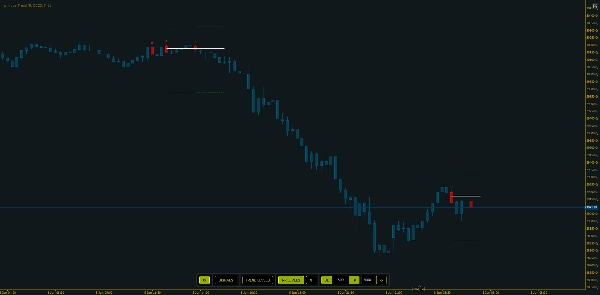
Dengan tahap Stoploss / Sasaran dihidupkan, setiap bar isyarat mendapat tiga garis mendatar pendek: satu garis Kemasukan pada harga tengah bar isyarat, satu garis SL pada jarak pip tetap di sisi rugi, dan satu garis TP pada jarak pip tetap di sisi menang.
Tahap dilanjutkan terlebih dahulu oleh sejumlah bar tetap dan tidak terus berkembang selepas itu — satu snapshot pada isyarat. Isyarat baru memendekkan set sebelumnya supaya tahap tidak bercampur. Kemasukan, SL, dan TP masing-masing mempunyai warna sendiri, dengan lebar dan gaya garis yang boleh laras.
"Ia membingkai dagangan secara visual — kemasukan, hentian, sasaran — supaya anda melihat risiko-ganjaran sebelum membuat komitmen, kemudian menjaga carta kemas dengan mengehadkan berapa banyak set yang tinggal."
7. Panel interaktif — ubah visual secara langsung
Panel pada carta mengubah apa yang dipaparkan segera, tanpa membuka semula parameter.
Togol aktif diserlahkan; panel sentiasa mencerminkan keadaan semasa. Anda mempunyai beberapa pilihan untuk meletakkannya pada carta, atau menyembunyikannya sepenuhnya.
"Segala-galanya yang biasanya anda gali dalam tetapan — pewarnaan, tahap tren, garis risiko, dan jarak SL/TP — adalah satu klik pada panel. Taip jarak baru, tekan segar semula, dan tahap dikemas kini."
8. Pendekatan perdagangan — beberapa contoh
Pendekatan A — Berdagang pertukaran (mengikuti tren). Gunakan isyarat pertukaran sebagai petunjuk utama anda: masuk dalam arah baru pada pertukaran yang disahkan, dan anggap garis susulan sebagai pembatalan visual anda. Pertukaran kembali ke warna bertentangan adalah keluar/terbalik. Bacaan paling mudah dan bersih.
Pendekatan B — Kemasukan tarikan balik dalam tren. Dengan tren sudah mantap, tunggu harga menarik balik ke zon kemasukan dan hidupkan isyarat kemasukan silang supaya silang semula menandakan saat harga menuntut semula zon — menyertai tren pada nilai yang lebih baik dan bukan mengejar ekstrem.
Pendekatan C — Risiko dibingkai pada setiap persediaan. Hidupkan Tahap RR, tetapkan jarak SL / TP yang sesuai dengan volatiliti simbol. Anda melihat kemasukan / hentian / sasaran sebelum membuat komitmen, dan mengurus dagangan anda dengan sewajarnya.
Di ketiga-tiga pendekatan, benang yang sama adalah pertimbangan: bertindak mengikut arah tren, sahkan dengan tindakan harga sekitar, dan gunakan garis sebagai rujukan anda — Hyper Trend adalah bacaan, anda tempatkan dan urus dagangan.
"Berdagang pertukaran, atau tunggu tarikan balik ke zon, atau bingkai setiap persediaan dengan garis risiko — pilih pendekatan yang sesuai dengan cara anda berdagang. Fahami konteks pasaran dan gabungkan dengan alat lain seperti RSI atau MACD, kenal pasti divergences. Gabungan itu adalah di mana ia memberi nilai."
9. Cara menilainya
Pemeriksaan praktikal: skrol kembali melalui sejarah dan lihat sama ada garis tren mengekalkan anda di sisi yang betul bagi pergerakan berterusan dan di mana pertukaran berkumpul; bandingkan dua tetapan sebelah menyebelah (contohnya gandaan ATR berbeza atau tempoh tren) untuk melihat pertukaran responsif-vs-pelicinan; semak bingkai SL/TP secara sejarah untuk mengukur berapa kerap sasaran dicapai sebelum hentian pada jarak yang anda pilih; padankan dengan pasaran (jelas tren vs. julat ketat); dan perhatikan masa — ia mengenal pasti rejim terbaiknya semasa pasaran benar-benar bergerak, jadi bandingkan waktu aktif dengan waktu tenang, luar puncak.
"Nilai dengan menatal sejarah dan membandingkan tetapan — betapa bersihnya pertukaran, betapa baiknya zon kemasukan mengatur masa tarikan balik, dan bagaimana bingkai SL/TP menyelesaikan?"
10. Had & nota lain
Hyper Trend dibina untuk menjadi di atas kualiti indikator generik yang dibungkus semula — tetapi ia adalah alat, bukan bola kristal:
-
- Ia masih boleh menghasilkan isyarat palsu. Bertindak secara mekanikal pada setiap isyarat tidak akan menghasilkan hasil positif dengan sendirinya.
- Ia memberi ganjaran kepada kemahiran dan konteks. Ia mengandaikan keupayaan asas untuk membaca harga dan rasa pasaran sekitar. Digabungkan dengan konteks itu dan pengurusan wang yang baik, ia menjadi alat yang benar-benar berkuasa — dan gabungan itu yang cenderung menghasilkan keputusan positif dalam jangka panjang.
- Ia terbaik apabila pasaran bergerak. Bacaan yang diambil dalam tempoh tenang, atau sepenuhnya di luar waktu dagangan biasa, kehilangan sebahagian kualiti itu.
- Alat tren tertinggal dan berayun. Seperti mana-mana pendekatan gaya SuperTrend, pertukaran boleh datang lewat pada pembalikan dan berkumpul dalam julat; pelicinan dan jalur ATR mengurangkan ini tetapi tidak menghapusnya.
- Garis SL/TP adalah bantuan perancangan, bukan jaminan. Rujukan pip tetap dari titik tengah bar isyarat; ia tidak mengambil kira spread, slippage, atau pengisian sebenar anda, dan ia tidak mengikuti harga.
"Bawa bacaan harga asas, konteks pasaran, dan pengurusan wang, dan ia menjadi benar-benar berkuasa dalam jangka panjang — paling kuat apabila pasaran bergerak."
HyperTrend disampaikan sebagai overlay yang bersih dan tidak mengganggu dengan masa kemasukan terbina dalam, isyarat jelas, bingkai risiko pada carta, dan panel kawalan langsung. Mudah digunakan, ringan pada cTrader, dan sesuai untuk mana-mana pedagang, pada mana-mana simbol atau jangka masa.
"Mudah disediakan, ringan dijalankan, dan dibina untuk membantu mana-mana pedagang membaca tren, menunjukkan kemasukan dan keluar, dan membingkai risiko — kekal bersih dan boleh dibaca."
Ringkasan
Under the hood, HyperTrend processes price data through selectable sources and optional smoothing filters such as Heikin-Ashi and Kalman filters. It applies volatility bands based on ATR and SuperTrend logic to determine active trend direction. The indicator offers three types of signals—trend switches, entry zone crosses, and trailing line crosses—with labeled markers and optional alerts via sound and popups.
Risk management is supported through on-chart stop-loss and take-profit levels displayed as horizontal lines at fixed pip distances from entry points, helping traders visualize risk/reward before committing. An interactive on-chart panel allows live adjustment of visual settings and parameters without reopening menus.
HyperTrend is optimized for fast, low-CPU performance on cTrader, suitable for all trader experience levels, and applicable across symbols and timeframes. It emphasizes readability and simplicity while incorporating modern data processing techniques to enhance traditional trend-following methods.





![Logo "Wyckoff Toolkit [Iridio Capital]"](https://cdn.ctrader.com/image/webp/5318c788-91ef-4297-bca6-4ce73b1516a8_61556)