


Descripción
Sistema de Trading Angora — cBot BB + RSI Range Grid
--------------------------------------------------
VISIÓN GENERAL
El Sistema de Trading Angora es un cBot de reversión a la media. Busca que el precio se estire hasta el borde de las Bandas de Bollinger mientras el RSI confirma una condición de sobrecompra o sobreventa, y opera el movimiento de regreso hacia la banda media. El indicador ADX decide si el mercado está en rango o en tendencia, por lo que el bot solo opera cuando las condiciones se ajustan a este enfoque. Una cuadrícula opcional basada en ATR puede añadir posiciones a la cesta cuando el precio se mueve en contra de la primera entrada. Cada tramo comparte un stop loss de cesta, que se envía al bróker con cada orden.
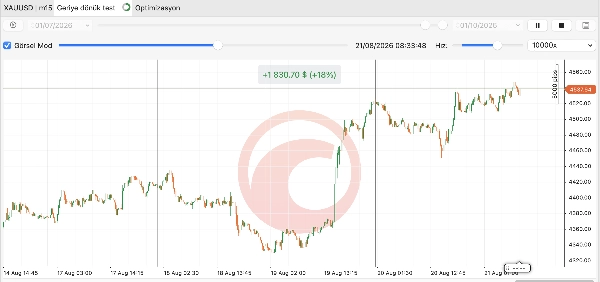
El bot fue diseñado y probado en BTCUSD, US30, XAUUSD, EURUSD, GBPUSD y USDJPY en M15. Funciona en cualquier símbolo y marco temporal, pero debe realizar pruebas retrospectivas y ajustar los parámetros para cada instrumento.
INDICADORES UTILIZADOS
- Bandas de Bollinger: zonas de entrada (banda superior e inferior) y objetivo de salida (banda media o banda opuesta).
- RSI (Índice de Fuerza Relativa): confirma condiciones de sobrecompra y sobreventa para entradas y adiciones a la cuadrícula.
- ADX con +DI / -DI (Sistema de Movimiento Direccional): identifica el régimen del mercado (rango o tendencia) y la dirección de la tendencia, y activa la salida por ruptura de tendencia.
- ATR (Rango Verdadero Promedio): escala todo según la volatilidad actual, incluyendo el espaciamiento de la cuadrícula, la distancia del stop de la cesta, el filtro de ancho de banda, el filtro de distancia objetivo y el filtro de spread.
Todas las señales usan solo barras cerradas, por lo que no se repintan.
CÓMO OPERA
1) Régimen del mercado (ADX)
- ADX por debajo de "ADX Max Entry" (por defecto 25) = RANGO. El bot opera reversiones de banda en ambas direcciones.
- ADX entre "ADX Max Entry" y "Trend ADX Max" (por defecto 25-45) = TENDENCIA, si el Modo Alineado a la Tendencia está activado. El bot opera retrocesos solo en la dirección de la tendencia: compra en la banda inferior en una tendencia alcista (+DI > -DI) y vende en la banda superior en una tendencia bajista (-DI > +DI).
- ADX por encima de "Trend ADX Max" = no hay nuevas entradas (movimiento extremo o parabólico).
- En modo RANGO, se omiten las entradas mientras el ADX sube rápidamente, porque puede estar comenzando una nueva tendencia.
2) Señal de entrada
- Modo ReEntrada (por defecto): la barra anterior tocó o cerró fuera de una banda, y la última barra cerró de nuevo dentro de ella. El RSI debe estar sobrevendido (compra) o sobrecomprado (venta) en una de las dos últimas barras.
- Modo Toque: basta con que una barra toque la banda más la condición del RSI.
- Filtros: ancho mínimo de la Banda de Bollinger (evita compresiones y condiciones previas a rupturas), distancia mínima al objetivo (el movimiento debe ser lo suficientemente grande para cubrir costos), spread, sesión y protecciones de cuenta.
3) Cuadrícula (opcional)
- Cuando el precio se mueve en contra de la cesta por "Grid Step" x ATR, el bot añade una nueva pierna en la misma dirección, hasta un máximo de "Max Grid Levels" piernas en total. Las piernas cerradas también cuentan para este límite.
- Una adición a la cuadrícula requiere que el RSI siga cerca de la zona extrema y que el ADX se mantenga por debajo del límite de la cuadrícula. En modo tendencia, el DI debe seguir apuntando en la dirección de la cesta.
- Todas las piernas comparten un stop loss de cesta colocado más allá del último nivel posible de la cuadrícula. Se envía con cada orden, por lo que ninguna posición está abierta sin un stop loss.
- No se realizan adiciones a la cuadrícula una vez que la protección de ganancias está activa.
4) Salidas
- Objetivo: el precio alcanza la banda media (o la banda opuesta) y la ganancia de la cesta es al menos "Min Basket Profit at Target".
- Protección de ganancias: bloqueo en punto de equilibrio y un piso de ganancia móvil (ver abajo).
- Pérdida máxima de la cesta (en R), más el stop loss de la cesta en el lado del bróker.
- Salida por tiempo suave (cerrar en punto de equilibrio o mejor después de N barras) y salida por tiempo duro (cerrar después de N barras).
- Salida por ruptura de tendencia: cierra una cesta perdedora cuando el ADX sube por encima del umbral y el DI se vuelve en contra de la cesta.
¿QUÉ ES "R"?
El bot mide el riesgo y la ganancia en R:
- 1R (cesta) = la cantidad total perdida si se llenan todos los niveles de la cuadrícula y se alcanza el stop loss de la cesta.
- Rp (protección) = el riesgo de la primera pierna hasta el stop loss de la cesta. Los umbrales de protección de ganancias usan Rp por defecto, para que sean sensatos cuando la cuadrícula está activada. Con la cuadrícula desactivada, R y Rp son iguales.
PARÁMETROS
[Trading]
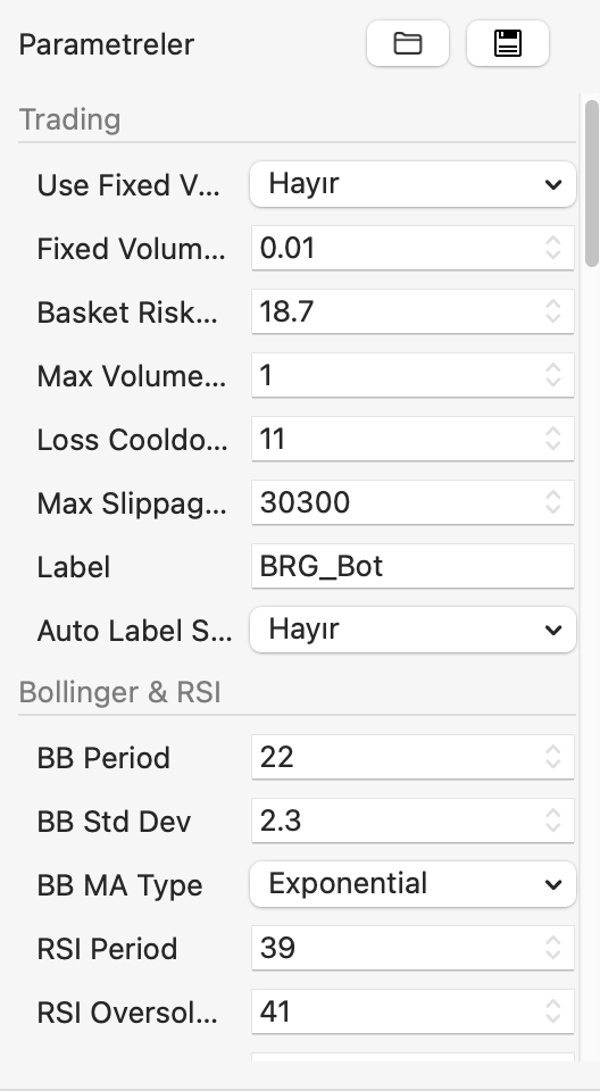
- Usar Volumen Fijo: ON = cada pierna usa "Volumen Fijo por Pierna". OFF = el tamaño de la posición se calcula a partir de "Riesgo de Cesta %".
- Volumen Fijo por Pierna (lotes): tamaño del lote de cada pierna cuando el volumen fijo está activado. Por defecto 0.01.
- Riesgo de Cesta %: porcentaje del capital perdido si se llenan todos los niveles de la cuadrícula y se alcanza el stop de la cesta (1R). Usado cuando el volumen fijo está desactivado. Por defecto 2.
- Volumen Máximo por Pierna (lotes): límite máximo en el tamaño de cualquier pierna individual. Por defecto 1.0.
- Enfriamiento por Pérdida (barras): número de barras a esperar después de una cesta perdedora. Por defecto 4.
- Deslizamiento Máximo (pips): por encima de 0, las órdenes se envían como órdenes de rango de mercado con este límite de deslizamiento. 0 = orden de mercado normal.
- Etiqueta / Sufijo de Etiqueta Automática: etiqueta de posición. Con el sufijo activado, la etiqueta se convierte en Etiqueta_Símbolo_MarcoTemporal, para que varias instancias puedan ejecutarse sin interferencias.
[Bollinger & RSI]
- Periodo BB / Desviación Estándar BB / Tipo MA BB: configuración de Bandas de Bollinger. Por defecto 20 / 2.0 / Simple.
- Periodo RSI: por defecto 14.
- RSI Sobrevendido (COMPRA) / RSI Sobrecomprado (VENTA): umbrales RSI en modo RANGO. Por defecto 30 / 70.
[Entrada]
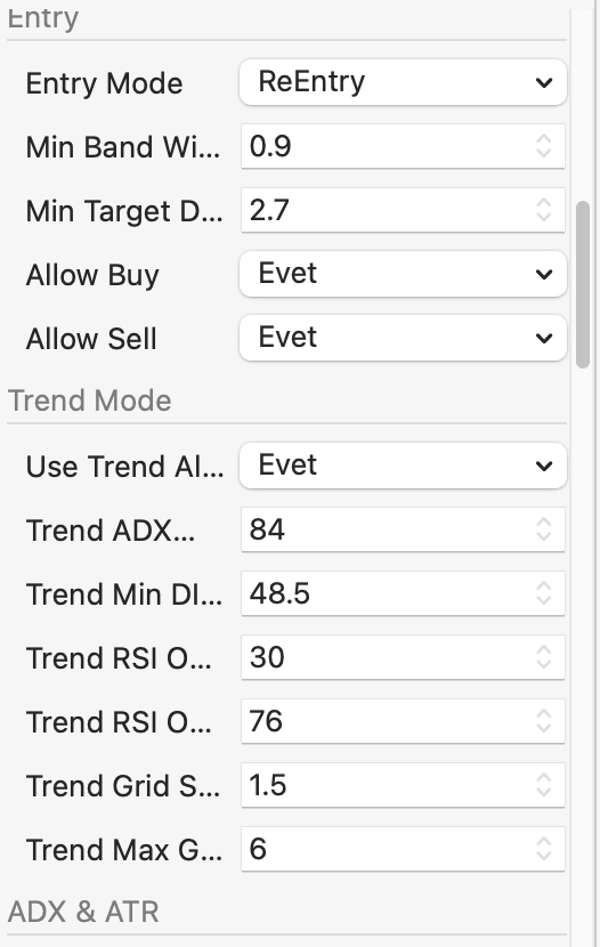
- Modo de Entrada: ReEntrada (por defecto) o Toque.
- Ancho Mínimo de Banda (xATR): las bandas deben estar al menos a esta cantidad de ATRs de distancia. Por defecto 2.0.
- Distancia Mínima al Objetivo (xATR): la distancia desde la entrada hasta el objetivo debe ser al menos esta cantidad de ATRs. Por defecto 0.8.
- Permitir Compra / Permitir Venta: habilitar o deshabilitar cada dirección.
[Modo Tendencia]
- Usar Modo Alineado a la Tendencia: permite entradas de retroceso en dirección de la tendencia cuando el ADX está por encima del umbral de rango. Por defecto ACTIVADO.
- ADX Máximo de Tendencia: no hay nuevas entradas por encima de este valor de ADX. Por defecto 45.
- Diferencia Mínima DI de Tendencia: diferencia mínima entre +DI y -DI necesaria para confirmar la dirección de la tendencia. Por defecto 5.
- RSI Sobrevendido / Sobrecomprado de Tendencia: umbrales RSI más flexibles para retrocesos. Por defecto 40 / 60.
- Multiplicador de Paso de Cuadrícula de Tendencia: multiplica el paso de la cuadrícula para cestas de tendencia. Por defecto 1.5.
- Niveles Máximos de Cuadrícula de Tendencia: máximo de piernas para una cesta de tendencia. Por defecto 3.
[ADX & ATR]
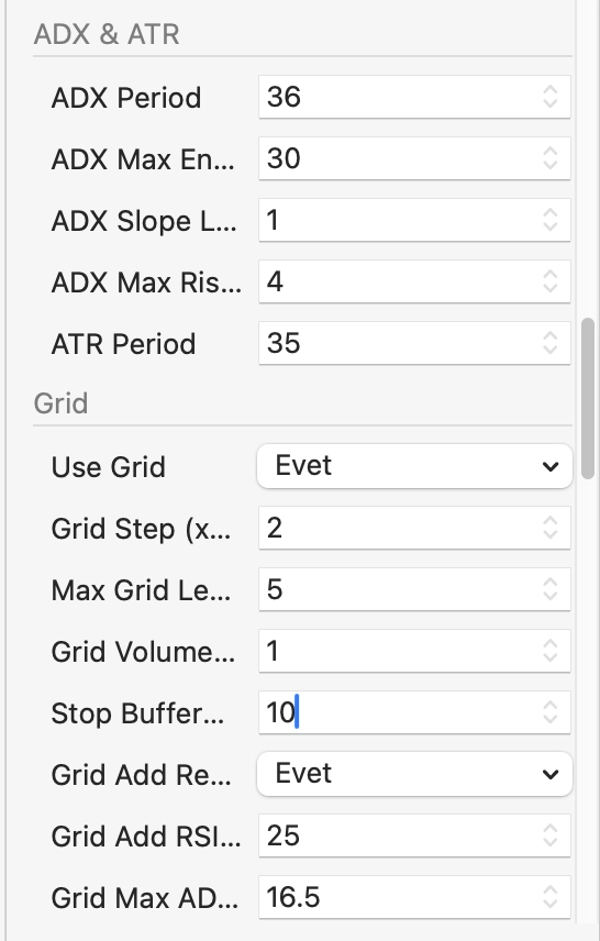
- Periodo ADX: por defecto 14.
- Entrada Máxima ADX: el umbral RANGO / TENDENCIA. Por defecto 25.
- Retroceso de Pendiente ADX / Pendiente Máxima de Subida ADX: omite entradas en RANGO si el ADX subió más que esta cantidad en el retroceso. Por defecto 3 barras / 3.0 (0 = desactivado).
- Periodo ATR: por defecto 14.
[Cuadrícula]
- Usar Cuadrícula: habilitar o deshabilitar adiciones a la cuadrícula. Por defecto ACTIVADO.
- Paso de Cuadrícula (xATR): distancia adversa entre piernas de la cuadrícula. Por defecto 1.0.
- Niveles Máximos de Cuadrícula: máximo de piernas por cesta, incluyendo la primera entrada. Por defecto 4.
- Multiplicador de Volumen de Cuadrícula: multiplicador de lotes por nivel. 1.0 = lotes iguales (recomendado). Valores por encima de 1.3 activan una advertencia de martingala.
- Buffer de Stop (xATR): distancia del stop de la cesta más allá del último nivel de cuadrícula. Por defecto 1.5.
- Añadir a Cuadrícula Requiere RSI / Buffer RSI para Añadir a Cuadrícula: solo se añade una pierna a la cuadrícula mientras el RSI esté dentro del umbral más este buffer. Por defecto ACTIVADO / 10.
- ADX Máximo de Cuadrícula: no se añaden piernas a la cuadrícula por encima de este valor de ADX (cestas en rango). Por defecto 30.
- Intervalo Mínimo para Añadir a Cuadrícula (seg): tiempo mínimo entre intentos de añadir a la cuadrícula. Por defecto 60.
[Salida]
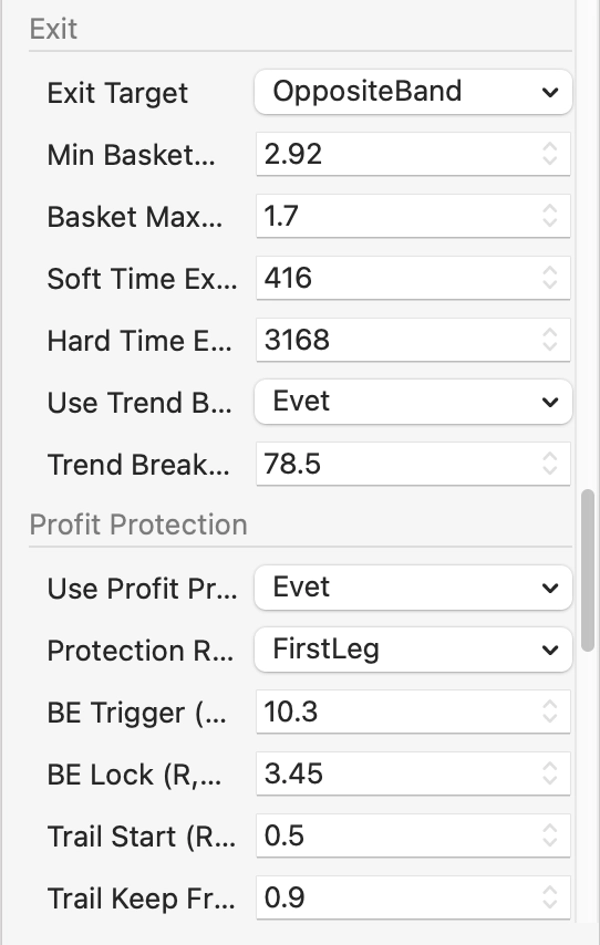
- Objetivo de Salida: MiddleBand (por defecto) u OppositeBand.
- Ganancia Mínima de Cesta en el Objetivo (R): la salida objetivo solo se activa si la ganancia de la cesta es al menos esta cantidad. Por defecto 0.05.
- Pérdida Máxima de Cesta (R): cierra la cesta a esta pérdida. Por defecto 1.0 (0 = desactivado).
- Salida por Tiempo Suave (barras): después de esta cantidad de barras, cierra tan pronto como la cesta esté en punto de equilibrio o mejor. Por defecto 32.
- Salida por Tiempo Duro (barras): siempre cierra después de esta cantidad de barras. Por defecto 96.
- Usar Salida por Ruptura de Tendencia / ADX de Ruptura de Tendencia: cierra una cesta perdedora cuando el ADX alcanza este nivel y el DI está en contra de la posición. Por defecto ACTIVADO / 35.
[Protección de Ganancias]
- Usar Protección de Ganancias: por defecto ACTIVADO.
- Base R de Protección: PrimeraPierna (por defecto, recomendado con la cuadrícula) o CestaCompleta.
- Disparador BE / Bloqueo BE (R): una vez que la ganancia máxima alcanza el disparador, se asegura una ganancia mínima igual al bloqueo. Por defecto 0.75 / 0.1.
- Inicio de Seguimiento / Fracción de Mantenimiento de Seguimiento: una vez que la ganancia máxima alcanza el Inicio de Seguimiento, el bot mantiene esta fracción del máximo. El piso solo se mueve hacia arriba. Por defecto 2.0 / 0.5.
- Mover SL del Bróker al Piso: convierte la ganancia protegida en un precio y mueve el stop loss de cada pierna allí, para que la ganancia también esté protegida en el lado del bróker. Por defecto ACTIVADO.
- Usar TP Parcial / TP Parcial (R) / Fracción de Cierre Parcial: cierra parte de la cesta a una ganancia dada. Por defecto DESACTIVADO.
- TP Fijo (R): cierra toda la cesta a una ganancia fija, independientemente de las bandas. 0 = desactivado.
[Filtros de Mercado]
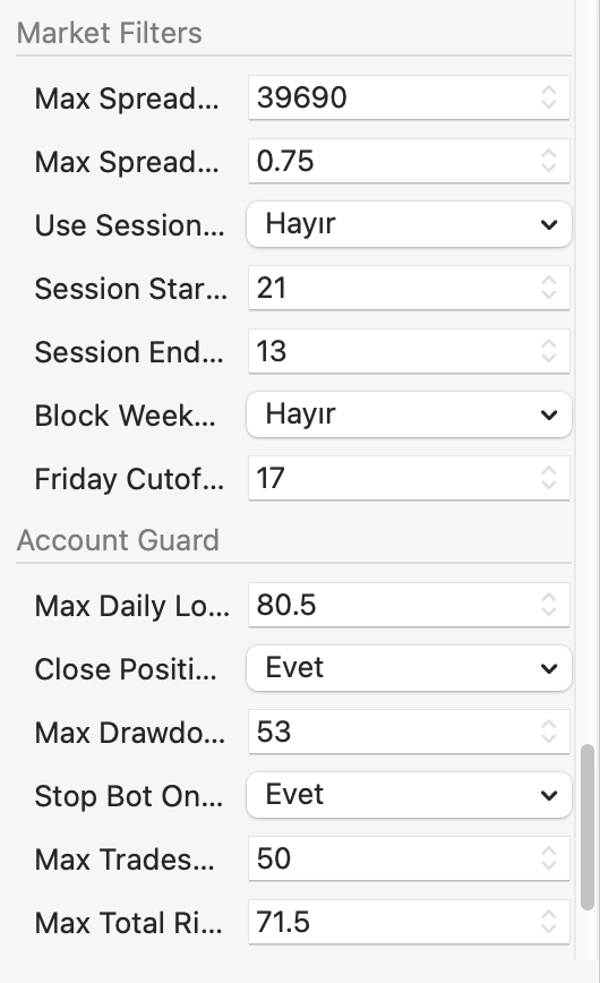
- Spread Máximo (pips) / Spread Máximo (xATR): omite entradas y adiciones a la cuadrícula cuando el spread es demasiado amplio. Por defecto desactivado / 0.2 x ATR.
- Usar Filtro de Sesión / Hora de Inicio / Fin de Sesión (UTC): operar solo dentro de las horas dadas. Por defecto DESACTIVADO.
- Bloquear Entradas de Fin de Semana / Hora de Corte del Viernes: protección opcional para el fin de semana.
[Protección de Cuenta]
- Pérdida Diaria Máxima (% del capital) / Cerrar Posiciones al Límite Diario: detiene nuevas entradas por el resto del día y puede cerrar posiciones abiertas. Por defecto 5% / ACTIVADO.
- Máximo Drawdown (% del capital máximo) / Detener Bot en Máximo Drawdown: cierra todo y puede detener el bot. Por defecto 20% / ACTIVADO.
- Máximo de Operaciones por Día: 0 = ilimitado.
- Riesgo Total Máximo (% del capital): límite en el riesgo total abierto hasta el stop loss. Por defecto 3%. Siempre aplicado cuando se dimensiona por porcentaje de riesgo.
- Aplicar Límite de Riesgo en Modo Fijo: también aplica el límite anterior cuando el volumen fijo está activado. Por defecto DESACTIVADO.
[Registro]
- Nivel de Registro: Silencioso, Normal o Verboso.
- Imprimir Líneas CSV de Operaciones: imprime una línea CSV por cada cesta completada, para facilitar el análisis.
SEGURIDAD DE REINICIO E INFORMES
- Después de un reinicio o reconexión, el bot reconstruye la cesta abierta (dirección, piernas, stop, ganancia realizada) a partir de los comentarios de posición y el historial de operaciones.
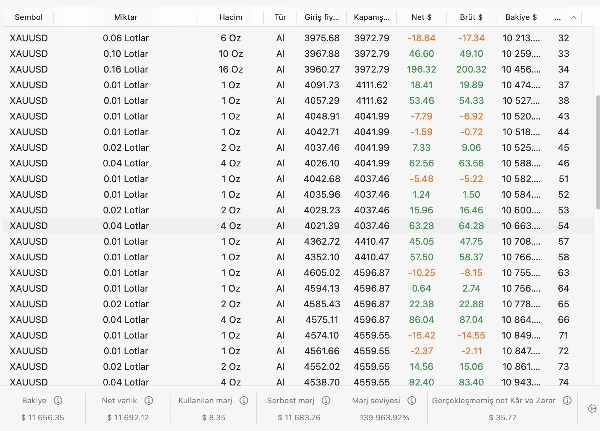
- Cuando el bot se detiene, imprime un resumen estadístico: operaciones, tasa de ganancia, factor de beneficio, ganancia y pérdida promedio, máximo drawdown y racha perdedora, además de resultados agrupados por motivo de salida (por ejemplo RANGO/objetivo, TENDENCIA/bloqueo de ganancia).
CÓMO EMPEZAR
1. Comience con una prueba retrospectiva en su símbolo y marco temporal con los parámetros predeterminados, usando datos de ticks y un período de al menos 3-6 meses.
2. Revise las líneas "ESTADÍSTICAS POR MOTIVO" en el registro para ver qué salidas generan o pierden dinero.
3. Mantenga la cuadrícula conservadora: lotes iguales (Multiplicador de Volumen de Cuadrícula = 1.0) y 3-4 niveles.
4. Mantenga el riesgo por cesta (o lote fijo) en un nivel donde la protección de pérdida diaria no se active con operaciones normales.
5. Realice pruebas en cuenta demo antes de operar en vivo.
AVISO DE RIESGO
Operar productos apalancados como CFDs y criptomonedas conlleva un alto nivel de riesgo y puede no ser adecuado para todos los inversores. Las estrategias de cuadrícula y promedio pueden aumentar las pérdidas durante tendencias fuertes. El rendimiento pasado, incluidos los resultados de pruebas retrospectivas, no garantiza resultados futuros. Use este cBot bajo su propio riesgo y solo con capital que pueda permitirse perder.
Resumen
The system supports an optional ATR-based grid that adds positions when the price moves against the initial entry, with all legs sharing a single basket stop loss sent to the broker. Exits include reaching target bands, profit protection via break-even locks and trailing stops, basket max loss limits, time-based exits, and trend-break exits triggered by ADX signals.
Designed and tested on multiple instruments including BTCUSD, US30, XAUUSD, EURUSD, GBPUSD, and USDJPY on the M15 timeframe, it is adaptable to other symbols and timeframes with parameter adjustments. Risk and profit are measured in "R" units, representing the basket risk. The bot includes configurable parameters for trading volume, grid settings, market filters, and risk management tools such as stop loss, take profit, trailing stop, break-even management, and daily loss guards. It supports market orders and reconstructs open positions after restarts for continuity.
Conversación
Valoraciones de clientes
Preguntas frecuentes
Más de este autor

















Precio