


Descrizione
Lasciami presentarti => Il Gestore di Posizione
- La gestione del Trading tutto-in-uno per entrambi Trader e Sviluppatori
Per i Trader => Proteggi i profitti, Limita le perdite e Applica la disciplina tramite input configurabili.
Il Gestore di Posizione ha 4 moduli che giustificano il suo nome:
- Protettore del Portafoglio
- Trading Guardiano
- Gestore del Rischio (per trading manuale/semi-automatizzato)
- Gestore del Trading (TP trailing, TP/SL parziali)
Ognuno con sotto-moduli per una migliore gestione.
Casi d'uso:
- Trader che cercano protezione del portafoglio + scaling intelligente quando fanno trading su Desktop, Mobile e Web.
-
- Se fai trading interamente tramite Desktop, usa Modalità Headless=> OFF
- Se fai anche trading tramite Mobile/Web, usa Modalità Headless=> ON
- Prop-Trader con limiti di rischio fissi.
- Sviluppatori che vogliono trasformare segnali di trading in vere entrate.
Come usare:
- Per il primo utilizzo, raccomando fortemente di:
- Creare una sola istanza di "Il Gestore di Posizione" con:
- Modalità Headless => OFF (modalità UI)
- Modalità Istanza => Entrambe (Manager + Pannello Trading)
- Poi imparare il suo comportamento, preferibilmente in backtesting(modalità visiva) prima di andare live.
Tieni a mente => "Il Gestore di Posizione" non apre posizioni da solo:
- Gestisce quelle esistenti!
- mentre fornisce gestione a livello di conto.
Per conti piccoli, puoi aumentare le percentuali.
Per conti grandi, puoi diminuire le percentuali.
In ogni caso, adatta sempre gli input alla dimensione del tuo conto.
Una volta che conosci i parametri/comportamento, puoi eseguirlo su cTrader Cloud per gestire le posizioni su Mobile/Web, ci sono solo due semplici regole da seguire:
- Modalità Headless=> ON
- Inoltre, deve essere aggiunta una sola istanza di "Il Gestore di Posizione":
-
- Altrimenti, potrebbero “combattere” tra loro, poiché la maggior parte delle operazioni sono a livello di simbolo..
- La stessa regola vale quando si esegue localmente.
Lasciami spiegare i parametri e il comportamento atteso per ciascuno:
Anche se alcuni sono intuitivi, ci sono molti parametri...
Per favore leggi ciascuno con pazienza.
==== La Gestione della Posizione ====
- Modalità Headless? => Le funzionalità disponibili in questa modalità sono:
-
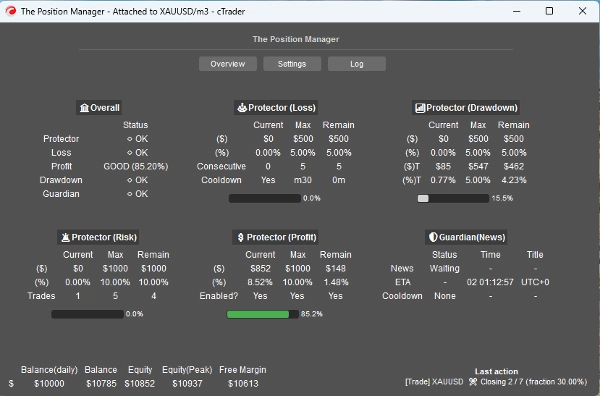
- Protettore del Portafoglio
-
- Tutte le funzionalità sono disponibili.
- Trading Guardiano
-
- Il filtro notizie è disabilitato se Modalità Headless => ON.
- Profitto Trailing
-
- Per qualsiasi simbolo, le posizioni non devono avere Take Profit.
- Chiusure Parziali
-
- Per qualsiasi simbolo, le posizioni devono avere Take Profit o Stop Loss
=> Headless OFF (modalità UI)
- Modalità Istanza:
-
- Manager => Deve essere aggiunta una sola istanza.
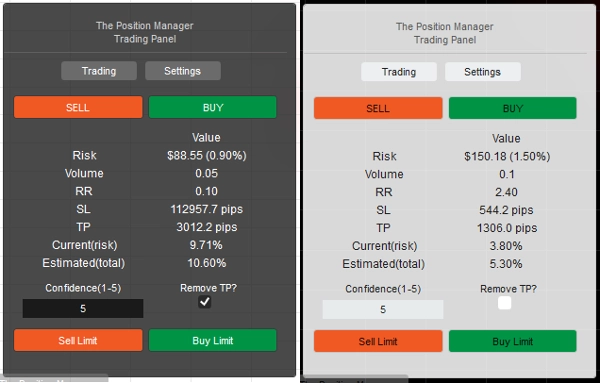
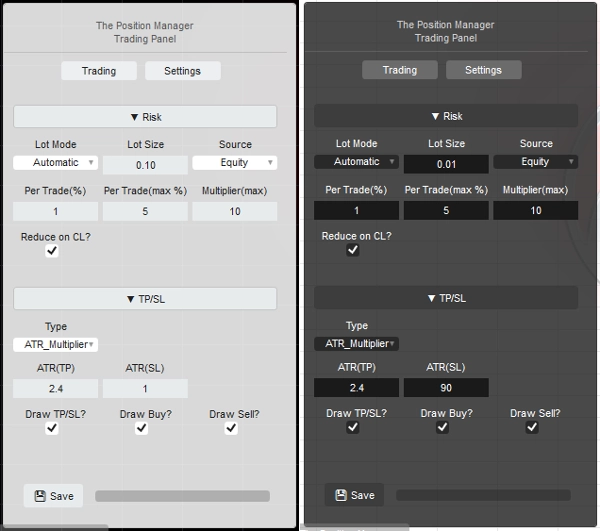
- Trading => Pannello di trading puro (modulo Gestore del Rischio), puoi aggiungere più istanze.
- Entrambe => Deve essere aggiunta una sola istanza:
-
- Manager sarà visualizzato come finestra.
- Trading sarà visualizzato sul grafico.
- Tipo/Posizione Pannello: Autoesplicativo
- Archiviazione Da:
-
- Usa Broker per salvare/caricare le stesse impostazioni ad ogni riavvio.
- Usa Broker_Symbol se vuoi usare la configurazione di ogni simbolo come una sorta di “profilo di rischio”.
=> Headless OFF/ON - Localmente
- Permetti Modalità Messaggio?
-
- Autoesplicativo
- Quando usi [Trading, Entrambe] Modalità Istanza, cambia il “TP/SL => Tipo” in “Pips” nelle impostazioni del pannello così TP/SL può essere impostato tramite messaggio.
- Permetti Trading da Messaggio?
-
- Permetti l'apertura di posizioni tramite messaggi.
- Se Headless ON, la configurazione del Gestore del Rischio non è possibile.
- Se Headless OFF, quando usi [Trading, Entrambe] Modalità Istanza, puoi configurare il modulo Gestore del Rischio come desideri.
=> Headless ON / Generale Conto
- Breakeven Minimo(%):
-
- Per ogni posizione, quando la logica di Breakeven viene eseguita dai moduli Trailing/Partial Profit, invece di spostare lo SL esattamente al Prezzo di Entrata (che porta a PnL negativo).
- Lo SL sarà spostato x% in avanti rispetto al Prezzo di Entrata.
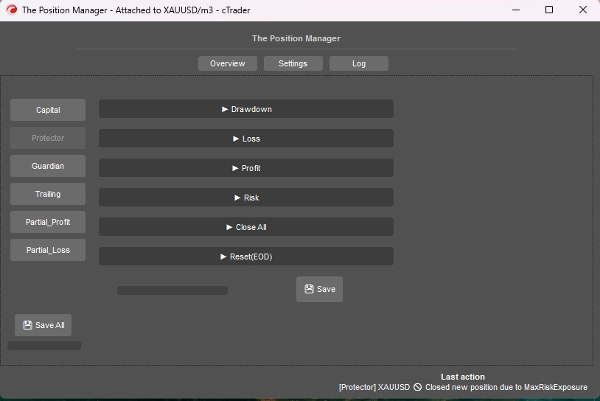
=> Headless ON / Protettore Drawdown
- Modalità Drawdown:
-
- Giornaliero => Basato sul saldo del giorno
- Trailing => Basato sul picco di equity
- Tipo di Drawdown:
-
- Percentuale => % del saldo del giorno, ideale per crescita dinamica.
- Fisso => Importo fisso, ideale per regole rigide
- Drawdown Massimo => % o fisso (autoesplicativo)
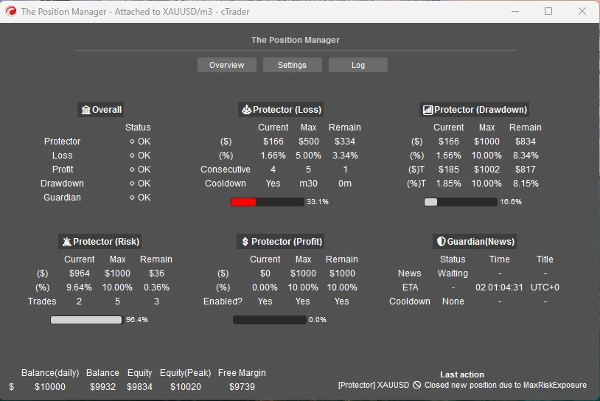
=> Headless ON / Protettore Perdita
- Fonte della Perdita: => Attualmente, basato solo su “Saldo del Giorno”.
-
- Se l'Equity scende sotto il Saldo del Giorno, allora verrà attivato/contato.
- Tipo di Perdita:
-
- Percentuale => % del saldo del giorno, ideale per crescita dinamica.
- Fisso => Importo fisso, ideale per regole rigide
- Perdita Massima Giornaliera² => % o fisso (autoesplicativo)
- Perdita Consecutiva(CL):
-
- Abilita la chiusura delle posizioni quando si verificano perdite consecutive.
- Conteggio Consecutivo:
-
- Autoesplicativo
- Cooldown per Reset(CL):
-
- Cooldown per resettare il conteggio e permettere l'apertura di nuove posizioni.
=> Headless ON / Protettore Profitto
- Abilita Limite di Profitto? => Autoesplicativo
-
- Una volta raggiunto il Profitto Massimo, le nuove posizioni saranno chiuse.
- Fonte del Profitto: => Sempre basato sul saldo del giorno
- Tipo di Profitto:
-
- Percentuale => % del saldo del giorno, ideale per crescita dinamica.
- Fisso => Importo fisso, ideale per regole rigide
- Profitto Massimo² => % o fisso (autoesplicativo)
=> Headless ON / Protettore Rischio
- Esposizione Totale(%):
-
- Considera anche le posizioni in Breakeven.
- Totale Operazioni Aperte:
-
- Le nuove posizioni saranno chiuse se il Conteggio Totale è uguale a Totale Operazioni Aperte
=> Headless ON / Protettore ChiudiTutto
- Chiudere a Fine Giornata? => Chiudi tutte le posizioni a fine giornata
- Chiudere a Fine Settimana? => Chiudi tutte le posizioni a fine settimana (venerdì), usa le ore di fine giornata come riferimento.
=> Headless ON / Protettore Reset(EOD)
- Ora per “resettare” il tracciamento del picco di equity, così come la logica di ChiudiTutto eseguita, se applicabile.
- Reset (Ora) => 0h - 23h
- Reset (Minuto) => 0m – 59m
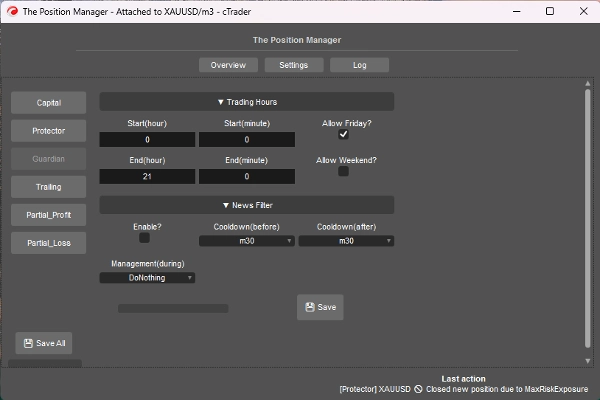
=> Headless ON / Guardiano
- Le posizioni aperte fuori dagli Orari di Trading o dal Giorno Consentito saranno chiuse automaticamente.
-
- Inizio/Fine (Ora) => 0h – 23h
- Inizio/Fine (Minuto) => 0m – 59m
- Permetti Venerdì? => Autoesplicativo
- Permetti Weekend? (crypto) => Autoesplicativo
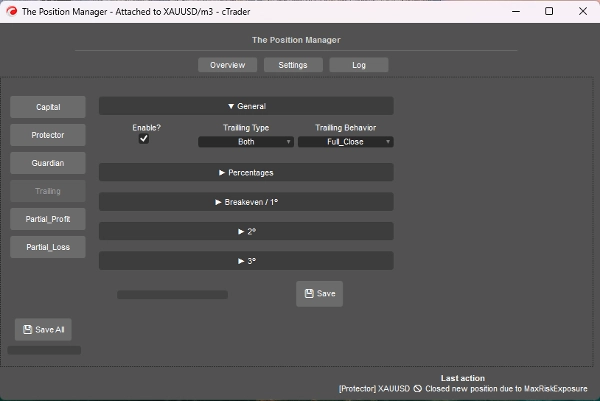
=> Headless ON / Profitto Trailing
- È un Take Profit basato sull'Equity
- Abilita?
-
- Per posizioni senza TP, ideale per posizioni trend-following.
- => Tipo:
-
- Percentuale => Pure % di equity
- Drawdown => Basato sul concetto di Trailing DD (Picco Equity), pensa in termini di pullback/ritracciamento del prezzo.
- Entrambi => Il comportamento Partial_Close è abilitato di default:
-
- Tipo percentuale per i parziali.
- Tipo drawdown per l'uscita completa.
- Comportamento:
-
- Chiusura Completa:
-
- Una volta raggiunta la % target di equity, chiudi tutte le posizioni senza TP.
- Inoltre, quando metà della % target di equity è raggiunta, lo SL viene spostato a Breakeven.
- Chiusura Parziale:
-
- Abilita chiusure parziali.
- Tieni a mente => Se la dimensione della posizione (lotto) è troppo piccola per la chiusura parziale, la posizione sarà chiusa completamente.
- Profitto Minimo(%):
-
- Il profitto minimo per attivare la logica trailing.
- => Chiusura Completa a(%):
-
- Solo per il comportamento “Chiusura Completa”.
- => [Entrambe] Chiudi Drawdown(%):
-
- Solo per il tipo “Entrambe” .
- => [Solo %] SL Intelligente?"
-
- Solo per il tipo “Percentuale” .
- È abbastanza simile al tipo Drawdown, ma più reattivo usando Trailling SL
- Parziale 1(%) / Parziale 2(%)
-
- % target di equity per eseguire i parziali (Percentuale o Entrambe)
- Verifica sempre se il tipo Trailling è Percentuale o Drawdown
- Parziale 1(ordine %) / Parziale 2(ordine %)
-
- Autoesplicativo
- => Chiudi 3(%):
-
- % target di equity per chiudere completamente le posizioni senza TP.
- Solo per i tipi Percentuale o Drawdown .
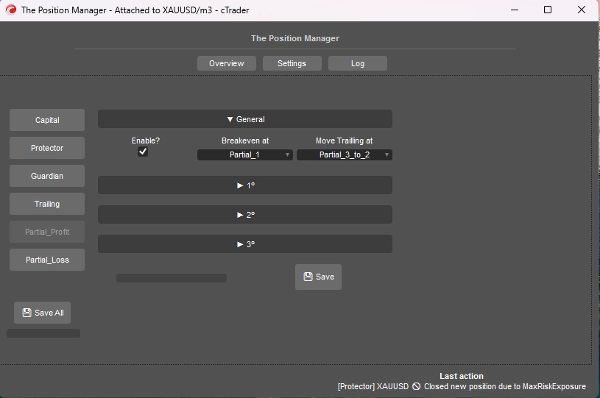
=> Headless ON / Perdita Parziale
- Abilita?
-
- Per posizioni con SL, ideale per limitare le perdite di operazioni in perdita che potrebbero tornare in direzione.
- Il Prezzo di Entrata sarà 0%
- Lo Stop Loss sarà 100%
- I Prezzi Parziali saranno calcolati basandosi su questo approccio.
- Parziale 1(%) /
Parziale 2(%) /
Parziale 3(%) -
- Percentuali tra Prezzo di Entrata e Stop Loss.
- => Abilita 2º?
=> Abilita 3º? -
- Autoesplicativo
- Parziale 1(ordine %) /
Parziale 2(ordine %) /
Parziale 3(ordine %) -
- Autoesplicativo
====================================================
Per gli Sviluppatori => Plug-and-Play per qualsiasi strategia tramite Messaggi/abbonamenti di cTrader Algo.
- Per sistemi semi o completamente automatizzati:
- Semi: Gli ordini sono ancora aperti da noi, ma:
-
- SL e TP sono impostati tramite Messaggi/abbonamenti.
- Completamente: I segnali di ordine sono inviati tramite Messaggi/abbonamenti a “Il Gestore di Posizione”
-
- La configurazione del “Gestore del Rischio” potrebbe non essere disponibile in questo approccio.
È abbastanza semplice, devi solo inviare il segnale usando la seguente classe:
public class TradeSignal
{
public string Symbol { get; set; }
public TradeType Direction { get; set; }
public double StopLossPips { get; set; }
public double? TakeProfitPips { get; set; } // null = senza TP
public string StrategyId { get; set; }
public double? EntryPrice { get; set; } // null = mercato, altrimenti ordine limite.
public DateTime Timestamp { get; set; }
public int Confidence { get; set; } // 1–5
}
Poi:
Messages.Send("ThePositionManager", signal);
Esempio breve:
TradeSignal signal = new()
{
Symbol = Symbol.Name,
Direction = TradeType.Buy,
StopLossPips = 1500,
TakeProfitPips = 3000,
StrategyId = "MyStrategy",
Confidence = 5
};
Messages.Send("ThePositionManager", signal);
Riepilogo
Key features include four main modules: Portfolio Protector, Guardian Trading, Risk Manager (for manual or semi-automated trading), and Trade Manager (supporting trailing take profit and partial take profit/stop loss). The tool supports intelligent scaling and portfolio protection across Desktop, Mobile, and Web platforms, with a Headless mode option for managing positions remotely via cTrader Cloud.
For traders, it offers configurable risk controls such as daily and trailing drawdown limits, profit caps, exposure limits, and automated position closing based on trading hours or drawdown thresholds. Trailing profit and partial profit/loss management allow dynamic adjustment of stop loss and take profit levels to optimize trade exits.
Developers can integrate The Position Manager with automated strategies by sending trade signals via messages, enabling semi or fully automated order management with customizable stop loss and take profit settings.
The tool supports saving settings by broker or symbol, and includes detailed parameters for break-even management, risk exposure, and partial close orders, making it adaptable to various account sizes and trading styles.
Discussioni
Recensioni dei clienti
5 | 0 % | |
4 | 67 % | |
3 | 33 % | |
2 | 0 % | |
1 | 0 % |
Domande frequenti















Prezzo