Descrição
Radar de Volatilidade da Sessão — Análise Cruzada Volatilidade × Estrutura com um Motor de Sinal Adaptativo
════════════════════════════════════════════════════════════════════════════════
VISÃO GERAL DO PRODUTO
O Radar de Volatilidade da Sessão (SVR) é um indicador profissional para cTrader, projetado para mercados 24 horas, como Forex, ouro/prata à vista e mercados contínuos 7*24 como criptomoedas.
O SVR não se limita a "volatilidade alta/baixa". Ele realiza uma análise cruzada de:
- Regime de volatilidade (ATR / Média do ATR)
- Regime de estrutura (lado EMA + estrutura de oscilação fractal confirmada)
Em seguida, ele mapeia esse contexto para o comportamento prático do sinal:
Estrutura de entrada (consciente da tendência):
- Baixa Volatilidade + Tendência → entradas de pullback PB para EMA
- Rompimento de Estrutura + Contexto de Tendência → entradas de rompimento BO
- Sem Contexto de Tendência → sem sinal de entrada
Estrutura de saída (monitores independentes):
- HV: saída por pico de volatilidade
- REV: saída por reversão de estrutura (com confirmação opcional de N barras)
- RES: saída por ressonância HV + REV (ambos devem convergir)
Reversão na mesma barra é suportada: quando condições de saída e entrada em direção oposta ocorrem na mesma barra, ambos são sinalizados.
Este modelo de dois eixos ajuda a reduzir decisões unidimensionais e mantém o contexto visível em tempo real através do painel no gráfico.
════════════════════════════════════════════════════════════════════════════════
POR QUE O SVR É DIFERENTE
1) Contexto primeiro, depois sinal
A maioria das ferramentas reporta apenas volatilidade. O SVR combina volatilidade e estrutura antes de sinalizar.
2) Fluxo de trabalho nativo de sessão
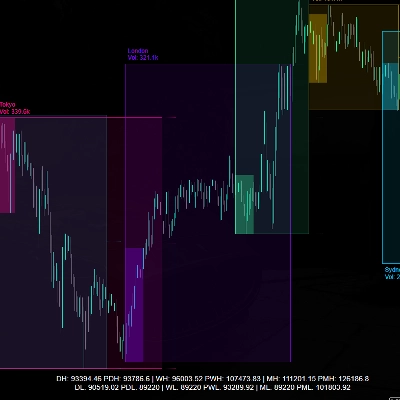
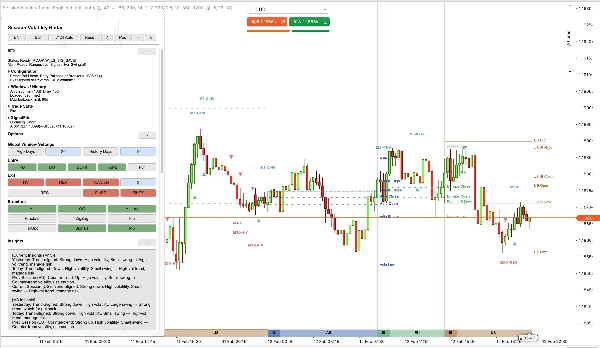
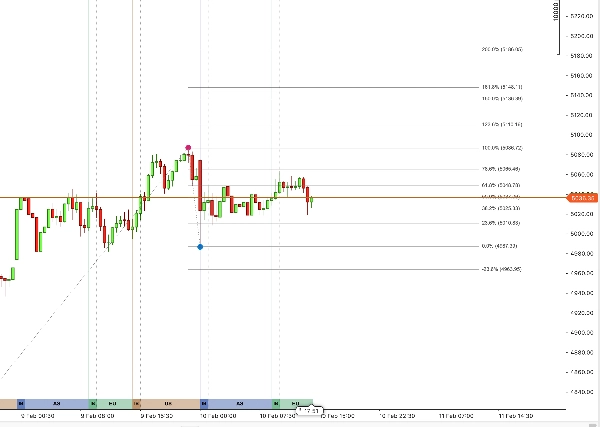
O SVR sobrepõe bandas de sessão Ásia / Europa / EUA / Fim de Semana (WK) com intervalos IB diretamente no gráfico, além de linhas OHLC de sessão com etiquetas de texto para o dia de negociação atual.
3) Lógica adaptativa, não de limite fixo
Os limites de volatilidade e oscilação são recalculados automaticamente a partir de dados recentes. Os padrões dos parâmetros atuam como âncoras iniciais e entradas de ajuste.
4) SignalFib faz parte da lógica, não é decoração
O SignalFib pode participar do filtro de entrada e da lógica de saída (limite PB / saída por retração / saída por extensão), não apenas do desenho.
5) Painel prático para suporte à decisão ao vivo
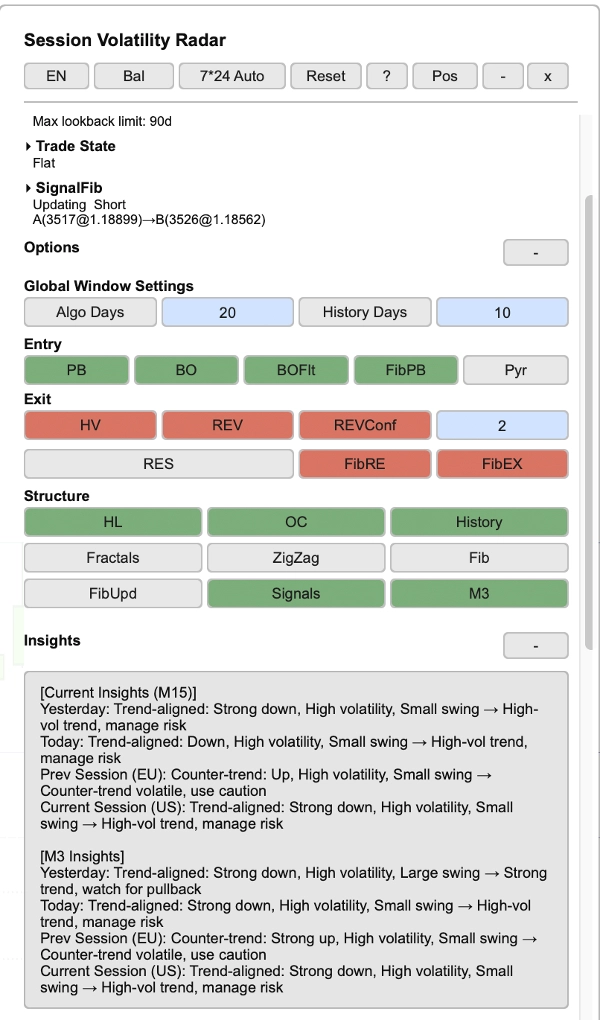
- O painel mostra o estado da negociação (Longo/Curto/Neutro), direção da tendência, resumo da configuração, estatísticas da sessão, status do SignalFib e insights do mercado — com suporte bilíngue (Chinês / Inglês), padrão para Inglês.
6) Gerenciamento automático de histórico
O SVR carrega automaticamente o histórico em cadeia em direção ao alvo da janela do algoritmo. Se seu corretor/servidor não puder fornecer histórico suficiente, o SVR entrará em um estado visível degradado/congelado (mostrado na linha de status do painel).
════════════════════════════════════════════════════════════════════════════════
CARACTERÍSTICAS PRINCIPAIS
────────────────────────────────────────────────────────────────────────────────
1. ANÁLISE CRUZADA VOLATILIDADE × ESTRUTURA
O SVR avalia o estado do mercado através de duas dimensões sincronizadas:
- Dimensão de volatilidade: classificação ATR / Média do ATR em regimes de baixa / normal / alta volatilidade.
- Dimensão de estrutura: tendência do lado EMA + estrutura de oscilação fractal confirmada para contexto de rompimento e reversão.
Quatro predefinições adaptativas (Conservador / Balanceado / Agressivo / Personalizado) fornecem controle de sensibilidade com um clique. O modo personalizado padrão é Balanceado e pode ser ajustado livremente. As predefinições controlam apenas a sensibilidade do limite; os interruptores de entrada/saída são configuráveis independentemente.
────────────────────────────────────────────────────────────────────────────────
2. BANDAS DE SESSÃO — CONTEXTO INTRADIÁRIO INSTANTÂNEO
O SVR desenha bandas de sessão configuráveis no fundo do gráfico:
- Sessão Ásia (AS): 9 horas
- Sessão Europa (EU): 5,5 horas
- Sessão EUA (US): 9,5 horas
- Sessão de fim de semana (WK): 24 horas (quando o modo 7*24 está ativo)
O alinhamento da sessão é ancorado ao início do dia de negociação de Nova York (padrão: 18:00 NY) e mapeado automaticamente para o horário do gráfico. As sessões cobrem 24 horas desde o início do dia de negociação até o início do próximo dia de negociação.
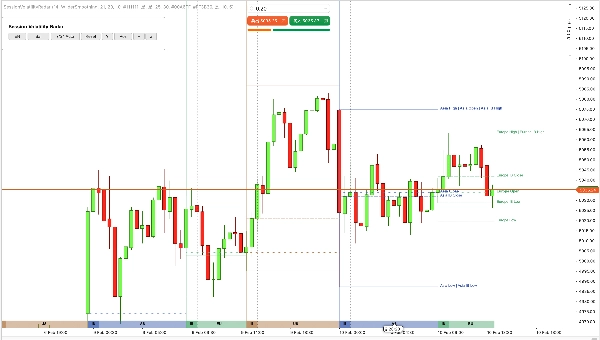
Cada banda suporta altura e opacidade configuráveis. As cores das bandas seguem uma paleta incorporada (ajustada ao tema), com linhas de referência de Abertura / Máxima / Mínima / Fechamento da sessão e etiquetas de texto para o dia atual.
A exibição histórica da sessão suporta até 90 dias de negociação (os dias históricos mostram apenas linhas, sem etiquetas).
────────────────────────────────────────────────────────────────────────────────
3. SALDO INICIAL (IB) — ESTRUTURA INICIAL DA SESSÃO
O IB é calculado a partir de uma série dedicada de barras derivadas do Tamanho do Bloco IB (padrão barras de 30 minutos) e é configurável por:
- Tamanho do Bloco IB (minutos), padrão: 30
- Contagem de Blocos IB, padrão: 2
Durante o período IB, as linhas Máxima/Mínima do IB sincronizam dinamicamente com a Máxima/Mínima da sessão em tempo real. Após o fechamento da janela IB, as linhas Máxima/Mínima do IB congelam no intervalo de abertura, uma linha de Fechamento IB é adicionada, e todas as três linhas IB continuam se estendendo até o fim da sessão para referência.
────────────────────────────────────────────────────────────────────────────────
4. MOTOR DE SINAL (ENTRADA + SAÍDA)
Lado de entrada:
- PB (pullback): entradas de pullback de tendência de baixa volatilidade em direção à EMA, com modo de confirmação PB opcional (Desligado / Básico / Forte)
- BO (rompimento): entradas de rompimento de estrutura, com filtro padrão de alta volatilidade e filtro mínimo de corpo/ATR
- Projeção opcional de sinal M3 (3 minutos) para o timeframe atual, com deduplicação na mesma barra
- Espaçamento mínimo em mesma direção aplicado (sem entradas consecutivas na mesma direção)
Nota sobre confirmação PB:
- Nos modos de confirmação, o PB pode armar em uma barra e confirmar na próxima; o Limite Fib PB segue o contexto de pullback armado para consistência.
Lado de saída:
- HV: saída em pico de volatilidade
- REV: saída em estrutura de reversão, com confirmação opcional de N barras e modo de filtro cruzado (Distância ATR ou Apenas Lado EMA)
- RES: saída somente quando HV e REV convergem (exclusão mútua com HV/REV independentes)
- Saídas Fib: saída por retração e saída por extensão (avaliadas independentemente e combinadas com modos de saída ativados; quando RES está ativado, HV/REV independentes são desativados por design)
Reversão na mesma barra: quando saída e entrada em direção oposta disparam na mesma barra, ambos os sinais são anotados.
Controles opcionais incluem pirâmide (reentrada na mesma direção) e todos os filtros baseados em Fib.
────────────────────────────────────────────────────────────────────────────────
5. SIGNALFIB — FIBONACCI ALINHADO AO CÁLCULO
O SignalFib é a única fonte de verdade para o cálculo do sinal, com desenho opcional no gráfico. Ele participa de:
- Limitação da profundidade PB (filtro de entrada)
- Saída baseada em retração
- Saída baseada em extensão de alvo
- Atualizações opcionais de âncora via catraca fractal confirmada (apenas na direção de proteção de lucro)
Interruptores individuais de visibilidade dos níveis SignalFib (0%, 23,6%, 38,2%, 50%, 61,8%, 78,6%, 100%, extensões até 200% e extensões negativas) são apenas para desenho e não afetam o cálculo do sinal.
────────────────────────────────────────────────────────────────────────────────
6. PAINEL INTERATIVO + GERENCIAMENTO DE HISTÓRICO
- Painel ao vivo com suporte bilíngue (Chinês / Inglês), todas as seções recolhíveis
- Botões do cabeçalho: ciclo de predefinições, alternância de idioma, ciclo do modo 7*24 (Auto / Forçar Ligado / Forçar Desligado), resetar, ajuda, posição, minimizar, fechar
- Áreas de botões organizadas por função: seleção de entrada, seleção de saída, alternância de estrutura/exibição
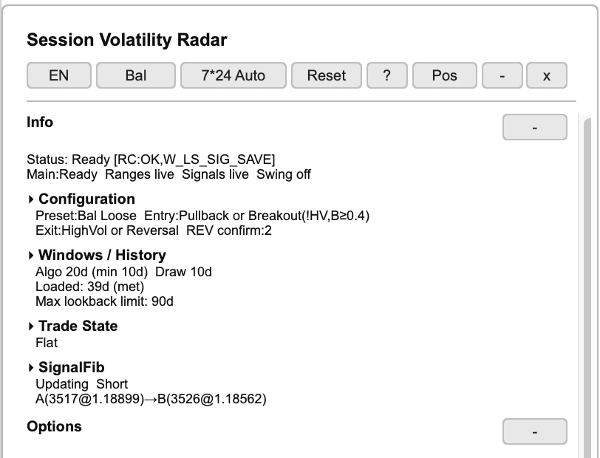
Seção de informações:
- Linha de status: prontidão do sistema (Pronto/Carregando) e estados dos subsistemas
- Resumo da configuração: predefinição ativa, modos de entrada/saída, barras de confirmação REV
- Janelas / Histórico: dias da janela do algoritmo, dias de desenho, status do histórico carregado, limite máximo de retrocesso
- Exibição do estado da negociação (Longo / Curto / Neutro), independente dos interruptores de exibição de entrada/saída
- Status do SignalFib: atualizando/congelado, direção, pontos de âncora (A→B)
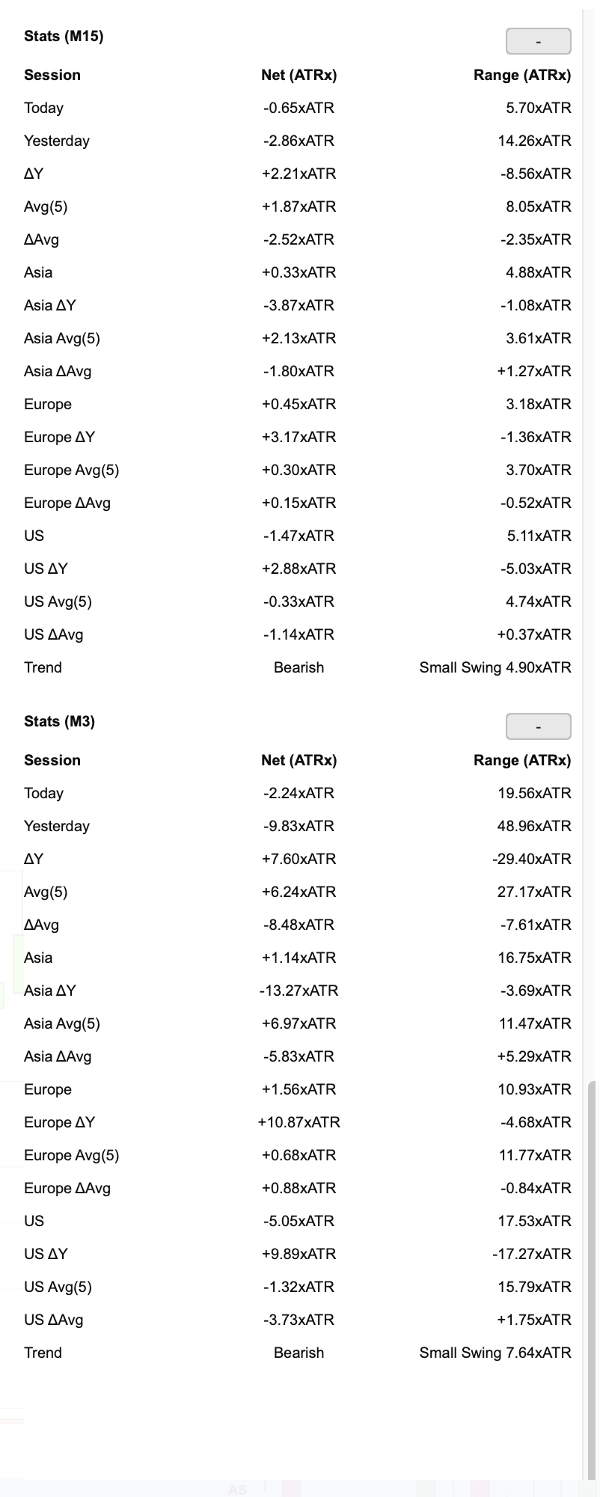
Tabelas de estatísticas:
- Estatísticas da sessão para o timeframe principal e M3 (quando ativado): Hoje, Ontem, ΔY, Média, ΔMédia, por sessão (Ásia/Europa/EUA) com linhas de delta e média
- Colunas: variação líquida (ATRx), intervalo (ATRx)
- Linha de tendência: direção (Alta/Baixa) + magnitude da oscilação
Seção de insights (derivada dos dados estatísticos acima):
- Interpretação contextual do mercado para o timeframe principal e M3
- Abrange: Ontem, Hoje, Sessão Anterior, Sessão Atual
- Cada insight combina alinhamento de tendência, nível de volatilidade, tamanho da oscilação → orientação acionável (ex.: "Tendência forte, observe o pullback" ou "Volátil contra-tendência, use cautela")
Histórico:
- Carregamento automático em cadeia do histórico em direção ao alvo da janela do algoritmo. Se o histórico não puder ser totalmente obtido do corretor/servidor, o SVR degradará/congelará e mostrará o estado na linha de status do painel.
- Sinais/histórico são armazenados localmente com limpeza automática
- Persistência do estado do painel salva localmente em seu dispositivo (sem transferência externa de dados)
════════════════════════════════════════════════════════════════════════════════
PARÂMETROS (Visão Geral)
────────────────────────────────────────────────────────────────────────────────
1. Configurações do Algoritmo
- Período ATR — padrão: 14
- Tipo MA ATR — padrão: Suavização Wilder
- Período EMA — padrão: 21
- Período Médio ATR (Vol) — padrão: 34
- Retrospectiva da Estrutura — padrão: 20
- Barras Fractais Esquerda/Direita — padrão: 20 / 2
- Limite de Oscilação da Estrutura (ATRx) — padrão: 1.25
- ATR/Média de Baixa Vol — padrão: 1.1
- ATR/Média de Alta Vol — padrão: 1.25
- Mínimo de Barras de Baixa Vol — padrão: 2
- Dias da Janela do Algoritmo — padrão: 20 (até 90)
────────────────────────────────────────────────────────────────────────────────
2. Configurações de Sinal
- Permitir Entrada por Pullback (PB) — padrão: LIGADO
- Modo de Confirmação PB — padrão: Desligado (opções: Desligado / Básico / Forte)
- Permitir Rompimento (BO) — padrão: LIGADO
- Filtro BO para Alta Vol — padrão: LIGADO
- Mínimo Corpo/ATR BO — padrão: 0.4
- Permitir Pirâmide — padrão: DESLIGADO
- Usar Sinais M3 — padrão: LIGADO (desativado automaticamente se o timeframe do gráfico for M3)
- Mínimo de Barras para Espaçamento de Entrada — padrão: 2
- Sair em Alta Vol (HV) — padrão: LIGADO
- Sair em Reversão (REV) — padrão: LIGADO
- Sair em Ressonância (RES) — padrão: DESLIGADO
- Ativar Confirmação REV — padrão: LIGADO
- Barras de Confirmação REV — padrão: 2
- Filtro Cruzado REV — padrão: Distância ATR (alternativa: Apenas Lado EMA)
- Ativar Limite Fib PB — padrão: LIGADO
- Nível do Limite Fib PB — padrão: 78,6%
- Ativar Saída Fib por Retração — padrão: LIGADO
- Nível da Saída Fib por Retração — padrão: 61,8%
- Ativar Saída Fib por Extensão — padrão: LIGADO
- Nível da Saída Fib por Extensão — padrão: 123,6%
- Ativar Atualizações do Signal Fib (FibUpd) — padrão: DESLIGADO
────────────────────────────────────────────────────────────────────────────────
3. Configurações de Sessão
- Mostrar Bandas de Sessão — padrão: LIGADO
- Altura / Opacidade da Banda de Sessão — configurável
- Mostrar IB — padrão: LIGADO
- Mostrar Linhas HL / Mostrar Linhas OC — padrão: LIGADO
- Tamanho do Bloco IB (min) / Contagem — padrão: 30 / 2
- Cores das bandas de sessão — paleta incorporada (ajustada ao tema)
────────────────────────────────────────────────────────────────────────────────
4. Configurações de Estrutura
- Mostrar Fractais — padrão: DESLIGADO
- Ativar ZigZag — padrão: DESLIGADO
- Mostrar Signal Fib — padrão: DESLIGADO
- Interruptores individuais de visibilidade dos níveis SignalFib (incluindo extensões)
────────────────────────────────────────────────────────────────────────────────
5. Configurações de Exibição
- Idioma — Chinês / Inglês, padrão para Inglês
- Tema de Desenho — Claro / Escuro
- Modo Mercado 7*24 — Auto / Forçar Ligado / Forçar Desligado
- Mostrar Painel / Posição do Painel / Cor do Texto do Painel
- Mostrar Sinais de Entrada/Saída — configurável
────────────────────────────────────────────────────────────────────────────────
6. Configurações de Histórico
- Mostrar Histórico — padrão: LIGADO
- Dias de Histórico — padrão: 10 (até 90)
- Dias Médios (Painel) — padrão: 5
════════════════════════════════════════════════════════════════════════════════
NOTAS IMPORTANTES
LIMITES ADAPTATIVOS
Os limites reais usados pelo motor de sinal são valores adaptativos derivados de dados recentes. Os padrões dos parâmetros são apenas âncoras iniciais.
TEMPO DE SESSÃO
As sessões seguem uma âncora do dia Forex (abertura de Nova York às 18:00) e são mapeadas automaticamente para o horário do gráfico. Para mercados contínuos 7*24 (ex.: cripto), a detecção automática é suportada via Modo Mercado 7*24 (Auto / Forçar Ligado / Forçar Desligado).
CARREGAMENTO DE HISTÓRICO
O SVR carrega automaticamente o histórico em cadeia em direção ao alvo da janela do algoritmo. Se o histórico não puder ser totalmente obtido do corretor/servidor, o SVR degradará/congelará e mostrará o estado na linha de status do painel.
ESCOPO SEM REPINTURA
Oscilações fractais confirmadas e sinais históricos confirmados não repintam. A barra ainda em formação e o estado ativo em progresso podem atualizar conforme novos dados chegam.
INDICADOR, NÃO UM ROBÔ
O SVR é um indicador analítico, não um robô de negociação automatizado (cBot). Ele não realiza ordens, gerencia posições ou executa controles de risco para você.
VERSÃO DE TESTE
Uma versão de teste de 7 dias está disponível na cTrader Store.
════════════════════════════════════════════════════════════════════════════════
SUPORTE
Se você tiver dúvidas ou feedback, por favor entre em contato conosco via cTrader Store.
Obrigado por escolher o Radar de Volatilidade da Sessão.