الوصف
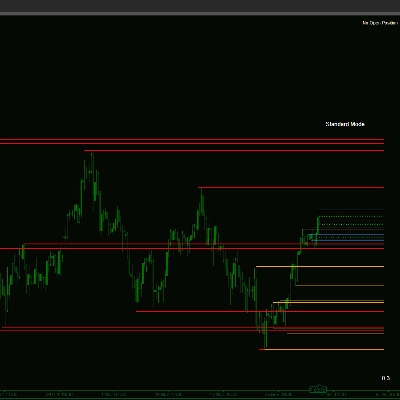
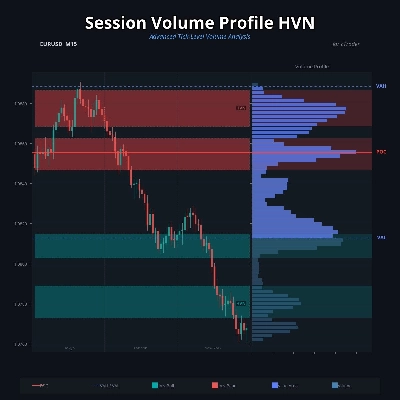
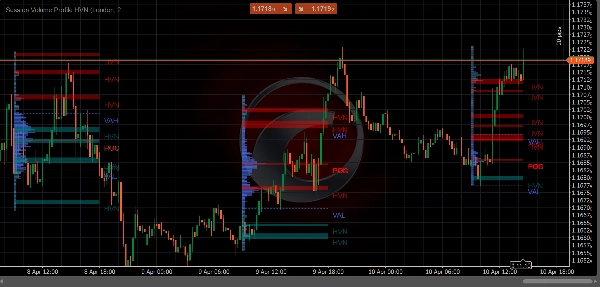
The Session Volume Profile HVN is a comprehensive, professional-grade volume analysis indicator built exclusively for cTrader Automate. Moving beyond traditional time-based volume, this indicator constructs precise volume-at-price histograms utilizing real tick data. By mapping the exact price levels where the most significant trading activity occurs, traders gain unparalleled insights into market structure, institutional interest, and true support and resistance zones.
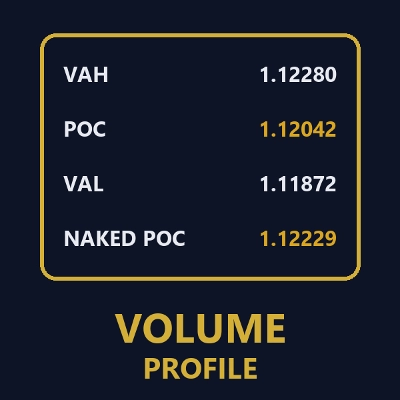
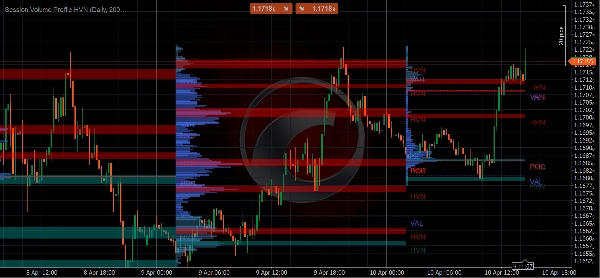
Designed to match the methodology of top-tier institutional charting platforms, this indicator accurately identifies the Point of Control (POC), Value Area High (VAH), Value Area Low (VAL), and dynamically detects High Volume Nodes (HVNs). Whether you are day trading the London session, swinging the weekly ranges, or analyzing the New York open, the Session Volume Profile HVN provides the critical context needed to make informed trading decisions.
Key Features
The Session Volume Profile HVN indicator provides a robust suite of analytical tools designed for precision trading:
• Real Tick Data Precision: Constructs profiles using actual mid-price tick data (MarketData.GetTicks()), ensuring the volume distribution reflects true market activity rather than mere estimations based on timeframes.
• Intelligent HVN Detection: Utilizes a sophisticated local maximum detection algorithm with area expansion to identify critical High Volume Nodes, matching the reference methodology used by industry-leading platforms like TradingView.
• Bullish & Bearish HVN Coloring: Automatically colors HVN areas based on their position relative to the previous session's close, providing immediate visual context regarding market sentiment at those key levels.
• Comprehensive Session Support: Offers six distinct session types to suit any trading style: Tokyo, London, New York, Daily, Weekly, and Monthly.
• Value Area & POC Identification: Clearly demarcates the Point of Control (POC) and the Value Area (configurable, default 70%), highlighting where the majority of trading volume occurred.
• Highly Customizable Visuals: Features extensive aesthetic controls, allowing users to choose between left or right histogram alignment, solid or hollow profiles, line or area representations for HVNs, and complete color customization to match any chart theme.
• Optimized Performance: Engineered for cTrader 4.x+ (.NET 6.0+), the indicator pre-loads necessary tick history and efficiently rebuilds profiles only on new bars, ensuring smooth operation even with extensive lookback periods.
How to Use the Indicator for Trading
The Session Volume Profile HVN is a powerful tool for deciphering market context and identifying high-probability trading opportunities. Here is a practical guide on utilizing its core components:
Identifying Support and Resistance via HVN Areas
High Volume Nodes (HVNs) represent price levels where significant trading activity previously took place, indicating areas of high liquidity and institutional interest. The indicator detects these nodes by finding local maximums within a configurable strength window and expanding them valley-to-valley to form distinct areas.
When price approaches an established HVN from a previous session, it often acts as strong support or resistance. Because significant volume was transacted at this level, traders who previously entered positions there may defend those levels, or the sheer liquidity present may absorb incoming market orders, causing price to stall or reverse.
The indicator enhances this analysis by applying bullish or bearish coloring to the HVNs. If the previous session's close was above the HVN peak, it is colored bullishly, suggesting it may act as strong support. Conversely, if the previous close was below the peak, it is colored bearishly, indicating potential resistance. Traders can look for price action confirmation (such as reversal candlestick patterns) when price tests these colored HVN areas to enter trades with favorable risk-to-reward ratios.
Utilizing the Point of Control (POC)
The Point of Control (POC) is the single price level where the highest volume was traded during the session. It represents the "fairest" price agreed upon by buyers and sellers.
In a trending market, a "naked" or untested POC from a previous session often acts as a powerful magnet for price. If price moves away from the POC, it frequently returns to retest that level before continuing its trend. Traders can use untested POCs as high-probability profit targets for existing positions or as entry zones for mean-reversion trades when price overextends.
Trading the Value Area (VAH and VAL)
The Value Area encompasses the price range where a specified percentage (typically 70%) of the total session volume occurred. The boundaries of this area are the Value Area High (VAH) and Value Area Low (VAL).
The Value Area is crucial for identifying market balance and imbalance. When price opens and remains within the previous session's Value Area, the market is considered balanced, and traders often employ mean-reversion strategies, buying near the VAL and selling near the VAH.
However, if price opens outside the Value Area and fails to re-enter it (or re-enters but is quickly rejected), it signals a market imbalance and potential trend continuation. A common strategy is the "80% Rule": if price opens outside the Value Area, enters it, and sustains two consecutive periods within it, there is an 80% probability that price will traverse the entire Value Area to test the opposite boundary.
Customizable Parameters Explained
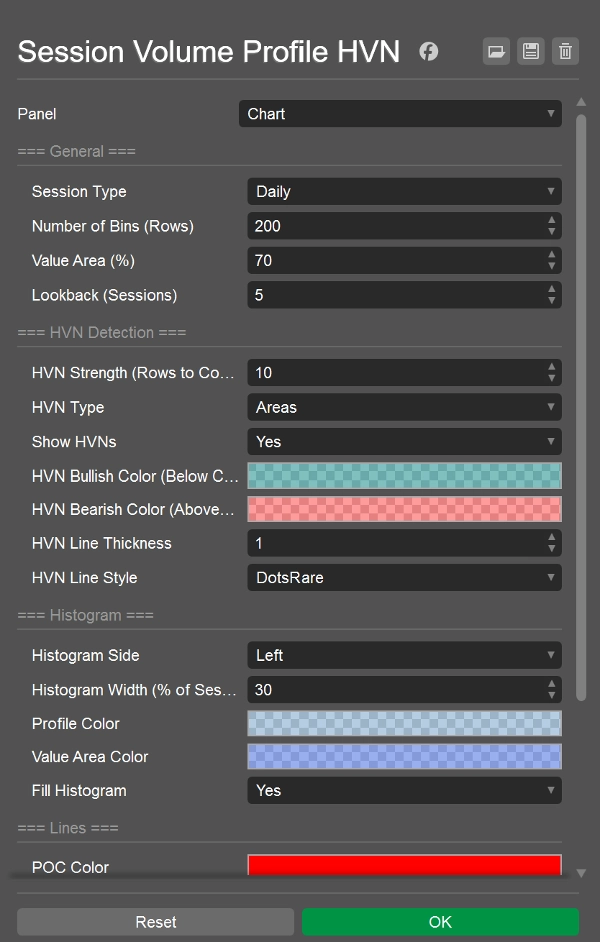
The indicator offers extensive configuration options divided into logical groups to tailor the analysis to your specific needs:
- General Settings
Session Type
Defines the time period for each profile. Options include specific market sessions (Tokyo: 00:00-09:00 UTC, London: 07:00-16:00 UTC, New York: 12:00-21:00 UTC), or standard timeframes (Daily, Weekly, Monthly).
Number of Bins (Rows)
Determines the granularity of the profile (default 200). A higher number creates finer, more detailed price levels, while a lower number groups volume into broader zones.
Value Area (%)
The percentage of total session volume used to calculate the Value Area (default 70%).
Lookback (Sessions)
The number of historical sessions to calculate and display on the chart (default 5).
- HVN Detection Settings
HVN Strength
The number of rows above and below a specific bin to compare when determining a local maximum (default 10). A higher value detects fewer, more significant HVNs; a lower value detects more granular nodes.
HVN Type
Choose how HVNs are displayed: as single price Levels (lines at the peak) or as shaded Areas (expanding from the peak to the surrounding volume valleys).
Show HVNs
Toggle the visibility of High Volume Nodes on or off.
- Visual and Histogram Settings
Histogram Side
Aligns the volume histogram to the Left (start of session) or Right (end of session) of the session window.
Histogram Width (%)
Sets the maximum width of the histogram as a percentage of the total session duration (default 30%).
Profile Color
The color of the volume bins outside the Value Area.
Value Area Color
The distinct color used to highlight the volume bins within the Value Area.
Fill Histogram
Toggle between solid filled rectangles or hollow outlines for the histogram bars.
- Lines and Labels Settings
POC Color / Thickness / Style
Customizes the appearance of the Point of Control line.
VAH / VAL Color / Thickness / Style
Customizes the appearance of the Value Area High and Low lines.
HVN Bullish / Bearish Color
Sets the specific colors for HVNs based on their relationship to the previous session's close.
Show Labels
Toggles the text labels (POC, VAH, VAL, HVN) displayed at the edge of the lines.
HVN Detection Methodology
The Session Volume Profile HVN employs a rigorous methodology to identify and display High Volume Nodes, ensuring they represent genuinely significant liquidity pools rather than arbitrary volume spikes.
1.Local Maximum Check: The algorithm evaluates every price bin in the profile. A bin qualifies as a potential HVN peak only if its volume is strictly greater than the volume of all surrounding bins within the user-defined HVN Strength window (e.g., ±10 rows). There is no minimum volume threshold; any true local maximum qualifies.
2.Valley-to-Valley Area Expansion: Once a peak is identified, the algorithm expands the HVN area outward. It scans upward from the peak until it finds a bin where the volume begins to increase again (a "valley"). It then repeats this process downward. The resulting price range between these two valleys forms the complete HVN Area.
3.Contextual Coloring: To provide immediate sentiment analysis, the indicator compares the price level of the HVN peak to the closing price of the previous session. If the previous close was higher than the HVN peak, the node is colored bullishly, suggesting buyers defended that level. If the previous close was lower, it is colored bearishly, suggesting selling pressure.
Recommended Usage
•Recommended Timeframes: While the indicator calculates volume independently of the chart timeframe, it is best viewed on lower timeframes (e.g., M5, M15, M30) to see the detailed price action interacting with the session levels.
•Recommended Instruments: The indicator is highly effective on liquid markets with distinct session volatility.