

Açıklama
TAM SÜRÜM! https://ctrader.com/products/2705
DEMO SINIRLAMALARI:
- Seçkin birkaç enstrüman
- 4 zaman dilimi (M1, M10, M30, H2)
- Geri test verilerinde 2 yıl sınırı
- x4 eşzamanlı geri test
Tam sürüme erişmek için lütfen yukarıdaki bağlantıya bakınız!
----------------
Neden OmniSim?
cTrader'da geleneksel geri test, gerçek zamanlı sermaye eğrileri ve bakiye grafiklerini oluştururken önemli sistem kaynakları tüketir, bu da bilgisayarınızı yavaşlatır ve test verimliliğini sınırlar. OmniSim, sunucu tick verilerini doğrudan alarak ve seçtiğiniz enstrümanlar ve zaman dilimleri üzerinde görsel yük olmadan ancak eksik bırakmadan hafif, odaklanmış geri testler yaparak tüm süreci kolaylaştırır.
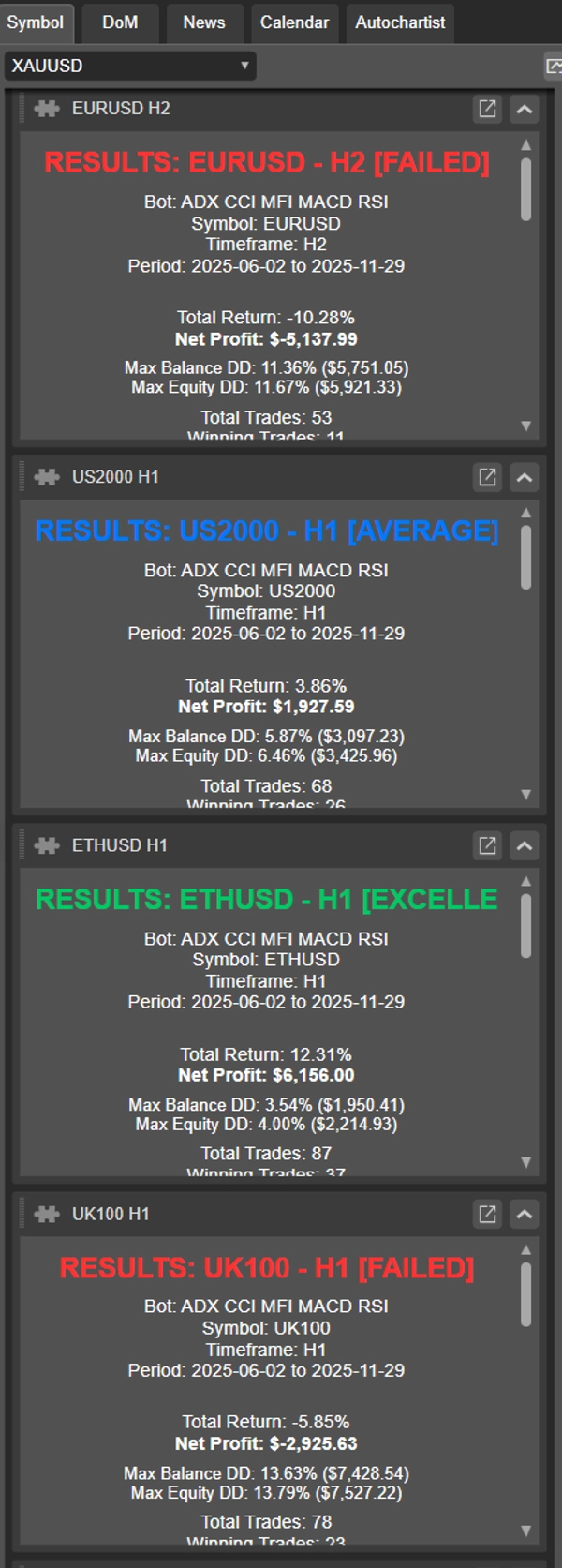
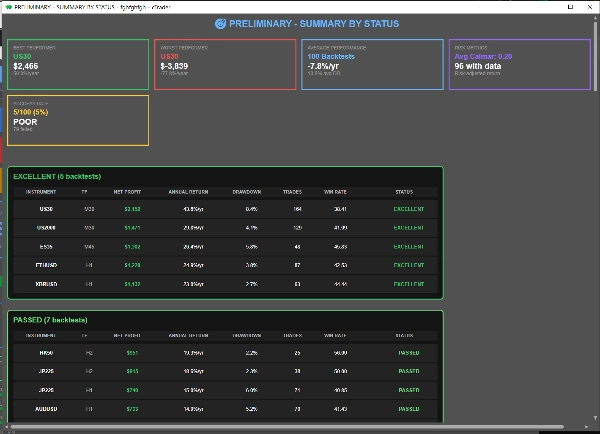
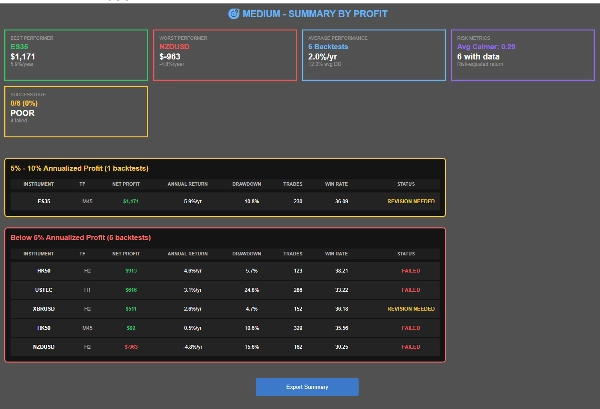
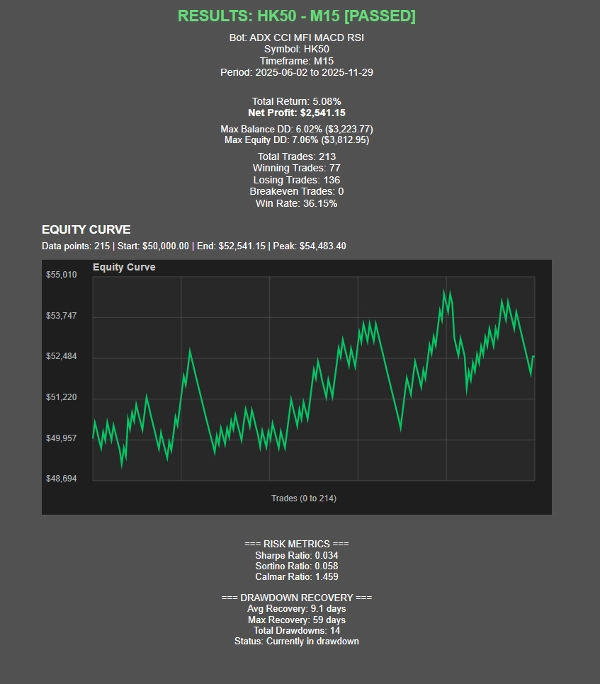
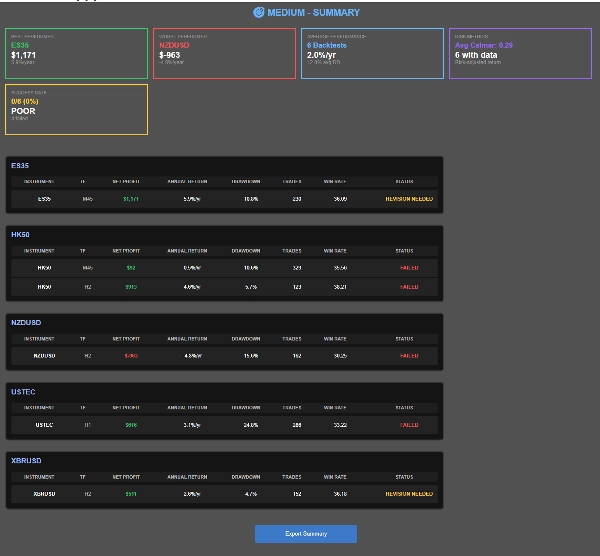
Testler tamamlandıkça, OmniSim her geri test için otomatik olarak bireysel raporlar ve kapsamlı bir özet raporu oluşturur, böylece performansınızı tek bakışta tam olarak görmenizi sağlar.
Nasıl çalışır?
OmniSim'in kullanıcı arayüzü sezgi ve sadelik düşünülerek tasarlanmıştır.
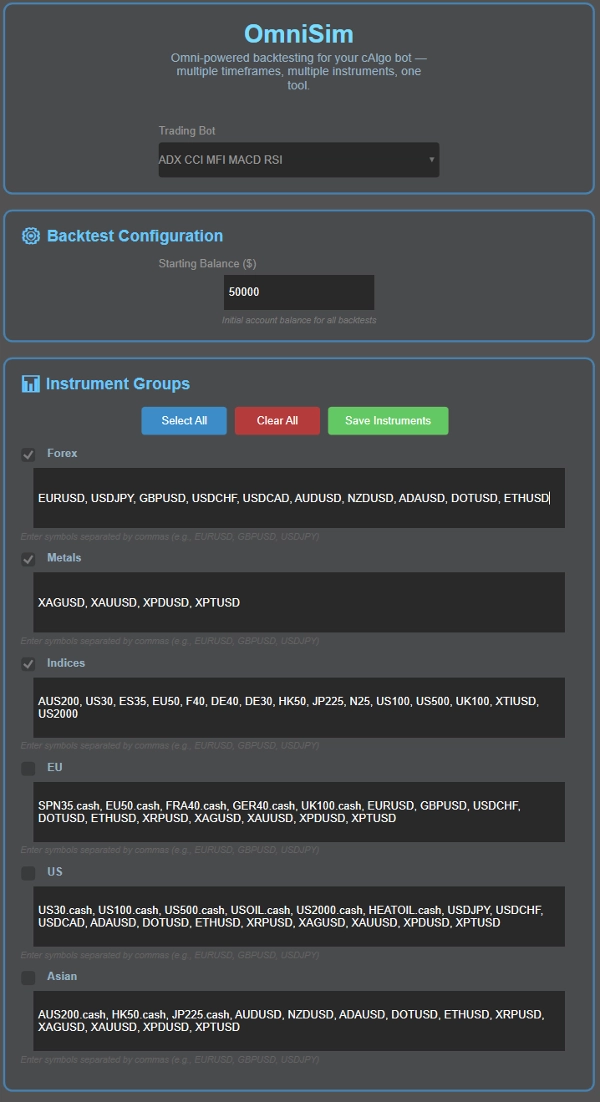
- Botunuzu seçin: Omni, yüklü tüm botları otomatik olarak yükler ve kullanıcı arayüzünün üst kısmında açılır listede gösterir
- Sermayenizi seçin
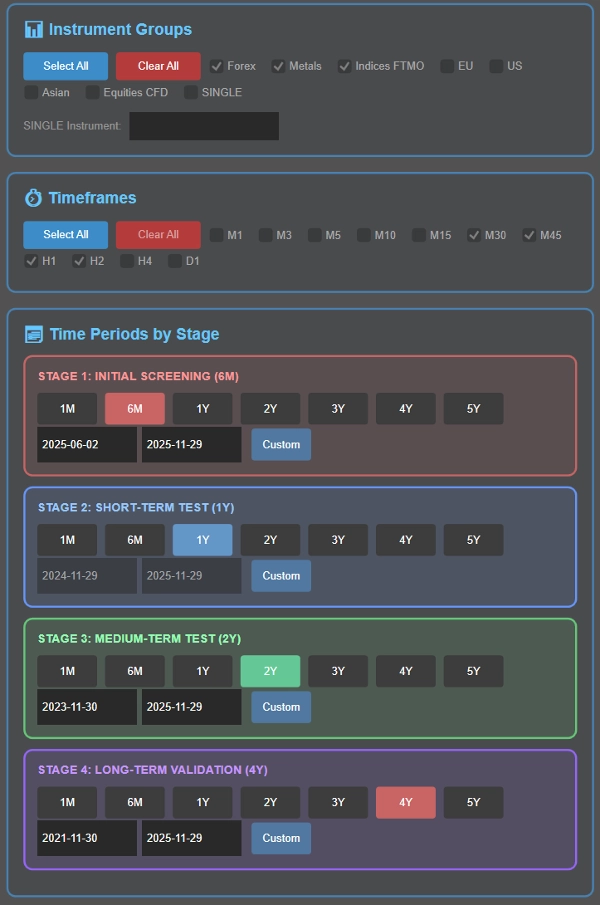
- Enstrüman(lar)ınızı seçin: burada 5 grup (Forex, Metaller, Endeksler, AB, ABD, Asya) ile karşılanacaksınız; enstrümanları sizin için özelleştirilebilir. Geri testten önce, test etmek istediğiniz enstrüman grubunu seçebilirsiniz
- Zaman diliminizi seçin: Test etmek istediğiniz zaman dilimlerini seçin: M1, M3, M5, M10, M15, M30, M45, H1, H2, H4, D1
- Geri test zaman dilimlerinizi akıllı kademeli süreç (aşağıda detaylandırılmış) kapsamında ayarlayın veya tercih ederseniz tek bir belirli dönemi seçin.
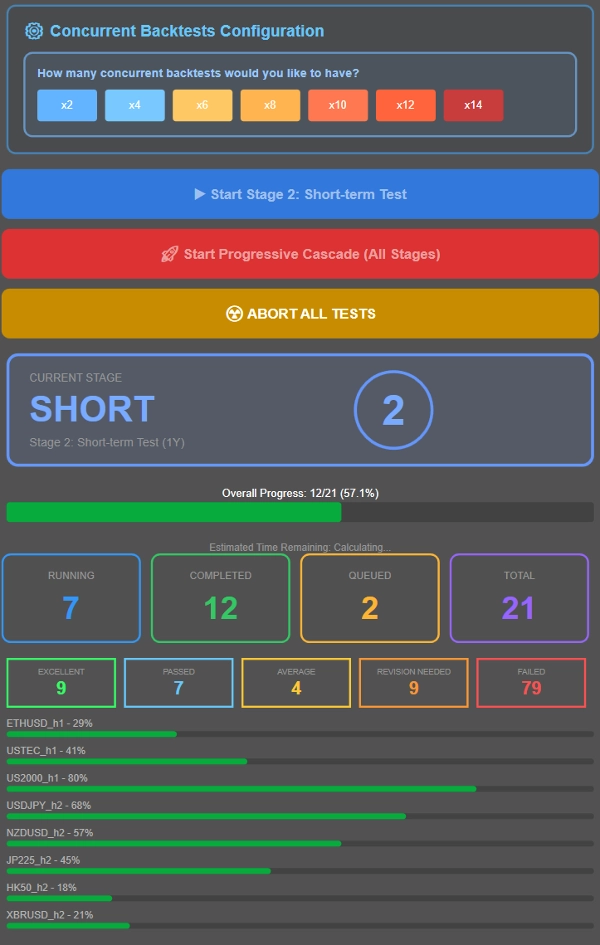
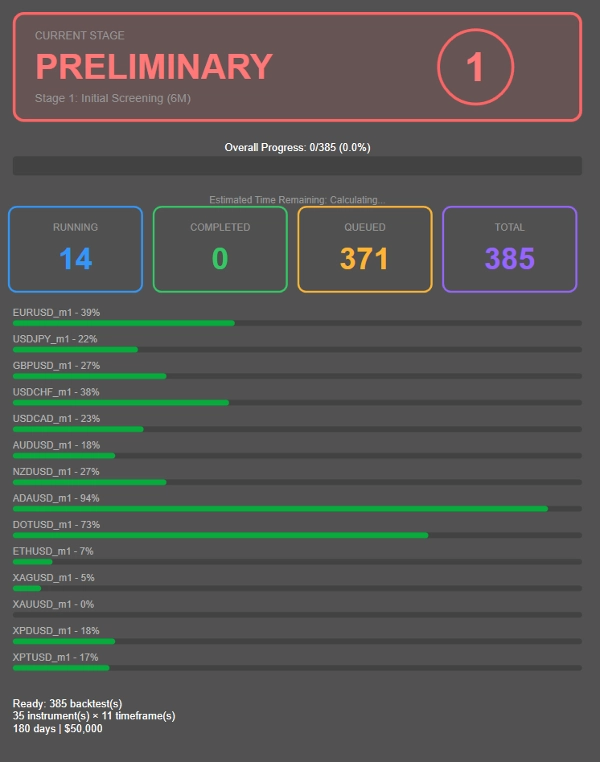
- Sistem özelliklerinize göre aynı anda kaç testin çalışacağını kontrol edin. Referans olarak, Ryzen 7 5800X3D ile 16GB RAM sistem 8 eşzamanlı geri testi kolayca yönetir, performans 12-14 eşzamanlı teste kadar sorunsuz kalır. Donanımınıza göre ayarlayın.
- Ya kademeli geri test (birden fazla zaman dilimi boyunca ilerleyici filtreleme) yapın ya da tüm kombinasyonları cbot'un varsayılan parametre değerleri ile tek bir belirli döneme karşı test edin.
Kademeli geri test süreci nedir?
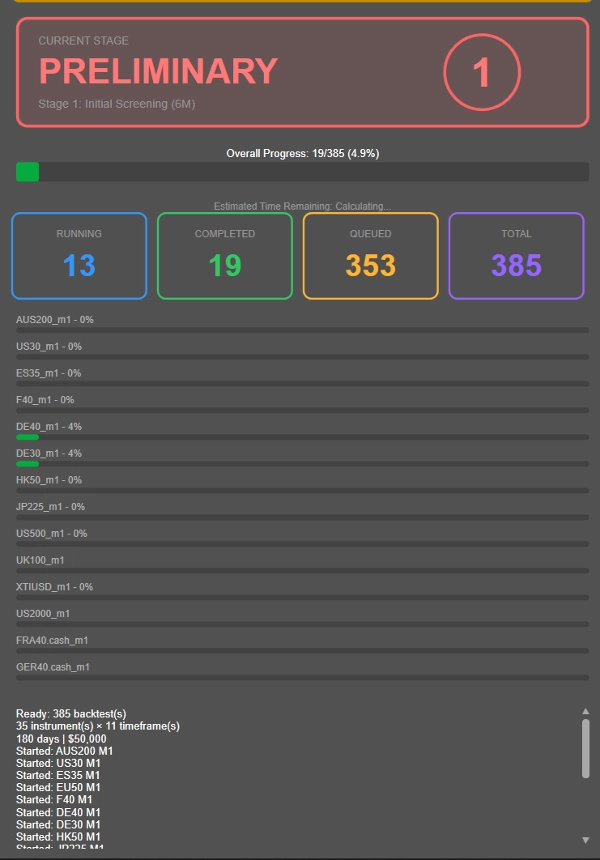
Her enstrüman-zaman dilimi kombinasyonunda (kârsız olanlar dahil) uzun 4 yıllık geri testler yapmak yerine, OmniSim ilerleyici kademeli metodolojiyi kullanır ve düşük performans gösterenleri erken aşamada akıllıca eler:
- Aşama 1: İlk 6 aylık tarama
- Aşama 2: Hayatta kalanlar 1 yıllık teste geçer
- Aşama 3: Tutarlı performans gösterenler 2 yıllık doğrulamaya geçer
- Aşama 4: Sadece en sağlam kombinasyonlar tam 4 yıllık teste tabi tutulur
---------------
- Yukarıdaki her aşamanın süresi, benim makul ve uygun bir geri test süresi olduğunu düşündüğüm şekilde seçilmiştir. İsterseniz süreyi değiştirebilirsiniz, 6A → 1Y → 2Y → 4Y yerine 1A → 2Y → 4Y → 8Y seçebilirsiniz! Tamamen özelleştirilebilir.
---------------
Bu yaklaşım, kârsız kombinasyonlarda gereksiz hesaplamayı önemli ölçüde azaltır ve kaynakları gerçekten umut vadeden stratejilere odaklamanızı sağlar.
Her şeyi tek bir döneme karşı test etmek ister misiniz? Sadece Aşama 2'de istediğiniz zaman dilimini yapılandırın ve mavi düğmeye tıklayarak tüm kombinasyonları o belirli döneme karşı çalıştırın.
Performans Sınıflandırması, satın aldıktan sonra talep üzerine ayarlanabilir!
- MÜKEMMEL: ≤%10 ort. DD, ≥%20 yıllık kâr
- GEÇTİ: ≤%10 ort. DD, %10-%20 yıllık kâr
- ORTA: ≤%10 ort. DD, %5-%10 yıllık kâr
- REVİZYON GEREKİYOR: %10-%20 DD ile >%5 kâr VEYA ≤%5 DD ile %0-%5 kâr
- BAŞARISIZ: Diğer tüm durumlar
Bu eklenti, popüler prop firmaların geçme ve kalma kriterleri (yüzde 10 diskalifiye çekilme) göz önünde bulundurularak tasarlanmıştır. İşlem başına ne kadar risk alındığına bağlı olarak gerçek performansı bulmak zor olabilir, bu yüzden revizyon gereken ve ortalama gibi diğer kategoriler makul performans ölçütleri içinde yer almaktadır. Başarısız, vasat getiriler, yok denecek kadar az çekilme veya büyük çekilme için ayrılmıştır.
Performans Ölçütleri:
- Sharpe Oranı, Sortino Oranı, Calmar Oranı (Çalışma Aşamasında)
- Çekilme kurtarma istatistikleri
- Sermaye eğrisi görselleştirmesi
- Tahmini varış süresi ile gerçek zamanlı ilerleme takibi
Sonuç Sunumu
- Üç özet görünüm: Enstrümana göre, Duruma göre, Kâra göre
- Tıklanabilir sonuç navigasyonu
- CSV dışa aktarma işlevi
- Görsel durum kartları ve ilerleme göstergeleri
Özet
Müşteri değerlendirmeleri
Tartışma
SSS
Bu oluşturanın diğer ürünleri



!["Custom Timeframes [Iridio Capital]" logosu](https://cdn.ctrader.com/image/webp/4d75a920-23c7-4fea-a7b5-594a9d067f2e_63286)








Fiyat