

Description
Precision FVG Analysis - Indicateur professionnel de Fair Value Gap
Aperçu
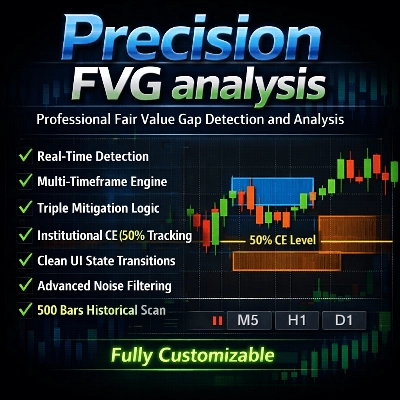
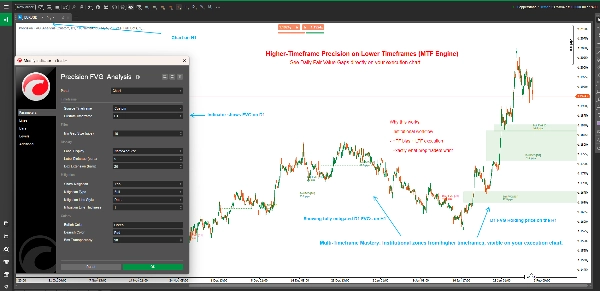
Precision FVG Analysis est un indicateur puissant et flexible de détection des Fair Value Gaps (FVG) conçu pour les traders sérieux qui utilisent les concepts Smart Money (SMC) et les méthodologies ICT. Cet indicateur avancé identifie, suit et visualise automatiquement les Fair Value Gaps sur plusieurs unités de temps avec des capacités sophistiquées de suivi de mitigation.
Les Fair Value Gaps représentent des déséquilibres sur le marché où le prix a évolué trop rapidement, laissant des inefficacités qui sont souvent revisitées. Comprendre et trader ces gaps est crucial pour les traders modernes axés sur l'action des prix.
Fonctionnalités clés
🎯 Analyse multi-unités de temps
- Détection adaptative de l’unité de temps : Choisissez d’afficher les FVG de l’unité de temps actuelle du graphique ou de toute unité de temps personnalisée
- Trading inter-unités de temps : Visualisez les FVG des unités de temps supérieures sur des graphiques d’unités de temps inférieures pour un meilleur contexte de trading
- Étiquettes intelligentes d’unité de temps : Identification automatique de l’unité de temps dans les étiquettes lors de l’utilisation d’unités de temps personnalisées
📊 Suivi avancé de la mitigation
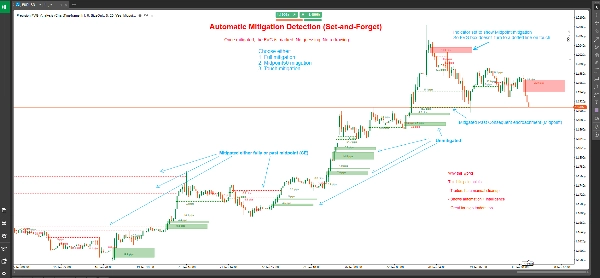
- Trois types de mitigation :
-
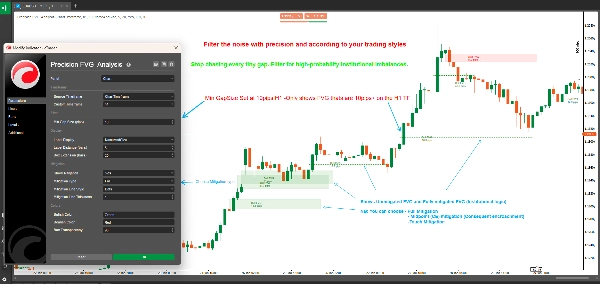
- Mitigation complète : Le prix comble entièrement le gap (approche la plus conservatrice)
- Point médian à 50 % (CE) : Le prix atteint le niveau de Consequent Encroachment (approche équilibrée)
- Mitigation par contact : Le prix touche la limite du gap (la plus sensible)
- Changements visuels d’état : Les FVG non mitigés s’affichent sous forme de boîtes pleines ; les FVG mitigés deviennent des lignes pointillées
- Marquage précis de la mitigation : Montre la bougie exacte où la mitigation a eu lieu
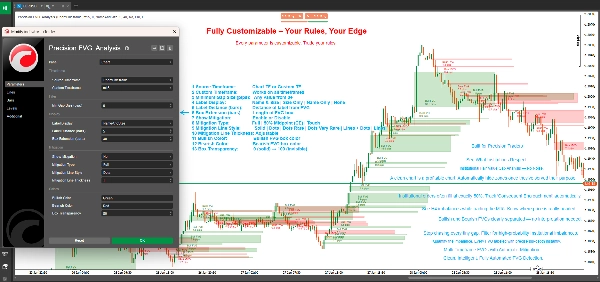
🎨 Affichage entièrement personnalisable
- Extension flexible des boîtes : Contrôlez jusqu’où les boîtes FVG s’étendent dans le futur (0-500 barres)
- Système d’étiquetage intelligent : Choisissez parmi quatre modes d’étiquettes :
-
- Nom et taille : Détails complets avec type de FVG et taille en pips
- Taille uniquement : Juste la taille du gap en pips
- Nom uniquement : Identification du type de FVG
- Aucune : Graphique épuré sans étiquettes
- Couleurs personnalisées : Schémas de couleurs distincts pour haussier et baissier
- Transparence ajustable : Transparence des boîtes de 0 à 100 %
- Personnalisation de la ligne de mitigation : Choisissez le style et l’épaisseur des lignes pour les FVG mitigés
⚙️ Filtrage professionnel
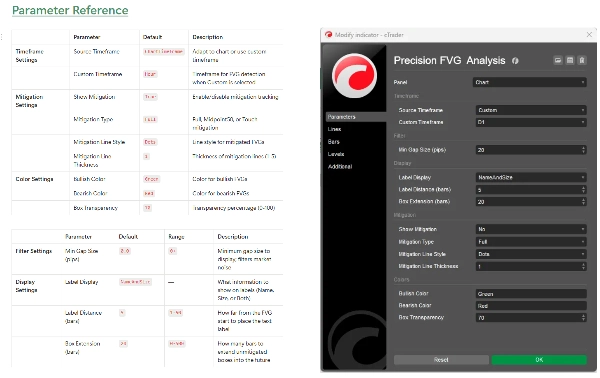
- Filtre de taille minimale du gap : Définissez la taille minimale en pips pour filtrer les gaps insignifiants
- Détection automatique : Identification en temps réel des FVG à chaque clôture de bougie
- Analyse historique : Analyse automatique jusqu’à 500 barres historiques à l’initialisation
Qu’est-ce que les Fair Value Gaps ?
Les Fair Value Gaps (FVG) se produisent lorsqu’il y a une inefficacité de prix entre trois bougies consécutives :
FVG haussier : Se forme lorsque le plus bas de la bougie actuelle est supérieur au plus haut de la bougie d’il y a deux barres, la bougie du milieu clôturant au-dessus de ce plus haut. Cela crée un gap ascendant qui agit souvent comme support.
FVG baissier : Se forme lorsque le plus haut de la bougie actuelle est inférieur au plus bas de la bougie d’il y a deux barres, la bougie du milieu clôturant en dessous de ce plus bas. Cela crée un gap descendant qui agit souvent comme résistance.
Ces gaps représentent des zones où des achats ou ventes agressifs ont eu lieu, laissant des déséquilibres de prix que le marché revisite fréquemment pour retrouver la "juste valeur" avant de continuer dans la direction initiale.
Comprendre les types de mitigation
Mitigation complète (conservatrice)
- FVG haussier : Mitigé lorsque le prix évolue en dessous du bas du gap
- FVG baissier : Mitigé lorsque le prix évolue au-dessus du haut du gap
- Cas d’utilisation : Confirmation que le gap a été complètement comblé, adapté aux traders swing et aux stratégies cherchant une confirmation
Point médian à 50 % / CE (équilibré)
- FVG haussier : Mitigé lorsque le prix atteint ou franchit le point médian vers le bas
- FVG baissier : Mitigé lorsque le prix atteint ou franchit le point médian vers le haut
- Cas d’utilisation : Le niveau de Consequent Encroachment (CE) est souvent l’endroit où les institutions placent leurs ordres, ce qui le rend idéal pour des entrées avec un bon ratio risque-rendement
Mitigation par contact (agressive)
- FVG haussier : Mitigé lorsque le prix touche ou franchit la limite supérieure
- FVG baissier : Mitigé lorsque le prix touche ou franchit la limite inférieure
- Cas d’utilisation : Système d’alerte précoce pour les traders souhaitant saisir les réactions aux limites des FVG, idéal pour le scalping et les entrées rapides
Comment utiliser
Configuration de base
- Ajoutez Precision FVG Analysis à votre graphique
- Définissez votre Unité de temps source :
-
- Choisissez "ChartTimeframe" pour détecter les FVG sur votre graphique actuel
- Choisissez "Custom" et sélectionnez une unité de temps spécifique (par ex., H4, D1) pour voir les FVG des unités de temps supérieures
- Configurez Taille minimale du gap pour filtrer les gaps petits et insignifiants (recommandé : 2-5 pips pour le forex)
Configuration de la mitigation
- Activez Afficher la mitigation pour activer le suivi de la mitigation
- Sélectionnez votre Type de mitigation selon votre style de trading :
-
- Day traders et scalpers : considérez "Touch" ou "Midpoint50"
- Traders swing : utilisez "Full" pour confirmation
- Personnalisez l’apparence de la ligne de mitigation avec Style de ligne et Épaisseur
Personnalisation visuelle
- Réglez Extension des boîtes pour contrôler jusqu’où les boîtes se projettent (20 barres par défaut)
- Choisissez votre préférence d’Affichage des étiquettes
- Ajustez la Couleur haussière et la Couleur baissière pour correspondre à votre thème de graphique
- Affinez la Transparence des boîtes pour une visibilité optimale
Stratégies de trading
Stratégie 1 : FVG d’unité de temps supérieure avec entrée sur unité de temps inférieure
- Réglez l’indicateur sur l’unité de temps H4 ou D1 sur un graphique M15 ou M5
- Identifiez les FVG non mitigés d’unité de temps supérieure
- Attendez que le prix approche le FVG sur l’unité de temps inférieure
- Cherchez une confirmation sur l’unité de temps inférieure (motifs de chandeliers, blocs d’ordres, etc.)
- Entrez lorsque le prix atteint votre niveau de mitigation choisi
Stratégie 2 : Zones de confluence FVG
- Utilisez plusieurs instances de l’indicateur avec différentes unités de temps
- Identifiez les zones où plusieurs FVG d’unités de temps se chevauchent
- Ces zones de confluence offrent des emplacements de trading à haute probabilité
- Utilisez le suivi de mitigation pour synchroniser précisément vos entrées
Stratégie 3 : Confirmation de breakout
- Identifiez les niveaux clés de support/résistance
- Surveillez la formation de FVG lors des breakouts
- Les FVG non mitigés dans la direction du breakout suggèrent une continuation
- Les FVG mitigés suggèrent un breakout potentiellement raté ou un retournement
Stratégie 4 : Scalping basé sur la mitigation
- Utilisez la mitigation par contact sur les unités de temps inférieures (M1, M5)
- Entrez immédiatement lorsque le FVG est touché
- Visez le précédent sommet/creux du swing
- Utilisez des stops serrés sous/au-dessus du FVG
Spécifications techniques
- Plateforme : cTrader
- Type : Indicateur superposé
- Calcul : En temps réel à la clôture de la barre
- Barres historiques : Analyse jusqu’à 500 barres à l’initialisation
- Nombre maximum de FVG actifs : 500 gaps simultanés
- Utilisation des ressources : Léger et optimisé pour la performance
Bonnes pratiques
Directives générales de trading
- Combinez avec d’autres concepts : Les FVG fonctionnent mieux lorsqu’ils sont combinés avec des blocs d’ordres, des pools de liquidité et la structure du marché
- Respectez le contexte du marché : Les FVG des unités de temps supérieures ont plus de poids que ceux des unités inférieures
- Utilisez plusieurs unités de temps : Superposez différents FVG d’unités de temps pour la confluence
- Gestion des risques : Utilisez toujours des stops appropriés ; tous les FVG ne tiendront pas
Conseils d’optimisation
- Ajustez la taille minimale du gap : Définissez-la en fonction de la volatilité moyenne de votre instrument
- Extension des boîtes : Plus longue pour le swing trading (50-100 barres), plus courte pour le day trading (10-20 barres)
- Type de mitigation : Adaptez-le à votre unité de temps et style de trading
- Distance des étiquettes : Ajustez en fonction de l’encombrement du graphique et du niveau de zoom
Pièges courants à éviter
- Sur-trading : Tous les FVG ne sont pas des opportunités de trading
- Ignorer le contexte : Les FVG contre des tendances fortes sont moins fiables
- Mauvais type de mitigation : Les scalpers utilisant la mitigation complète manquent des entrées ; les traders swing utilisant la mitigation par contact se font stopper
- Pas de confirmation : Attendez toujours une confirmation de l’action des prix aux niveaux de FVG
Questions fréquentes
Q : Pourquoi certains FVG disparaissent-ils immédiatement ? R : Lorsque "Afficher la mitigation" est activé avec la mitigation "Touch", les FVG qui sont immédiatement retracés deviennent rapidement des lignes pointillées. C’est un comportement normal.
Q : Puis-je voir plusieurs FVG d’unités de temps simultanément ? R : Oui ! Ajoutez l’indicateur plusieurs fois à votre graphique avec différentes unités de temps personnalisées pour une analyse multi-unités de temps.
Q : Quelle est la différence entre cet indicateur et d’autres indicateurs FVG ? R : Precision FVG Analysis offre une capacité multi-unités de temps, trois types de mitigation, et une clarté visuelle supérieure avec un rendu basé sur l’état (boîtes vs lignes).
Q : Quel type de mitigation devrais-je utiliser ? R : Commencez par Midpoint50 (CE) car il équilibre signaux précoces et fiabilité. Ajustez selon vos résultats et style de trading.
Q : Cela fonctionne-t-il sur tous les instruments ? R : Oui, l’indicateur fonctionne sur Forex, indices, matières premières et cryptomonnaies. Ajustez le paramètre "Taille minimale du gap" selon la volatilité de l’instrument.
Q : Jusqu’où remonte l’analyse historique ? R : L’indicateur analyse jusqu’à 500 barres à l’initialisation, fournissant un contexte historique complet.
Support et mises à jour
Cet indicateur est activement maintenu et mis à jour. Les utilisateurs bénéficient de :
- Mises à jour régulières avec de nouvelles fonctionnalités
- Optimisations de performance
- Corrections de bugs et améliorations
- Mises à jour de la documentation
Pour toute question, suggestion ou support, veuillez contacter via le système de messagerie du store cTrader.
Avertissement
Le trading comporte un risque important de perte et n’est pas adapté à tous les investisseurs. Les performances passées ne préjugent pas des résultats futurs. Cet indicateur est un outil d’analyse et ne constitue pas un conseil financier. Pratiquez toujours une gestion des risques appropriée et ne risquez jamais plus que ce que vous pouvez vous permettre de perdre.
Historique des versions
Version 1.0 (Actuelle)
- Détection multi-unités de temps des FVG
- Trois types de mitigation (Complète, Midpoint50, Touch)
- Changements visuels d’état (boîtes vers lignes pointillées)
- Couleurs et transparence personnalisables
- Système d’étiquetage flexible
- Analyse historique (500 barres)
- Détection et suivi en temps réel
Precision FVG Analysis - Élevez votre trading des Fair Value Gaps au niveau professionnel.
Résumé
Key features include adaptive multi-timeframe detection, allowing users to view FVGs from the current or custom timeframes, and advanced mitigation tracking with three types: Full Mitigation (complete gap fill), 50% Midpoint (Consequent Encroachment), and Touch Mitigation (gap boundary touch). Visual states change accordingly, with unmitigated gaps shown as filled boxes and mitigated ones as dotted lines, including precise candle marking of mitigation events.
The indicator offers extensive customization options such as box extension length, label display modes (name, size, both, or none), separate bullish/bearish color schemes, transparency control, and mitigation line styling. It filters gaps by minimum size and scans up to 500 historical bars on initialization for comprehensive context.
Applicable to Forex, Indices, Commodities, Cryptocurrencies, and Stocks, it supports various trading strategies including multi-timeframe analysis, confluence zones, breakout confirmation, and mitigation-based scalping. The tool operates in real-time on bar close and is optimized for performance with up to 500 active gaps tracked concurrently.
Discussion
Avis clients
5 | 50 % | |
4 | 50 % | |
3 | 0 % | |
2 | 0 % | |
1 | 0 % |
Questions fréquentes








Prix