
Mô tả
🚀 TradeCopierBot — Sao chép giao dịch nhanh, sạch và chống lại nhà môi giới (Local/VPS) 🔁✨
Sao chép giao dịch của bạn từ tài khoản MASTER sang một (hoặc nhiều) tài khoản SLAVE với một bộ sao chép nhẹ, dựa trên sự kiện được thiết kế cho điều kiện giao dịch thực tế: nhà môi giới khác nhau, tên ký hiệu khác nhau, quy tắc lô khác nhau.
Hoàn hảo cho thực thi đa tài khoản, tỷ lệ rủi ro, và phân phối chiến lược — với nhật ký gỡ lỗi chi tiết để bạn luôn biết điều gì đang xảy ra. 🧠📈
✅ Tối ưu cho cài đặt Local / VPS (cùng máy).
❌ Không thiết kế cho cTrader Cloud (các phiên bản bị cô lập, nên tín hiệu không thể chia sẻ). ☁️🚫
Chú ý: nếu bạn có hai tài khoản cTrader khác nhau, bạn cần mua hai cBot; nếu không, bạn sẽ không thể sao chép chúng. Chúng tôi luôn sẵn sàng hỗ trợ bạn với bất kỳ thông tin nào.
🧠 Cách hoạt động (MASTER → SLAVE) 🧩
🔁 1) Vận chuyển tín hiệu (cách giao dịch “di chuyển”)
Bộ sao chép này sử dụng cTrader LocalStorage (Phạm vi thiết bị) như một “bus tin nhắn” chung.
✅ MASTER
- Lắng nghe sự kiện vị trí: Mở / Sửa đổi / Đóng
- Tạo một
TradeSignal(MỞ / SỬA / ĐÓNG) - Thêm nó vào danh sách tín hiệu trong LocalStorageScope .Device
- Gọi Flush() để SLAVE có thể đọc ngay lập tức
✅ SLAVE
- Chạy một Bộ hẹn giờ mỗi Khoảng thời gian kiểm tra giây
- Gọi Reload()
- Đọc danh sách tín hiệu
- Xử lý chỉ tín hiệu mới (sử dụng
_lastSignalIndexProcessed)
🧷 2) Ánh xạ vị trí (để lệnh ĐÓNG hoạt động)
Khi SLAVE mở một giao dịch, nó lưu:
🧩 MasterPositionId → SlavePositionId
Bản đồ này cũng được lưu vào LocalStorage, nên nó tồn tại qua các lần khởi động lại:
- ✅ Lệnh ĐÓNG vẫn hoạt động sau khi khởi động lại
- ✅ Lệnh SỬA vẫn tìm đúng vị trí
🧭 3) Dịch ký hiệu (ký hiệu MASTER → ký hiệu SLAVE)
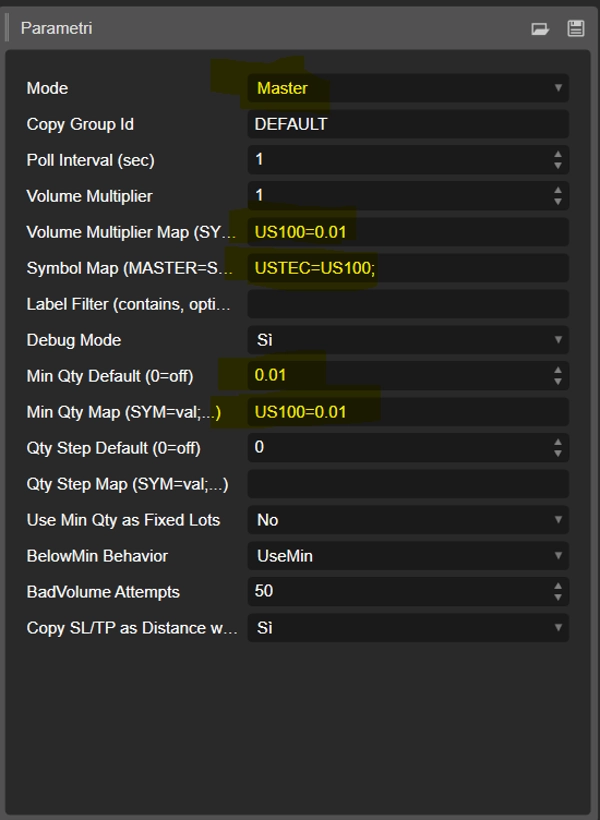
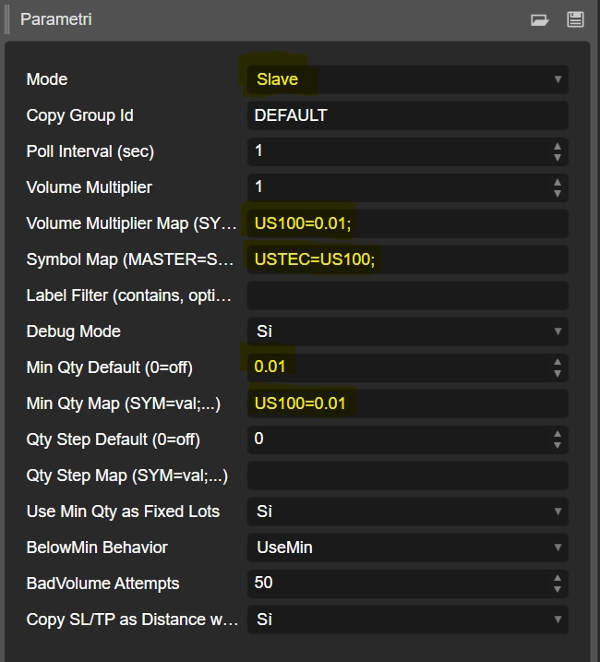
🗺️ Bản đồ ký hiệu (MASTER=SLAVE;...)
Dùng khi tên ký hiệu khác nhau giữa các nhà môi giới/tài khoản.
Định dạng:
MASTER=SLAVE;MASTER2=SLAVE2;...
Ví dụ (trường hợp của bạn):
- MASTER mở
USTEC - SLAVE phải giao dịch
US100
➡️ USTEC=US100
✅ Bên trái = ký hiệu đến từ MASTER
✅ Bên phải = ký hiệu trên nhà môi giới SLAVE
📏 4) Logic khối lượng (phần quan trọng) 🔥
✅ Hoạt động theo lô/số lượng (hỗ trợ số thập phân)
Để xử lý số thập phân (0.10, 0.01, v.v.), SLAVE:
- Tính toán lô mong muốn
- Áp dụng bộ nhân / tối thiểu / bước
- Chuyển đổi lô → khối lượng sử dụng
QuantityToVolumeInUnits(lots) - Gửi lệnh sử dụng một phương thức quá tải chấp nhận khối lượng kiểu double ✅
Điều này làm cho nó mạnh mẽ ngay cả khi các nhà môi giới áp dụng các quy tắc độ chính xác lô khác nhau.
⚙️ Giải thích các tham số (kèm biểu tượng)
🧩 Cốt lõi
- 🧭 Chế độ
-
Master= phát tín hiệuSlave= đọc tín hiệu và sao chép giao dịch
- 🧷 ID Nhóm Sao chép
-
- Kênh giao tiếp. MASTER và SLAVE phải trùng khớp (ví dụ,
DEFAULT)
- Kênh giao tiếp. MASTER và SLAVE phải trùng khớp (ví dụ,
- ⏱️ Khoảng thời gian kiểm tra (giây)
-
- SLAVE kiểm tra tín hiệu mới mỗi N giây
- 🐞 Chế độ Gỡ lỗi
-
- In nhật ký chi tiết (khuyến nghị khi thiết lập)
🗺️ Dịch ký hiệu
- 🧾 Bản đồ ký hiệu (MASTER=SLAVE;...)
-
- Ví dụ:
USTEC=US100;XAUUSD=GOLD;NAS100=USTEC
- Ví dụ:
🎚️ Tỷ lệ khối lượng (QUAN TRỌNG NHẤT) ✅
🔢 Bộ nhân toàn cục
- ➗ Bộ nhân khối lượng
-
- Tỷ lệ tất cả các lô được sao chép:
desiredLots = masterLots * VolumeMultiplier
🎛️ Bộ nhân theo ký hiệu (công cụ chính của bạn)
- 🧷 Bản đồ Bộ nhân khối lượng (SYM=mult;...)
-
- Ghi đè bộ nhân theo từng ký hiệu (ký hiệu bên SLAVE)
- Ví dụ:
-
US100= 0. 10- Định dạng kiểu Ý cũng được chấp nhận:
US100=0,10
✅ Đây là cách bạn đạt được: 1. 00 trên MASTER → 0. 10 trên SLAVE
🧱 Ràng buộc lô của nhà môi giới (tối thiểu và bước)
- 🧱 Số lượng tối thiểu mặc định (0=tắt)
-
- Số lô tối thiểu toàn cục nếu được bật
- 🧱 Bản đồ số lượng tối thiểu (SYM=val;...)
-
- Số lô tối thiểu theo từng ký hiệu
- Ví dụ:
US100=0. 10
- 🪜 Bước số lượng mặc định (0=tắt)
-
- Bước toàn cục nếu được bật
- 🪜 Bản đồ bước số lượng (SYM=val;...)
-
- Bước theo từng ký hiệu
- Ví dụ:
US100=0. 10→ các giá trị cho phép: 0. 10, 0 .20, 0.30…
🧯 Hành vi an toàn
- 🧷 Sử dụng Min Qty như Lô cố định
-
- Nếu
true: SLAVE bỏ qua kích thước master và luôn sử dụng MinQty (kích thước cố định)
- Nếu
- ⚠️ Hành vi dưới Min
-
UseMin= nếu dưới min → nâng lên minSkip= nếu dưới min → không mở
- 🔁 Cố gắng BadVolume
-
- Nếu nhà môi giới trả về BadVolume, thử điều chỉnh nhỏ lên đến N lần
🎯 Logic sao chép SL/TP
- 🛡️ Sao chép SL/TP dưới dạng Khoảng cách khi ký hiệu khác nhau
-
- Nếu ký hiệu MASTER và SLAVE khác nhau:
- SL/TP được sao chép dưới dạng khoảng cách từ điểm vào, không phải giá tuyệt đối
- Điều này giữ cho kiểm soát rủi ro nhất quán trên các công cụ
✅ Cài đặt được khuyến nghị (USTEC → US100, lô SLAVE = 0. 10)
Trên SLAVE:
🗺️ Dịch ký hiệu:
Symbol Map=USTEC=US100
🎛️ Tỷ lệ khối lượng:
Volume Multiplier Map=US100=0,10
🧱 Ràng buộc nhà môi giới:
Min Qty Map=US100=0,10Qty Step Map=US100=0,10
Kết quả:
- ✅ MASTER 1. 00 → SLAVE 0. 10 trên US100
☁️ Quan trọng: Chỉ Local/VPS (không phải Cloud) ❌
🖥️ Local/VPS ✅
Hoạt động vì MASTER và SLAVE chia sẻ cùng LocalStorageScope .Device (cùng máy/môi trường).
☁️ cTrader Cloud ❌
Không hoạt động vì các phiên bản Cloud bị cô lập, nên chúng không chia sẻ LocalStorage và SLAVE không thể thấy tín hiệu của MASTER.
✅ Kết luận:
- ✔️ Sử dụng trên cùng một PC hoặc VPS nơi cả hai phiên bản chạy cùng nhau
- ❌ Đối với Cloud bạn cần một bộ chuyển tiếp bên ngoài (máy chủ HTTP/WebSocket)
Tóm tắt
Key features include:
- Position mapping to maintain correct trade management across restarts.
- Symbol translation via customizable symbol maps to handle differing broker symbol names.
- Volume scaling with global and per-symbol multipliers, supporting decimal lot sizes and broker-specific minimum quantity and step constraints.
- Safety behaviors such as fixed lot sizing and handling of trades below minimum lot sizes.
- Stop loss and take profit copying as distance from entry price when symbols differ, preserving consistent risk control.
Parameters include mode selection (MASTER or SLAVE), communication group ID, polling interval, debug mode, symbol maps, volume multipliers, and broker lot constraints. The bot is not compatible with cTrader Cloud due to isolated instances but functions reliably on local or VPS setups where MASTER and SLAVE share the same environment.
Đánh giá của khách hàng
5 | 67 % | |
4 | 0 % | |
3 | 33 % | |
2 | 0 % | |
1 | 0 % |