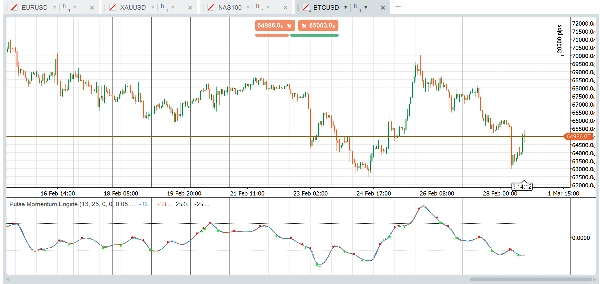
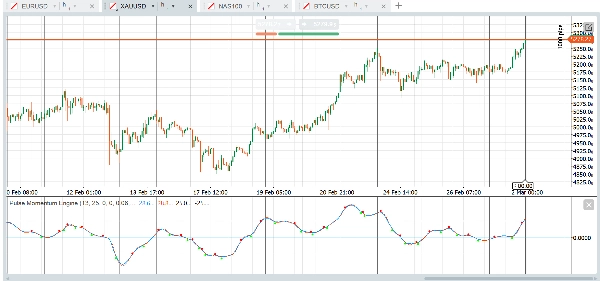
Mô tả
Động cơ Pulse Momentum Engine (PME) là một bộ dao động động lượng thích ứng tiên tiến với hiệu chỉnh trễ tích hợp và bộ lọc hội tụ 5 điều kiện. Nó tăng tốc trong các xu hướng, giảm tốc trong nhiễu, và chỉ hiển thị cho bạn các tín hiệu đáng để thực hiện. Hoạt động trên Forex, chỉ số, vàng, tiền điện tử và nhiều hơn nữa — ngay khi sử dụng.
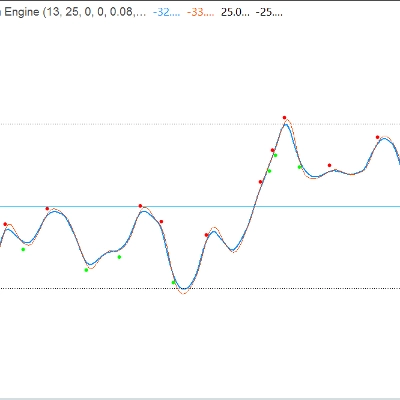
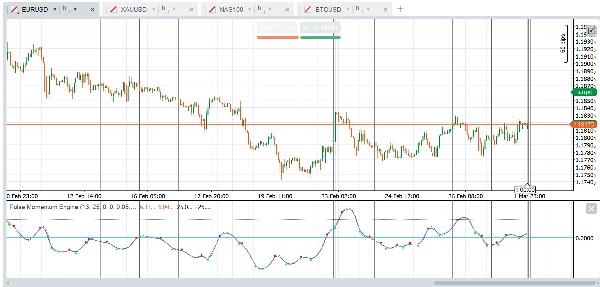
Chỉ báo hiển thị dưới dạng bộ dao động cửa sổ phụ với Đường Pulse chính, một Đường Tín hiệu tùy chọn, các mức Quá mua/Quá bán cố định, và các mũi tên giao cắt tùy chọn được lọc bởi hệ thống hội tụ đa điều kiện.
Nhóm Tham số:
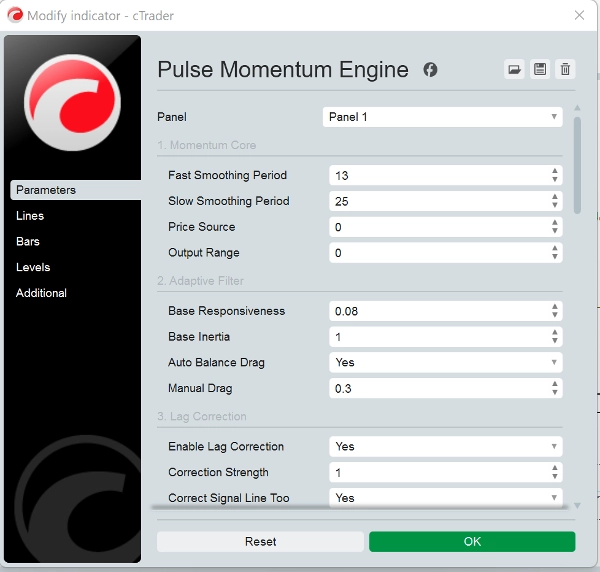
- Lõi Động lượng: Điều khiển phép tính động lượng cơ bản. Phạm vi đầu ra mặc định là 0 làm trung tâm. Khi sử dụng Phạm vi đầu ra = 1 (Dịch chuyển), điều chỉnh các mức OB/OS tương ứng (ví dụ: OB = 70, OS = 30)
- Bộ lọc Thích ứng: Điều khiển cách bộ lọc theo dõi tín hiệu động lượng. Độ phản hồi cơ bản (0.08) xác định tốc độ bộ lọc phản ứng với thay đổi động lượng. Cao hơn = nhanh hơn nhưng nhiều nhiễu hơn. Quán tính cơ bản (1.0) xác định sức cản với các thay đổi đột ngột. Cao hơn = đầu ra mượt mà hơn nhưng trễ hơn. Kéo cân bằng tự động (True) tự động tính toán lực kéo tối ưu để ngăn chặn dao động/rung. Khuyến nghị giữ bật. Kéo thủ công (0.3) là hệ số kéo thủ công khi cân bằng tự động bị tắt. Cao hơn = giảm chấn nhiều hơn.
- Hiệu chỉnh trễ: Giảm độ trễ vốn có của bộ lọc thích ứng bằng phản hồi lỗi hai lần.
- Theo dõi động: Làm cho bộ lọc thích ứng hành vi dựa trên điều kiện thị trường.
- Động cơ thích ứng: Điều khiển cơ chế thích ứng tổng thể.
- Đường tín hiệu: Đường tham chiếu chậm hơn dùng cho tín hiệu dựa trên giao cắt.
- Mũi tên giao cắt: Các dấu hiệu trực quan tại điểm giao cắt đường chính/tín hiệu. Lưu ý: Không vẽ lại: Khi "Yêu cầu thanh xác nhận" là True (mặc định), tín hiệu giao cắt chỉ xuất hiện sau khi thanh đóng và sẽ không bao giờ biến mất. Chỉ đặt False nếu bạn cần cảnh báo thời gian thực và hiểu rằng tín hiệu có thể thay đổi trước khi thanh đóng.
- Bộ lọc hội tụ: Yêu cầu nhiều điều kiện đồng thuận trước khi hiển thị mũi tên giao cắt. Giảm đáng kể tín hiệu sai.
- Mức cố định: Các đường tham chiếu quá mua và quá bán đơn giản, cố định. Bảo thủ (ít tín hiệu hơn): OB = 40, OS = -40 (làm trung tâm) hoặc OB = 70, OS = 30 (dịch chuyển). Mạnh mẽ (nhiều tín hiệu hơn): OB = 15, OS = -15 (làm trung tâm) hoặc OB = 60, OS = 40 (dịch chuyển).
- Hiệu suất: Số thanh tối đa để tính toán được đặt là 0. 0 = tính toán toàn bộ lịch sử có sẵn. Đặt từ 5000-10000 trên biểu đồ rất dài để giảm tải CPU.
Cách sử dụng cơ bản
- Hướng xu hướng: Khi Đường Pulse (màu xanh dương) ở trên 0 và tăng, động lượng là tăng giá. Dưới 0 và giảm cho thấy động lượng giảm giá.
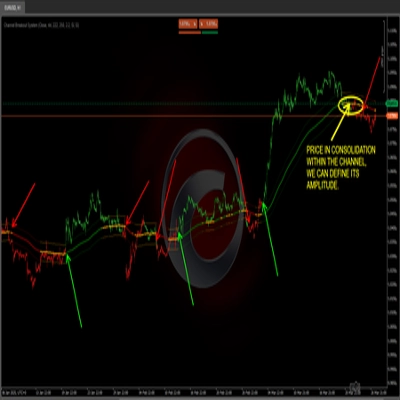
- Tín hiệu giao cắt: Một tín hiệu tăng giá xảy ra khi Đường Pulse cắt lên trên Đường Tín hiệu (mũi tên xanh). Một tín hiệu giảm giá xảy ra khi nó cắt xuống dưới (mũi tên đỏ).
- Vùng Quá mua/Quá bán:
-
- Đường Pulse ở trên mức OB → thị trường có thể bị kéo quá mức lên trên. Tìm các giao cắt giảm giá như tín hiệu đảo chiều tiềm năng.
- Đường Pulse dưới mức OS → thị trường có thể bị bán quá mức. Tìm các giao cắt tăng giá như tín hiệu đảo chiều tiềm năng.
- Các giao cắt xảy ra trong vùng trung tính (giữa OB và OS) thường là tín hiệu theo xu hướng.
Chiến lược Bộ lọc Hội tụ
Cấu hình mặc định yêu cầu 3 trong 5 điều kiện xác nhận một giao cắt. Điều này giảm đáng kể tín hiệu sai. Bạn có thể:
- Tăng số điều kiện tối thiểu lên 4-5 để có ít tín hiệu hơn nhưng chất lượng cao hơn
- Giảm số điều kiện tối thiểu xuống 1-2 để có nhiều tín hiệu hơn với chất lượng cá nhân thấp hơn
- Tắt các bộ lọc riêng lẻ để tùy chỉnh các xác nhận quan trọng với chiến lược của bạn
Tài sản & Thị trường Đề xuất
Các cặp Forex chính- EUR/USD, GBP/USD, USD/JPY, AUD/USD (Thanh khoản cao tạo ra các dao động động lượng sạch. Bộ lọc thích ứng xử lý hiệu quả biến động phiên khác nhau)
Các cặp Forex chéo - EUR/GBP, GBP/JPY, AUD/NZD (Thường thể hiện hành vi xu hướng mạnh hơn, mà bộ lọc hội tụ khai thác tốt)
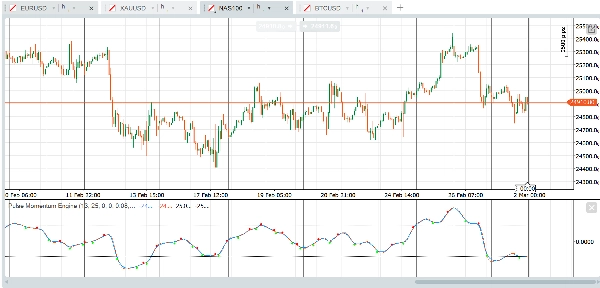
Chỉ số chứng khoán - US30, NAS100, SPX500, GER40 (Các pha xu hướng bền vững phù hợp với bộ lọc thích ứng. Hiệu chỉnh trễ bắt kịp các đột phá sớm)
Vàng (XAU/USD) - Các dao động động lượng dài và pha xu hướng rõ ràng phù hợp chặt chẽ với thiết kế bộ lọc.
Dầu thô - WTI, Brent (Động lượng bền vững mạnh)
Cổ phiếu vốn hóa lớn - AAPL, MSFT, AMZN, TSLA (Sự tham gia của tổ chức tạo ra các dấu hiệu động lượng sạch)
Tiền điện tử chính - BTC/USD, ETH/USD (Xu hướng mạnh. Tăng Độ phản hồi lên 0.10 - 0.15 cho chu kỳ nhanh hơn của tiền điện tử).
Ít phù hợp với các công cụ thanh khoản thấp (các đột biến ngẫu nhiên được khuếch đại thành tín hiệu sai) và các cặp giới hạn phạm vi hẹp (Chỉ báo cung cấp ít thông tin có thể hành động).
Về khung thời gian, cài đặt mặc định được thiết kế để hoạt động với biểu đồ dựa trên giờ một giờ ngay khi sử dụng nhưng các khung thời gian và loại biểu đồ khác như renko, phạm vi, ticks cũng hoạt động tốt. Nền tảng và chỉ báo là của bạn để thử nghiệm tìm cài đặt phù hợp với chiến lược của bạn. Dưới đây là ví dụ về các cài đặt nhanh bạn có thể thử:
Cài đặt nhanh bắt đầu
Các cặp Forex chính — Sẵn sàng sử dụng ngay
Cài đặt mặc định được tối ưu cho các cặp forex chính trên khung thời gian H1. Không cần thay đổi. Chỉ cần áp dụng chỉ báo và đặt mức Quá mua là 25 và mức Quá bán là -25.
Vàng & Dầu — Phản hồi nhanh hơn một chút
Đối với vàng (XAU/USD) và dầu thô, tăng Độ phản hồi cơ bản lên 0.10 để nắm bắt tốt hơn các dao động động lượng đặc trưng của chúng. Mở rộng nhẹ các mức OB/OS lên 30 và -30 để phù hợp với phạm vi dao động rộng hơn. Các cài đặt khác có thể giữ nguyên mặc định.
Chỉ số chứng khoán — Nhanh hơn và chặt chẽ hơn
Các chỉ số như US30, NAS100 và SPX500 hưởng lợi từ các chu kỳ làm mượt ngắn hơn. Đặt Chu kỳ nhanh là 11 và Chu kỳ chậm là 21 để phản ứng nhanh hơn với các thay đổi động lượng trong ngày. Tăng Độ phản hồi cơ bản lên 0.10 và giảm Chu kỳ tín hiệu xuống 6 để thời gian giao cắt chặt hơn. Giữ OB ở 25 và OS ở -25. Min Hội tụ ở 3 hoạt động tốt cho hầu hết giao dịch chỉ số.
Tiền điện tử — Thiết kế cho tốc độ
Thị trường tiền điện tử di chuyển nhanh và xu hướng mạnh. Rút ngắn Chu kỳ nhanh xuống 10 và Chu kỳ chậm xuống 21. Đẩy Độ phản hồi cơ bản lên 0.12 và giảm Quán tính cơ bản xuống 0.8 để bộ lọc phản ứng nhanh với các dao động biến động. Sử dụng Chu kỳ tín hiệu là 5 để phát hiện giao cắt nhanh hơn. Tăng trần Độ phản hồi tối đa lên 0.5 để động cơ thích ứng có nhiều không gian hơn. Giảm Min Hội tụ xuống 2 vì xu hướng tiền điện tử có xu hướng định hướng hơn và ít nhiễu hơn khi đã thiết lập. Đặt OB là 30 và OS là -30.
Trái phiếu & Công cụ chậm — Kiên nhẫn và chọn lọc
Trái phiếu chính phủ, bunds và các công cụ di chuyển chậm khác yêu cầu các chu kỳ nhìn lại dài hơn và sự kiên nhẫn nhiều hơn. Tăng Chu kỳ nhanh lên 18 và Chu kỳ chậm lên 34. Giảm Độ phản hồi cơ bản xuống 0.05 và tăng Quán tính cơ bản lên 1.5 để ngăn bộ lọc phản ứng với các biến động nhỏ. Mở rộng Chu kỳ tín hiệu lên 10 và Chu kỳ nhìn lại thích ứng lên 15. Tăng Min Hội tụ lên 4 để đảm bảo chỉ các thiết lập mạnh nhất kích hoạt tín hiệu. Sử dụng các mức OB/OS chặt hơn là 20 và -20 vì các công cụ này dao động trong phạm vi hẹp hơn.
Lưu ý quan trọng
- Không vẽ lại: Với "Yêu cầu thanh xác nhận" được bật (mặc định), tất cả tín hiệu mũi tên giao cắt dựa trên các thanh đã đóng và sẽ không bao giờ thay đổi hoặc biến mất ngược lại.
- Giá trị Đường Pulse và Đường Tín hiệu trên thanh hiện tại (chưa đóng) sẽ cập nhật theo thời gian thực — đây là hành vi tiêu chuẩn của bất kỳ chỉ báo nào. Chỉ các tín hiệu mũi tên được kiểm soát bởi cài đặt thanh xác nhận.
- Mức OB/OS cố định là các đường tham chiếu đơn giản. Không giống như các mức động, chúng không thích ứng với điều kiện thị trường thay đổi. Điều chỉnh chúng dựa trên tài sản và khung thời gian bạn giao dịch.
- Khi chuyển đổi Phạm vi đầu ra từ Trung tâm sang Dịch chuyển, nhớ cập nhật các mức OB/OS tương ứng (xem bảng Hướng dẫn mức ở trên).
- Hiệu suất: Trên các biểu đồ rất dài (50.000+ thanh), hãy cân nhắc đặt "Số thanh tối đa để tính toán" từ 5000-10000.
Tuyên bố từ chối trách nhiệm
Chỉ báo này là công cụ phân tích kỹ thuật và không cấu thành lời khuyên tài chính. Hiệu suất trong quá khứ không phản ánh kết quả trong tương lai. Luôn sử dụng quản lý rủi ro phù hợp và kết hợp với các hình thức phân tích khác trước khi đưa ra quyết định giao dịch.
Tóm tắt
Key functionalities include:
- Adaptive filtering that adjusts responsiveness and inertia based on market conditions.
- Lag correction via two-pass error feedback to improve signal timeliness.
- A confluence filter requiring multiple conditions to confirm crossover signals, enhancing signal quality.
- Fixed overbought and oversold reference levels to identify potential reversal zones.
- Customizable parameters for momentum calculation, filter behavior, lag correction, and signal generation.
PME is optimized for one-hour charts but supports other timeframes and chart types. It provides presets tailored for different markets such as Forex majors, gold, oil, stock indices, cryptocurrencies, and bonds, allowing users to adjust responsiveness and signal sensitivity accordingly. The indicator is non-repainting when used with confirmed bar settings and is intended as a technical analysis tool to assist in trend detection and trade timing.
Thảo luận
Đánh giá của khách hàng
5 | 25 % | |
4 | 75 % | |
3 | 0 % | |
2 | 0 % | |
1 | 0 % |