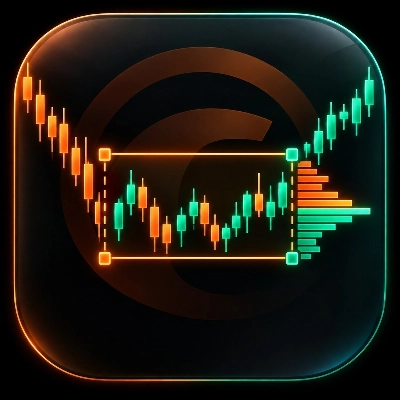
"VP TPO Bubble v1.0" 标识
指标
2 下载
版本 1.0, Jun 2026
Windows 版、Mac 版
"VP TPO Bubble v1.0" 已上传图片
2
免费安装

Volume Profile TPO Bubble — by The Quant

Volume Profile TPO Bubble is a premium cTrader indicator created by The Quant.


It brings together three powerful market-reading tools in one clean indicator:

◆ Volume Profile
◆ Bubble Chart
◆ TPO
◆ POC Break & Retest signals for robots

This tool is designed for traders who want to read volume zones more clearly, identify important POC levels, and use those levels inside manual or automated strategies.

It is built for cTrader, with both visual analysis and cBot automation in mind.

What This Indicator Does

Volume Profile TPO Bubble helps you identify the zones where the market has been active.

These zones are called POCs, or Points of Control.

A POC is a price area where activity was concentrated.
When price comes back to this area, it may break it, retest it, reject it, or react from it.

The goal is not to predict the market.

The goal is to make important market zones easier to see, easier to understand, and easier to use in a strategy.

Main Visual Modes

Volume Profile

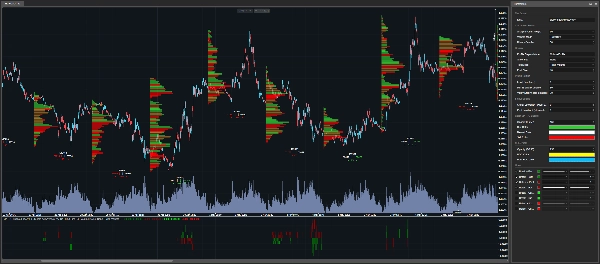
The Volume Profile mode displays horizontal volume bars directly on the cTrader chart.

The bigger the bar, the more important the price zone was during the selected analysis candle.

This mode is useful when you want to see the full structure of volume distribution.

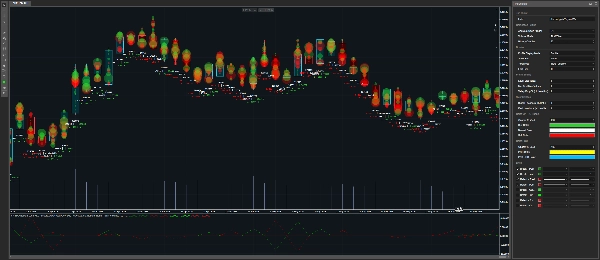
Bubble Chart

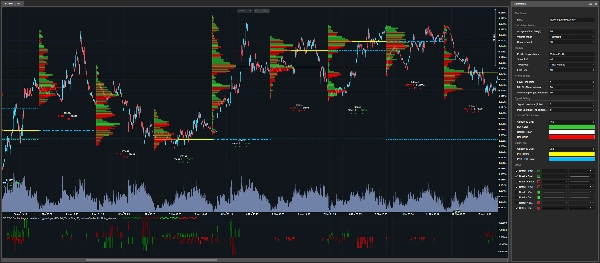
The Bubble Chart mode displays important volume zones as bubbles.

The bigger the bubble, the more important the detected zone is.

This mode is made for fast visual reading.
It helps you quickly spot the most important areas on the chart.

If you want to use the indicator mainly as a Bubble Chart, you can set Show POC to None, then adjust Min % of Max Volume and Valley Drop % depending on how many bubbles you want to see.

Lower values show more bubbles.
Higher values keep only the cleanest zones.

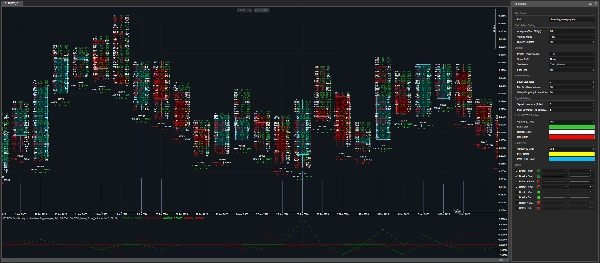
TPO

The TPO mode gives a more detailed view of what happened inside a candle.

It displays buy volume, sell volume, and delta by price level.

This mode is useful when you want to understand the internal structure of a zone, not just see where the volume was.

Tick and TickXSize Logic

On CFDs, traders do not receive centralized exchange volume like on futures markets.

Instead, volume is based on broker tick data.

This indicator gives you two volume calculation modes:

Tick

Each tick counts as one unit.

This is the simple reading of the broker tick flow.

TickXSize

Ticks are weighted by the size of the price movement.

A tick that moves price by 1 pip has more weight than a tick that moves price by 0.1 pip.

This can help reveal zones where the movement had more impact, even if the raw tick count alone does not make the zone obvious.

Tick counts events.
TickXSize counts events with the weight of the movement.

POC Detection

The indicator detects POC zones using volume peaks and filtering logic.

A zone must be strong enough and isolated enough to be considered relevant.

This helps avoid displaying every small noisy area on the chart.

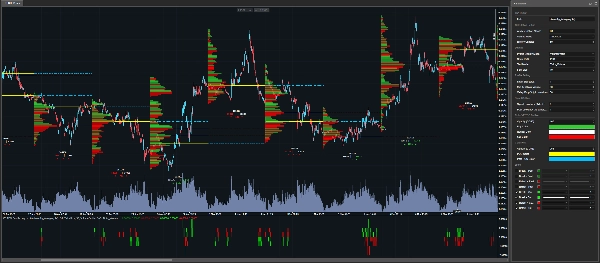
Current POCs can be displayed directly on the chart.
They can also be extended into the next analysis candle with dotted lines.

Past POCs can also be displayed, allowing traders to track older levels that may still matter.

Robot-Ready Break & Retest Signals

Volume Profile TPO Bubble is not only a visual indicator.

It also exposes output series that can be used inside a cBot or trading robot.

The indicator can detect:

◆ Break of current POC levels
◆ Retest of current POC levels
◆ Break of past POC levels
◆ Retest of past POC levels

This allows a robot to detect when price interacts with important volume zones.

Signal Scores

The indicator does not only return a signal.

It also returns a score.

The score tells the robot which POC zone was touched, broken, or retested.

The ranking is based on the open price of the selected analysis candle.

Positive scores represent POC zones above the open.
Negative scores represent POC zones below the open.

Example:

+1 = first POC zone above the open
-1 = first POC zone below the open
+2 = second POC zone above the open
-3 = third POC zone below the open

The further the number is from zero, the further the zone is from the open.

This is useful for automation because the robot does not only know that a signal happened.
It also knows where the signal happened.

Parameters

Calculation Settings

Analyse Timeframe

Selects the timeframe used to build the profiles.

For example:

Daily = one profile per day
H4 = one profile every four hours

This timeframe is the base used to build profiles, detect POCs, and organize signal scores.

Volume Mode

Chooses how tick volume is calculated.

Tick = one tick equals one unit
TickXSize = ticks are weighted by price movement size

Tick is the simple mode.
TickXSize gives more importance to ticks that move price more strongly.

History Candles

Defines how many past candles from the selected Analyse Timeframe are kept on the chart.

More candles give more historical context.
Fewer candles keep the chart lighter.

The indicator may keep a small additional margin internally so that POCs, Breaks, and Retests are calculated correctly.

Display Settings

Profile Display Mode

Choose what is displayed on the chart:

None
Volume Profile
Bubble
TPO

None is useful for automation because it removes drawings from the chart while keeping the indicator outputs available.

This allows traders to keep a clean chart and still use the signals inside a robot.

Show POC

Controls which POC levels are displayed.

None = no POC lines
PoC = current POC levels
PoC Past = past POC levels
All = current and past POC levels

Current POCs can be extended into the next analysis candle with dotted lines.

Text Mode

Controls the volume information displayed under the candle.

None = no text
Ticks Volume = tick volume information
Delta Percent = imbalance shown as percentage

For automation, this can be set to None to keep the chart clean.

Font Size

Controls the size of the displayed text.

Increase it for better readability.
Decrease it if the chart is too crowded.

Profile Settings

Level Size

Controls the size of each price level.

Smaller values give more detail.
Larger values create a cleaner and lighter profile.

The indicator includes a safety mechanism to avoid creating too many chart objects.

If a message recommends increasing Level Size, it means the indicator is protecting the chart from unnecessary overload.

In that case, a safe minimum level is already applied internally.

Min % of Max Volume

Filters zones based on their strength.

The indicator first finds the strongest volume zone inside the candle.

Then it keeps only the zones that reach at least the selected percentage of that maximum zone.

Example:

If Min % of Max Volume is set to 80%, only zones with at least 80% of the highest volume zone can be selected.

Lower values show more zones.
Higher values show fewer but stronger zones.

Min % of Max Volume is the power filter.

Valley Drop %

Checks whether a POC is clearly isolated.

Think of the POC as the top of a mountain.

To confirm that it is a real peak, the indicator checks if volume drops enough around it.

Lower values accept more zones.
Higher values keep only cleaner and more separated zones.

Valley Drop is the isolation filter.

Signal Settings

Signal Lookback

Chooses which closed candle provides the POCs used for current Break and Retest signals.

0 = last closed candle
1 = candle before the last closed candle
2 = even further back

This allows traders to test signals based on more recent or older POC references.

Past Lookback

Defines how many older candles are scanned to build past POC levels.

A higher value allows the indicator to search for older POC zones that may still matter.

Color Settings

Profile Colors

Customize the colors of the visual profile:

Buy Color
Sell Color
Neutral Color
Profile Opacity

These settings control the appearance of Volume Profile, Bubble Chart, and TPO elements.

POC Colors

Customize the colors of current and past POC levels:

POC Color
Past POC Color
POC Opacity

Using different colors for current and past POCs makes the chart easier to read.

Who Is This Indicator For?

This indicator is designed for:

◆ cTrader users
◆ Volume Profile traders
◆ TPO traders
◆ Bubble Chart users
◆ POC traders
◆ Algo traders
◆ cBot developers
◆ Traders who want visual tools and robot-ready outputs
◆ Traders who want to test Break and Retest logic around volume zones

Important Note

This indicator is not a magic button.

It does not predict the market.

It helps traders identify important market zones, observe price reactions, and build strategies that can be tested, optimized, and automated.

Always test your strategy before using it live.

The Quant

The Quant is a trading and algo trading project focused on data, automation, backtesting, optimization, and anti-overfitting.

The goal is to help traders move from ideas to testable, structured, and automatable strategies.

The Quant, for data believers.

指标配置
0.0
评价:0
客户评价
该产品尚无评价。已经试过了?抢先告诉其他人!
Engulfing
Key Levels
Liquidity Sweep
Volume
Market Structure
Supply & Demand
Support & Resistance
cTrader Store 提供的所有产品,包括交易机器人、指标和插件,均由第三方开发者提供,仅供信息参考和技术访问之用。cTrader Store 并非经纪商,不提供投资建议、个人推荐或任何未来业绩保证。

猜您喜欢

指标
ATR
ROC
+5
Percentile rank indicator with bar coloring, MTF filter, ATR signals & real-time strength panel.
指标
Forex
Crypto
+6
The ultimate candlestick suite is here to help you detect most of the candlestick patters that exist today.
指标
Indices
Breakout
+1
You can use the cTrader Pivot Points Pro indicator to find a good pullback entry in a trend
指标
Forex
BTCUSD
+4
This indicator is designed to perform multiple non-linear regression analysis using four independent variables.
指标
EMA
RSI
+5
MACD Colour Histogram with 11 Moving Average Types, Multi-timeframe confirmation and Sound Signal Alert.
指标
Forex
Crypto
+3
Perfect Trend
指标
RSI
MACD
+5
An advanced indicator merging Smart Money Concepts, Gann Sq9 targets, Monte Carlo analysis, and MTF trend bias.
指标
CandleCounterAlex – Candle Cycle Counter with Colors and Adjustable Position.
指标
Forex
USDJPY
+1
JPYX Indicator with HMA
指标
AI-assisted
Predictive Monte Carlo Engine Forecast future price paths using institutional-grade statistical models and probability
指标
AI
ATR
+23
Candle Timer best used for Scalper
指标
Forex
BTCUSD
+9
🎯 Automatically identify significant breakouts from price consolidation zones.
指标
Forex
Crypto
+2
HTF Candle
指标
Prop
Forex
+5
Higher TimeFrame Candle Tracker: Current Timeframe (Any TimeFrame) Show High TimeFrame Candle Bar
指标
Grid
Prop
+16
With this Fibonacci retracement indicator, traders have full control over the retracement levels displayed on the chart.
指标
ATR
RSI
+5
Delta RSI Candle Pro, the indicator that transforms ordinary candlesticks into powerful momentum visualizers.
指标
ATR
RSI
+13
technical analysis tool designed to provide traders with a structured view of market momentum and volatility
指标
BOS
CHOCH
+3
Smart Money Concepts Pro v5.1 for cTrader is a structural market analysis indicator that identifies swings, BOS, CHoC
2
免费安装