


الوصف
دعني أقدم لك => مدير المراكز
- إدارة التداول الشاملة لكل من المتداولين والمطورين
للمتداولين => حماية الأرباح، تحديد الخسائر و فرض الانضباط من خلال مدخلات قابلة للتكوين.
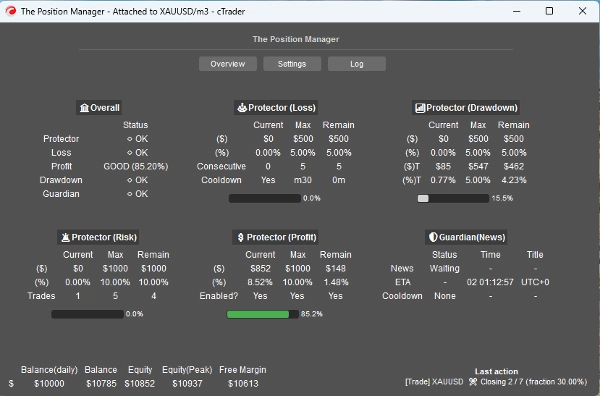
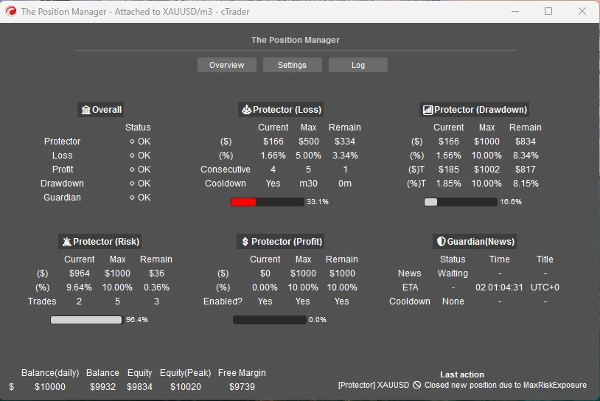
مدير المراكز يحتوي على 4 وحدات تبرر اسمه:
- حامي المحفظة
- تداول الحارس
- مدير المخاطر (للتداول اليدوي/شبه الآلي)
- مدير التداول (جني الأرباح المتحرك، جني الأرباح/وقف الخسارة الجزئي)
كل واحدة منها تحتوي على وحدات فرعية لإدارة أفضل.
حالات الاستخدام:
- المتداولون الذين يبحثون عن حماية المحفظة + التدرج الذكي عند التداول على سطح المكتب، الجوال والويب.
-
- إذا كنت تتداول بالكامل عبر سطح المكتب، استخدم وضع بدون واجهة => إيقاف
- إذا كنت تتداول أيضًا عبر الجوال/الويب، استخدم وضع بدون واجهة => تشغيل
- المتداولون الممولون مع حدود مخاطر ثابتة.
- المطورون الذين يرغبون في تحويل إشارات التداول إلى مداخل فعلية.
كيفية الاستخدام:
- للاستخدام الأول، أوصي بشدة بـ:
- إنشاء نسخة واحدة فقط من "مدير المراكز" مع:
- وضع بدون واجهة => إيقاف (وضع الواجهة)
- وضع النسخة => كلاهما (المدير + لوحة التداول)
- ثم التعرف على سلوكه، ويفضل في الاختبار الخلفي(الوضع المرئي) قبل التشغيل المباشر.
ضع في اعتبارك => "مدير المراكز" لا يفتح المراكز بنفسه:
- إنه يدير المراكز القائمة!
- بينما يوفر إدارة على مستوى الحساب.
للحسابات الصغيرة، يمكنك زيادة النسب المئوية.
للحسابات الكبيرة، يمكنك تقليل النسب المئوية.
في أي حال، قم دائمًا بتكييف المدخلات مع حجم حسابك.
بمجرد أن تتعرف على المعلمات/السلوك، يمكنك تشغيله على سحابة cTrader من أجل إدارة المراكز على الجوال/الويب، هناك فقط قاعدتان بسيطتان يجب اتباعهما:
- وضع بدون واجهة => تشغيل
- أيضًا، يجب إضافة نسخة واحدة فقط من "مدير المراكز" :
-
- وإلا، قد "تتنافس" النسخ مع بعضها، لأن معظم العمليات تشمل جميع الرموز.
- ينطبق نفس القاعدة عند التشغيل محليًا.
دعني أشرح المعلمات و السلوك المتوقع لكل واحدة:
على الرغم من أن بعضها بديهي، هناك الكثير من المعلمات...
يرجى قراءة كل واحدة بصبر.
==== إدارة المراكز ====
- وضع بدون واجهة؟ => الميزات المتاحة في هذا الوضع هي:
-
- حامي المحفظة
-
- جميع الميزات متاحة.
- تداول الحارس
-
- مرشح الأخبار معطل إذا كان وضع بدون واجهة => تشغيل.
- جني الأرباح المتحرك
-
- لأي رمز، يجب ألا تحتوي المراكز على جني أرباح.
- الإغلاقات الجزئية
-
- لأي رمز، يجب أن تحتوي المراكز على جني أرباح أو وقف خسارة
=> وضع بدون واجهة إيقاف (وضع الواجهة)
- وضع النسخة:
-
- المدير => يجب إضافة نسخة واحدة فقط.
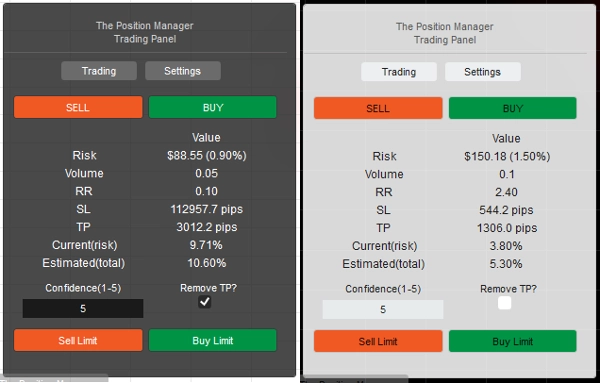
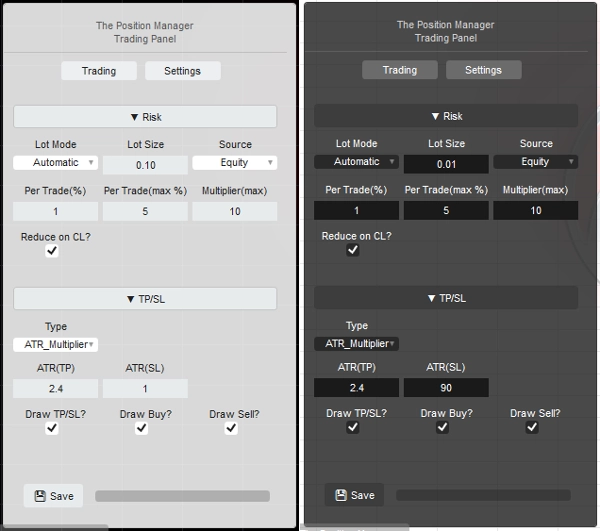
- التداول => لوحة تداول بحتة (وحدة مدير المخاطر)، يمكنك إضافة نسخ متعددة.
- كلاهما => يجب إضافة نسخة واحدة فقط:
-
- المدير سيظهر كنافذة.
- التداول سيظهر على الرسم البياني.
- نوع/موضع اللوحة: واضح بذاته
- التخزين بواسطة:
-
- استخدم الوسيط لحفظ/تحميل نفس الإعدادات عند كل إعادة تشغيل.
- استخدم الوسيط_الرمز إذا كنت تريد استخدام إعدادات كل رمز كنوع من "ملف تعريف المخاطر".
=> وضع بدون واجهة إيقاف/تشغيل - محليًا
- هل تسمح بوضع الرسائل؟
-
- واضح بذاته
- عند استخدام [التداول، كلاهما] وضع النسخة، قم بتغيير "جني الأرباح/وقف الخسارة => النوع" إلى "نقاط" في إعدادات اللوحة حتى يمكن تعيين جني الأرباح/وقف الخسارة عبر الرسالة.
- هل تسمح بتداول الرسائل؟
-
- السماح بفتح المراكز عبر الرسائل.
- إذا كان وضع بدون واجهة تشغيل، فإن تكوين مدير المخاطر غير ممكن.
- إذا كان وضع بدون واجهة إيقاف، عند استخدام [التداول، كلاهما] وضع النسخة، يمكنك تكوين وحدة مدير المخاطر كما تريد.
=> وضع بدون واجهة تشغيل / الحساب العام
- الحد الأدنى للتعادل(%):
-
- لكل مركز، عندما يتم تنفيذ منطق التعادل بواسطة وحدات جني الأرباح المتحرك/الجزئي، بدلاً من تحريك وقف الخسارة مباشرة إلى سعر الدخول (مما يؤدي إلى خسارة صافية).
- سيتم تحريك وقف الخسارة x% للأمام إلى سعر الدخول.
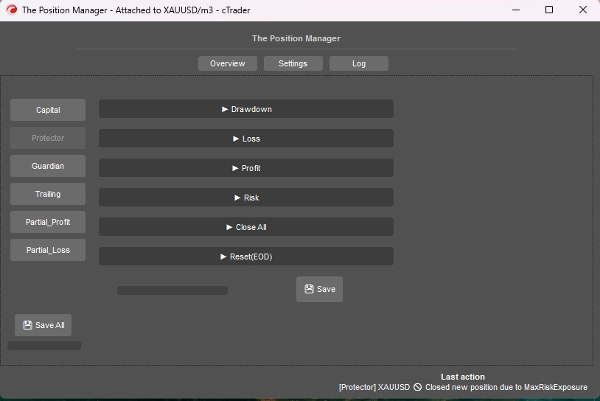
=> وضع بدون واجهة تشغيل / حماية السحب
- وضع السحب:
-
- يومي => مبني على رصيد اليوم
- متتبع => مبني على ذروة الأسهم
- نوع السحب:
-
- النسبة المئوية => % من رصيد اليوم، مثالي للنمو الديناميكي.
- ثابت => مبلغ ثابت، مثالي للقواعد الصارمة
- الحد الأقصى للسحب => % أو ثابت (واضح بذاته)
=> وضع بدون واجهة تشغيل / حماية الخسارة
- مصدر الخسارة: => حاليًا، مبني على "رصيد اليوم" فقط.
-
- إذا انخفضت الأسهم تحت رصيد اليوم، فسيتم تفعيل/احتساب ذلك.
- نوع الخسارة:
-
- النسبة المئوية => % من رصيد اليوم، مثالي للنمو الديناميكي.
- ثابت => مبلغ ثابت، مثالي للقواعد الصارمة
- الحد الأقصى للخسارة اليومية² => % أو ثابت (واضح بذاته)
- الخسائر المتتالية (CL):
-
- تمكين إغلاق المراكز عند حدوث خسائر متتالية.
- عدد الخسائر المتتالية:
-
- واضح بذاته
- فترة التهدئة لإعادة التعيين (CL):
-
- فترة التهدئة لإعادة تعيين العد والسماح بفتح مراكز جديدة.
=> وضع بدون واجهة تشغيل / حماية الربح
- تمكين حد الربح؟ => واضح بذاته
-
- بمجرد الوصول إلى الحد الأقصى للربح، سيتم إغلاق المراكز الجديدة.
- مصدر الربح: => دائمًا مبني على رصيد اليوم
- نوع الربح:
-
- النسبة المئوية => % من رصيد اليوم، مثالي للنمو الديناميكي.
- ثابت => مبلغ ثابت، مثالي للقواعد الصارمة
- الحد الأقصى للربح² => % أو ثابت (واضح بذاته)
=> وضع بدون واجهة تشغيل / حماية المخاطر
- التعرض الكلي(%):
-
- كما يأخذ في الاعتبار المراكز التي في التعادل.
- إجمالي الصفقات المفتوحة:
-
- سيتم إغلاق المراكز الجديدة إذا كان الإجمالي يساوي إجمالي الصفقات المفتوحة
=> وضع بدون واجهة تشغيل / إغلاق الكل
- الإغلاق في نهاية اليوم؟ => إغلاق جميع المراكز في نهاية اليوم
- الإغلاق في نهاية الأسبوع؟ => إغلاق جميع المراكز في نهاية الأسبوع (الجمعة)، يستخدم ساعات نهاية اليوم كمرجع.
=> وضع بدون واجهة تشغيل / إعادة التعيين (نهاية اليوم)
- الساعة لـ "إعادة تعيين" تتبع ذروة الأسهم، وكذلك تنفيذ منطق إغلاق الكل، إذا كان ذلك مناسبًا.
- إعادة التعيين (الساعة) => 0س - 23س
- إعادة التعيين (الدقيقة) => 0د – 59د
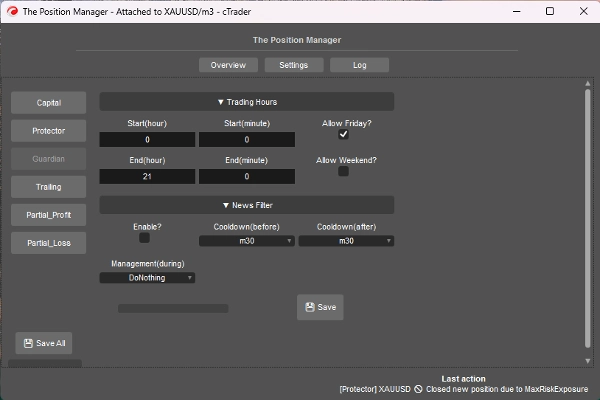
=> وضع بدون واجهة تشغيل / الحارس
- المراكز المفتوحة خارج ساعات التداول أو اليوم المسموح به سيتم إغلاقها تلقائيًا.
-
- بداية/نهاية (الساعة) => 0س – 23س
- بداية/نهاية (الدقيقة) => 0د – 59د
- هل يسمح بالجمعة؟ => واضح بذاته
- هل يسمح بعطلة نهاية الأسبوع؟ (العملات الرقمية) => واضح بذاته
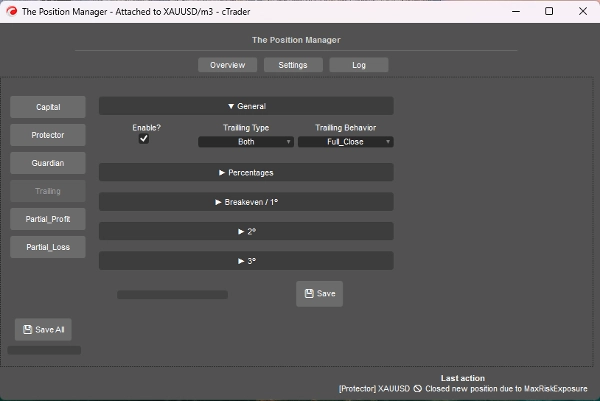
=> وضع بدون واجهة تشغيل / جني الأرباح المتحرك
- إنه جني أرباح مبني على الأسهم
- تمكين؟
-
- للمراكز بدون جني أرباح، مثالي للمراكز المتبعة للاتجاه.
- => النوع:
-
- النسبة المئوية => نسبة الأسهم الصافية
- السحب => مبني على مفهوم السحب المتحرك (ذروة الأسهم)، فكر من حيث التراجعات/الارتدادات السعرية.
- كلاهما => سلوك الإغلاق الجزئي مفعل بشكل افتراضي:
-
- نوع النسبة المئوية للإغلاقات الجزئية.
- نوع السحب للخروج الكامل.
- السلوك:
-
- الإغلاق الكامل:
-
- بمجرد الوصول إلى نسبة الأسهم المستهدفة، أغلق جميع المراكز بدون جني أرباح.
- أيضًا، عندما يصل نصف نسبة الأسهم المستهدفة، يتم تحريك وقف الخسارة إلى التعادل.
- الإغلاق الجزئي:
-
- تمكين الإغلاقات الجزئية.
- ضع في اعتبارك => إذا كان حجم المركز (حجم اللوت) صغيرًا جدًا للإغلاق الجزئي، فسيتم إغلاق المركز بالكامل.
- الحد الأدنى للربح(%):
-
- الربح الأدنى لتفعيل منطق الجني المتحرك.
- => الإغلاق الكامل عند(%):
-
- لـ سلوك "الإغلاق الكامل" فقط.
- => [كلاهما] إغلاق السحب(%):
-
- لـ "كلاهما" النوع فقط.
- => [النسبة المئوية فقط] وقف خسارة ذكي؟"
-
- لـ "النسبة المئوية" النوع فقط.
- إنه مشابه جدًا لنوع السحب، لكنه أكثر تفاعلية باستخدام وقف الخسارة المتحرك
- جزئي 1(%) / جزئي 2(%)
-
- نسبة الأسهم المستهدفة لتنفيذ الإغلاقات الجزئية (النسبة المئوية أو كلاهما)
- تحقق دائمًا مما إذا كان نوع الجني المتحرك هو النسبة المئوية أو السحب
- جزئي 1(ترتيب %) / جزئي 2(ترتيب %)
-
- واضح بذاته
- => إغلاق 3(%):
-
- نسبة الأسهم المستهدفة للإغلاق الكامل للمراكز بدون جني أرباح.
- لـ الأنواع النسبة المئوية أو السحب فقط
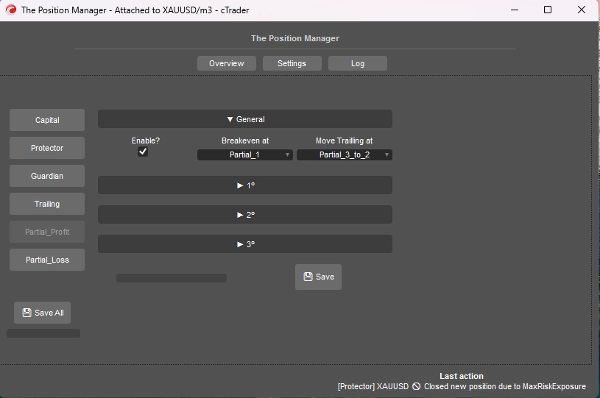
=> وضع بدون واجهة تشغيل / جني الأرباح الجزئي
- تمكين؟
-
- للمراكز التي تحتوي على جني أرباح، مثالي لمراكز التداول اليومي أو السكالبينج.
- سعر الدخول سيكون 0%
- جني الأرباح سيكون 100%
- الأسعار الجزئية سيتم حسابها بناءً على هذا النهج.
- التعادل عند:
-
- واضح بذاته، حرك وقف الخسارة إلى التعادل عند تفعيل الجزئي المختار.
- => تحريك الجني المتحرك عند:
-
- واضح بذاته، حرك وقف الخسارة إلى السعر الجزئي السابق عند تفعيل الجزئي المختار.
- ضع في اعتبارك => تأكد من تفعيل الجزئي 2 أو 3.
- جزئي 1(%) /
جزئي 2(%) /
جزئي 3(%) -
- نسب مئوية بين سعر الدخول وجني الأرباح.
- => تمكين 2º؟
=> تمكين 3º؟ -
- واضح بذاته
- جزئي 1(ترتيب %) /
جزئي 2(ترتيب %) /
جزئي 3(ترتيب %) -
- واضح بذاته
=> وضع بدون واجهة تشغيل / الخسارة الجزئية
- تمكين؟
-
- للمراكز التي تحتوي على وقف خسارة، مثالي لتحديد خسائر الصفقات الخاسرة التي قد تعود إلى الاتجاه.
- سعر الدخول سيكون 0%
- وقف الخسارة سيكون 100%
- الأسعار الجزئية سيتم حسابها بناءً على هذا النهج.
- جزئي 1(%) /
جزئي 2(%) /
جزئي 3(%) -
- نسب مئوية بين سعر الدخول ووقف الخسارة.
- => تمكين 2º؟
=> تمكين 3º؟ -
- واضح بذاته
- جزئي 1(ترتيب %) /
جزئي 2(ترتيب %) /
جزئي 3(ترتيب %) -
- واضح بذاته
====================================================
للمطورين => توصيل وتشغيل لـ أي استراتيجية عبر الرسائل/الاشتراكات في cTrader Algo.
- لـ أنظمة شبه أو كاملة آلية:
- شبه: الأوامر لا تزال تفتح بأنفسنا، لكن:
-
- يتم تعيين وقف الخسارة وجني الأرباح بواسطة الرسائل/الاشتراكات.
- كامل: يتم إرسال إشارات الأوامر عبر الرسائل/الاشتراكات إلى "مدير المراكز"
-
- قد لا يكون تكوين "مدير المخاطر" متاحًا في هذا النهج.
الأمر بسيط جدًا، فقط تحتاج إلى إرسال الإشارة باستخدام الفئة التالية:
public class TradeSignal
{
public string Symbol { get; set; }
public TradeType Direction { get; set; }
public double StopLossPips { get; set; }
public double? TakeProfitPips { get; set; } // null = بدون جني أرباح
public string StrategyId { get; set; }
public double? EntryPrice { get; set; } // null = السوق، وإلا أمر محدد.
public DateTime Timestamp { get; set; }
public int Confidence { get; set; } // 1–5
}
ثم:
Messages.Send("ThePositionManager", signal);
مثال قصير:
TradeSignal signal = new()
{
Symbol = Symbol.Name,
Direction = TradeType.Buy,
StopLossPips = 1500,
TakeProfitPips = 3000,
StrategyId = "MyStrategy",
Confidence = 5
};
Messages.Send("ThePositionManager", signal);
الملخص
Key features include four main modules: Portfolio Protector, Guardian Trading, Risk Manager (for manual or semi-automated trading), and Trade Manager (supporting trailing take profit and partial take profit/stop loss). The tool supports intelligent scaling and portfolio protection across Desktop, Mobile, and Web platforms, with a Headless mode option for managing positions remotely via cTrader Cloud.
For traders, it offers configurable risk controls such as daily and trailing drawdown limits, profit caps, exposure limits, and automated position closing based on trading hours or drawdown thresholds. Trailing profit and partial profit/loss management allow dynamic adjustment of stop loss and take profit levels to optimize trade exits.
Developers can integrate The Position Manager with automated strategies by sending trade signals via messages, enabling semi or fully automated order management with customizable stop loss and take profit settings.
The tool supports saving settings by broker or symbol, and includes detailed parameters for break-even management, risk exposure, and partial close orders, making it adaptable to various account sizes and trading styles.
مناقشة
تقييمات العملاء
5 | 0 % | |
4 | 67 % | |
3 | 33 % | |
2 | 0 % | |
1 | 0 % |
الأسئلة الشائعة


















السعر