
LineTrader Pro (formerly ScalpRiskManager) cTrader plugin overview
About this video
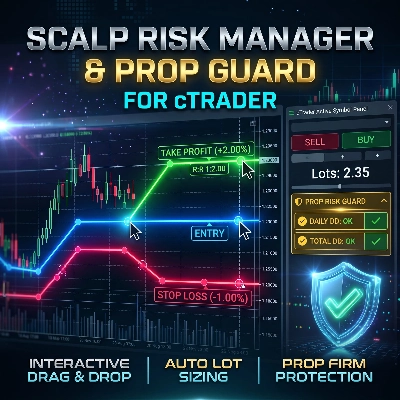
If you trade intraday or scalp fast-moving markets, you already know the brutal truth. Every second matters. A clean breakout happens, volatility spikes, and you have just a split-second window to enter before the opportunity vanishes. In these critical moments, execution speed is everything. Yet, your trading platform might actually be the very thing holding you back. Look at the default order panel in cTrader. It was built around a traditional workflow where you type in the quantity of lots first, and only then do you figure out your stop loss. Think about that for a second. When a setup appears on Gold, NASDAQ, or EUR/USD, how many lots equal exactly one percent of your account on a fourteen-pip stop? You cannot know instantly. You are forced to guess, or do mental arithmetic while the candle is aggressively pushing. So what do most traders do? They switch tabs. They open a web-based lot size calculator, type in their account balance, calculate the stop distance, copy the lots, and tab back to cTrader. By the time you paste those numbers in, the market has already moved five pips. Your planned risk-to-reward is ruined, your entry is compromised, or you miss the trade completely out of hesitation. Even worse, what happens when you rush? You enter a rough estimate of lots just to catch the move. The market wicks against you, spreads widen, and that single oversized position wipes out days of discipline. If you trade for a prop firm like FTMO or FundedNext, guessing your lot size under pressure is the fastest way to breach your strict daily drawdown limit and lose your funded account. Mental math does not belong in professional scalping. That is exactly why we built Line Trader Pro. Injected directly into your native Active Symbol Panel, it replaces manual math with a visual, low-latency execution workflow built specifically for scalpers and prop traders. Instead of typing abstract numbers into input boxes, everything happens right on your chart. With three interactive lines for Entry, Stop Loss, and Take Profit, you simply drag your stop to your technical market structure. As you move the line, the plugin calculates your exact position size in real time, strictly based on your predefined risk percentage or fixed monetary amount. In market mode, the entry line even tracks the live spread, dynamically adjusting your volume on every tick to help keep your loss within your set risk. Need precision targets? Toggle the Risk to Reward Lock, and your Take Profit automatically moves to maintain your exact target ratio, like one to two. And for funded traders, the built-in Prop Risk Guard actively monitors your daily and overall drawdown in real time. It simulates your potential loss before you click, alerting you with a clear traffic-light indicator to help you stay within your prop firm rules. No external calculators. No hesitation. No blown accounts from math errors under pressure. Just fast, visual, and disciplined execution. Get Scalp Line Trader Pro today on the cTrader Store and take control of your risk. Link: #cTrader #cTraderStore #RiskManagement #PropFirm #trading #tradingplatform