
Description
LookPosOrder vous aide à éviter les surprises coûteuses en facilitant l’affichage ou la dissimulation des Positions et des Ordres en attente—et en vous avertissant clairement lorsque quelque chose est caché pour le symbole actuel.
Ce qu’il fait
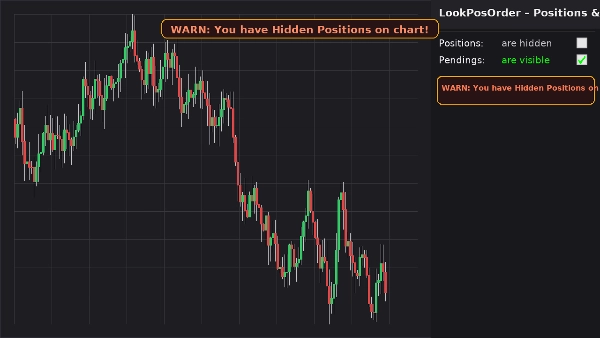
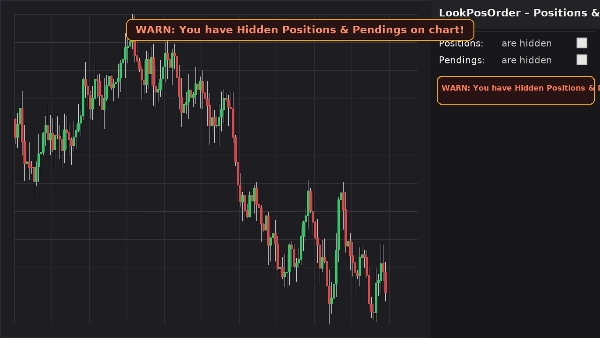
- Ajoute un bloc de contrôle clair dans le Panneau de symbole actif (ASP) avec deux cases à cocher :
-
- Positions : sont visibles / sont cachées
- Ordres en attente : sont visibles / sont cachés
- Affiche une bannière d’avertissement fixe sur le graphique (ne bouge pas lorsque vous déplacez/zoomez) si des éléments cachés existent pour le symbole actuel.
- Reproduit le même avertissement en ligne dans le bloc ASP.
- Mémorise vos préférences par symbole.
Pourquoi les traders l’adorent
- Éviter les erreurs : ne jamais oublier que quelque chose est caché sur votre graphique.
- Basculement rapide : plus besoin de chercher dans les menus du graphique.
- Conscience par symbole : avertit uniquement lorsque le symbole actuel a effectivement des éléments cachés.
- Léger et épuré : interface minimale, réactive instantanément.
Fonctionnalités clés
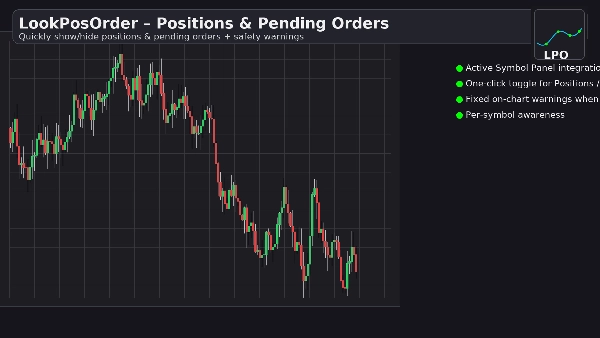
- Intégration du Panneau de symbole actif
- Basculements en un clic pour Positions et Ordres en attente
- Bannière d’avertissement fixe sur le graphique lorsque des éléments sont cachés
- Avertissement en ligne dans le bloc ASP
- Conscience par symbole (filtre les positions/ordres pour le symbole actuel)
- Persistance des paramètres (par symbole)
- Fonctionne avec les Paramètres d’affichage natifs (synchronisation automatique si modifié depuis le menu du graphique)
Exigences
- cTrader 5.4.9 ou version ultérieure recommandée
- Plateforme de bureau
Installation
- Téléchargez le fichier du plugin.
- Ouvrez cTrader → Automatiser → Plugins → Importer.
- Activez le plugin LookPosOrder.
- Ouvrez un graphique, sélectionnez le symbole, et utilisez le bloc LookPosOrder dans le ASP à droite.
Comment utiliser
- Basculez les Positions et les Ordres en attente via les cases à cocher.
- Si quelque chose est caché et existe pour le symbole actuel, vous verrez un avertissement :
-
- « AVERTISSEMENT : Vous avez des positions cachées sur le graphique ! »
- « AVERTISSEMENT : Vous avez des ordres en attente cachés sur le graphique ! »
- « AVERTISSEMENT : Vous avez des positions et des ordres en attente cachés sur le graphique ! »
FAQ
Q : Le plugin modifie-t-il mes ordres ou positions ?
R : Non. Il ne fait que basculer la visibilité du graphique en utilisant les Paramètres d’affichage natifs.
Q : Vais-je être averti pour d’autres symboles ?
R : Non. Les avertissements ne sont émis que lorsque le symbole actuel a des éléments cachés.
Q : Que se passe-t-il si je change la visibilité depuis le menu du graphique ?
R : Le plugin synchronise automatiquement les cases à cocher et les avertissements.
Q : Impact sur les performances ?
R : Négligeable. C’est une superposition UI légère et un bloc ASP.
Remboursement
- Remboursements : garantie de remboursement de 14 jours si le plugin ne fonctionne pas comme décrit sur votre configuration.
Confidentialité
Le plugin ne collecte ni ne transmet de données personnelles. Il interagit uniquement avec le graphique local et l’interface utilisateur de cTrader.
Résumé
Discussion
Avis clients
5 | 100 % | |
4 | 0 % | |
3 | 0 % | |
2 | 0 % | |
1 | 0 % |