present
가입하고 첫 구매 시 $50 할인을 받으세요
Trading product for SmartOrderPro 데스크톱 플러그인 Position Sizer Stop Loss (SL) Manager, image 1
SmartOrderPro
데스크톱 플러그인
버전 1.4, Oct 2026
Windows, Mac
Trading product for SmartOrderPro 데스크톱 플러그인 Position Sizer Stop Loss (SL) Manager, image 2
가입일 09/03/2026
49
무료 설치

설명

SmartOrderPro : 위험을 드래그하세요. 이익을 고정하세요.

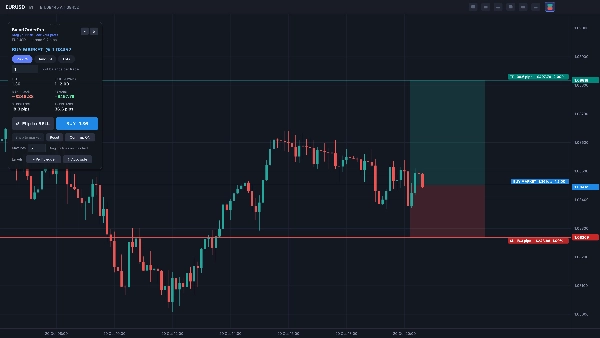
cTrader 차트에서 시각적으로 거래를 계획하고 배치하세요. 가격을 입력하고 로트 크기를 계산하는 대신 세 줄 – 진입, 손절매 및 이익실현 – 을 드래그하면 SmartOrderPro가 위험, 보상, R:R, 핍 및 포지션 크기를 실시간으로 보여줍니다. 거래가 적절해 보이면 한 번의 클릭으로 실행하세요.

시각적 주문 계획
• 어디든 드래그할 수 있는 진입(회색), 손절매(빨강) 및 이익실현(초록) 선
• 포지션 도구처럼 실시간 캔들 위에 음영 처리된 위험 및 보상 구역
• 각 선의 라벨은 핍, 위험 또는 보상의 금액, 잔액 비율 및 R 배수를 표시
• 진입선을 드래그하면 전체 설정이 함께 움직이며 R:R을 유지
• 손절매 또는 이익실현선을 진입선 반대편으로 드래그하면 즉시 매수와 매도 간 전환

스마트 주문 유형
• 현재 가격에서 진입 = 시장가 주문
• 진입선을 가격에서 멀리 드래그하면 SmartOrderPro가 자동으로 지정가 또는 스톱 주문 선택
• "시장에 스냅"은 대기 중인 설정을 한 번의 클릭으로 시장가 주문으로 되돌림
• 시장가 주문의 경우, 손절매 및 이익실현은 드래그한 정확한 가격으로 설정

포지션 크기 조정
• 위험 %: 거래당 잔액의 일정 비율 위험 감수
• 금액: 거래당 고정 금액 위험 감수
• 로트: 고정 로트 크기로 거래
• 로트 크기는 브로커의 로트 스텝에 맞춰 내림 처리되어 계획보다 더 큰 위험을 방지
• 최대 로트 안전 한도
• 최소 로트로도 설정한 위험을 초과하면 주문이 차단되고 패널에 이유 표시

주문 패널
• 차트 어디든 드래그할 수 있는 플로팅 패널 또는 축소 가능
• 로트 크기가 표시된 큰 매수 및 매도 버튼
• 선택적 확인 단계: 한 번 클릭해 준비, 확인 클릭으로 전송 – 또는 원클릭 거래를 위해 끌 수 있음
• 잘못된 설정에 대한 명확한 경고: 잘못된 쪽의 손절매 또는 이익실현, 스프레드 내 손절매, 브로커 또는 자신의 제한 초과 크기
• 기본 설정을 새로 고치는 리셋 버튼

실시간 거래 라벨
SmartOrderPro로 배치된 포지션 및 대기 주문용:
• 진입 라벨: 실시간 손익, 핍 및 R
• 손절매 및 이익실현 라벨: 해당 레벨 도달 시 위험 금액 및 R
• 손절매가 이익 구간으로 이동하면 라벨에 고정된 이익 표시
• 손절매 또는 이익실현 수정 시 라벨 업데이트

사용자 설정
• 라벨 위치: 차트 오른쪽 가장자리, 실시간 캔들 옆 또는 왼쪽 가장자리
• 라벨 측면: 자동, 항상 선 위, 또는 항상 선 아래
• 모든 설정은 저장되어 다음 사용 시 복원됨

실제 사용을 위해 제작됨
• 시간 프레임을 전환해도 설정 유지
• cTrader 외부나 다른 차트를 클릭해도 열려 있음 – 사용자가 닫을 때만 종료
• 다른 차트의 툴바 버튼이 미리보기를 해당 차트로 이동
• 빠른 지원을 위한 상세 로그("[SOP]" 필터 가능)

설치 방법

  1. cTrader 스토어에서 SmartOrderPro를 받으세요 – 자동으로 cTrader에 추가됩니다.
  2. cTrader 데스크톱을 열고 Algo › Plugins로 이동하세요. SmartOrderPro가 활성화되어 있는지 확인하세요.
  3. 아무 차트나 열면 차트 툴바에 SmartOrderPro 버튼이 나타납니다.

사용 방법

  1. 차트 툴바의 SmartOrderPro 버튼을 클릭해 주문 미리보기를 엽니다.
  2. 사이징 모드(위험 %, 금액 또는 로트)를 선택하고 값을 입력하세요.
  3. 손절매 및 이익실현 선을 원하는 레벨로 드래그하세요. 지정가 또는 스톱 주문을 위해 진입선을 드래그하세요.
  4. 패널과 차트에서 위험, 보상 및 R:R을 확인하세요.
  5. 매수 또는 매도를 클릭하세요(확인 단계가 켜져 있으면 CONFIRM도 클릭). cTrader가 거래 권한을 요청하면 허용하세요.
  6. 패널의 × 또는 툴바 버튼으로 미리보기를 닫으세요.

요구 사항
• cTrader 데스크톱 5.2 이상
• 브로커가 제공하는 모든 심볼에서 작동

주의 사항
• 위험 수치는 손절매 거리 기준이며 수수료나 스왑은 포함하지 않습니다.
• 브로커의 최소 스톱 거리 규정이 적용되며, 너무 촘촘한 스톱은 브로커가 주문을 거부하고 SmartOrderPro가 이유를 표시합니다.
• 거래에는 위험이 따릅니다. 항상 데모 계좌에서 먼저 테스트하세요.

요약

AI summary
SmartOrderPro is a trading plugin for cTrader Desktop (version 5.2 or newer) that enables visual trade planning and one-click order placement directly on the chart. Users drag three adjustable lines—Entry, Stop Loss (SL), and Take Profit (TP)—to set trade parameters visually. The plugin dynamically calculates and displays key metrics including risk, reward, risk-to-reward ratio (R:R), pips, and position size based on the user’s chosen sizing mode: risk percentage, fixed amount, or fixed lots. Lot sizes are automatically adjusted to comply with broker lot steps and user-defined maximums.

SmartOrderPro supports market, limit, and stop orders, automatically selecting the order type based on the entry line position relative to the current price. The interface includes a floating, draggable order panel with large Buy and Sell buttons, optional confirmation steps, and clear warnings for invalid setups such as improper SL/TP placement or exceeding size limits.

Live trade labels update in real time to show profit/loss, pips, and risk multiples for open positions and pending orders. Customization options allow label positioning and display preferences, with all settings saved between sessions. The plugin maintains setups across timeframes and chart changes, enhancing trade management efficiency for any symbol offered by the broker.

플러그인 프로필
플러그인 카테고리
위험 관리
데이터 액세스
차트
지원되는 주문 유형
시장
Limit
Stop
Stop Limit
위험 모델
고정 위험 비율
고정 랏
동적
지원되는 위험 통제
손절매
이익실현

고객 리뷰

0.0
리뷰: 0
고객 리뷰
이 상품에 대한 리뷰가 아직 없습니다. 이미 사용해 보셨나요? 다른 사람들에게 가장 먼저 소개해 주세요!

상담

자주 묻는 질문(FAQ)

Position Sizer
Stop Loss (SL) Manager
One-click Trading
SL Manager
Risk/Reward
Risk Calculator
Take Profit (TP) Manager
트레이딩 봇, 지표, 플러그인 등 cTrader Store에서 제공되는 상품은 제3자 개발자에 의해 제공되며, 이는 단순히 정보 및 기술적 접근을 목적으로 제공된 것입니다. cTrader Store는 중개인이 아니며, 투자 조언, 개인별 추천 또는 향후 성과에 대한 어떠한 보장도 제공하지 않습니다.

이 작성자의 상품 더 보기

지표
Key Levels
Every major liquidity level drawn for you: PDH/PDL, PWH/PWL, PMH/PML and more. Same price on every timeframe. Free.
데스크톱 플러그인
Chart UI Tools
Replay your broker’s charts candle by candle. Rewind any time, switch timeframes and practise trades with full stats.
지표
Fair Value Gap
Auto-draws every Fair Value Gap on any timeframe and removes it once filled. Clean, fast, free. Built for cTrader.
데스크톱 플러그인
Prop Firm Fit
Trade Journal
+1
Paper trade your broker’s live prices in cTrader: demo accounts, prop challenges, a stats dashboard and trading journal
지표
Key Levels
Support & Resistance
Day and week separators plus previous day high, low and close lines for every day on H1 and lower charts
데스크톱 플러그인
Trade Journal
Trade Statistics
Track. Analyze. Improve. A journal and statistics for your real cTrader trades, with a prop challenge guard.
지표
EMA
Outlines the first candle of the real session open for indices, forex & crypto. Auto DST, HTF candle panel & EMA.
지표
BOS
CHOCH
+5
SMC structure indicator for cTrader: BOS/CHoCH, order blocks, FVGs, liquidity sweeps, key levels and alerts.
지표
EMA
Flag
+2
Liquidity levels, trend lines, filtered chart patterns and a composite bias HUD in one cTrader overlay.

좋아하실 만한 다른 항목

데스크톱 플러그인
Forex
Commodities
Close all non crypto trades at 19:55 utc Friday
데스크톱 플러그인
Prop
Forex
+5
Place professional OCO & OSO orders in cTrader — visually, instantly, and without execution mistakes.
데스크톱 플러그인
Risk Alerts
Prop Firm Fit
+5
Read-only risk cockpit for prop-firm traders: live drawdown gauges, FTMO-style permitted loss, alerts and reports.
데스크톱 플러그인
ATR
RSI
+24
One-click toggle for Positions / Pending Orders on cTrader charts with fixed on-chart warnings and an ASP control panel
데스크톱 플러그인
External Data
Trade Journal
+2
Real Quant Audit, Live equity, open-position risk and 24 quant tests on your full account. IS THE EDGE REAL?
데스크톱 플러그인
Signal
Breakout
The Risk-Reward plugin is a tool to visualize a trading idea based on other analysis tools,
데스크톱 플러그인
Chart UI Tools
Replay your broker’s charts candle by candle. Rewind any time, switch timeframes and practise trades with full stats.
데스크톱 플러그인
ATR
Prop
+5
cTrader risk management plugin with daily & total drawdown limits, CBot control, and risk-based order execution.
데스크톱 플러그인
Trade Journal
Trade Statistics
Track. Analyze. Improve. A journal and statistics for your real cTrader trades, with a prop challenge guard.
데스크톱 플러그인
Prop Firm Fit
Trade Journal
+1
Paper trade your broker’s live prices in cTrader: demo accounts, prop challenges, a stats dashboard and trading journal

가격

가입일 09/03/2026
49
무료 설치