Description
Le synchroniseur d’espace de travail ultime pour les traders de corrélation.
NexusChartSync Pro 100 est un utilitaire haute performance qui unifie votre terminal cTrader. Conçu pour les traders qui ont besoin d’un alignement parfait, il vous permet de Zoomer, Faire défiler et changer les périodes sur un graphique pendant que tous les autres graphiques ouverts suivent instantanément. Il suffit d’attacher cet indicateur à chaque graphique que vous souhaitez synchroniser, et les graphiques commenceront immédiatement à refléter ce que vous faites sur le graphique actif.
Ce qu’il analyse
Contrairement aux indicateurs standards, cet utilitaire analyse votre flux de travail et navigation. Il suit la position sur l’axe X (temps), niveau de zoom, et période du graphique actif, diffusant ces coordonnées à tout votre espace de travail en temps réel.
Comment interpréter les visuels
- Le bouton SYNC : Un simple interrupteur très visible dans le coin supérieur droit.
-
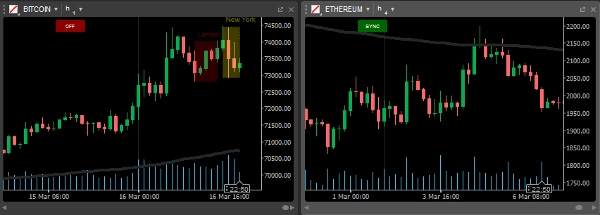
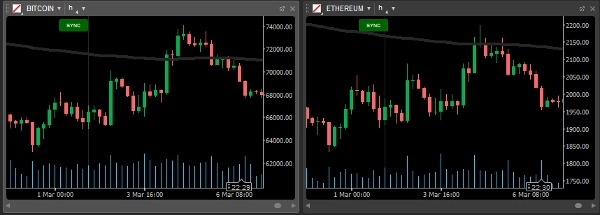
- Vert (SYNC) : Ce graphique fait partie du "Nexus" et suivra le leader.
- Rouge (OFF) : Ce graphique est déconnecté pour une analyse indépendante.
- Focus intelligent : Il n’y a pas de réglages complexes "Maître/Esclave". Quel que soit le graphique sur lequel vous cliquez devient automatiquement le Maître, contrôlant instantanément les autres.
Cas d’utilisation et scénarios typiques
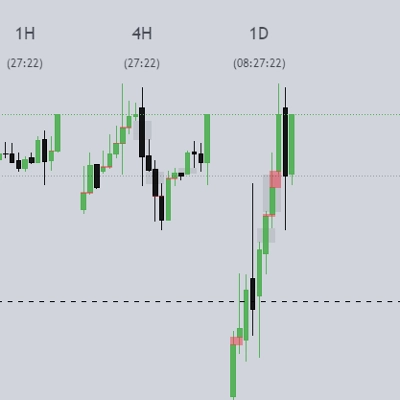
- Maîtrise de la corrélation : Ouvrez EURUSD et GBPUSD côte à côte. Faites défiler jusqu’à un pic spécifique sur l’un ; l’autre saute au même moment exact. Cela vous permet de repérer les avances, retards et divergences de prix qui sont invisibles sur des graphiques uniques.
- Analyse multi-périodes descendante : Rend l’analyse descendante facile et permet de repérer rapidement les tendances corrélées. Changez les périodes sur tous vos graphiques simultanément en un clic ou via un raccourci clavier.
- Revue d’événements d’actualité : Revenez à une publication d’actualité à fort impact (comme le NFP) et regardez tout votre espace de travail s’aligner sur cette seconde précise à travers plusieurs actifs.
Paramètres clés
- Synchronisation à latence zéro : Optimisée avec un taux de rafraîchissement de 50 ms pour une sensation "temps réel".
- Bascule en un clic : Verrouillez ou déverrouillez instantanément les graphiques du groupe. Il suffit de cliquer sur le bouton "Sync", rouge signifie désactivé, vert signifie activé.
- Compatibilité universelle : Fonctionne sur tous les symboles, du Forex au Crypto.
Profil du trader
- Intermédiaire à professionnel : Essentiel pour les traders utilisant des configurations multi-graphiques ou ceux qui se concentrent sur les actifs corrélés et l’analyse intermarché.
- Niveau d’expérience : Idéal pour les traders qui valorisent la rapidité, la précision et un espace de travail propre et organisé.
Notes importantes d’utilisation
- Graphique actif : Pour diriger le groupe, il suffit de cliquer sur le graphique que vous souhaitez contrôler.
- Sandbox sécurisé : Construit avec AccessRights.None pour une sécurité à 100 % et la conformité au cTrader Store.
Résumé
This tool supports all symbols, including Forex, commodities, and cryptocurrencies, enabling traders to perform correlation analysis, multi-timeframe top-down reviews, and event-based chart alignment efficiently. It operates with a low-latency refresh rate (~50ms) to provide near real-time updates. The indicator is suited for intermediate to professional traders who use multi-chart layouts and focus on correlated assets or intermarket analysis. It is built with secure sandbox permissions for compliance and safety within cTrader.
Discussion
Avis clients
5 | 100 % | |
4 | 0 % | |
3 | 0 % | |
2 | 0 % | |
1 | 0 % |





![Logo de "[Stellar Strategies] Market Session Ultimate"](https://cdn.ctrader.com/image/webp/61ffd537-0125-4246-9e72-42eca1791d64_28232)