Description
Votre stratégie tient-elle réellement en dehors de l'échantillon — ou avez-vous simplement eu de la chance en ajustant une seule backtest ?
cTrader ne dispose pas d'une optimisation native en marche avant glissante — seulement une séparation unique entre échantillon d'entraînement et échantillon de test. WFO Studio ajoute une validation réelle en marche avant directement dans la plateforme : pas d'exportations CSV, pas d'outils externes, pas de feuilles de calcul.
COMMENT ÇA FONCTIONNE
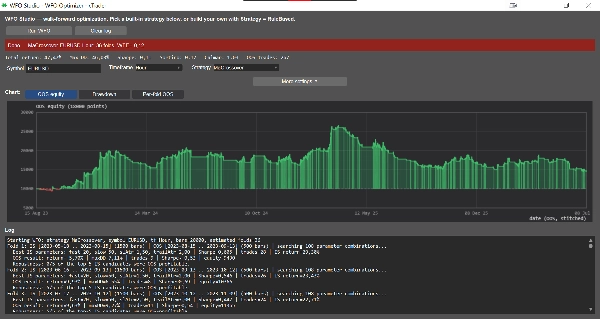
Choisissez un symbole et une période, sélectionnez une stratégie, définissez vos fenêtres d'échantillon d'entraînement et de test, puis cliquez sur Exécuter WFO. Vous obtenez un rapport complet :
• Pliages roulants ou ancrés sur votre historique
• Efficacité en marche avant (combien de votre avantage en échantillon d'entraînement survit hors échantillon)
• Stabilité des paramètres à travers les plis — signale les stratégies qui n'ont fonctionné que grâce à un seul ensemble de paramètres chanceux
• Vérification de robustesse Top-N — valide les N meilleurs ensembles de paramètres en échantillon d'entraînement sur les données hors échantillon, pas seulement le meilleur seul
• Une courbe de capital hors échantillon assemblée, avec des vues graphiques de capital / drawdown / rendement par pli et une ligne de statistiques résumées (rendement total, DD max, Sharpe, Sortino, Calmar, nombre de trades)
CRÉEZ VOS PROPRES RÈGLES — AUCUN CODE REQUIS
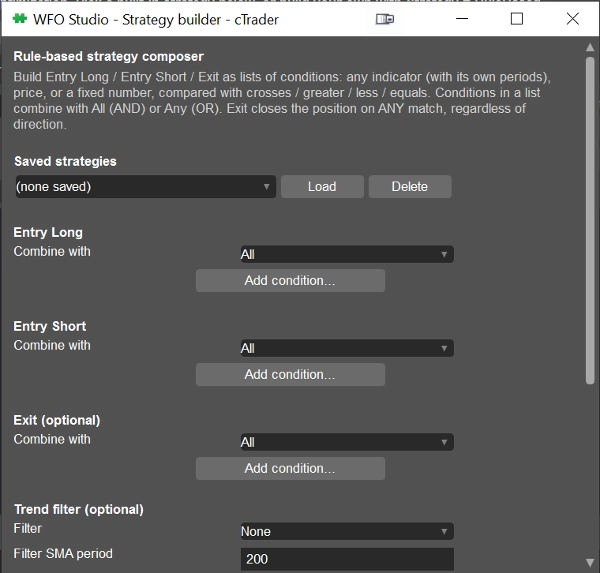
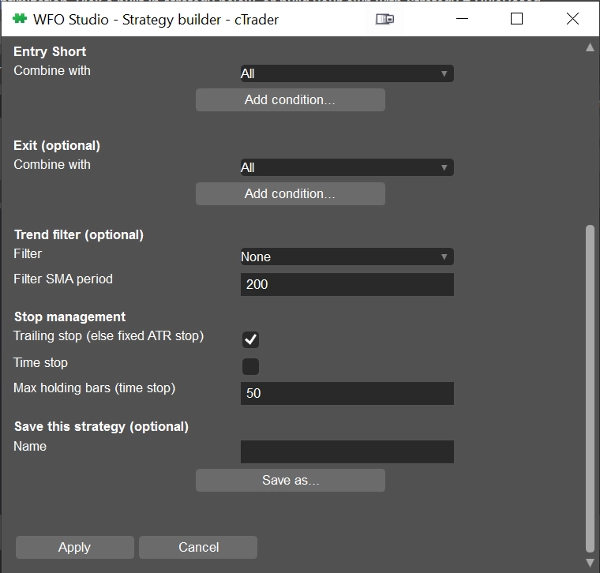
Vous préférez votre propre logique à une stratégie fixe ? Le générateur de stratégie intégré vous permet de composer des conditions d'entrée long, d'entrée short et de sortie à partir de 15 indicateurs — RSI, MACD, Bandes de Bollinger, Stochastique, ADX/DMI, Aroon, Parabolic SAR, Supertrend, Canaux Keltner, SMA/EMA, ATR, Canaux Donchian, CCI, Williams %R. Comparez n'importe quelle ligne d'indicateur avec un autre indicateur, le prix ou un nombre fixe en utilisant croisements / supérieur / inférieur / égal, combinez avec ET/OU, et enregistrez plusieurs stratégies pour basculer entre elles à tout moment.
Tous les calculs d'indicateurs passent par l'API des indicateurs propre à cTrader, donc les chiffres que vous voyez correspondent exactement à ce qui est affiché sur vos graphiques — pas une réimplémentation séparée.
POUR QUI C'EST
Les traders qui veulent tester une idée sous contrainte avant de risquer du capital réel, et les développeurs qui veulent un cadre de marche avant prêt à l'emploi au lieu d'en écrire un de zéro.
WFO Studio est un outil de recherche et de validation — il ne passe pas d'ordres en direct. Confirmez toujours les paramètres finaux avec un backtest complet dans le backtester natif de cTrader avant de passer en direct.
Résumé
Users select a symbol, timeframe, strategy, and define in-sample and out-of-sample windows to generate detailed reports including Walk-Forward Efficiency, parameter stability across folds, top-N robustness checks, and stitched out-of-sample equity curves with performance metrics such as total return, maximum drawdown, Sharpe ratio, and trade count.
Additionally, WFO Studio features a no-code Strategy Builder that allows users to create custom entry and exit rules using 15 technical indicators (e.g., RSI, MACD, Bollinger Bands, Stochastic, ADX/DMI) combined with logical operators. Indicator calculations use cTrader’s native Indicators API to ensure consistency with chart data.
This tool is designed for traders seeking to validate strategies before live deployment and for developers needing a ready-made walk-forward testing framework. It functions solely as a research and validation tool and does not execute live trades.
Discussion
Avis clients
5 | 100 % | |
4 | 0 % | |
3 | 0 % | |
2 | 0 % | |
1 | 0 % |