![Trading product for [Fx4U]Risk & Reward Trading Tool Pro cBot Forex Signal, image 1](https://cdn.ctrader.com/image/webp/e26324ec-9547-4365-a38e-ccd0e7c4d86f_31374)
![Trading product for [Fx4U]Risk & Reward Trading Tool Pro cBot Forex Signal, image 2](https://cdn.ctrader.com/image/webp/b39abd48-eefe-40d1-b5fc-2e6386f54a71_31375)
![Trading product for [Fx4U]Risk & Reward Trading Tool Pro cBot Forex Signal, image 3](https://cdn.ctrader.com/image/webp/67aa0c0c-8c57-48a7-9162-ad929ad7a475_31376)
![Trading product for [Fx4U]Risk & Reward Trading Tool Pro cBot Forex Signal, image 4](https://cdn.ctrader.com/image/webp/e3992ca9-7ae3-4710-9ddd-d3b38a430fc6_31377)
![Trading product for [Fx4U]Risk & Reward Trading Tool Pro cBot Forex Signal, image 5](https://cdn.ctrader.com/image/webp/3708b80a-d8a6-4ed1-aa3e-621594a534d9_31378)
![Trading product for [Fx4U]Risk & Reward Trading Tool Pro cBot Forex Signal, image 6](https://cdn.ctrader.com/image/webp/02d28981-4163-48c7-8fdb-f47c6e94e0d6_31379)
Deskripsi
Versi terbaru diperbarui di tautan di bawah ini:
https://ctrader.com/products/2100 (cbot)
https://ctrader.com/products/2101 (indicator)
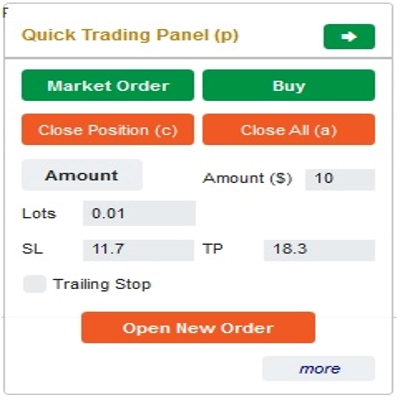
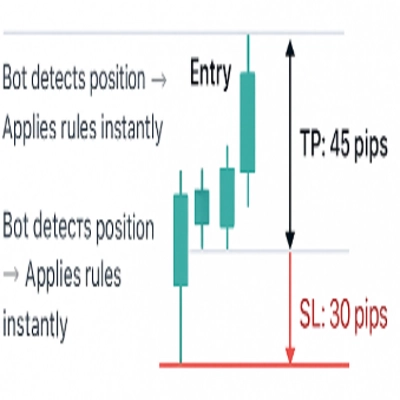
Ini adalah alat untuk membantu trader membuka/menutup order/memodifikasi order dengan cepat hanya dengan satu klik. Alat ini sudah menghitung jumlah Lot berdasarkan jumlah risiko untuk setiap order dan StopLoss yang Anda pilih. Alat ini dapat bekerja dalam mode Real-time untuk trading langsung maupun dalam mode Backtesting untuk menguji strategi Anda.
Catatan penting:
- "Tombol biru" adalah tombol perubahan status (Market Order => Limit Order => Stop Order => Market Order; Buy => Sell => Buy)
- "Tombol merah" adalah tombol "Eksekusi". => Untuk membuka order - gunakan tombol "Open New Order"; untuk menutup posisi - gunakan tombol "Close Position" atau tombol "Close All"; untuk Membatalkan Pending Order - gunakan tombol "Cancel Order" atau tombol "Close All".
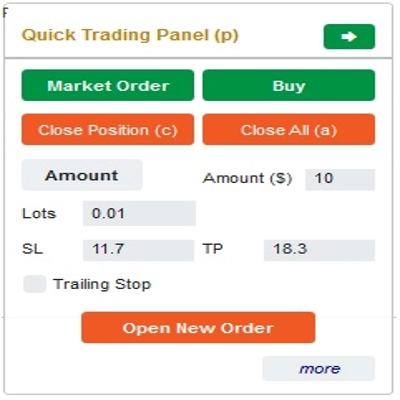
Di “Quick Trading Panel”:
Untuk beralih antara order BUY dan SELL, Anda dapat menyeret garis StopLoss pada grafik di atas atau di bawah Garis Entry.
– Anda dapat membuka dan menutup baik market order maupun Limit order atau Stop order.
– Anda dapat menyesuaikan jumlah order sebagai %Balance atau jumlah order tetap untuk setiap order. Berdasarkan jumlah ini dan StopLoss yang Anda pilih, bot akan secara otomatis menghitung jumlah Lot untuk membuka order.
– Anda dapat mengedit StopLoss, TakeProfit atau Harga Entry (untuk pending order) dengan mengubah angka SL, TP atau Range di “Quick Trading Panel” atau menyeret garis horizontal pada grafik.
– SL, TP dan Range (untuk pending order) dihitung dalam Pips, sementara Expiry(menit) dihitung dalam Menit (Jika Anda tidak menggunakan Expiry, biarkan 0 atau kosong)
Di “Quick Modifying Panel”:
– Di Panel ini Anda dapat menutup order atau mengedit parameter order seperti StopLoss (dalam Harga), TakeProfit (dalam Harga), TrailingStop atau Range (dalam Pips) dan Expiry (dalam Menit)
(Perlu dicatat bahwa StopLoss dan TakeProfit di panel ini adalah harga yang Anda maksudkan untuk dipindahkan)
– Di Panel ini Anda juga dapat mengubah StopLoss, TakeProfit atau Range(dalam Pips) dengan angka di panel atau menyeret garis horizontal pada grafik ke posisi yang diinginkan.
– Anda dapat berganti-ganti antara order untuk menampilkan parameter order tersebut di Panel
Catatan: Angka dalam kotak kuning adalah nomor ID dari order yang dipilih untuk diedit
Semoga trading Anda sukses!
Ringkasan
The interface includes a Quick Trading Panel where users can toggle between buy and sell orders by adjusting the stop loss line on the chart. Users can specify order amounts as a percentage of their balance or as fixed values. StopLoss, TakeProfit, and entry prices for pending orders can be edited either numerically or by dragging lines on the chart. Parameters such as SL, TP, and range are measured in pips, while expiry times are set in minutes.
A Quick Modifying Panel allows users to close orders or adjust order parameters including StopLoss, TakeProfit, TrailingStop, range, and expiry. Changes can be made by entering values or dragging chart lines. The panel also enables switching between orders to view and edit their details.
This tool operates in both real-time trading and backtesting modes, supporting multiple forex symbols including EURUSD, GBPUSD, USDJPY, and XAUUSD (gold). It is intended to streamline risk and reward management in forex trading environments.
Diskusi
Ulasan pelanggan
5 | 33 % | |
4 | 33 % | |
3 | 33 % | |
2 | 0 % | |
1 | 0 % |
![Logo "[Fx4U] GBPUSD - Price Action"](https://cdn.ctrader.com/image/webp/d80b34fc-da3c-4f01-a321-456450665649_26190)
![Logo "[Fx4U] CADJPY - Price Action"](https://cdn.ctrader.com/image/webp/1ba81247-b6b7-4f3c-a297-fa3eb1d57fe1_26195)

![Logo "[Fx4U] AUDCHF - Price Action"](https://cdn.ctrader.com/image/webp/0a22e9aa-c83b-42cd-b0b8-c1a2da593207_26148)

![Logo "[Fx4U] EURAUD - Price Action"](https://cdn.ctrader.com/image/webp/baf8dde4-1ef3-4beb-8ae2-0fed8320f65d_26177)