
Trend Cycle
Indikator
219 unduhan
Versi 1.0, Nov 2025
Windows, Mac

42.11M
Volume trading
6.13M
Pip dimenangkan
276
Penjualan
10.76K
Instal gratis
Deskripsi
Trend Cycle adalah alat analitik tren yang berfokus pada durasi tren, bukan hanya arah.
Ini:
- Mendeteksi tren bullish dan bearish berdasarkan kemiringan Hull Moving Average (HMA).
- Menghitung berapa banyak bar tren saat ini telah aktif (Panjang Nyata).
- Menyimpan panjang tren naik dan tren turun secara terpisah.
- Menghitung rata-rata panjang tren bullish dan bearish (Rata-rata Bull / Rata-rata Bear).
- Menggambar:
-
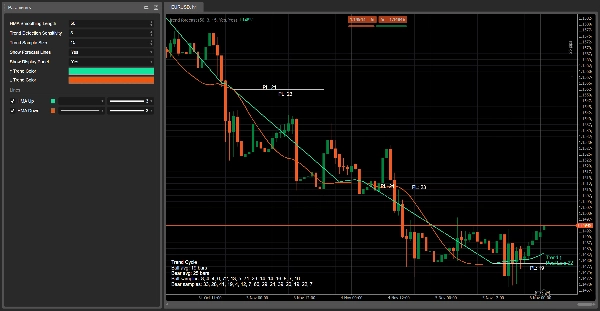
- HMA hijau selama tren bullish dan HMA merah selama tren bearish.
- Garis proyeksi horizontal di awal setiap tren, dengan label seperti
PL: 18(Panjang Probable dalam bar). - Label langsung di dekat harga saat ini yang menunjukkan arah tren dan Panjang Nyata.
- Panel tampilan dengan:
-
- durasi rata-rata tren bullish dan bearish,
- daftar panjang tren terbaru (hingga ukuran sampel yang dipilih).
Tujuannya adalah membantu Anda menjawab:
“Seberapa lama tren ini sudah berlangsung, dan berapa lama tren seperti ini biasanya bertahan?”
Cara kerjanya (logika)
- Hull Moving Average (HMA)
Indikator menghitung Hull Moving Average dari harga penutupan menggunakan parameter Panjang Perataan HMA.
HMA lebih halus daripada simple/EMA tetapi merespons dengan cepat terhadap perubahan arah. - Deteksi tren berdasarkan kemiringan
Selama Sensitivitas Deteksi Tren bar terakhir, ia memeriksa HMA:
Selama tren terdefinisi, penghitung (Panjang Nyata) bertambah setiap bar, mewakili durasi tren saat ini. -
- Jika HMA terus naik → tren adalah bullish (↑).
- Jika HMA terus turun → tren adalah bearish (↓).
- Jika tidak, tren sebelumnya tetap dipertahankan.
- Merekam panjang tren
Saat tren berubah dari bullish ke bearish atau sebaliknya: -
- Durasi tren yang selesai disimpan:
-
- tren bullish ke dalam daftar bullish,
- tren bearish ke dalam daftar bearish.
- Setiap daftar dibatasi oleh Ukuran Sampel Tren (misalnya 10 tren terakhir).
- Sampel ini digunakan untuk menghitung:
-
- Rata-rata Bull = rata-rata panjang tren bullish.
- Rata-rata Bear = rata-rata panjang tren bearish.
- Proyeksi Panjang Probable
Pada awal setiap tren baru, jika ada cukup sampel:
Proyeksi ini disimpan di grafik sebagai sejarah sehingga Anda dapat membandingkan secara visual durasi tren yang diprediksi vs aktual. -
- Menghitung rata-rata panjang untuk jenis tren tersebut (bullish atau bearish).
- Menggambar garis horizontal dari bar awal tren selama kira-kira sebanyak bar tersebut.
- Menempatkan label di tengah garis:
-
PL: X→ Panjang Probable = X bar.
- Label langsung
Pada setiap bar, indikator menggambar satu label langsung di dekat HMA:
Ini menunjukkan arah tren saat ini dan tepat berapa banyak bar yang telah berlangsung sejauh ini. -
- Contoh teks:
-
Trend ↑
Real Len: 7
- Warna:
-
- Hijau (↑) untuk tren bullish
- Oranye/merah (↓) untuk tren bearish
- Panel tampilan (bawah kiri)
Saat Tampilkan Panel Tampilan diaktifkan, panel teks statis muncul di sudut grafik yang menunjukkan:
Ini berfungsi sebagai gambaran statistik cepat tentang perilaku tren terbaru pada simbol/timeframe tersebut. -
- Judul: Trend Cycle
Rata-rata Bull: X barRata-rata Bear: Y barSampel Bull:daftar panjang tren bullish terbaruSampel Bear:daftar panjang tren bearish terbaru
Cara membacanya dalam praktik
- HMA Hijau + “Trend ↑”
→ Tren bullish sedang aktif.
→Panjang Nyatamemberi tahu Anda berapa banyak bar yang telah berlangsung sejauh ini.
→ GarisPL: Xterbaru memberi Anda gambaran visual tentang berapa lama tren bullish serupa biasanya berlangsung. - HMA Merah + “Trend ↓”
→ Tren bearish sedang aktif.
→Panjang Nyata= usia tren turun saat ini.
→ Bandingkan Panjang Nyata denganRata-rata Beardi panel untuk melihat apakah pergerakan ini masih muda atau sudah matang. - Saat Panjang Nyata mendekati atau melebihi rata-rata (Rata-rata Bull / Rata-rata Bear):
→ Tren saat ini secara statistik “tua” dibandingkan dengan sejarah terbaru.
→ Anda mungkin memilih untuk: -
- mengetatkan stop,
- mengamankan keuntungan,
- lebih berhati-hati dengan entri baru ke arah tersebut.
- Tren pendek vs tren panjang
-
- Banyak tren sangat pendek → lingkungan yang bergejolak / cenderung kembali ke rata-rata.
- Sedikit tren panjang → pasar yang lebih terarah, dengan pergerakan yang diperpanjang.
Ringkasan
AI summary
Trend Cycle is a technical indicator designed to analyze trend duration in financial markets. It detects bullish and bearish trends by evaluating the slope of a Hull Moving Average (HMA) applied to closing prices, providing a smoother yet responsive measure of trend direction. The indicator counts the number of bars the current trend has been active (Real Length) and records the lengths of recent up-trends and down-trends separately. Using these samples, it calculates average durations for bullish and bearish trends.
Visual elements include a green HMA line during bullish trends and a red HMA line during bearish trends. Horizontal projection lines mark the probable length of each trend at its start, labeled with "PL: X" to indicate expected duration in bars. A live label near the current price displays the active trend direction and its age in bars. An optional display panel offers a summary of average trend durations and recent trend length samples.
Trend Cycle helps users assess how long the current trend has lasted relative to historical trends, aiding decisions such as adjusting stops or managing entries. It supports analysis across various markets including Forex, cryptocurrencies, indices, commodities, and stocks.
Visual elements include a green HMA line during bullish trends and a red HMA line during bearish trends. Horizontal projection lines mark the probable length of each trend at its start, labeled with "PL: X" to indicate expected duration in bars. A live label near the current price displays the active trend direction and its age in bars. An optional display panel offers a summary of average trend durations and recent trend length samples.
Trend Cycle helps users assess how long the current trend has lasted relative to historical trends, aiding decisions such as adjusting stops or managing entries. It supports analysis across various markets including Forex, cryptocurrencies, indices, commodities, and stocks.
Profil indikator
Ulasan pelanggan
0.0
Ulasan: 0
Ulasan pelanggan
Belum ada ulasan untuk produk ini. Sudah mencobanya? Jadilah pemberi ulasan pertama!
Diskusi
Pertanyaan umum
BTCUSD
Forex
Signal
Breakout
Indices
EURUSD
Commodities
GBPUSD
NZDUSD
Martingale
Bollinger
Prop
ZigZag
Scalping
Supertrend
Crypto
Grid
Stocks
AI
XAUUSD
NAS100
USDJPY
Produk-produk yang tersedia melalui cTrader Store, termasuk bot trading, indikator, dan plugin, disediakan oleh pengembang pihak ketiga serta hanya ditujukan untuk akses teknis dan informasi. cTrader Store bukan broker dan tidak menyediakan saran investasi, rekomendasi pribadi, atau jaminan apa pun tentang kinerja di masa mendatang.


















Harga
42.11M
Volume trading
6.13M
Pip dimenangkan
276
Penjualan
10.76K
Instal gratis