Açıklama
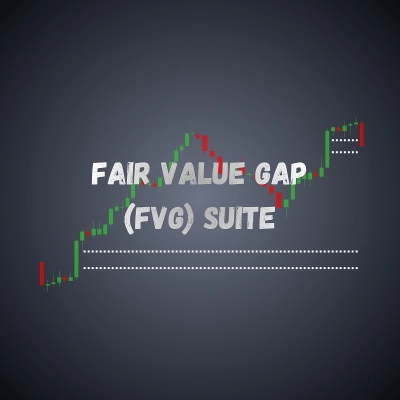
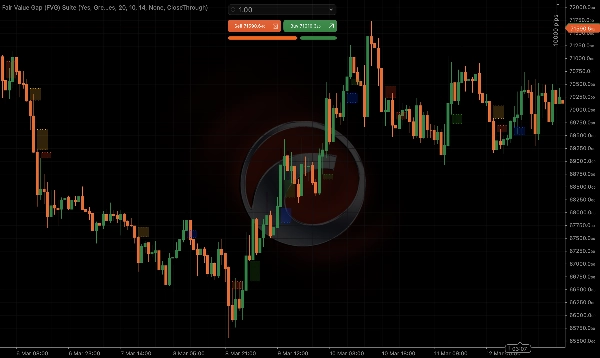
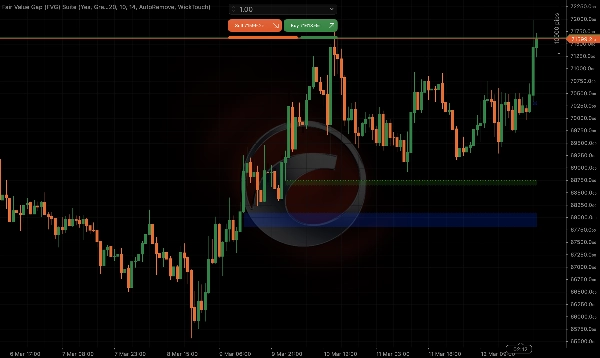
Fair Value Gap (FVG) Suite, özellikle ICT ve Smart Money Concepts (SMC) tüccarları için geliştirilmiş profesyonel düzeyde bir Fair Value Gap (FVG) göstergesidir. Standart FVG tespitinin ötesine geçerek Breakaway Gap (BAG) sınıflandırmasını tanıtır - cTrader mağazasındaki diğer hiçbir FVG göstergesinin sunmadığı bir ayrım.
Fair Value Gap, üç ardışık mumun doldurulmamış bir fiyat dengesizliği bırakmasıyla oluşur. Breakaway Gap ise üçüncü mumun orta mumun aralığının ötesinde kapanmasıyla oluşan daha güçlü bir varyanttır ve hareketin arkasındaki artan momentumu ve kararlılığı işaret eder. Fair Value Gap (FVG) Suite her ikisini de tanımlar ve renk kodlarıyla gösterir, böylece her boşluğun gücü hakkında anında görsel netlik sağlar.
Forex, endeksler, emtialar, hisse senetleri ve kripto gibi 7/24 işlem gören enstrümanlar dahil tüm varlık sınıflarında sorunsuz çalışacak şekilde tasarlanmış olan gösterge, oturum aralarını, hafta sonu boşluklarını ve farklı zaman dilimlerini otomatik olarak, manuel yapılandırma gerektirmeden yönetir.
İster yüksek olasılıklı giriş bölgeleri arayan deneyimli bir ICT tüccarı olun, ister Smart Money perspektifinden fiyat hareketini okumayı öğrenen bir acemi olun, Fair Value Gap (FVG) Suite bunu hassasiyetle yapmanız için size araçlar sunar.
Ana Özellikler
Boşluk Tespiti
- Standart 3-mum desenini kullanarak yükseliş ve düşüş Fair Value Gap'lerini tespit eder
- Boşlukları mum 3'ün mum 2'nin aralığının ötesinde kapanmasına göre FVG veya Breakaway Gap (BAG) olarak sınıflandırır
- FVG ve BAG ayrımı açılıp kapatılabilir - kapalıyken tüm boşluklar aynı şekilde gösterilir
- Hafta sonu işlem yapmayan enstrümanlarda hafta sonu oturum boşlukları ve Cuma son mum boşluklarını otomatik olarak filtreler, grafiği temiz ve ilgili tutar
Boşluk Boyutu Filtresi
- ATR tabanlı minimum boşluk boyutu filtresi önemsiz mikro boşlukları kaldırır
- Mevcut piyasa volatilitesine tamamen uyumlu - manuel pip eşiği gerekmez
- Yapılandırılabilir ATR periyodu ve minimum boşluk yüzdesi
Uzatma Seçenekleri
- Sabit bar uzatma - boşluklar yapılandırılabilir sayıda gerçek işlem barı kadar uzatılır
- Doldurulana Kadar Uzat - boşluklar fiyat ilk kez bölgeye girene kadar dinamik olarak uzatılır, ardından temas noktasında donar
- Uzatma barları sayılırken hafta sonu boşlukları atlanır, böylece uzunluk her zaman doğru olur
Azaltma Takibi
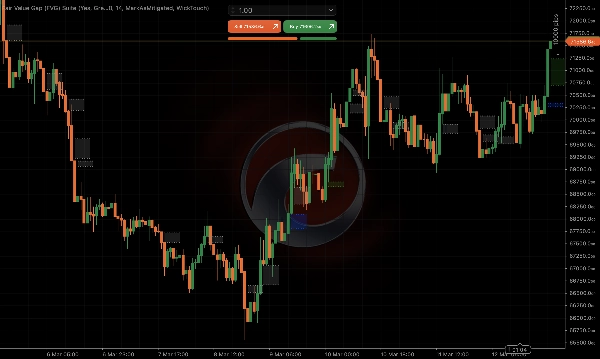
- Üç azaltma modu: Yok (boşluklar kalır), Azaltılmış Olarak İşaretle (boşluklar dolduğunda gri olur), Otomatik Kaldır (boşluklar dolduğunda kaybolur)
- Üç dolum koşulu: Fitil Teması, İç Kapanış, Üzerinden Kapanış - ticaret tarzınıza uygun tanımı seçin
- Azaltılmış boşluklar tarihsel olarak takip edilir, böylece grafik yüklenirken doğru dolum durumu yansıtılır
Görsel Özelleştirme
- Yükseliş FVG, düşüş FVG, yükseliş BAG ve düşüş BAG için ayrı yapılandırılabilir renkler
- Yapılandırılabilir opaklık ile gölgeli boşluk bölgelerini açıp kapama
- Çizgi stili açılır menüsü: Düz veya Noktalı
- Yapılandırılabilir çizgi kalınlığı
Uyumluluk
- 1 dakikadan aylığa kadar tüm zaman dilimlerinde çalışır
- Forex, endeksler, emtialar, hisse senetleri ve kripto dahil tüm cTrader enstrümanlarıyla uyumludur
- Yeniden boyama yapmaz
Nasıl Kullanılır
- Göstergiyi herhangi bir grafiğe ekleyin
- FVG ve BAG bölgeleri için tercih ettiğiniz renkleri ayarlayın
- Azaltma Modunuzu seçin - fiyatın tarihsel boşluklara nasıl saygı gösterdiğini görmek için Azaltılmış Olarak İşaretle ile başlayın
- Aktif boşluk bölgelerini dinamik olarak takip etmek için Doldurulana Kadar Uzat özelliğini etkinleştirin
- Kaç boşluğun görüneceğini kontrol etmek için ATR filtresini ayarlayın - daha yüksek değerler sadece en önemli boşlukları gösterir
Ayarlar Referansı
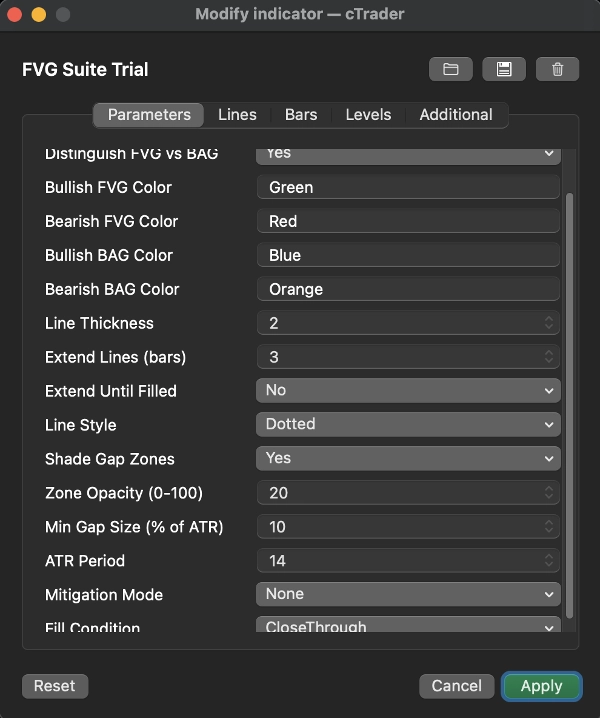
FVG ile BAG ayrımı yap - BAG'leri FVG'den ayrı renk kodla - Varsayılan: Açık
Yükseliş FVG Rengi - yükseliş fair value boşlukları için renk - Varsayılan: Yeşil
Düşüş FVG Rengi - düşüş fair value boşlukları için renk - Varsayılan: Kırmızı
Yükseliş BAG Rengi - yükseliş breakaway boşlukları için renk - Varsayılan: Mavi
Düşüş BAG Rengi - düşüş breakaway boşlukları için renk - Varsayılan: Turuncu
Çizgi Kalınlığı - boşluk sınır çizgilerinin kalınlığı - Varsayılan: 2
Çizgileri Uzat (barlar) - boşluk çizgilerini uzatılacak bar sayısı - Varsayılan: 3
Doldurulana Kadar Uzat - fiyat bölgeye girene kadar boşlukları dinamik olarak uzat - Varsayılan: Kapalı
Çizgi Stili - Düz veya Noktalı sınır çizgileri - Varsayılan: Noktalı
Boşluk Bölgelerini Gölgele - boşluk alanını şeffaf renk ile doldur - Varsayılan: Açık
Bölge Opaklığı - gölgeli bölgenin şeffaflığı (0-100) - Varsayılan: 20
Min Boşluk Boyutu (ATR'nin %) - ATR'ye göre minimum boşluk boyutu - Varsayılan: %10
ATR Periyodu - ATR hesaplaması için geriye dönük dönem - Varsayılan: 14
Azaltma Modu - Yok / Azaltılmış Olarak İşaretle / Otomatik Kaldır - Varsayılan: Yok
Dolum Koşulu - Fitil Teması / İç Kapanış / Üzerinden Kapanış - Varsayılan: Üzerinden Kapanış
Not
FVG ve BAG bölgeleri, tarihsel mum verilerine dayalı teorik fiyat seviyelerini işaret eder. Canlı piyasalarda bu seviyelere yakın işlem yaparken spread ve slippage'i göz önünde bulundurun - gerçek giriş ve çıkış fiyatları, özellikle düşük zaman dilimlerinde veya yüksek volatilite dönemlerinde gösterilen bölge sınırlarından farklı olabilir. Her zaman uygun risk yönetimi kullanın.
Özet
Compatible with all asset classes—including forex, indices, commodities, equities, and cryptocurrencies—and all timeframes from 1 minute to monthly, the suite automatically manages session breaks and weekend gaps without manual setup. It features an ATR-based adaptive filter to exclude insignificant gaps based on current market volatility.
Users can customize gap extensions either by a fixed number of bars or dynamically until the gap is filled by price action. Mitigation tracking offers three modes to mark or remove filled gaps, with configurable fill conditions such as wick touch or close inside the gap zone. Visual settings allow adjustment of colors, opacity, line style, and thickness.
The indicator provides non-repainting signals and supports multi-asset, multi-timeframe analysis to assist traders in identifying high-probability entry zones and understanding price imbalances across markets.
Tartışma
Müşteri değerlendirmeleri
5 | 0 % | |
4 | 100 % | |
3 | 0 % | |
2 | 0 % | |
1 | 0 % |






!["[Stellar Strategies] MARSI Signal Plotter" logosu](https://cdn.ctrader.com/image/webp/7b2b8da6-8f8e-4646-8d4a-4710c516c01e_25567)