Description
HFTCandleLite : Higher TimeFrame candles, live on your chart
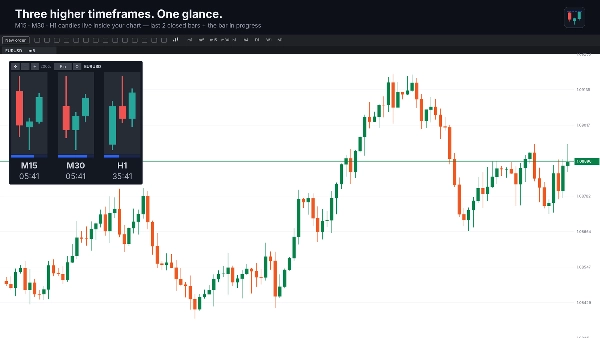
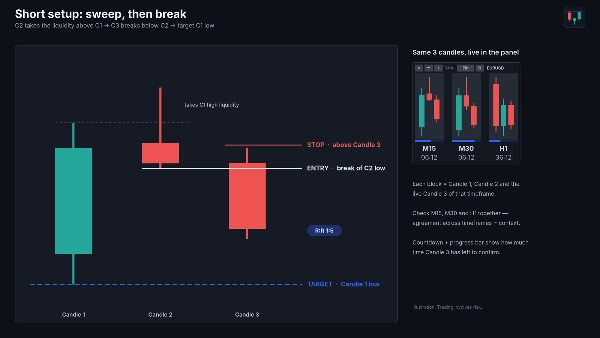
HFTCandleLite adds a compact panel inside your active chart showing the latest candles of three higher timeframes side by side — by default M15, M30 and H1. Each timeframe shows the last closed bars plus the bar in progress, updated on every tick, with a countdown and progress bar showing how long the current bar has left.
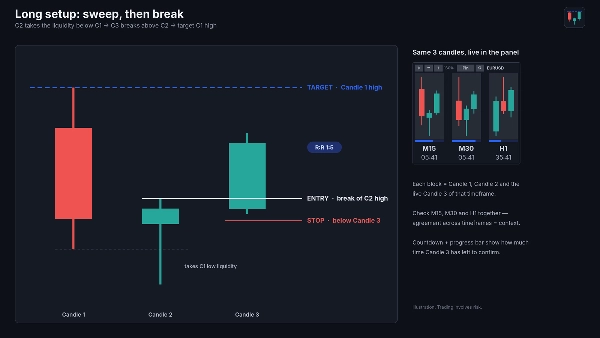
Built for the 3-candle sweep-and-break model
With the default 2 closed bars + live bar, every block shows exactly the three candles of the model:
• Candle 1 sets the range
• Candle 2 sweeps Candle 1’s low (long) or high (short) and closes back inside
• Candle 3 breaks Candle 2’s high (long) or low (short)
• Target: the opposite side of Candle 1
Seeing M15, M30 and H1 together lets you check whether the higher timeframes agree before you act, without switching charts.
Features
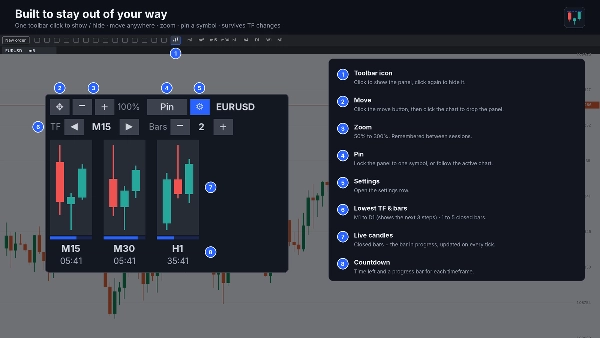
• Choose the lowest timeframe from M1 to D1; the panel shows it plus the next two (e.g. M15/M30/H1, H1/H4/D1, D1/W1/MN)
• 1 to 5 closed bars per timeframe, plus the live bar
• Countdown and progress bar per timeframe
• Toolbar icon to show or hide the panel
• Move the panel anywhere on the chart; zoom from 50% to 300%
• Follows the active chart’s symbol, or pin it to one symbol
• Stays in place when you change chart timeframe or symbol
• Position, zoom and settings are remembered between sessions
Install & launch
- Click Install on this page. The plugin is added to the cTID you are signed in with.
- Open cTrader Windows or Mac with the same cTID. With cloud synchronisation on, the plugin appears automatically.
- Click the Plugins icon in the top-left corner of the main menu (or go to Settings → Plugins) and switch HFTCandleLite on.
- On any chart, click the HFTCandleLite icon (three candles) in the chart toolbar. The panel appears on the active chart.
- Click the icon again to hide the panel. Use ⚙ in the panel to change the lowest timeframe and number of bars, − / + to zoom, ✥ to move it, and Pin to lock it to one symbol.
If the plugin doesn’t appear, restart cTrader, sign in again with the cTID used for the purchase, and check that the plugin is switched on in the Plugins window.
Use cases
• Multi-timeframe candle context while executing on a lower timeframe
• Spotting liquidity sweeps and breaks of the previous candle on higher timeframes
• Timing entries around higher-timeframe candle closes
Requirements: cTrader Windows or Mac (desktop plugin).
HFTCandleLite displays candles only. It does not place trades or generate signals; all trading decisions remain yours.
Trading involves risk. Past performance does not guarantee future results.












!["Custom Timeframes [Iridio Capital]" logo](https://cdn.ctrader.com/image/webp/4d75a920-23c7-4fea-a7b5-594a9d067f2e_63286)