

HMA MTF 2.0
Indicatore
5 acquisti
Versione 1.0, Mar 2025
Windows, Mac
4.2
Recensioni: 4

51
Vendite
1.4K
Installazioni gratuite
Descrizione
HMA MTF (Multi-Timeframe ) – Descrizione dell'indicatore
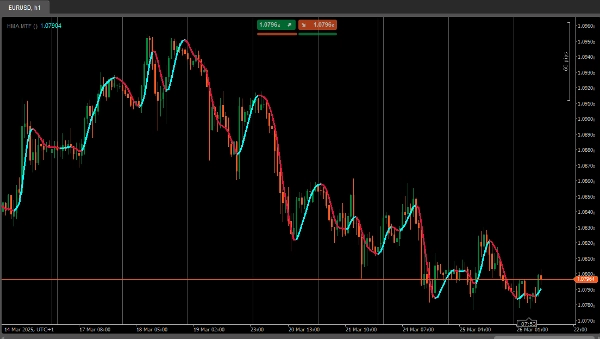
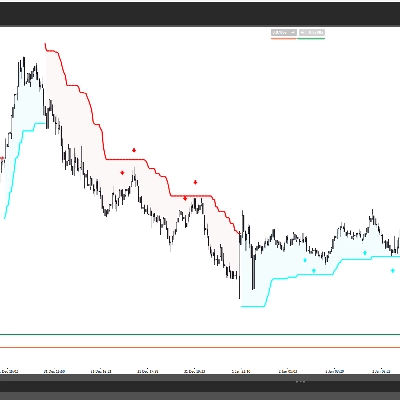
L'HMAMTF indicatore traccia una media mobile da un timeframe superiore o inferiore sul grafico corrente e la visualizza in due linee codificate a colori, indicando un momentum rialzista o ribassista. Utilizza la funzionalità di Media Mobile integrata di cTrader e calcola se la tendenza è in salita o in discesa confrontando il valore MA corrente con quello precedente.
Parametri
- Time Frame (
TimeFrame, Default ="Hour4")
Definisce quale timeframe dei dati (es. 4 ore, giornaliero, settimanale) sarà utilizzato per calcolare la media mobile. - Price (
PriceType, Default =Close)
Specifica quale prezzo (Close, Open, High o Low) viene utilizzato per il calcolo della MA. - Period (
int, Default =14, MinValue =1)
Il numero di barre considerate nel calcolo della media mobile. - MA Type (
MovingAverageType, Default =Weighted)
Sceglie il metodo della media mobile (es. Simple, Exponential, Smoothed, Weighted) applicato alla serie di prezzi selezionata.
Riepilogo
Riepilogo AI
HMA MTF 2.0 is a multi-timeframe indicator designed for use on the cTrader platform. It plots a moving average calculated from a user-selected higher or lower timeframe onto the current chart. The indicator displays two color-coded lines that represent bullish or bearish momentum by comparing the current moving average value to the previous one.
Key configurable parameters include:
1. Time Frame – selects the timeframe (e.g., 4-hour, daily, weekly) used for the moving average calculation.
2. Price – chooses the price type (Close, Open, High, or Low) applied in the moving average computation.
3. Period – defines the number of bars considered in the moving average.
4. MA Type – specifies the moving average method, such as Simple, Exponential, Smoothed, or Weighted.
This indicator supports multiple markets including Forex, Indices, Commodities, Crypto, and Stocks, providing a versatile tool for trend analysis across different asset classes.
Key configurable parameters include:
1. Time Frame – selects the timeframe (e.g., 4-hour, daily, weekly) used for the moving average calculation.
2. Price – chooses the price type (Close, Open, High, or Low) applied in the moving average computation.
3. Period – defines the number of bars considered in the moving average.
4. MA Type – specifies the moving average method, such as Simple, Exponential, Smoothed, or Weighted.
This indicator supports multiple markets including Forex, Indices, Commodities, Crypto, and Stocks, providing a versatile tool for trend analysis across different asset classes.
Profilo indicatore
Recensioni dei clienti
4.2
Recensioni: 4
5 | 25 % | |
4 | 75 % | |
3 | 0 % | |
2 | 0 % | |
1 | 0 % |
Recensioni dei clienti
April 7, 2025
April 5, 2025
The main upside is the first look still needs context. Manual review still matters.
April 3, 2025
Not perfect, but the workflow felt cleaner. Bad settings can ruin the idea.
April 1, 2025
the part that matters is the workflow stays easier to manage, and M15 is enough for the first pass.
Discussioni
Domande frequenti
Prop
Forex
Indices
Commodities
Crypto
Stocks
I prodotti disponibili tramite cTrader Store, inclusi bot di trading, indicatori e plugin, sono forniti da sviluppatori terzi e resi disponibili esclusivamente a scopo informativo e di accesso tecnico. cTrader Store non è un broker e non fornisce consulenze in materia di investimento, raccomandazioni individualizzate o garanzie di risultati futuri.












![Logo di "[Stellar Strategies] Inside Bar with Signals"](https://cdn.ctrader.com/image/webp/1d9e8bfa-3b2c-4440-bb37-5856902008a7_30683)


Prezzo
51
Vendite
1.4K
Installazioni gratuite