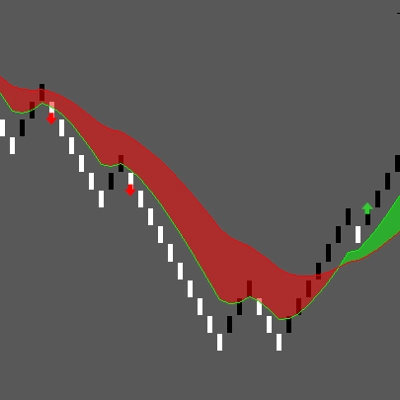
Descripción
Half Trend – Indicador de Reversión de Tendencia para cTrader
Half Trend es un indicador limpio de seguimiento de tendencia diseñado para resaltar posibles cambios en la dirección del mercado. Muestra líneas de tendencia alcistas y bajistas separadas directamente en el gráfico, ayudando a los traders a identificar cuándo el impulso puede estar cambiando.
El indicador puede usarse en gráficos estándar basados en tiempo, así como en gráficos Renko. Es particularmente útil como una herramienta de confirmación adicional después de un Barrido de Nivel Diario, durante movimientos volátiles impulsados por noticias, o cuando se espera que el mercado establezca una dirección más clara.
Características Clave
- Líneas Half Trend alcistas y bajistas
- Flechas visuales en posibles cambios de tendencia
- Medición opcional en pips entre señales consecutivas
- Amplitud ajustable y método de suavizado
- Fuentes configurables de Precio Máximo y Mínimo
- Compatible con marcos de tiempo estándar y gráficos Renko
- Adecuado para Forex, índices, materias primas, acciones y criptomonedas
Trading con Renko
Half Trend funciona particularmente bien con gráficos Renko porque las fluctuaciones de precio más pequeñas son filtradas por el tamaño de ladrillo seleccionado. Esto puede proporcionar una vista más limpia del movimiento direccional del precio y posibles reversiones de tendencia.
El tamaño del ladrillo Renko y los parámetros de Half Trend siempre deben ajustarse al símbolo seleccionado, la volatilidad y el estilo de trading.
Trading con Noticias
Durante anuncios económicos importantes, los mercados pueden moverse rápidamente y cambiar de dirección varias veces. Half Trend puede ayudar a visualizar la dirección que se desarrolla después de la volatilidad inicial.
No muestra un calendario económico ni predice resultados de noticias. Los traders deben esperar confirmación y aplicar una gestión de riesgo adecuada durante eventos de alto impacto.
Confirmación de Barrido de Nivel Diario
El indicador también puede complementar estrategias basadas en Máximos Diarios previos, Mínimos Diarios y otros niveles importantes de liquidez.
Un posible flujo de trabajo es:
- El precio alcanza o barre un nivel diario importante.
- El mercado muestra rechazo o un cambio de dirección.
- Half Trend cambia de dirección y proporciona confirmación visual adicional.
- El trader evalúa la configuración completa antes de tomar una decisión.
Configuraciones Flexibles de Precio y Suavizado
El Precio Máximo y el Precio Mínimo pueden configurarse usando diferentes fuentes de precio, incluyendo Máximo, Mínimo, Apertura, Cierre o Precio Medio.
El método de suavizado seleccionado y la Amplitud determinan cuán sensible es el indicador a los movimientos del mercado. Configuraciones más bajas generalmente reaccionan más rápido, mientras que configuraciones más altas pueden producir una vista de tendencia más suave.
Señales Opcionales y Visualización de Pips
Las flechas de cambio de tendencia pueden activarse o desactivarse. La visualización opcional de pips mide la distancia de precio entre señales consecutivas de Half Trend, facilitando la revisión de movimientos previos del mercado directamente en el gráfico.
Half Trend está diseñado como una herramienta de análisis técnico y confirmación. No debe usarse como un sistema de entrada independiente o automático. Siempre pruebe las configuraciones en el símbolo y tipo de gráfico previsto antes de usarlas en trading en vivo.
Resumen
Valoraciones de clientes
5 | 33 % | |
4 | 67 % | |
3 | 0 % | |
2 | 0 % | |
1 | 0 % |







![Logotipo de "Session Volume Profile (SVP) [Iridio Capital]"](https://cdn.ctrader.com/image/webp/b058beb7-b143-45f3-87d0-8c524c00b203_61552)