


説明
ご紹介しましょう => ポジションマネージャー
- トレーダー と 開発者のための オールインワンのトレード管理
トレーダー向け => 利益を保護し、 損失を制限し、 規律を強化するために設定可能な入力で管理します。
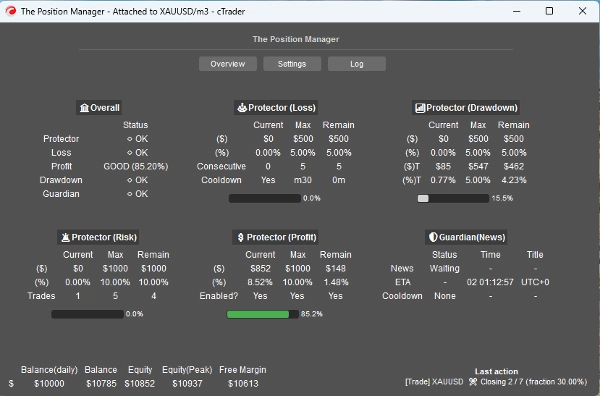
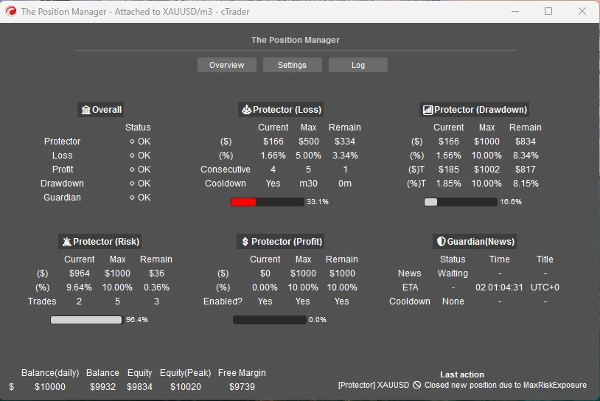
ポジションマネージャー には、その名前にふさわしい4つのモジュールがあります:
- ポートフォリオプロテクター
- ガーディアントレーディング
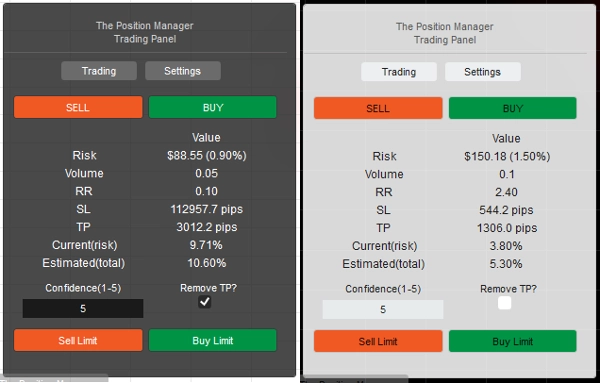
- リスクマネージャー (手動/半自動取引用)
- トレードマネージャー (トレーリングTP、部分的TP/SL)
それぞれにより良い管理のためのサブモジュールがあります。
使用例:
- トレーダーで ポートフォリオ保護+ インテリジェントスケーリングをデスクトップ、モバイル、ウェブでの取引時に求める方。
-
- 完全にデスクトップで取引する場合は、ヘッドレスモード => OFFを使用してください。
- モバイル/ウェブでも取引する場合は、ヘッドレスモード => ONを使用してください。
- プロップトレーダーで 固定リスク制限を持つ方。
- 開発者で 取引シグナルを実際のエントリーに変換したい方。
使い方:
- 初回使用時には、以下を強くお勧めします:
- 「ポジションマネージャー」のインスタンスを1つだけ作成し、
- ヘッドレスモード => OFF (UIモード)
- インスタンスモード => 両方 (マネージャー+トレーディングパネル)
- その後、できればバックテストで動作を学習し、(ビジュアルモード)ライブに移行してください。
覚えておいてください => 「ポジションマネージャー」は自動でポジションを開きません:
- 既存のポジションを管理します!
- かつアカウントレベルの管理を提供します。
小口アカウントの場合は、割合を増やしてもよいです。
大口アカウントの場合は、割合を減らしてもよいです。
いずれにせよ、常にアカウントサイズに合わせて入力を調整してください。
パラメータや動作に慣れたら、cTrader Cloud で実行して、モバイル/ウェブでポジションを管理できます。従うべき2つの簡単なルールがあります:
- ヘッドレスモード => ON
- また、ポジションマネージャーのインスタンスは1つだけ追加すべきです:
-
- そうしないと、互いに「競合」する可能性があります、なぜならほとんどの操作がシンボル全体に影響するからです。
- このルールはローカル実行時も同様です。
各パラメータと期待される動作について説明します:
直感的なものもありますが、パラメータは非常に多いです…
どうかそれぞれを忍耐強く読んでください。
==== ポジション管理 ====
- ヘッドレスモード? => このモードで利用可能な機能は:
-
- ポートフォリオプロテクター
-
- すべての機能が利用可能です。
- ガーディアントレーディング
-
- ヘッドレスモードがONの場合、ニュースフィルターは無効になります。
- トレーリング利益
-
- 任意のシンボルに対して、ポジションはテイクプロフィットを持っていてはいけません。
- 部分クローズ
-
- 任意のシンボルに対して、ポジションはテイクプロフィットまたはストップロスを持っていなければなりません。
=> ヘッドレスOFF(UIモード)
- インスタンスモード:
-
- マネージャー => インスタンスは1つだけ追加すべきです。
- トレーディング => 純粋なトレーディングパネル (リスクマネージャーモジュール)、複数のインスタンスを追加できます。
- 両方 => インスタンスは1つだけ追加すべきです:
-
- マネージャーはウィンドウとして表示されます。
- トレーディングはチャート上に表示されます。
- パネルタイプ/ポジション:自明です。
- 保存方法:
-
- 毎回の再起動時に同じ設定を保存/読み込みするにはブローカーを使用してください。
- 各シンボルの設定を「リスクプロファイル」のように使いたい場合はBroker_Symbolを使用してください。
=> ヘッドレスOFF/ON - ローカル
- メッセージモードを許可しますか?
-
- 自明です。
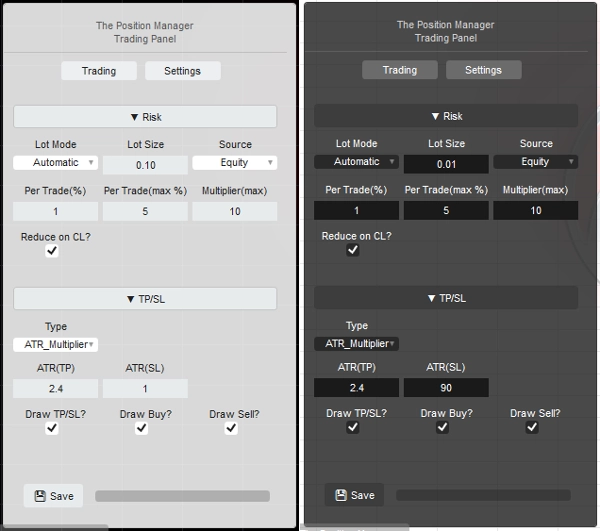
- [トレーディング、両方]のインスタンスモードを使用する場合、パネル設定で「TP/SL => タイプ」を「ピップス」に変更してください。これによりTP/SLをメッセージで設定できます。
- メッセージトレーディングを許可しますか?
-
- メッセージによるポジションのオープンを許可します。
- ヘッドレスONの場合、リスクマネージャーの設定はできません。
- ヘッドレスOFFの場合、[トレーディング、両方]インスタンスモードを使用すると、リスクマネージャーモジュールを自由に設定できます。
=> ヘッドレスON / アカウント全般
- 最小ブレイクイーブン(%):
-
- 各ポジションに対し、トレーリング/部分利益モジュールによってブレイクイーブンロジックが実行される際、SLをエントリ価格に直接移動する代わりに(これにより負の損益が生じる)、
- SLはx%前方にエントリ価格に移動されます。
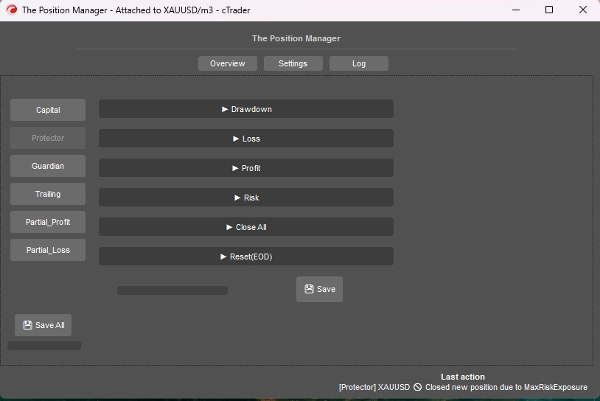
=> ヘッドレスON / プロテクタードローダウン
- ドローダウンモード:
-
- デイリー => 当日の残高に基づく
- トレーリング => ピークエクイティに基づく
- ドローダウンタイプ:
-
- パーセンテージ => 当日の残高の%、動的成長に理想的。
- 固定 => 固定額、厳格なルールに理想的。
- 最大ドローダウン => %または固定 (自明)
=> ヘッドレスON / プロテクター損失
- 損失ソース: => 現在は「当日の残高」のみを基にしています。
-
- エクイティが当日の残高を下回ると、トリガー/カウントされます。
- 損失タイプ:
-
- パーセンテージ => 当日の残高の%、動的成長に理想的。
- 固定 => 固定額、厳格なルールに理想的。
- 最大日次損失² => %または固定 (自明)
- 連続損失(CL):
-
- 連続損失が発生した場合にポジションをクローズすることを有効にします。
- 連続カウント:
-
- 自明です。
- リセットのクールダウン(CL):
-
- カウントをリセットし、新しいポジションのオープンを許可するためのクールダウン時間。
=> ヘッドレスON / プロテクター利益
- 利益上限を有効にしますか? => 自明です。
-
- 最大利益に達したら、新しいポジションはクローズされます。
- 利益ソース: => 常に当日の残高に基づきます。
- 利益タイプ:
-
- パーセンテージ => 当日の残高の%、動的成長に理想的。
- 固定 => 固定額、厳格なルールに理想的。
- 最大利益² => %または固定 (自明)
=> ヘッドレスON / プロテクターリスク
- 総エクスポージャー(%):
-
- ブレイクイーブンのポジションも考慮されます。
- 総オープントレード数:
-
- 総カウントが総オープントレード数と等しい場合、新しいポジションはクローズされます。
=> ヘッドレスON / プロテクター全閉
- 日終わりにクローズしますか? => EODで全ポジションをクローズします。
- 週終わりにクローズしますか? => EOW(金曜日)で全ポジションをクローズします。EOD時間を基準にします。
=> ヘッドレスON / プロテクターリセット(EOD)
- エクイティピークトラッキングのリセット時間、および適用される場合は実行された全閉ロジックの時間。
- リセット(時間) => 0時 - 23時
- リセット(分) => 0分 – 59分
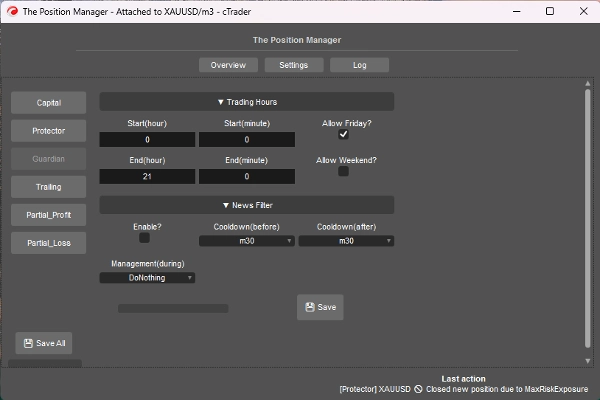
=> ヘッドレスON / ガーディアン
- 取引時間外または許可された曜日外に開かれたポジションは自動的にクローズされます。
-
- 開始/終了(時間) => 0時 – 23時
- 開始/終了(分) => 0分 – 59分
- 金曜日を許可しますか? => 自明です。
- 週末を許可しますか?(暗号通貨) => 自明です。
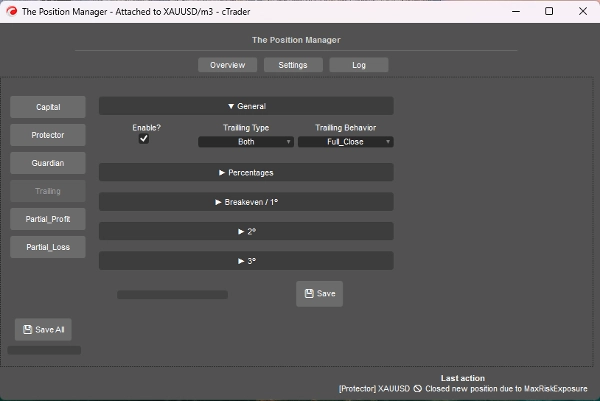
=> ヘッドレスON / トレーリング利益
- エクイティベースのテイクプロフィットです。
- 有効にしますか?
-
- TPなしのポジションに対して、トレンドフォローのポジションに理想的です。
- => タイプ:
-
- パーセンテージ => 純粋なエクイティ%
- ドローダウン => トレーリングDDコンセプトに基づく (ピークエクイティ)、価格のプルバック/リトラクションの観点で考えてください。
- 両方 => 部分クローズ動作はデフォルトで有効です:
-
- 部分クローズはパーセンテージタイプ。
- フルエグジットはドローダウンタイプ。
- 動作:
-
- フルクローズ:
-
- 目標%エクイティに達したら、TPなしのすべてのポジションをクローズします。
- また、目標%エクイティの半分に達したら、SLをブレイクイーブンに移動します。
- 部分クローズ:
-
- 部分クローズを有効にします。
- 注意 => 部分クローズに対してポジションサイズ(ロットサイズ)が小さすぎる場合、ポジションは完全にクローズされます。
- 最小利益(%):
-
- トレーリングロジックを有効にするための最小利益。
- => フルクローズ時(%):
-
- 「フルクローズ」動作のみ。
- => [両方] クローズドローダウン(%):
-
- 「両方」タイプのみ。
- => [%のみ] スマートSL?
-
- 「パーセンテージ」タイプのみ。
- ドローダウンタイプに似ていますが、トレーリングSLを使用してより反応的です。
- 部分1(%)/ 部分2(%)
-
- 部分クローズを実行するための目標%エクイティ (パーセンテージまたは両方)
- トレーリングタイプがパーセンテージかドローダウンかを常に確認してください。
- 部分1(%順)/ 部分2(%順)
-
- 自明です。
- => クローズ3(%):
-
- TPなしのポジションを完全にクローズするための目標%エクイティ。
- パーセンテージまたはドローダウンタイプのみ。
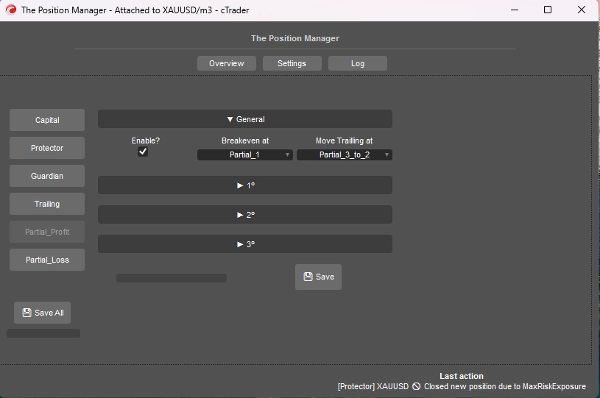
=> ヘッドレスON / 部分利益
- 有効にしますか?
-
- TPありのポジションに対して、デイトレードやスキャルピングに理想的です。
- エントリ価格 は0%になります。
- テイクプロフィットは100%になります。
- 部分価格はこのアプローチに基づいて計算されます。
- ブレイクイーブン位置:
-
- 自明です。選択した部分がトリガーされたときにSLをBEに移動します。
- => トレーリング移動位置:
-
- 自明です。選択した部分がトリガーされたときにSLを前の部分価格に移動します。
- 注意 => 部分2または3が有効になっていることを確認してください。
- 部分1(%) /
部分2(%) /
部分3(%) -
- エントリ価格とテイクプロフィットの間のパーセンテージ。
- => 2番目を有効にしますか?
=> 3番目を有効にしますか? -
- 自明です。
- 部分1(%順) /
部分2(%順) /
部分3(%順) -
- 自明です。
=> ヘッドレスON / 部分損失
- 有効にしますか?
-
- SLありのポジションに対して、方向性に戻る可能性のある損失トレードの損失を制限するのに理想的です。
- エントリ価格 は0%になります。
- ストップロス は100%になります。
- 部分価格はこのアプローチに基づいて計算されます。
- 部分1(%) /
部分2(%) /
部分3(%) -
- エントリ価格とストップロスの間のパーセンテージ。
- => 2番目を有効にしますか?
=> 3番目を有効にしますか? -
- 自明です。
- 部分1(%順) /
部分2(%順) /
部分3(%順) -
- 自明です。
====================================================
開発者向け => プラグアンドプレイ 任意の戦略に対して、メッセージ/サブスクリプションを介して cTrader Algoに対応します。
- 半自動または完全自動システム向け:
- 半自動: 注文はまだ自分で開きますが、
-
- SLとTPはメッセージ/サブスクリプションで設定されます。
- 完全自動: 注文シグナルはメッセージ/サブスクリプションを介して「ポジションマネージャー」に送信されます。
-
- このアプローチでは「リスクマネージャー」設定が利用できない場合があります。
非常に簡単で、以下のクラスを使ってシグナルを送信するだけです:
public class TradeSignal
{
public string Symbol { get; set; }
public TradeType Direction { get; set; }
public double StopLossPips { get; set; }
public double? TakeProfitPips { get; set; } // null = without TP
public string StrategyId { get; set; }
public double? EntryPrice { get; set; } // null = market, otherwise limit order.
public DateTime Timestamp { get; set; }
public int Confidence { get; set; } // 1–5
}
次に:
Messages.Send("ThePositionManager", signal);
簡単な例:
TradeSignal signal = new()
{
Symbol = Symbol.Name,
Direction = TradeType.Buy,
StopLossPips = 1500,
TakeProfitPips = 3000,
StrategyId = "MyStrategy",
Confidence = 5
};
Messages.Send("ThePositionManager", signal);
概要
Key features include four main modules: Portfolio Protector, Guardian Trading, Risk Manager (for manual or semi-automated trading), and Trade Manager (supporting trailing take profit and partial take profit/stop loss). The tool supports intelligent scaling and portfolio protection across Desktop, Mobile, and Web platforms, with a Headless mode option for managing positions remotely via cTrader Cloud.
For traders, it offers configurable risk controls such as daily and trailing drawdown limits, profit caps, exposure limits, and automated position closing based on trading hours or drawdown thresholds. Trailing profit and partial profit/loss management allow dynamic adjustment of stop loss and take profit levels to optimize trade exits.
Developers can integrate The Position Manager with automated strategies by sending trade signals via messages, enabling semi or fully automated order management with customizable stop loss and take profit settings.
The tool supports saving settings by broker or symbol, and includes detailed parameters for break-even management, risk exposure, and partial close orders, making it adaptable to various account sizes and trading styles.
カスタマーレビュー
5 | 0 % | |
4 | 67 % | |
3 | 33 % | |
2 | 0 % | |
1 | 0 % |
ディスカッション
よくあるご質問
















価格