present
新規登録で初回購入時に$50オフ
Trading product for TRADING CLOCK PRO インジケーター Fibonacci Premium/Discount , image 1
TRADING CLOCK PRO
インジケーター
バージョン 1.0、Aug 2026
Windows、Mac
Trading product for TRADING CLOCK PRO インジケーター Fibonacci Premium/Discount , image 2
Trading product for TRADING CLOCK PRO インジケーター Fibonacci Premium/Discount , image 3
Trading product for TRADING CLOCK PRO インジケーター Fibonacci Premium/Discount , image 4
82.74M
取引数量
50.16K
獲得pips
5
販売
391
無料インストール

説明

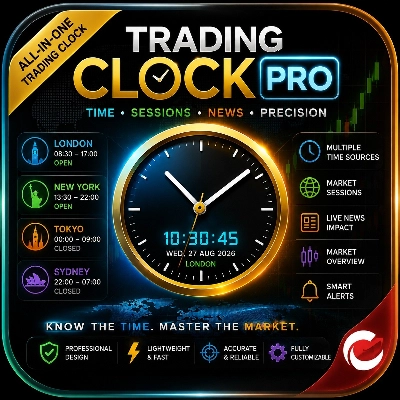
Trading Clock Pro is an all-in-one market timing dashboard designed to help traders understand when the market is most active and make better-timed decisions.

It shows:

  • 🕐 Real-time clock with multiple time sources, including broker, UTC, London, New York, Tokyo and Sydney.
  • 🌍 Forex trading sessions — Sydney, Tokyo, London and New York — with open/closed status and countdowns.
  • 🔥 London/New York overlap, helping traders identify periods of potentially increased market activity.
  • 📊 Market information including symbol, timeframe, bid/ask, spread and market-open status.
  • ⏱️ Candle countdown, showing exactly how much time remains before the current candle closes.
  • 🔔 Smart alerts for session openings, candle closing and unusually high spreads.
  • 📅 Weekend/market-hour awareness so traders can quickly see whether the forex market is open.


Instead of relying on guesswork about market timing, traders can instantly see which major session is active, whether London and New York are overlapping, when the next session begins, and when a candle is about to close. This can help traders focus their analysis around periods they consider most relevant for their strategy.

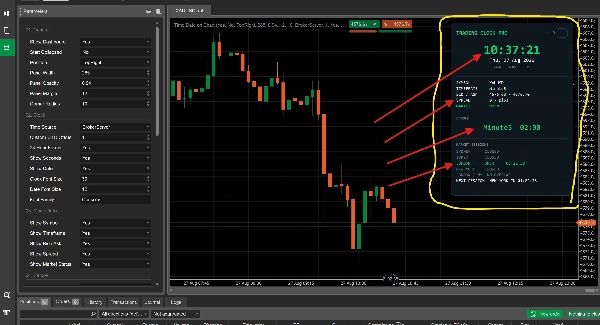
Trading Clock Pro is a professional market-timing and trading-information dashboard for cTrader. It is designed to give traders a clear view of market time, major forex sessions, candle timing, spread conditions, and basic market status directly on the chart.

Rather than generating buy/sell signals, the indicator helps traders understand when the market is active and what current trading conditions look like, allowing them to apply their own trading strategy with better timing.

What the Indicator Analyses

Trading Clock Pro monitors and displays several real-time market conditions:

  • Current market time using the selected time source.
  • Forex trading sessions: Sydney, Tokyo, London and New York.
  • London/New York overlap status.
  • Current candle duration and remaining time before the candle closes.
  • Bid and Ask prices for the active symbol.
  • Current spread in pips.
  • Forex market open/closed status, including weekend conditions.
  • Upcoming trading session and its countdown.
  • Session openings, candle closing and high-spread conditions can also trigger alerts when enabled.

How to Interpret the Dashboard

The dashboard provides a quick visual overview without requiring traders to interpret complicated calculations.

Market Sessions

Each session is displayed as OPEN or CLOSED.

When a session is open, the dashboard can also show the remaining time. The London / NY OVERLAP indicator highlights when both London and New York are simultaneously active.

The NEXT SESSION display shows which session is coming next and provides a countdown.

Candle Countdown

The candle section displays the current timeframe and the amount of time remaining before the current candle closes.

For example:

M15 — 04:32

means approximately four minutes and thirty-two seconds remain on the current 15-minute candle.

As the candle approaches its close, the countdown can change to a warning state according to the configured warning period.

Market Information

The market-information section displays:

  • Symbol
  • Current timeframe
  • Bid / Ask
  • Spread
  • Market status

The spread display can provide a warning when the current spread reaches or exceeds the configured maximum-spread threshold.

Alerts

When enabled, the indicator can notify the trader when:

  • A major trading session opens.
  • A candle is approaching its close.
  • The spread reaches the configured warning level.

Popup and sound notifications can be enabled independently.

Key Settings and Parameters

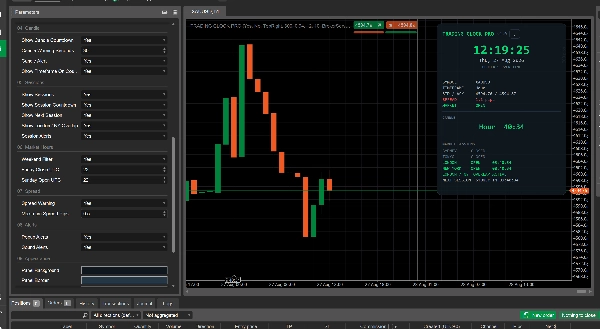
Trading Clock Pro provides extensive customization through its cTrader parameters.

General

Controls the dashboard's:

  • Visibility
  • Starting collapsed/expanded state
  • Chart position
  • Width
  • Opacity
  • Margin
  • Corner radius

Clock

Allows traders to select the time displayed by the dashboard:

  • Broker Server
  • UTC
  • Local Computer
  • Lagos
  • London
  • New York
  • Tokyo
  • Sydney
  • Custom UTC offset

Additional options control 24-hour/12-hour format, seconds, date display and clock font size.

Market Information

Individual displays can be enabled or disabled for:

  • Symbol
  • Timeframe
  • Bid / Ask
  • Spread
  • Market status

Candle

Controls:

  • Candle countdown
  • Warning threshold in seconds
  • Candle alerts
  • Timeframe display on the countdown

Sessions

Controls:

  • Session display
  • Session countdowns
  • Next-session display
  • London/New York overlap
  • Session-opening alerts

Market Hours

Includes weekend filtering and configurable Friday close and Sunday open UTC times.

Spread

The trader can enable spread warnings and define the maximum acceptable spread threshold in pips.

Alerts

Popup and sound notifications can be switched on or off.

Appearance

The dashboard's background, border, primary, secondary, muted, open, closed, warning and danger colors can be customized.

Typical Use Cases

Session-Based Trading

Traders who build strategies around London, New York or other major sessions can use the dashboard to immediately see which session is active and how long it has remaining.

London/New York Overlap

Traders who prefer periods when major sessions overlap can use the dedicated overlap display to quickly identify when London and New York are simultaneously open.

Candle-Based Strategies

Traders waiting for a candle to close before confirming a setup can use the countdown to monitor the remaining candle time without manually calculating it.

Spread Monitoring

Before entering a trade, traders can check the current spread and optionally receive a warning when it reaches their configured threshold.

Multi-Time-Zone Trading

Traders working with different market centers can select their preferred time source instead of manually converting between time zones.

General Chart Monitoring

The dashboard can function as a compact trading information center, allowing traders to monitor essential timing and market information without adding several separate indicators to the chart.

Who Is It Best Suited For?

Trading Clock Pro is suitable for:

  • Forex day traders
  • Scalpers who pay close attention to session timing
  • Intraday traders
  • Session-based strategy traders
  • Traders using candle-close confirmations
  • Traders who monitor spreads before entering positions
  • Traders trading across multiple time zones
  • Beginners who want a simple overview of market timing
  • Experienced traders who want a compact chart-side dashboard

It does not require advanced technical-analysis knowledge because it primarily presents timing and market-condition information rather than requiring the trader to interpret a complex mathematical indicator.

Important Limitations and Usage Notes

Trading Clock Pro is a market-information and timing tool, not an automated trading strategy or guaranteed signal generator.

It does not determine whether a trader should buy or sell, and the session or candle alerts should not be interpreted as guaranteed trading opportunities.

The indicator's usefulness depends on the trader's own strategy, market conditions and risk management.

Session times are calculated using the programmed time-zone and daylight-saving rules. Traders should ensure that their selected settings correspond with how they want to interpret each trading session.

The spread warning is based on the current Bid/Ask difference and should be treated as an informational condition rather than a prediction of future market behavior.

The candle countdown depends on the chart's timeframe and available bar data.

Trading Clock Pro is best used as a decision-support and market-awareness tool alongside a well-defined trading strategy, proper risk management and independent market analysis.

概要

インジケーターのプロフィール
インジケーターのカテゴリー
市場構造(SMC)
出力の種類
シグナル
ビジュアル表示
データ要件
ティックデータ
サポート対象のシグナル
セッション開始レンジ

カスタマーレビュー

0.0
レビュー: 0
カスタマーレビュー
この商品にはまだレビューがありません。お使いになったことがある方は、ぜひレビューをお願いします。

ディスカッション

よくあるご質問

Fibonacci
Premium/Discount
ATR
cTrader Storeで入手可能な取引ボット、インジケーター、プラグインなどの商品は、第三者の開発者が提供するものであり、情報と技術の取得のみを目的としてご利用いただけます。cTrader Storeはブローカーではなく、投資助言や個人的な推奨を行うことも、将来のパフォーマンスを保証することもありません。

この作成者の他の商品

cBot
XAUUSD
Commodities
Need Trial Version of Rocket Drive? Get it here
インジケーター
EMA
RSI
+5
MACD Colour Histogram with 11 Moving Average Types, Multi-timeframe confirmation and Sound Signal Alert.
インジケーター
Market Structure
An indicator That tracks the four major forex sessions — Sydney, Tokyo, London, and New York, with DST
cBot
AI
XAUUSD
+1
An AI infused Self Gold Recalibration Robot that uses custom indicator with 4 Take Profit features to maximize profit.
インジケーター
BOS
Key Levels
+2
Realtime Trade Adviser will tell you When to BUY and When to SELL. A real time Trade Prompter
「ZIG ZAG」ロゴ
トップ評価
4.4
(5)
$19
/
$20
インジケーター
Flag
Key Levels
+5
Zig Zag filters out minor price noise and connects only the most significant swing and lows for key turning points.
インジケーター
Inducement
Key Levels
+5
Digital Clock Overlay that displays a live, second-by-second clock and optional date directly on the trading chart.

これも好きかも

インジケーター
Volume
Key Levels
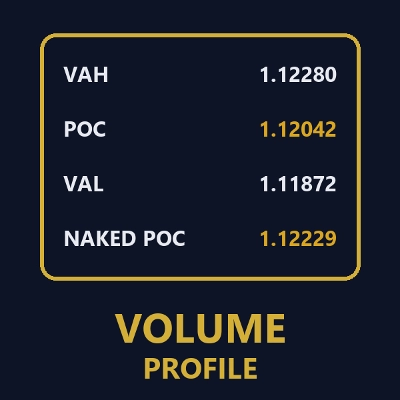
Dynamic Visible Range Volume Profile for cTrader. Real-time POC, Value Area & Smart Alerts for precise trading.
インジケーター
Imbalance
Risk Dashboard
+2
FX‑DESK RISK MANAGEMENT — Cross‑Asset Correlation Heatmap, Info Panel & Trade Signals
インジケーター
Volume
Order Block
+1
Elevate your market analysis with the Aggression Delta Volume Profile, a premium, institutional-grade order flow utility
インジケーター
SMC
Breakout
+1
Delta Peak Bubbles is a tick‑chart overlay for cTrader that highlights the strongest momentum spikes.
インジケーター
SMC
Prop
+15
Auto-detects Swing Highs/Lows to draw dynamic Support & Resistance levels with break tracking.
インジケーター
Forex
BTCUSD
+9
This indicator implements an Opening Range Breakout (ORB) trading strategy, designed to capture momentum during the most
インジケーター
AI
Prop
+16
Pro trading dashboard: WVAP analysis + Volume Profile + Neural AI tracking + News alerts. All-in-one tool!
インジケーター
RSI
Signal
The Wyckoff Toolkit is the ultimate ally for traders seeking to decode the market through the lens of "smart money."
インジケーター
Liquidity Grab
Liquidity Sweep
+1
CRT Sweep Tracker is an advanced panel for Candle Range Theory (CRT) traders to track HTF sweeps and manage live trades.
インジケーター
Forex
EURUSD
+3
ATR-normalized MA slope in degrees, comparable across all instruments. Color-coded labels flag strong trend moves.
インジケーター
ATR
SMC
+19
Smart Liquidity Sweep detector with auto-drawing True Channels and real market structure mapping.
インジケーター
EMA
VWAP
+2
ORB Range Indicator maps the opening range and gives a practical session-breakout workflow with clear labels.
インジケーター
SMC
VWAP
+4
Killzone Session and key levels with VWAP – Precision Meets Price Action
インジケーター
ATR
SMC
+17
Adaptive Swing-Anchored VWAP that tracks market structure shifts with precision and clarity.
インジケーター
ATR
Channel
+3
Catch trend with precision. BUY/SELL arrows, real-time dashboard, sound alerts and ATRchannel. Works on all markets.
インジケーター
Supertrend
Premium visual market-regime indicator for cTrader. Works beautifully with BTC on the 1D timeframe.
インジケーター
VWAP
Volume
+4
Advanced Order Flow & Volume Profiling for cTrader. Unveil institutional footprints, Delta, and Anchored VWAPs.
インジケーター
Forex
Enhance your trading strategy with automated detection and alerts for key chart patterns.

価格

82.74M
取引数量
50.16K
獲得pips
5
販売
391
無料インストール