

설명
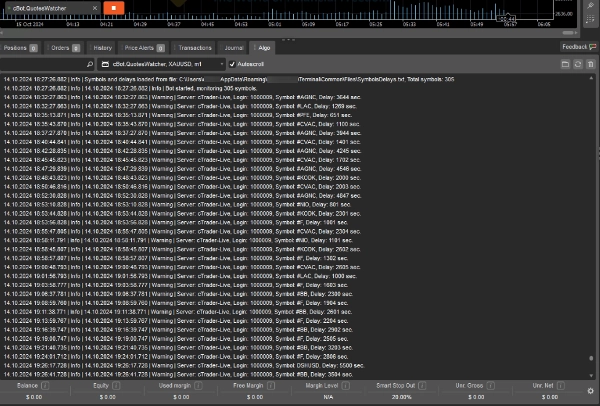
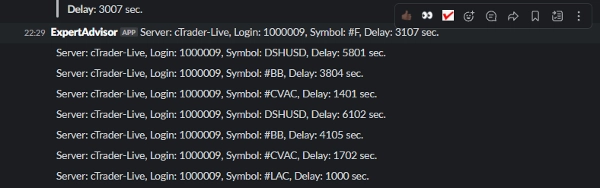
cTrader cBot "QuotesWatcher"는 금융 상품의 호가를 모니터링하고 수신 지연을 식별하도록 설계되었습니다. 특정 심볼의 지연 시간이 지정된 시간(MaxIdleTimeSeconds) 또는 SymbolsDelays.txt의 사용자 지정 값을 초과하면, 봇은 터미널 로그에 경고를 보내고 웹훅을 사용하여 외부 메신저에도 알림을 복제합니다.
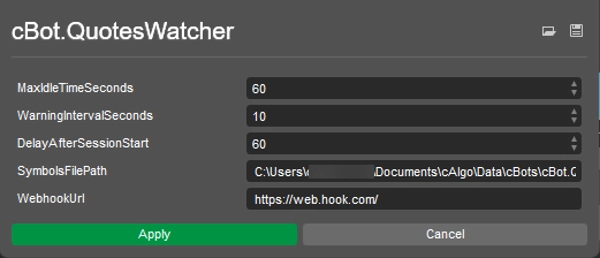
설정:
- MaxIdleTimeSeconds (int, DefaultValue = 60) — 각 심볼의 호가 수신 간 최대 허용 지연 시간(초)입니다. 이 값을 초과하면 봇이 경고를 보냅니다.
- WarningIntervalSeconds (int, DefaultValue = 10) — 지연이 여전히 허용 값을 초과할 경우 봇이 다시 경고를 보내는 간격(초)입니다.
- DelayAfterSessionStart (int, DefaultValue = 60) — 거래 세션 시작 후 봇이 경고를 보내지 않는 지연 시간(초)입니다.
- SymbolsFilePath (string, DefaultValue = "...file path\SymbolsDelays.txt") — 심볼 목록과 각 심볼별 개별 지연 값을 포함하는 파일 경로입니다.
- WebhookUrl (string, DefaultValue = "https://web.hook.com/") — 외부 메신저로 알림을 보내기 위한 웹훅 URL(HTTP 요청 + JSON 스키마)입니다.
요약
AI 요약
cTrader cBot "QuotesWatcher" monitors the quote feed of financial instruments to detect delays in quote reception. It tracks each symbol's quote update intervals and compares them against a configurable maximum allowable delay (MaxIdleTimeSeconds). If a symbol's quote delay exceeds this threshold or a custom delay specified in an external file (SymbolsDelays.txt), the bot issues a warning message to the terminal log. Additionally, it sends duplicate notifications to an external messenger via a configurable webhook URL using HTTP requests with JSON payloads.
Key configurable settings include:
- MaxIdleTimeSeconds: maximum allowed delay in seconds before triggering a warning.
- WarningIntervalSeconds: frequency in seconds for repeated warnings if delays persist.
- DelayAfterSessionStart: grace period after session start during which warnings are suppressed.
- SymbolsFilePath: path to a file defining individual delay thresholds per symbol.
- WebhookUrl: URL endpoint for sending external notifications.
This bot is designed to assist traders and system administrators in promptly identifying and responding to quote feed interruptions or latency issues across multiple financial instruments.
Key configurable settings include:
- MaxIdleTimeSeconds: maximum allowed delay in seconds before triggering a warning.
- WarningIntervalSeconds: frequency in seconds for repeated warnings if delays persist.
- DelayAfterSessionStart: grace period after session start during which warnings are suppressed.
- SymbolsFilePath: path to a file defining individual delay thresholds per symbol.
- WebhookUrl: URL endpoint for sending external notifications.
This bot is designed to assist traders and system administrators in promptly identifying and responding to quote feed interruptions or latency issues across multiple financial instruments.
트레이딩 프로필
상담
고객 리뷰
5.0
리뷰: 2
5 | 100 % | |
4 | 0 % | |
3 | 0 % | |
2 | 0 % | |
1 | 0 % |
고객 리뷰
October 29, 2024
the setup becomes easier to judge for algo trading if the trader keeps control. A 83 setup sample on M5 should show whether it really helps.
October 24, 2024
After 1 month, the useful part became clearer. 30 demo trades was enough to see whether it helped, and 0.5 percent risk kept the test grounded. The concern starts when the journal stops looking stable.
자주 묻는 질문(FAQ)
트레이딩 봇, 지표, 플러그인 등 cTrader Store에서 제공되는 상품은 제3자 개발자에 의해 제공되며, 이는 단순히 정보 및 기술적 접근을 목적으로 제공된 것입니다. cTrader Store는 중개인이 아니며, 투자 조언, 개인별 추천 또는 향후 성과에 대한 어떠한 보장도 제공하지 않습니다.
좋아하실 만한 다른 항목














가격

가입일 15/10/2024