


说明
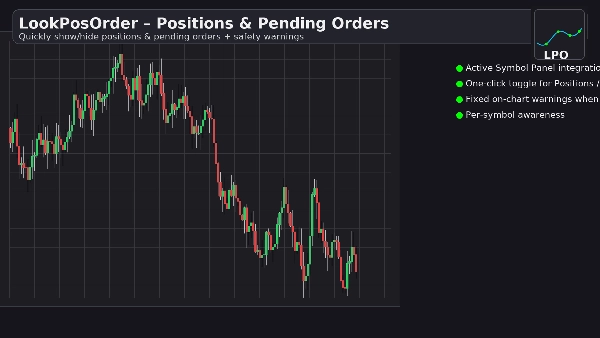
LookPosOrder 通过轻松显示或隐藏持仓和挂单,帮助您避免昂贵的意外——并且在当前交易品种有任何隐藏内容时,清晰地提醒您。
它的功能
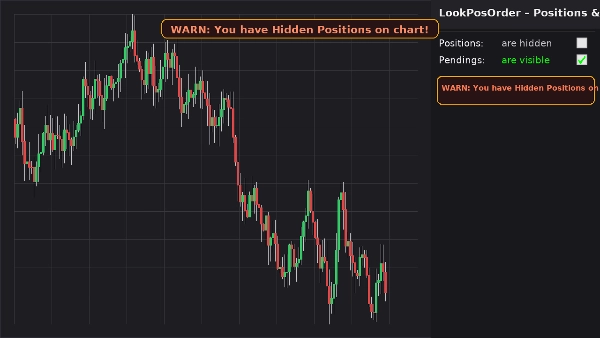
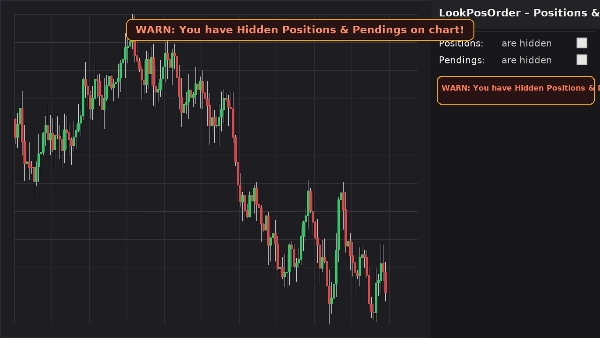
- 在活动交易品种面板 (ASP)中添加一个简洁的控制块,包含两个复选框:
-
- 持仓:可见 / 隐藏
- 挂单:可见 / 隐藏
- 如果当前交易品种存在隐藏项目,显示一个固定在图表上的警告横幅(在平移/缩放时不移动)。
- 在 ASP 块中同步显示相同的内联警告。
- 记住您每个交易品种的偏好设置。
交易者喜欢它的原因
- 防止错误:永远不会忘记图表上有隐藏内容。
- 快速切换:无需在图表菜单中寻找。
- 按交易品种识别:仅在当前交易品种确实有隐藏项目时发出警告。
- 轻量且简洁:界面简洁,响应迅速。
主要功能
- 活动交易品种面板集成
- 一键切换持仓和挂单
- 固定的图表警告横幅,当存在隐藏项目时显示
- ASP 块内的内联警告
- 按交易品种识别(过滤当前交易品种的持仓/订单)
- 设置持久化(按交易品种)
- 与原生显示设置协同工作(如果从图表菜单更改,自动同步)
要求
- 推荐使用 cTrader 5.4.9 或更高版本
- 桌面平台
安装
- 下载插件文件。
- 打开 cTrader → 自动化 → 插件 → 导入。
- 启用 LookPosOrder 插件。
- 打开图表,选择交易品种,并使用位于右侧 ASP中的LookPosOrder块。
使用方法
- 通过复选框切换持仓和挂单的显示状态。
- 如果当前交易品种存在隐藏的且项目,您将看到警告:
-
- “警告:您的图表上有隐藏的持仓!”
- “警告:您的图表上有隐藏的挂单!”
- “警告:您的图表上有隐藏的持仓和挂单!”
常见问题
问:插件会更改我的订单或持仓吗?
答:不会。它仅使用原生显示设置切换图表的可见性。
问:它会对其他交易品种发出警告吗?
答:不会。只有当前交易品种存在隐藏项目时才会发出警告。
问:如果我从图表自带菜单更改可见性怎么办?
答:插件会自动同步复选框和警告。
问:性能影响如何?
答:几乎没有。它是一个轻量级的 UI 覆盖层和 ASP 块。
退款
- 退款:如果插件在您的设置中无法按描述工作,提供14天退款保证。
隐私
该插件不收集或传输个人数据。它仅与 cTrader 的本地图表和界面交互。
摘要
AI 摘要
LookPosOrder is a plugin for the cTrader desktop platform (version 5.4.9 or later) that provides a one-click toggle to show or hide Positions and Pending Orders directly on trading charts. It integrates into the Active Symbol Panel (ASP) with two checkboxes allowing users to control visibility of Positions and Pending Orders for the current symbol. When any items are hidden, the plugin displays a fixed on-chart warning banner that remains visible during chart navigation, along with an inline warning in the ASP block. The plugin remembers visibility preferences on a per-symbol basis and automatically syncs with native cTrader Display Settings if changed outside the plugin. It does not modify orders or positions, only their chart visibility. The interface is lightweight and minimal, designed for fast toggling without navigating through menus. This tool helps traders avoid missing hidden positions or orders by providing clear, symbol-specific warnings. Installation involves importing the plugin into cTrader’s Automate Plugins section and enabling it. Users interact with the plugin via the ASP block on the right side of the chart. The plugin supports all markets available in cTrader and is compatible with various trading symbols. It does not collect or transmit personal data.
插件配置
讨论
客户评价
5.0
评价:1
5 | 100 % | |
4 | 0 % | |
3 | 0 % | |
2 | 0 % | |
1 | 0 % |
客户评价
November 4, 2025
Never miss a hidden trade again 🕵️♂️ - LookPosOrder gives you two quick toggles: show/hide Positions & Pendings, plus a bold on-chart alert when something’s hidden. Fast, clean, symbol-aware and super handy for serious traders who hate surprises. A tiny UI add-on that keeps your vision sharp and your risk under control.
常见问答
Signal
Indices
Commodities
GBPUSD
RSI
Bollinger
Fibonacci
Scalping
XAUUSD
NAS100
MACD
BTCUSD
Forex
Breakout
EURUSD
NZDUSD
Martingale
ZigZag
Supertrend
Fair Value Gap
Crypto
Grid
Stocks
ATR
USDJPY
VWAP
cTrader Store 提供的所有产品,包括交易机器人、指标和插件,均由第三方开发者提供,仅供信息参考和技术访问之用。cTrader Store 并非经纪商,不提供投资建议、个人推荐或任何未来业绩保证。
该作者的其他作品

猜您喜欢






价格
1
销售