
คำอธิบาย
DYNAMIC TRENDLINE PRO BOT V2.6.1
Automated trendline trading for cTrader, with session filters and prop firm risk management.
━━━━━━━━━━━━━━━━━━━━
WHAT IT DOES
Dynamic Trendline Pro draws support and resistance trendlines on your chart and recalculates them on every new bar. It trades when price breaks, touches or approaches a line. For each of these six situations (3 events × 2 lines) you choose the reaction: follow the trend, invert it, or do nothing.
V2.6.1 adds a full prop firm risk engine, a trading session filter with automatic daylight saving handling, and a set of fixes for position sizing and trade protection.
━━━━━━━━━━━━━━━━━━━━
KEY FEATURES
✅ Automatic trendlines, drawn on the chart (support yellow, resistance blue, angle shown)
✅ Six independent entry scenarios: Breakout / Touch / Approach on Support and Resistance
✅ Optional filters: MA trend, RSI, ADX, slope angle, minimum touches
✅ ATR volatility override
✅ Break-Even, Trailing Stop and optional Pyramiding
✅ Risk-based position sizing (always rounds DOWN)
✅ Session filter: Asian, London, New York, Overlap, Custom (DST handled per market)
✅ Prop firm tools: daily/weekly loss limits, max drawdown, profit targets, Hard Stop
✅ Equity limits checked on EVERY TICK
✅ Max trades per day, which survives a bot restart
✅ Detailed journal: every blocked trade tells you why
✅ No special permissions required (AccessRights.None)
━━━━━━━━━━━━━━━━━━━━
HOW IT WORKS
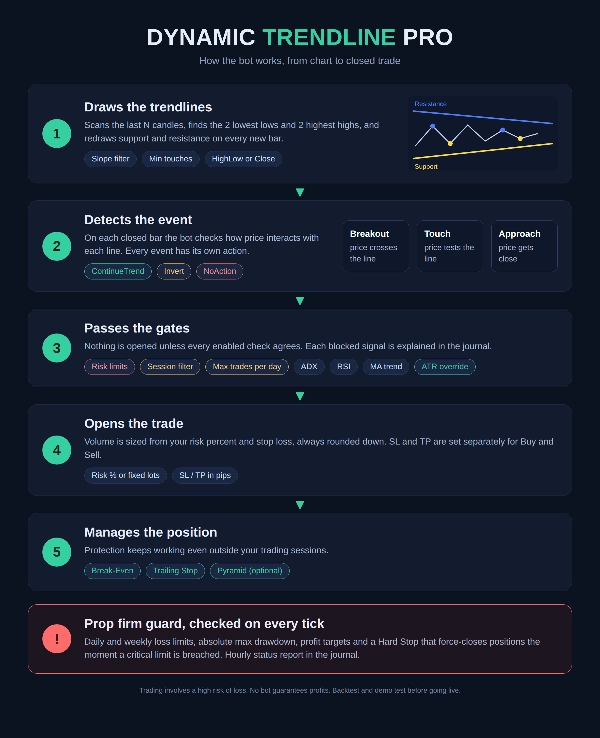
1️⃣ Finds the 2 lowest lows (support) and 2 highest highs (resistance) in the last N candles and draws the lines
2️⃣ On each closed bar, checks for Breakout, Touch or Approach
3️⃣ Runs the gates: risk limits, session, daily limit, ADX, RSI, MA
4️⃣ Opens the order with SL/TP in pips and risk-based volume
5️⃣ Manages the trade with Break-Even, Trailing Stop and Pyramid
Direction when the action is ContinueTrend (Invert does the opposite):
• Support Breakout → Sell
• Support Touch → Buy
• Support Approach → Buy
• Resistance Breakout → Buy
• Resistance Touch → Sell
• Resistance Approach → Sell
━━━━━━━━━━━━━━━━━━━━
PARAMETER GUIDE
⚠️ Pip note: all pip values depend on the instrument. The default values (SL 2500, TP 3000, etc.) are tuned for instruments with a very small pip size, such as Gold. On standard Forex pairs, scale them down. Always review the defaults before going live.
━━━━━━━━━━━━━━━━━━━━
📌 TRADING
• Label – Name tag for this bot's trades. The bot only manages positions with its own label. Use a different label for each instance on the same symbol.
• Size Mode – FixedLots uses a fixed volume. RiskPercent sizes each trade from your balance and stop loss.
• Volume (Lots) – Lot size used in FixedLots mode. Also the fallback if RiskPercent is selected but the SL is 0.
• Risk % per Trade – Percent of balance risked per trade in RiskPercent mode. Volume is rounded down. If the broker's minimum lot forces more risk than requested, a warning is printed in the journal.
• Approach Distance (Pips) – How close to a trendline price must be to trigger an Approach event. 0 disables Approach.
━━━━━━━━━━━━━━━━━━━━
📐 TRENDLINE
• Previous Candles Number – How many candles are scanned to find the two anchor points. Higher gives longer, steadier lines. Lower gives faster, more reactive lines.
• Support Price Source – HighLow (lows) or Close for the support line.
• Resistance Price Source – HighLow (highs) or Close for the resistance line.
━━━━━━━━━━━━━━━━━━━━
🔎 TRENDLINE VALIDATION
• Use Touch Validation – Rejects lines with too few contact points.
• Min Touches Required – Minimum touches, counting the 2 anchor points.
• Touch Tolerance (Pips) – Max distance from the line for a candle to count as a touch.
• Use Slope Filter – Only accepts lines whose slope falls inside a range.
• Min Slope Angle – Minimum absolute angle, in degrees.
• Max Slope Angle – Maximum absolute angle, in degrees.
━━━━━━━━━━━━━━━━━━━━
🎯 SUPPORT / RESISTANCE ACTIONS
Six parameters, one for each event:
Action on Support Breakout / Touch / Approach
Action on Resistance Breakout / Touch / Approach
Each accepts:
• ContinueTrend – enter in the "natural" direction (see the list above)
• Invert – enter in the opposite direction
• NoAction – ignore the event
Defaults: Support Breakout = Invert, Support Approach = ContinueTrend, Resistance Touch = ContinueTrend, the rest NoAction.
━━━━━━━━━━━━━━━━━━━━
🛑 STOP LOSS / TAKE PROFIT
• Stop Loss Long / Short (Pips) – Separate SL for Buy and Sell. 0 means NO stop. Do not use 0 in RiskPercent mode: the bot falls back to fixed volume and warns you.
• Take Profit Long / Short (Pips) – Separate TP for Buy and Sell. 0 means no TP.
━━━━━━━━━━━━━━━━━━━━
⚖️ BREAK-EVEN
• Use Break-Even – Moves the stop to break-even once the trade is in profit.
• BE Trigger (Profit Pips) – Profit needed to activate break-even.
• BE Extra Pips (Beyond Entry) – How many pips beyond entry the new stop is placed. It must be well BELOW the Trigger, otherwise the broker rejects the level. The bot warns you at startup.
━━━━━━━━━━━━━━━━━━━━
📈 TRAILING STOP
• Use Trailing Stop – Enables the trailing stop.
• TS Trigger (Profit Pips) – Profit at which trailing starts.
• TS Distance (Pips) – Distance between price and the stop.
ℹ️ Break-Even and Trailing always run, even outside your trading sessions. The session filter only blocks NEW entries.
━━━━━━━━━━━━━━━━━━━━
🧮 POSITION MANAGEMENT
• Max Trades Per Day (0=off) – Maximum trades OPENED per day, pyramid entries included, win or lose. Rebuilt from broker history on restart. Rolls over at Limits Reset Time UTC.
• Max Initial Long Entries – Max simultaneous Buy positions.
• Max Initial Short Entries – Max simultaneous Sell positions.
━━━━━━━━━━━━━━━━━━━━
🔺 PYRAMID
• Use Pyramid – Enables adding to an open position.
• Pyramid after BreakEven – Allows an add-on once the position reached break-even.
• Pyramid on Retrace (Pips) – Adds when price pulls back this many pips from its best level.
• Pyramid Lot Multiplier – Lot multiplier per level (1.5 = +50% each add-on).
• Max Pyramid Long / Short Entries – Maximum add-ons per direction.
Pyramid entries count toward the daily trade limit. They also respect the session filter and the risk limits.
━━━━━━━━━━━━━━━━━━━━
🕐 SESSION FILTER
Sessions are ADDITIVE: if any enabled session is open, the bot can trade. Times are entered in each market's LOCAL time, in HH:mm format. The bot converts them to UTC and handles UK and US daylight saving separately. Japan has none.
• Enable Session Filter – Turns the filter on. If it is on with no session selected, NO trades will be opened.
• Adjust For Daylight Saving – Automatic DST for UK (last Sunday of March to last Sunday of October) and US (second Sunday of March to first Sunday of November).
• Apply Session Filter To Pyramid – Also restricts pyramid add-ons to your sessions.
• Trade Asian Session + Start/End – Tokyo local time (default 09:00–15:00)
• Trade London Open + Start/End – London local time (default 08:00–11:00)
• Trade New York Open + Start/End – New York local time (default 09:30–11:30)
• Trade London NY Overlap + Start/End – London local time (default 13:00–16:00)
• Trade New York Afternoon + Start/End – New York local time (default 13:00–16:00)
• Use Custom Session – Your own window.
• Custom Session Timezone – UtcTime, LondonLocal, NewYorkLocal or TokyoLocal.
• Custom Session Start / End – Supports overnight windows (e.g. 22:00 to 06:00).
━━━━━━━━━━━━━━━━━━━━
🛡️ RISK MANAGEMENT (PROP FIRM)
• Use Daily Loss Limit – Daily drawdown limit measured on EQUITY from the day's high-water mark, the way most prop firms measure it.
• Daily Loss Limit Percent – Maximum daily loss, in percent.
• Use Weekly Loss Limit – Weekly limit on realized losses.
• Weekly Loss Limit Percent – Maximum weekly loss, in percent.
• Use Max Drawdown Limit – Absolute equity floor based on the session's starting balance. Once breached it LATCHES: trading stays disabled until you restart the bot.
• Max Drawdown Limit Percent – Maximum total drawdown. Keep it above the daily limit.
• Use Daily Profit Target – Enables a daily profit goal.
• Daily Profit Target Percent – Daily profit goal, in percent.
• Use Weekly Profit Target – Enables a weekly profit goal.
• Weekly Profit Target Percent – Weekly profit goal, in percent.
• Stop Trading On Profit Target – When on, the bot stops opening trades once a target is hit. When off, it keeps trading and only logs it.
• Use Forced Closure Hard Stop – When a critical limit (loss or drawdown) is breached, open positions are closed immediately.
• Hard Stop Closes All Symbol Positions – DEFAULT: ON. Closes ALL positions on the symbol, including manual trades and trades from other bots, because prop firms measure drawdown on the whole account. Turn it off to close only this bot's positions.
• Limits Reset Time UTC – When daily and weekly counters and the trades-per-day count reset. Trading is re-enabled at reset, unless max drawdown was breached.
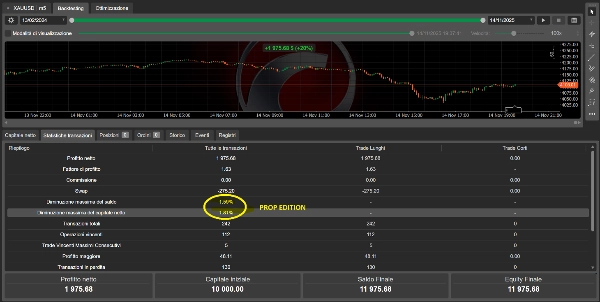
• Enable Hourly Status Report – Prints equity, daily and total drawdown, daily P/L and trading status to the journal every hour.
━━━━━━━━━━━━━━━━━━━━
📊 TREND MA FILTER
• Use Trend MA Filter – Buys only above the moving average, sells only below.
• MA Period / MA Type – Period and type of the moving average.
✅ RSI CONFIRMATION
• Use RSI Confirmation Filter – Confirms entries with RSI.
• RSI Confirmation Period – RSI period.
• RSI Confirm Level Buy (>=) – Buys are allowed only if RSI is at or above this level.
• RSI Confirm Level Sell (<=) – Sells are allowed only if RSI is at or below this level.
↔️ SIDEWAYS MARKET FILTER (ADX)
• Use Sideways ADX Filter – Blocks entries in ranging markets.
• ADX Period – ADX period.
• ADX Threshold Level (< Blocks) – Entries are blocked when ADX is below this value.
━━━━━━━━━━━━━━━━━━━━
⚡ OVERRIDE TREND (ATR & MANUAL)
• Force Always ContinueTrend (Manual) – Always forces the breakout direction and bypasses filters. Use with caution.
• Use ATR Override – Enables unusual-volatility detection.
• ATR Panic Mode (Bypass Filters) – In high volatility, forces the breakout direction AND skips the ADX/RSI/MA filters.
• ATR Direction Only (Keep Filters) – In high volatility, forces the breakout direction but KEEPS the filters.
• ATR Period – ATR period.
• ATR Average Period – Period of the ATR average used as a baseline.
• ATR Threshold Multiplier – The override triggers when ATR exceeds its average times this value.
If ATR Override is on but both Panic Mode and Direction Only are off, ATR is only monitored and changes nothing.
━━━━━━━━━━━━━━━━━━━━
🆕 WHAT'S NEW IN V2.6.1
• Fixed inverted Bid/Ask in open-profit calculation (Break-Even, Trailing and Pyramid were firing one spread early)
• Break-Even and Trailing now validate levels before sending, and no longer retry a rejected level on every bar
• Position sizing always rounds DOWN, with a warning when the minimum lot raises your risk
• RiskPercent with SL = 0 no longer invents a 10-pip stop
• Max Trades Per Day now rolls over at Limits Reset Time UTC
• Hard Stop snapshots positions first, so it cannot stop halfway
• Startup validation flags configurations that cannot work
━━━━━━━━━━━━━━━━━━━━
💡 QUICK START TIPS
- Backtest first, then forward test on demo before going live
- Adjust SL/TP/Trailing/Break-Even to your instrument's pip size
- On prop accounts, set your limits TIGHTER than the firm's (e.g. 2% daily vs the firm's 5%)
- Read the journal at startup: it summarizes your sessions, limits and any config warnings
- Max Trades Per Day defaults to 1, so with Pyramid on, the add-ons would use up the limit
━━━━━━━━━━━━━━━━━━━━
⚠️ RISK DISCLAIMER
Trading CFDs, Forex and commodities involves a high risk of losing your capital. No bot guarantees profits. Past performance and backtest results are not indicative of future results. This software is an automation tool and is not financial advice. Only trade with money you can afford to lose.
https://www.youtube.com/watch?v=ZPy1xNpjC8Q
สรุป
Key functionalities include session-based trading filters with automatic daylight saving adjustments, multiple technical filters (MA trend, RSI, ADX, slope angle), and volatility overrides using ATR. Trade management features encompass risk-based position sizing (rounding down), configurable stop loss and take profit levels, break-even and trailing stops, and optional pyramiding with customizable parameters.
Risk controls tailored for prop firms include daily and weekly loss limits, maximum drawdown thresholds, profit targets, and hard stops that can close all positions on a symbol. The bot enforces maximum trades per day and validates all risk limits on every tick. It supports multiple trading sessions (Asian, London, New York, overlaps, and custom) and provides detailed journaling for trade decisions and blocked entries.
This bot operates on market orders, is optimized for day trading with medium trade frequency, and is compatible with instruments requiring careful pip size adjustment. It includes a comprehensive parameter set for trendline validation, entry conditions, and risk management to adapt to various trading styles and risk profiles.