

คำอธิบาย
การวิเคราะห์ Precision FVG - ตัวบ่งชี้ช่องว่างมูลค่ายุติธรรมระดับมืออาชีพ
ภาพรวม
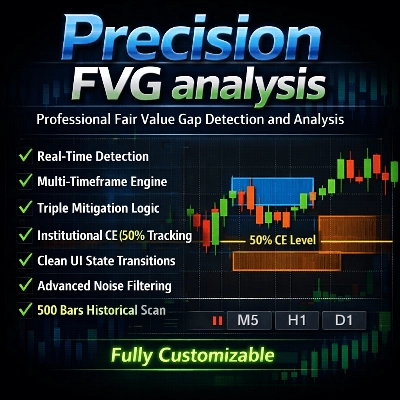
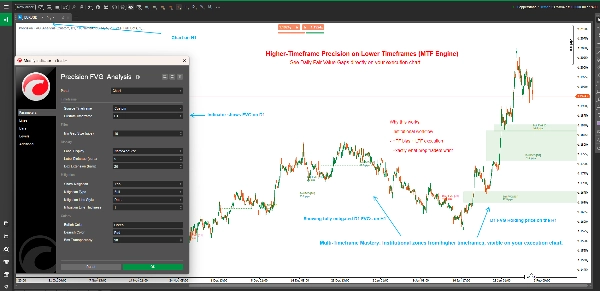
การวิเคราะห์ Precision FVG เป็นตัวบ่งชี้การตรวจจับช่องว่างมูลค่ายุติธรรม (FVG) ที่ทรงพลังและยืดหยุ่น ออกแบบมาสำหรับเทรดเดอร์ที่จริงจังซึ่งใช้แนวคิด Smart Money Concepts (SMC) และวิธีการ ICT ตัวบ่งชี้ขั้นสูงนี้จะระบุ ติดตาม และแสดงภาพช่องว่างมูลค่ายุติธรรมในหลายกรอบเวลาโดยอัตโนมัติ พร้อมความสามารถในการติดตามการบรรเทาที่ซับซ้อน
ช่องว่างมูลค่ายุติธรรมแสดงถึงความไม่สมดุลในตลาดที่ราคาขยับเร็วเกินไป ทำให้เกิดความไม่มีประสิทธิภาพซึ่งมักจะถูกกลับไปดูอีกครั้ง การเข้าใจและเทรดช่องว่างเหล่านี้เป็นสิ่งสำคัญสำหรับเทรดเดอร์ที่ใช้การเคลื่อนไหวของราคาในยุคปัจจุบัน
คุณสมบัติหลัก
🎯 การวิเคราะห์หลายกรอบเวลา
- การตรวจจับกรอบเวลาที่ปรับได้: เลือกแสดง FVG จากกรอบเวลาปัจจุบันของชาร์ตหรือกรอบเวลาแบบกำหนดเองใดก็ได้
- การเทรดข้ามกรอบเวลา: ดู FVG ของกรอบเวลาที่สูงกว่าบนชาร์ตกรอบเวลาที่ต่ำกว่าเพื่อบริบทการเทรดที่ดีขึ้น
- ป้ายกรอบเวลาอัจฉริยะ: การระบุกรอบเวลาอัตโนมัติในป้ายเมื่อใช้กรอบเวลาแบบกำหนดเอง
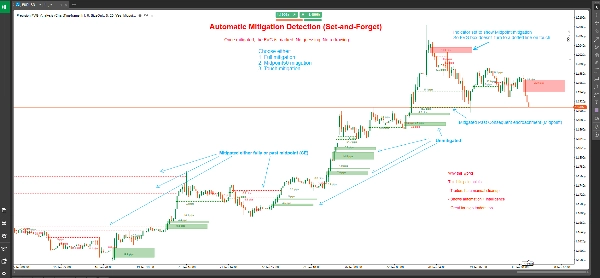
📊 การติดตามการบรรเทาขั้นสูง
- สามประเภทของการบรรเทา:
-
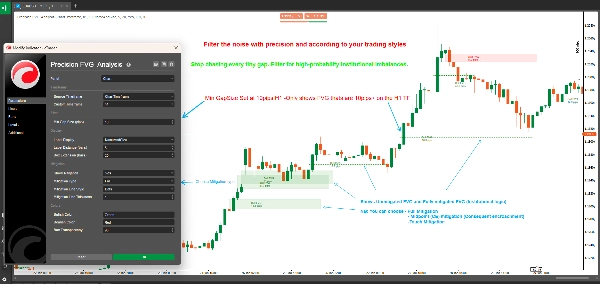
- การบรรเทาเต็มรูปแบบ: ราคากรอกช่องว่างทั้งหมดอย่างสมบูรณ์ (ระมัดระวังที่สุด)
- 50% จุดกึ่งกลาง (CE): ราคาถึงระดับ Consequent Encroachment (แนวทางสมดุล)
- การบรรเทาแบบสัมผัส: ราคาสัมผัสขอบเขตของช่องว่าง (ไวที่สุด)
- การเปลี่ยนแปลงสถานะภาพ: FVG ที่ยังไม่บรรเทาจะแสดงเป็นกล่องเต็ม; FVG ที่บรรเทาแล้วจะแปลงเป็นเส้นประ
- การทำเครื่องหมายการบรรเทาอย่างแม่นยำ: แสดงแท่งเทียนที่เกิดการบรรเทาอย่างชัดเจน
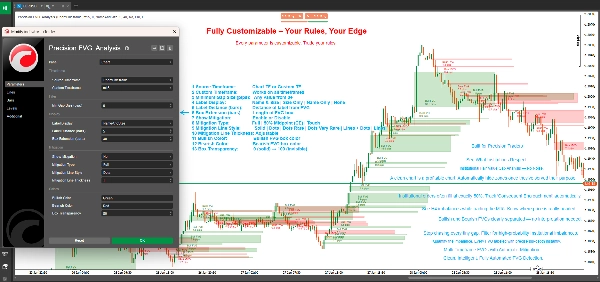
🎨 การแสดงผลที่ปรับแต่งได้เต็มที่
- การขยายกล่องที่ยืดหยุ่น: ควบคุมว่ากล่อง FVG ขยายไปข้างหน้าได้ไกลแค่ไหน (0-500 แท่ง)
- ระบบป้ายอัจฉริยะ: เลือกจากโหมดป้ายสี่แบบ:
-
- ชื่อและขนาด: รายละเอียดเต็มรูปแบบพร้อมประเภท FVG และขนาดพิป
- ขนาดเท่านั้น: ขนาดช่องว่างในหน่วยพิปเท่านั้น
- ชื่อเท่านั้น: การระบุประเภท FVG
- ไม่มี: ชาร์ตสะอาดไม่มีป้าย
- สีที่กำหนดเอง: แยกสีสำหรับแนวโน้มขาขึ้นและขาลง
- ความโปร่งใสที่ปรับได้: ความโปร่งใสของกล่องตั้งแต่ 0-100%
- การปรับแต่งเส้นบรรเทา: เลือกรูปแบบเส้นและความหนาสำหรับ FVG ที่บรรเทาแล้ว
⚙️ การกรองระดับมืออาชีพ
- ตัวกรองขนาดช่องว่างขั้นต่ำ: ตั้งค่าขั้นต่ำของพิปเพื่อกรองช่องว่างที่ไม่มีนัยสำคัญ
- การตรวจจับอัตโนมัติ: การระบุ FVG แบบเรียลไทม์ในทุกแท่งเทียนที่ปิดใหม่
- การสแกนประวัติ: สแกนอัตโนมัติสูงสุด 500 แท่งเทียนในตอนเริ่มต้น
ช่องว่างมูลค่ายุติธรรมคืออะไร?
ช่องว่างมูลค่ายุติธรรม (FVGs) เกิดขึ้นเมื่อมีความไม่มีประสิทธิภาพของราคาระหว่างแท่งเทียนสามแท่งติดต่อกัน:
FVG ขาขึ้น: เกิดขึ้นเมื่อราคาต่ำของแท่งเทียนปัจจุบันสูงกว่าราคาสูงของแท่งเทียนสองแท่งก่อนหน้า โดยแท่งเทียนกลางปิดเหนือราคาสูงนั้น สร้างช่องว่างขึ้นที่มักทำหน้าที่เป็นแนวรับ
FVG ขาลง: เกิดขึ้นเมื่อราคาสูงของแท่งเทียนปัจจุบันต่ำกว่าราคาต่ำของแท่งเทียนสองแท่งก่อนหน้า โดยแท่งเทียนกลางปิดต่ำกว่าราคาต่ำนั้น สร้างช่องว่างลงที่มักทำหน้าที่เป็นแนวต้าน
ช่องว่างเหล่านี้แสดงถึงพื้นที่ที่มีการซื้อหรือขายอย่างรุนแรง ทำให้เกิดความไม่สมดุลของราคา ซึ่งตลาดมักจะกลับไปดูเพื่อหามูลค่ายุติธรรมก่อนที่จะดำเนินไปในทิศทางเดิม
การเข้าใจประเภทของการบรรเทา
การบรรเทาเต็มรูปแบบ (ระมัดระวัง)
- FVG ขาขึ้น: บรรเทาเมื่อราคาซื้อขายต่ำกว่าก้นของช่องว่าง
- FVG ขาลง: บรรเทาเมื่อราคาซื้อขายสูงกว่าหัวของช่องว่าง
- กรณีใช้งาน: การยืนยันว่าช่องว่างถูกกรอกเต็ม เหมาะสำหรับเทรดเดอร์สวิงและกลยุทธ์ที่ต้องการการยืนยัน
50% จุดกึ่งกลาง / CE (สมดุล)
- FVG ขาขึ้น: บรรเทาเมื่อราคาถึงหรือต่ำกว่าจุดกึ่งกลาง
- FVG ขาลง: บรรเทาเมื่อราคาถึงหรือสูงกว่าจุดกึ่งกลาง
- กรณีใช้งาน: ระดับ Consequent Encroachment (CE) มักเป็นที่ที่สถาบันวางคำสั่ง เหมาะสำหรับการเข้าตลาดที่มีความเสี่ยง-ผลตอบแทนดี
การบรรเทาแบบสัมผัส (รุนแรง)
- FVG ขาขึ้น: บรรเทาเมื่อราคาสัมผัสหรือตัดผ่านขอบบน
- FVG ขาลง: บรรเทาเมื่อราคาสัมผัสหรือตัดผ่านขอบล่าง
- กรณีใช้งาน: ระบบเตือนล่วงหน้าสำหรับเทรดเดอร์ที่ต้องการจับปฏิกิริยาที่ขอบ FVG เหมาะสำหรับการสแคปปิ้งและการเข้าตลาดอย่างรวดเร็ว
วิธีใช้
การตั้งค่าพื้นฐาน
- เพิ่ม การวิเคราะห์ Precision FVG ลงในชาร์ตของคุณ
- ตั้งค่า กรอบเวลาต้นทาง ที่คุณต้องการ:
-
- เลือก "ChartTimeframe" เพื่อตรวจจับ FVG บนชาร์ตปัจจุบันของคุณ
- เลือก "Custom" และเลือกกรอบเวลาที่เฉพาะเจาะจง (เช่น H4, D1) เพื่อดู FVG ของกรอบเวลาที่สูงกว่า
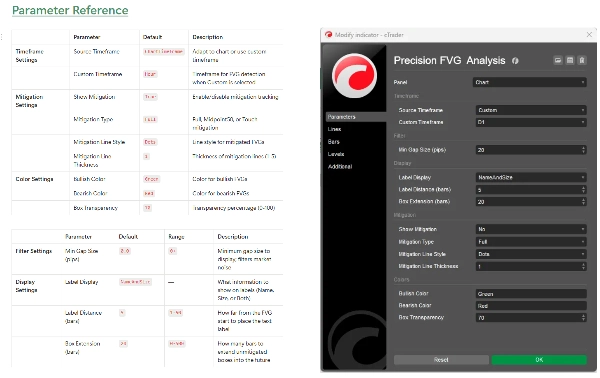
- ตั้งค่า ขนาดช่องว่างขั้นต่ำ เพื่อกรองช่องว่างเล็กๆ ที่ไม่มีนัยสำคัญ (แนะนำ: 2-5 พิปสำหรับฟอเร็กซ์)
การตั้งค่าการบรรเทา
- เปิดใช้งาน แสดงการบรรเทา เพื่อเปิดใช้งานการติดตามการบรรเทา
- เลือก ประเภทการบรรเทา ตามสไตล์การเทรดของคุณ:
-
- เทรดเดอร์รายวันและสแคปเปอร์: พิจารณา "สัมผัส" หรือ "Midpoint50"
- เทรดเดอร์สวิง: ใช้ "เต็ม" เพื่อยืนยัน
- ปรับแต่งลักษณะเส้นบรรเทาด้วย รูปแบบเส้น และ ความหนา
การปรับแต่งภาพ
- ตั้งค่า การขยายกล่อง เพื่อควบคุมว่ากล่องขยายไปไกลแค่ไหน (ค่าเริ่มต้น 20 แท่ง)
- เลือก การแสดงป้าย ที่คุณชอบ
- ปรับ สีขาขึ้น และ สีขาลง ให้เข้ากับธีมชาร์ตของคุณ
- ปรับแต่ง ความโปร่งใสของกล่อง เพื่อการมองเห็นที่ดีที่สุด
กลยุทธ์การเทรด
กลยุทธ์ 1: FVG กรอบเวลาสูงกับการเข้ากรอบเวลาต่ำ
- ตั้งค่าตัวบ่งชี้เป็นกรอบเวลา H4 หรือ D1 บนชาร์ต M15 หรือ M5
- ระบุ FVG กรอบเวลาสูงที่ยังไม่บรรเทา
- รอให้ราคามาใกล้ FVG ในกรอบเวลาต่ำ
- มองหาการยืนยันในกรอบเวลาต่ำ (รูปแบบแท่งเทียน, บล็อกคำสั่ง ฯลฯ)
- เข้าตลาดเมื่อราคาถึงระดับการบรรเทาที่เลือก
กลยุทธ์ 2: โซนการรวมตัวของ FVG
- ใช้ตัวบ่งชี้หลายตัวพร้อมกรอบเวลาที่แตกต่างกัน
- ระบุพื้นที่ที่ FVG หลายกรอบเวลาทับซ้อนกัน
- โซนการรวมตัวเหล่านี้เป็นจุดเทรดที่มีโอกาสสูง
- ใช้การติดตามการบรรเทาเพื่อจับเวลาการเข้าตลาดอย่างแม่นยำ
กลยุทธ์ 3: การยืนยันการเบรกเอาท์
- ระบุระดับแนวรับ/แนวต้านสำคัญ
- เฝ้าดูการก่อตัวของ FVG ในช่วงเบรกเอาท์
- FVG ที่ยังไม่บรรเทาในทิศทางเบรกเอาท์บ่งชี้การดำเนินต่อ
- FVG ที่บรรเทาแล้วบ่งชี้การเบรกเอาท์ล้มเหลวหรือกลับตัว
กลยุทธ์ 4: การสแคปปิ้งแบบอิงการบรรเทา
- ใช้การบรรเทาแบบสัมผัสบนกรอบเวลาต่ำ (M1, M5)
- เข้าตลาดทันทีเมื่อ FVG ถูกสัมผัส
- ตั้งเป้าหมายที่จุดสูง/ต่ำของสวิงก่อนหน้า
- ใช้จุดหยุดที่แน่นใต้/เหนือ FVG
ข้อมูลทางเทคนิค
- แพลตฟอร์ม: cTrader
- ประเภท: ตัวบ่งชี้ซ้อนทับ
- การคำนวณ: แบบเรียลไทม์เมื่อแท่งเทียนปิด
- แท่งเทียนประวัติ: สแกนสูงสุด 500 แท่งเมื่อเริ่มต้น
- จำนวน FVG ที่ใช้งานสูงสุด: ช่องว่างพร้อมกัน 500 ช่อง
- การใช้ทรัพยากร: น้ำหนักเบาและปรับแต่งเพื่อประสิทธิภาพ
แนวทางปฏิบัติที่ดีที่สุด
แนวทางการเทรดทั่วไป
- ผสมผสานกับแนวคิดอื่นๆ: FVG ทำงานได้ดีที่สุดเมื่อรวมกับบล็อกคำสั่ง, สระสภาพคล่อง และโครงสร้างตลาด
- เคารพบริบทตลาด: FVG ในกรอบเวลาสูงมีน้ำหนักมากกว่ากรอบเวลาต่ำ
- ใช้หลายกรอบเวลา: ซ้อน FVG หลายกรอบเวลาเพื่อความสอดคล้อง
- การจัดการความเสี่ยง: ใช้จุดหยุดขาดทุนอย่างเหมาะสมเสมอ; ไม่ใช่ทุก FVG จะคงอยู่
เคล็ดลับการปรับแต่ง
- ปรับขนาดช่องว่างขั้นต่ำ: ตั้งตามความผันผวนเฉลี่ยของเครื่องมือของคุณ
- การขยายกล่อง: ยาวขึ้นสำหรับการเทรดสวิง (50-100 แท่ง), สั้นลงสำหรับการเทรดรายวัน (10-20 แท่ง)
- ประเภทการบรรเทา: ให้เหมาะกับกรอบเวลาและสไตล์การเทรดของคุณ
- ระยะห่างของป้าย: ปรับตามความรกของชาร์ตและระดับการซูม
ข้อผิดพลาดทั่วไปที่ควรหลีกเลี่ยง
- เทรดมากเกินไป: ไม่ใช่ทุก FVG จะเป็นโอกาสเทรด
- ไม่สนใจบริบท: FVG ที่สวนทางกับแนวโน้มแรงมักไม่น่าเชื่อถือ
- เลือกประเภทการบรรเทาผิด: สแคปเปอร์ที่ใช้การบรรเทาเต็มรูปแบบพลาดการเข้าตลาด; เทรดเดอร์สวิงที่ใช้สัมผัสถูกตัดขาดทุน
- ไม่มีการยืนยัน: รอการยืนยันการเคลื่อนไหวของราคาที่ระดับ FVG เสมอ
คำถามที่พบบ่อย
ถาม: ทำไมบาง FVG ถึงหายไปทันที? ตอบ: เมื่อเปิดใช้งาน "แสดงการบรรเทา" พร้อมการบรรเทาแบบ "สัมผัส" FVG ที่ถูกย้อนกลับทันทีจะเปลี่ยนเป็นเส้นประอย่างรวดเร็ว นี่เป็นพฤติกรรมปกติ
ถาม: ฉันสามารถดู FVG หลายกรอบเวลาได้พร้อมกันไหม? ตอบ: ได้! เพิ่มตัวบ่งชี้หลายครั้งในชาร์ตของคุณพร้อมกรอบเวลาแบบกำหนดเองที่แตกต่างกันเพื่อการวิเคราะห์หลายกรอบเวลา
ถาม: ความแตกต่างระหว่างตัวนี้กับตัวบ่งชี้ FVG อื่นๆ คืออะไร? ตอบ: การวิเคราะห์ Precision FVG มีความสามารถหลายกรอบเวลา, สามประเภทการบรรเทา และความชัดเจนทางภาพที่เหนือกว่าโดยใช้การแสดงผลตามสถานะ (กล่องกับเส้น)
ถาม: ควรใช้ประเภทการบรรเทาแบบไหน? ตอบ: เริ่มต้นด้วย Midpoint50 (CE) เพราะสมดุลระหว่างสัญญาณล่วงหน้ากับความน่าเชื่อถือ ปรับตามผลลัพธ์และสไตล์การเทรดของคุณ
ถาม: ตัวนี้ใช้ได้กับเครื่องมือทุกประเภทไหม? ตอบ: ใช่ ตัวบ่งชี้ทำงานได้กับฟอเร็กซ์, ดัชนี, สินค้าโภคภัณฑ์ และคริปโต ปรับพารามิเตอร์ "ขนาดช่องว่างขั้นต่ำ" ตามความผันผวนของเครื่องมือ
ถาม: การสแกนประวัติย้อนหลังไปไกลแค่ไหน? ตอบ: ตัวบ่งชี้สแกนสูงสุด 500 แท่งเมื่อเริ่มต้น ให้บริบทประวัติที่ครอบคลุม
การสนับสนุนและการอัปเดต
ตัวบ่งชี้นี้ได้รับการดูแลและอัปเดตอย่างต่อเนื่อง ผู้ใช้จะได้รับ:
- การอัปเดตเป็นประจำพร้อมฟีเจอร์ใหม่
- การปรับแต่งประสิทธิภาพ
- การแก้ไขบั๊กและการปรับปรุง
- การอัปเดตเอกสาร
สำหรับคำถาม ข้อเสนอแนะ หรือการสนับสนุน โปรดติดต่อผ่านระบบส่งข้อความของร้านค้า cTrader
ข้อจำกัดความรับผิดชอบ
การเทรดมีความเสี่ยงสูงที่จะสูญเสียและไม่เหมาะสำหรับนักลงทุนทุกคน ผลการดำเนินงานในอดีตไม่ใช่ตัวบ่งชี้ผลลัพธ์ในอนาคต ตัวบ่งชี้นี้เป็นเครื่องมือสำหรับการวิเคราะห์และไม่ใช่คำแนะนำทางการเงิน โปรดปฏิบัติการจัดการความเสี่ยงอย่างเหมาะสมและอย่าเสี่ยงเกินกว่าที่คุณจะรับได้
ประวัติรุ่น
รุ่น 1.0 (ปัจจุบัน)
- การตรวจจับ FVG หลายกรอบเวลา
- สามประเภทการบรรเทา (เต็ม, Midpoint50, สัมผัส)
- การเปลี่ยนแปลงสถานะภาพทางภาพ (กล่องเป็นเส้นประ)
- สีและความโปร่งใสที่ปรับแต่งได้
- ระบบป้ายที่ยืดหยุ่น
- การสแกนประวัติ (500 แท่ง)
- การตรวจจับและติดตามแบบเรียลไทม์
การวิเคราะห์ Precision FVG - ยกระดับการเทรดช่องว่างมูลค่ายุติธรรมของคุณสู่ระดับมืออาชีพ
สรุป
Key features include adaptive multi-timeframe detection, allowing users to view FVGs from the current or custom timeframes, and advanced mitigation tracking with three types: Full Mitigation (complete gap fill), 50% Midpoint (Consequent Encroachment), and Touch Mitigation (gap boundary touch). Visual states change accordingly, with unmitigated gaps shown as filled boxes and mitigated ones as dotted lines, including precise candle marking of mitigation events.
The indicator offers extensive customization options such as box extension length, label display modes (name, size, both, or none), separate bullish/bearish color schemes, transparency control, and mitigation line styling. It filters gaps by minimum size and scans up to 500 historical bars on initialization for comprehensive context.
Applicable to Forex, Indices, Commodities, Cryptocurrencies, and Stocks, it supports various trading strategies including multi-timeframe analysis, confluence zones, breakout confirmation, and mitigation-based scalping. The tool operates in real-time on bar close and is optimized for performance with up to 500 active gaps tracked concurrently.
การสนทนา
รีวิวจากลูกค้า
5 | 50 % | |
4 | 50 % | |
3 | 0 % | |
2 | 0 % | |
1 | 0 % |
คำถามที่พบบ่อย
!["[Hamster-Coder] Moving Average MTF" โลโก้](https://cdn.ctrader.com/image/webp/b11b98b1-194d-4b8e-b00e-d611826ad159_31226)
!["[CB] Pivot Points Pro" โลโก้](https://cdn.ctrader.com/image/webp/43463c82-67b0-4f10-a4ba-901bba091d81_32594)







ราคา