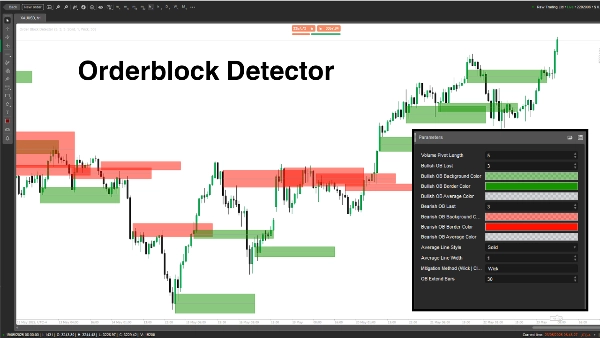
Opis
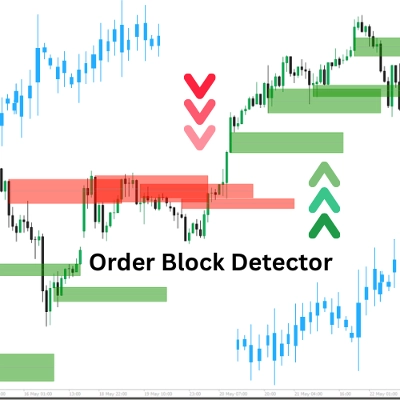
Wskaźnik "Order Block Detector" został stworzony, aby wykrywać i wyświetlać Order Blocki (OB) na wykresie cenowym — kluczowe strefy, w których duzi gracze (instytucje) składają znaczące zlecenia kupna lub sprzedaży, często wywołując silne reakcje cenowe. Pomaga traderom precyzyjnie określić potencjalne strefy wsparcia/oporu dla mądrzejszych wejść w transakcje, stop-lossów lub take-profitów.
Koncepcja
- Order Blocki: Są to strefy cenowe, w których rynek się odwraca lub zatrzymuje z powodu dużego przepływu zleceń instytucjonalnych. Wskaźnik wykrywa OB, analizując szczyty wolumenu oraz stan rynku (byczy/niedźwiedzi).
- Jak to działa:
-
- Określa stan rynku (byczy/niedźwiedzi) poprzez porównanie maksimów/minimów z okresem wstecznym (Length).
- Identyfikuje OB na szczytach wolumenu powiązanych z kluczowymi poziomami cenowymi.
- Rysuje prostokąty i linie średnie, aby oznaczyć OB, jednocześnie sprawdzając i usuwając złagodzone OB, gdy cena je przebija.
- Przypadek użycia: Traderzy mogą używać OB jako stref o wysokim prawdopodobieństwie dla ustawień transakcyjnych, zarządzania ryzykiem lub celów zysku.
Rozbicie parametrów
- Długość Pivot Wolumenu (Length, Domyślnie: 5, Min: 1)
-
- Co robi: Ustawia okres wsteczny (liczbę świec) do obliczania maksimów/minimów i szczytów wolumenu.
- Dlaczego to ważne: Dłuższy okres zwiększa dokładność, ale zmniejsza częstotliwość OB; krótszy okres wykrywa więcej OB, ale może zawierać szumy.
- Ostatni Byczy OB (BullExtLast, Domyślnie: 3, Min: 1)
-
- Co robi: Ogranicza liczbę przechowywanych i śledzonych byczych OB.
- Dlaczego to ważne: Ogranicza liczbę wyświetlanych byczych OB, aby wykres był czytelny i zoptymalizowany pod kątem wydajności.
- Kolor tła byczego OB (BgBullCss, Domyślnie: #80169400)
-
- Co robi: Ustawia kolor tła i przezroczystość prostokątów byczego OB.
- Dlaczego to ważne: Pomaga wizualnie odróżnić bycze OB na wykresie.
- Kolor obramowania byczego OB (BullCss, Domyślnie: #169400)
-
- Co robi: Definiuje kolor obramowania prostokątów byczego OB.
- Dlaczego to ważne: Zwiększa widoczność stref byczego OB.
- Kolor średniej byczego OB (BullAvgCss, Domyślnie: #609598A1)
-
- Co robi: Koloruje linię średnią wewnątrz byczego OB.
- Dlaczego to ważne: Oznacza środek OB, służący jako kluczowy poziom odniesienia dla traderów.
- Ostatni Niedźwiedzi OB (BearExtLast, Domyślnie: 3, Min: 1)
-
- Co robi: Ogranicza liczbę przechowywanych i śledzonych niedźwiedzich OB.
- Dlaczego to ważne: Podobnie jak BullExtLast, utrzymuje wykres czytelny, ograniczając niedźwiedzie OB.
- Kolor tła niedźwiedziego OB (BgBearCss, Domyślnie: #80FF1100)
-
- Co robi: Ustawia kolor tła i przezroczystość prostokątów niedźwiedziego OB.
- Dlaczego to ważne: Odróżnia niedźwiedzie OB od byczych.
- Kolor obramowania niedźwiedziego OB (BearCss, Domyślnie: #FF1100)
-
- Co robi: Definiuje kolor obramowania prostokątów niedźwiedziego OB.
- Dlaczego to ważne: Sprawia, że niedźwiedzie OB są wyraźnie widoczne dla szybkiej identyfikacji.
- Kolor średniej niedźwiedziego OB (BearAvgCss, Domyślnie: #609598A1)
-
- Co robi: Koloruje linię średnią wewnątrz niedźwiedziego OB.
- Dlaczego to ważne: Podkreśla centralny poziom cenowy niedźwiedziego OB dla planowania transakcji.
- Styl linii średniej (LineStyle, Domyślnie: Solid)
-
- Co robi: Ustawia styl linii średniej OB (ciągła, przerywana, kropkowana).
- Dlaczego to ważne: Dostosowuje wygląd linii średniej do preferencji tradera.
- Grubość linii średniej (LineWidth, Domyślnie: 1, Min: 1)
-
- Co robi: Reguluje grubość linii średniej OB.
- Dlaczego to ważne: Kontroluje, jak wyraźnie linia średnia jest widoczna na wykresie.
- Metoda łagodzenia (Mitigation, Domyślnie: "Wick")
-
- Co robi: Określa, jak OB są unieważniane:
-
- Wick: Używa najniższej ceny (byczy OB) lub najwyższej ceny (niedźwiedzi OB) do sprawdzenia łagodzenia.
- Close: Używa ceny zamknięcia do sprawdzenia łagodzenia.
- Dlaczego to ważne: Wpływa na czułość wskaźnika na przebicie stref OB, decydując o momencie usuwania OB.
Order Block Detector to potężne narzędzie do wykrywania instytucjonalnych stref zleceń na podstawie skoków wolumenu i ruchów cen. Rysuje wyraźne prostokąty OB z liniami średnimi i dynamicznie usuwa unieważnione. Traderzy mogą dostosowywać parametry, aby precyzyjnie dopasować wykrywanie, wyświetlanie i zarządzanie OB do swojego stylu handlu.
Podsumowanie
The indicator works by analyzing volume pivot highs and determining market state (bullish or bearish) based on highs and lows over a configurable lookback period. It marks OBs with rectangles and average lines, dynamically removing those invalidated when price breaks through the zones. Users can customize parameters such as the lookback length, the number of bullish and bearish OBs tracked, colors and styles of OB rectangles and average lines, and the method used to detect OB mitigation (using wick or close prices).
This flexibility allows traders to tailor the detection and visualization of Order Blocks to their trading style, aiding in identifying high-probability zones for trade setups, risk management, and profit targeting.
Opinie klientów
5 | 100 % | |
4 | 0 % | |
3 | 0 % | |
2 | 0 % | |
1 | 0 % |