![Trading product for Gaussian Channel [Iridio Capital] Indicador BTCUSD Signal, image 1](https://cdn.ctrader.com/image/webp/2c4f9ca9-4e9b-476d-b5a6-787c8095032b_61546)
![Trading product for Gaussian Channel [Iridio Capital] Indicador BTCUSD Signal, image 2](https://cdn.ctrader.com/image/webp/ec813869-e811-4734-99a4-2059f47fcfd0_61545)
![Trading product for Gaussian Channel [Iridio Capital] Indicador BTCUSD Signal, image 3](https://cdn.ctrader.com/image/webp/b37468c1-e550-4aef-bd19-529f4940409f_41961)
![Trading product for Gaussian Channel [Iridio Capital] Indicador BTCUSD Signal, image 4](https://cdn.ctrader.com/image/webp/3f23aafc-2ba3-4316-becf-bed38d9862f4_41962)
Descrição
DESCRIÇÃO COMPLETA
Canal Gaussiano [DW] – Filtro de Tendência Adaptativo com Bandas de Volatilidade para cTrader
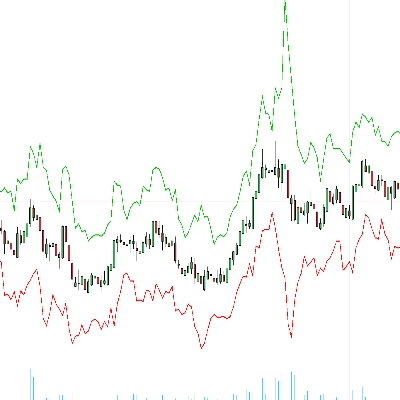
Uma fiel porta do indicador Canal Gaussiano aclamado de DonovanWall para cTrader. Esta sobreposição aplica um filtro Gaussiano IIR (Resposta ao Impulso Infinita) multipolo aos dados de preço, produzindo uma linha de tendência ultra-suave cercada por bandas baseadas na volatilidade — tudo com cor dinâmica que muda entre verde e vermelho conforme a direção da tendência muda.
O filtro Gaussiano é matematicamente superior às médias móveis padrão: cada polo adicional aumenta a ordem de suavização, eliminando progressivamente o ruído de alta frequência enquanto preserva o sinal da tendência subjacente com distorção mínima.
🔬 COMO FUNCIONA
O Filtro Gaussiano (Motor Principal)
No coração deste indicador está a implementação do filtro Gaussiano IIR de John Ehlers. Em vez de uma média móvel simples, o filtro aplica um núcleo de suavização exponencial várias vezes em sucessão (uma passagem por "polo"). O resultado é uma curva de resposta que aproxima de perto uma verdadeira distribuição Gaussiana no domínio da frequência.
O coeficiente de suavização (alfa) é derivado do período de amostragem que você escolher. Ele é calculado usando a fórmula de Ehlers baseada no cosseno da frequência angular e um fator de correção para o número de polos. A equação do filtro recursivo usa coeficientes binomiais (triângulo de Pascal) para combinar valores passados do filtro — produzindo uma resposta Gaussiana multipolo matematicamente exata.
Em termos práticos: mais polos significam saída mais suave com menos atraso por unidade de suavização comparado ao empilhamento de médias móveis simples.
Bandas de Volatilidade (O Canal)
As bandas superior e inferior são construídas aplicando o mesmo filtro Gaussiano ao True Range, depois adicionando/subtraindo o TR filtrado multiplicado por um fator configurável. Isso cria um canal que se expande dinamicamente durante condições voláteis e se contrai durante mercados calmos — semelhante em conceito às Bandas de Bollinger, mas com um envelope muito mais suave e com menos ruído.
Cor Dinâmica
A linha central e ambas as bandas mudam de cor com base na direção do filtro: verde quando o filtro está subindo, vermelho quando está caindo. As transições de cor são tratadas de forma contínua — tanto a série de cor que sai quanto a que entra são desenhadas na barra de transição para evitar lacunas visuais entre os segmentos.
⚡ MODOS ESPECIAIS
Modo de Atraso Reduzido
Filtros Gaussianos padrão introduzem atraso de fase proporcional à sua força de suavização. Quando o Atraso Reduzido está ativado, o indicador pré-processa a série de entrada adicionando a diferença entre o valor atual e o valor de N barras atrás (onde N é o atraso calculado). Isso efetivamente antecipa a entrada, reduzindo significativamente o atraso do filtro enquanto mantém a maior parte de suas propriedades de suavização.
Modo de Resposta Rápida
Quando ativado, a saída final é a média entre o filtro completo de N polos e o filtro de 1 polo. A versão de 1 polo reage mais rápido (com mais ruído), enquanto a versão de N polos é mais suave (com mais atraso). Misturá-los produz um compromisso: reação mais rápida às mudanças de tendência sem sacrificar totalmente a suavidade.
Ambos os modos podem ser combinados para máxima responsividade, ou desativados para a saída Gaussiana mais pura e suave.
📊 O QUE VOCÊ VÊ NO GRÁFICO
- Linha Central — O preço filtrado pelo Gaussiano (HLC3), desenhado em verde quando sobe e vermelho quando desce. Esta é sua referência principal de tendência.
- Banda Superior — A linha central mais o True Range filtrado pelo Gaussiano vezes o multiplicador. Atua como uma zona dinâmica de resistência/sobrecompra.
- Banda Inferior — A linha central menos o True Range filtrado pelo Gaussiano vezes o multiplicador. Atua como uma zona dinâmica de suporte/sobrevenda.
- Mudanças de Cor — Transições suaves entre segmentos de alta (verde) e baixa (vermelho), sem lacunas ou sobreposições nas mudanças de direção.
📈 COMO USAR
Identificação de Tendência O uso mais imediato: quando o canal está verde, a tendência é de alta; quando vermelho, a tendência é de baixa. As transições de cor marcam potenciais reversões de tendência. Isso sozinho substitui múltiplos sistemas de cruzamento de médias móveis com um único sinal mais claro.
Suporte/Resistência pelas Bandas Em uma tendência de alta, a banda inferior atua como suporte dinâmico — retrações que tocam ou se aproximam dela são potenciais entradas longas. Em uma tendência de baixa, a banda superior atua como resistência dinâmica — repiques nela oferecem potenciais entradas curtas.
Confirmação de Rompimento Quando o preço fecha fora do canal (acima da banda superior ou abaixo da banda inferior), sinaliza forte momentum. Combine isso com volume ou análise da estrutura do mercado para confirmar operações de rompimento.
Filtragem de Outros Sinais Use o Canal Gaussiano como filtro direcional: só faça setups longos de outros indicadores quando o canal estiver verde, e setups curtos quando estiver vermelho. Isso reduz drasticamente sinais falsos de osciladores e ferramentas baseadas em padrões.
Ajuste dos Parâmetros
- Período de Amostragem inferior (ex.: 50–80) para scalping intradiário em M1–M15.
- O padrão 144 funciona bem em M30–H4 para swing trading.
- Valores mais altos (200+) em Diário/Semanal para trading de posição e identificação de macro tendência.
- Aumente os Polos (5–7) para saída ultra-suave em instrumentos ruidosos. Diminua (2–3) para filtragem mais rápida e reativa.
- Ajuste o Multiplicador TR para alargar (1.5–2.0) ou estreitar (0.8–1.2) o canal para combinar com o perfil de volatilidade do instrumento.
💡 DICAS
- Comece com os padrões (4 polos, período 144, multiplicador 1.414) — eles são bem calibrados para a maioria dos pares forex em H1–H4.
- Ative o Atraso Reduzido se achar que o filtro atrasa demais em movimentos bruscos, mas note que pode introduzir leve overshoot.
- Ative o Resposta Rápida quando quiser transições de cor mais rápidas sem reduzir o número de polos.
- Combinar ambos os modos dá máxima responsividade — útil em timeframes menores, mas pode reduzir a qualidade da filtragem em timeframes maiores.
- O multiplicador 1.414 não é arbitrário — equivale à raiz quadrada de 2, valor derivado da pesquisa original de Ehlers sobre largura ótima de banda para ruído distribuído Gaussianamente.
⚠️ AVISO LEGAL
Este indicador é uma ferramenta de análise técnica projetada para identificação de tendência e visualização de volatilidade. Ele não gera sinais automáticos de compra/venda e não deve ser usado como única base para decisões de negociação. Sempre use gerenciamento de risco adequado e combine com sua própria análise. Desempenho passado não garante resultados futuros. Negociar envolve risco significativo de perda.
Resumo
The filter uses John Ehlers' implementation, which applies exponential smoothing multiple times to approximate a Gaussian distribution, reducing noise while preserving trend signals with minimal lag. The indicator features dynamic color changes: green when the trend is rising and red when falling, with seamless transitions to indicate trend direction shifts.
Two special modes enhance responsiveness: Reduced Lag mode anticipates input to minimize filter delay, and Fast Response mode blends outputs from different poles for quicker reaction to trend changes. Both can be combined or used separately.
Traders use the Gaussian Channel for trend identification, support/resistance detection, breakout confirmation, and as a directional filter for other signals. Parameters such as sampling period, number of poles, and True Range multiplier can be adjusted to suit different instruments and timeframes, from scalping to position trading.
Avaliações de clientes
5 | 67 % | |
4 | 33 % | |
3 | 0 % | |
2 | 0 % | |
1 | 0 % |

![Logótipo de "Custom Timeframes [Iridio Capital]"](https://cdn.ctrader.com/image/webp/4d75a920-23c7-4fea-a7b5-594a9d067f2e_63286)
![Logótipo de "Trend Angle Indicator [Iridio Capital]"](https://cdn.ctrader.com/image/webp/75f1045e-ef06-4d88-8208-bc347c788992_61558)
![Logótipo de "Smart Money Concepts (SMC) [Iridio Capital]"](https://cdn.ctrader.com/image/webp/b4b5414d-a5ca-44b7-a947-e28eca44a218_61548)
![Logótipo de "High-Low Divergence [Iridio Capital]"](https://cdn.ctrader.com/image/webp/10a9e91b-243a-43f6-bbfe-7376bad5a214_61554)
![Logótipo de "Wyckoff Toolkit [Iridio Capital]"](https://cdn.ctrader.com/image/webp/5318c788-91ef-4297-bca6-4ce73b1516a8_61556)
![Logótipo de "Session Volume Profile (SVP) [Iridio Capital]"](https://cdn.ctrader.com/image/webp/b058beb7-b143-45f3-87d0-8c524c00b203_61552)
![Logótipo de "Inverse Fair Value Gap (iFVG) [Iridio Capital]"](https://cdn.ctrader.com/image/webp/314e3224-d85e-48a4-9111-a2b0baaf3477_61527)
![Logótipo de "Forecast Indicator [Iridio Capital]"](https://cdn.ctrader.com/image/webp/0115b1cf-e645-41d0-88db-5919a94116aa_61550)