

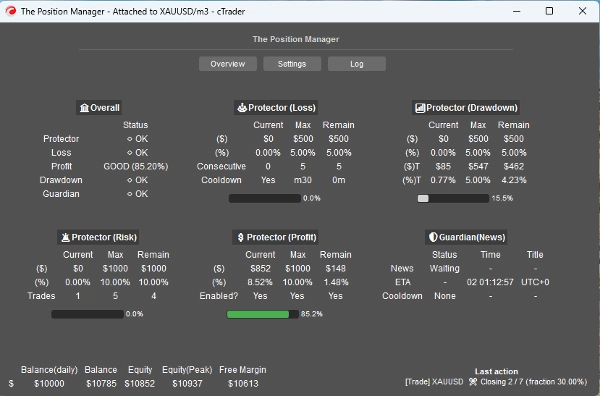
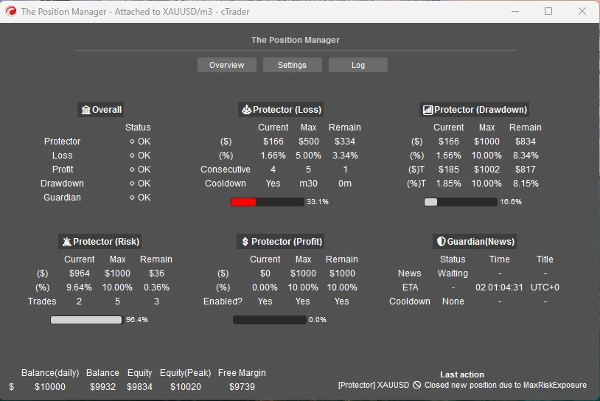
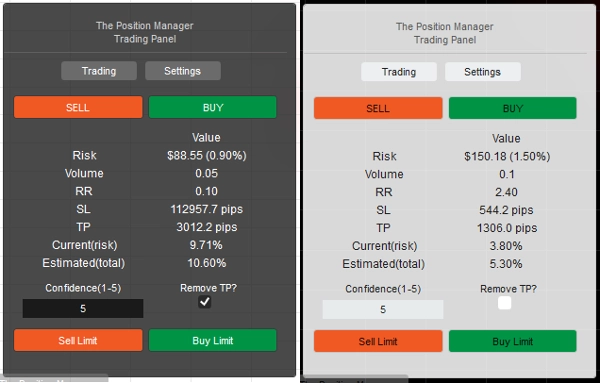
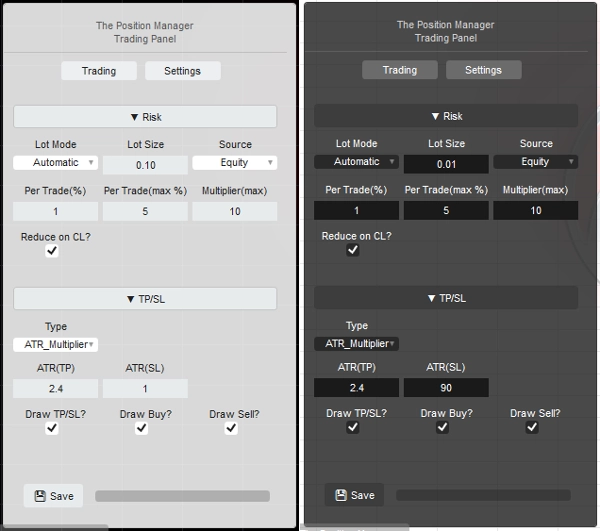

Descrição
Deixe-me apresentar => O Gerenciador de Posições
- O gerenciamento de negociações tudo-em-um para Traders e Desenvolvedores
Para Traders => Proteja lucros, Limite perdas e Imponha disciplina por meio de entradas configuráveis.
O Gerenciador de Posições possui 4 módulos que justificam seu nome:
- Protetor de Portfólio
- Guardian Trading
- Gerenciador de Risco (para negociação manual/semi-automatizada)
- Gerenciador de Negociações (trailing TP, TP/SL parciais)
Cada um com submódulos para melhor gerenciamento.
Casos de uso:
- Traders buscando proteção de portfólio + escalonamento inteligente ao negociar em Desktop, Mobile e Web.
-
- Se você negocia inteiramente via Desktop, use Modo Headless=> DESLIGADO
- Se você também negocia via Mobile/Web, use Modo Headless=> LIGADO
- Prop-Traders com limites de risco fixos.
- Desenvolvedores que querem transformar sinais de negociação em entradas reais.
Como usar:
- Para o primeiro uso, recomendo fortemente:
- Criar apenas uma instância do "Gerenciador de Posições" com:
- Modo Headless => DESLIGADO (modo UI)
- Modo de Instância => Ambos (Gerenciador + Painel de Negociação)
- Depois, aprenda sobre seu comportamento, preferencialmente em backtesting(modo visual) antes de ir ao vivo.
Tenha em mente => "O Gerenciador de Posições" não abre posições por si só:
- Ele gerencia as existentes!
- enquanto fornece gerenciamento a nível de conta.
Para contas pequenas, você pode aumentar as porcentagens.
Para contas grandes, você pode diminuir as porcentagens.
Em qualquer caso, sempre adapte as entradas ao tamanho da sua conta.
Uma vez familiarizado com os parâmetros/comportamento, você pode executá-lo no cTrader Cloud para gerenciar posições no Mobile/Web, há apenas duas regras simples a seguir:
- Modo Headless=> LIGADO
- Além disso, apenas uma instância do "Gerenciador de Posições" deve ser adicionada:
-
- Caso contrário, elas podem “competir” entre si, pois a maioria das operações são para todos os símbolos.
- A mesma regra se aplica ao executar localmente.
Deixe-me explicar os parâmetros e comportamento esperado para cada um:
Embora alguns sejam intuitivos, há muitos parâmetros...
Por favor leia cada um com paciência.
==== O Gerenciamento de Posições ====
- Modo Headless? => Os recursos disponíveis neste modo são:
-
- Protetor de Portfólio
-
- Todos os recursos estão disponíveis.
- Guardian Trading
-
- Filtro de notícias está desativado se o Modo Headless => LIGADO.
- Lucro Trailing
-
- Para qualquer símbolo, as posições não devem ter Take Profit.
- Fechamentos Parciais
-
- Para qualquer símbolo, as posições devem ter Take Profit ou Stop Loss
=> Headless DESLIGADO (modo UI)
- Modo de Instância:
-
- Gerenciador => Apenas uma instância deve ser adicionada.
- Negociação => Painel de negociação puro (módulo Gerenciador de Risco), você pode adicionar múltiplas instâncias.
- Ambos => Apenas uma instância deve ser adicionada:
-
- Gerenciador será exibido como Janela.
- Negociação será exibido no Gráfico.
- Tipo/Posição do Painel: Autoexplicativo
- Armazenamento Por:
-
- Use Corretora para salvar/carregar as mesmas configurações a cada reinício.
- Use Corretora_Símbolo se quiser usar a configuração de cada símbolo como uma espécie de “perfil de risco”.
=> Headless DESLIGADO/LIGADO - Localmente
- Permitir Modo Mensagem?
-
- Autoexplicativo
- Ao usar [Negociação, Ambos] Modo de Instância, mude o “TP/SL => Tipo” para “Pips” nas configurações do painel para que o TP/SL possa ser definido pela mensagem.
- Permitir Negociação por Mensagem?
-
- Permitir abrir posições pelas mensagens.
- Se Headless LIGADO, a configuração do Gerenciador de Risco não é possível.
- Se Headless DESLIGADO, ao usar [Negociação, Ambos] Modo de Instância, você pode configurar o Módulo Gerenciador de Risco como desejar.
=> Headless LIGADO / Conta Geral
- Breakeven Mínimo(%):
-
- Para cada posição, quando a lógica de Breakeven for executada pelos módulos de Lucro Trailing/Parcial, em vez de mover o SL diretamente para o Preço de Entrada (o que leva a PnL negativo).
- O SL será movido x% à frente do Preço de Entrada.
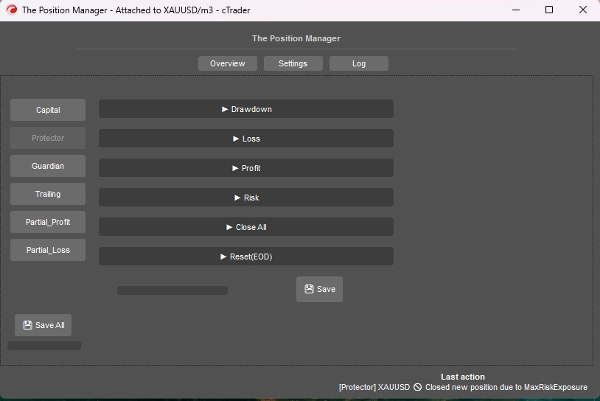
=> Headless LIGADO / Protetor de Drawdown
- Modo Drawdown:
-
- Diário => Baseado no Saldo do Dia
- Trailing => Baseado no Pico de Patrimônio
- Tipo de Drawdown:
-
- Porcentagem => % do Saldo do Dia, ideal para crescimento dinâmico.
- Fixo => Quantia fixa, ideal para regras rígidas
- Drawdown Máximo => % ou fixo (autoexplicativo)
=> Headless LIGADO / Protetor de Perda
- Fonte da Perda: => Atualmente, baseado apenas no “Saldo do Dia”.
-
- Se o Patrimônio cair abaixo do Saldo do Dia, então será acionado/contado.
- Tipo de Perda:
-
- Porcentagem => % do Saldo do Dia, ideal para crescimento dinâmico.
- Fixo => Quantia fixa, ideal para regras rígidas
- Perda Máxima Diária² => % ou fixo (autoexplicativo)
- Perdas Consecutivas(CL):
-
- Habilitar fechamento de posições quando ocorrerem perdas consecutivas.
- Contagem Consecutiva:
-
- Autoexplicativo
- Cooldown para Resetar(CL):
-
- Cooldown para resetar a contagem e permitir que novas posições sejam abertas.
=> Headless LIGADO / Protetor de Lucro
- Ativar Limite de Lucro? => Autoexplicativo
-
- Uma vez que o Lucro Máximo seja alcançado, novas posições serão fechadas.
- Fonte do Lucro: => Sempre baseado no Saldo do Dia
- Tipo de Lucro:
-
- Porcentagem => % do Saldo do Dia, ideal para crescimento dinâmico.
- Fixo => Quantia fixa, ideal para regras rígidas
- Lucro Máximo² => % ou fixo (autoexplicativo)
=> Headless LIGADO / Protetor de Risco
- Exposição Total(%):
-
- Também considera posições que estão em Breakeven.
- Total de Negociações Abertas:
-
- Novas posições serão fechadas se a Contagem Total for igual ao Total de Negociações Abertas
=> Headless LIGADO / Protetor FecharTudo
- Fechar no Fim do Dia? => Fechar todas as posições no final do dia
- Fechar no Fim da Semana? => Fechar todas as posições no final da semana (sexta-feira), usa o horário do final do dia como referência.
=> Headless LIGADO / Protetor Reset(EOD)
- Hora para “resetar” o acompanhamento do pico de patrimônio, assim como a lógica executada de FecharTudo, se aplicável.
- Resetar (Hora) => 0h - 23h
- Resetar (Minuto) => 0m – 59m
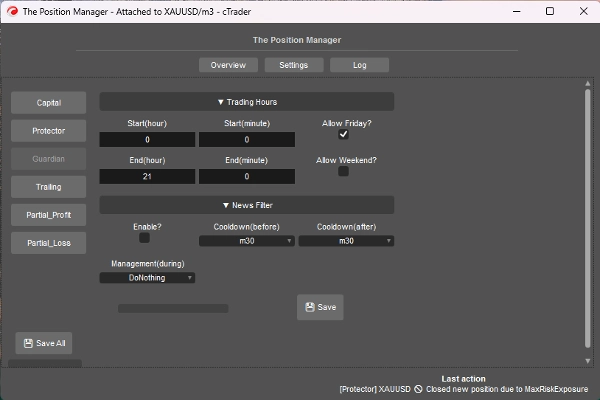
=> Headless LIGADO / Guardian
- Posições abertas fora do Horário de Negociação ou Dia Permitido serão fechadas automaticamente.
-
- Início/Fim (Hora) => 0h – 23h
- Início/Fim (Minuto) => 0m – 59m
- Permitir Sexta-feira? => Autoexplicativo
- Permitir Fim de Semana? (cripto) => Autoexplicativo
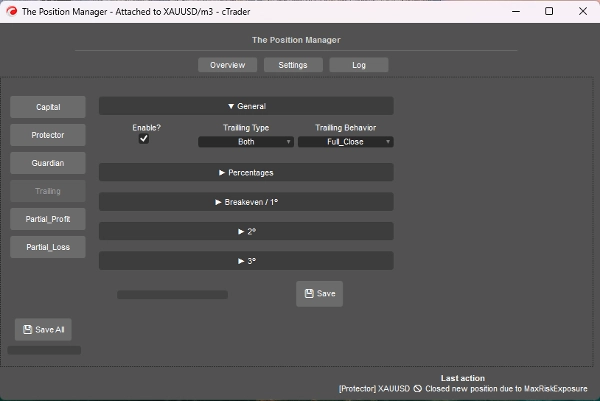
=> Headless LIGADO / Lucro Trailing
- É um Take Profit baseado em Patrimônio
- Ativar?
-
- Para posições sem TP, ideal para posições de seguimento de tendência.
- => Tipo:
-
- Porcentagem => % puro do patrimônio
- Drawdown => Baseado no conceito de Drawdown Trailing (Pico de Patrimônio), pense em termos de pullbacks/retração de preço.
- Ambos => Comportamento Partial_Close está ativado por padrão:
-
- Tipo porcentagem para parciais.
- Tipo drawdown para saída total.
- Comportamento:
-
- Fechamento Total:
-
- Uma vez que a % alvo do patrimônio seja alcançada, feche todas as posições sem TP.
- Além disso, quando metade da % alvo do patrimônio for alcançada, o SL é movido para Breakeven.
- Fechamento Parcial:
-
- Habilitar fechamentos parciais.
- Tenha em mente => Se o tamanho da posição (tamanho do lote) for muito pequeno para fechamento parcial, a posição será fechada completamente.
- Lucro Mínimo(%):
-
- O lucro mínimo para ativar a lógica trailing.
- => Fechamento Total em(%):
-
- Para Comportamento “Fechamento_Total” apenas.
- => [Ambos] Fechar Drawdown(%):
-
- Para “Tipo Ambos” apenas.
- => [Apenas %] SL Inteligente?"
-
- Para “Porcentagem” Tipo apenas.
- É bastante similar ao tipo Drawdown, mas mais reativo usando SL Trailing
- Parcial 1(%) / Parcial 2(%)
-
- % alvo do patrimônio para executar os parciais (Porcentagem ou Ambos)
- Sempre verifique se o Tipo Trailing é Porcentagem ou Drawdown
- Parcial 1(ordem %) / Parcial 2(ordem %)
-
- Autoexplicativo
- => Fechar 3(%):
-
- % alvo do patrimônio para fechar completamente as posições sem TP.
- Para Tipos Porcentagem ou Drawdown apenas
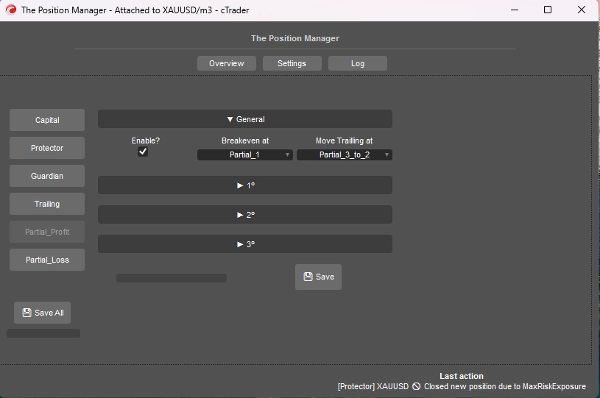
=> Headless LIGADO / Lucro Parcial
- Ativar?
-
- Para posições com TP, ideal para posições de day-trading ou scalping.
- O Preço de Entrada será 0%
- O Take Profit será 100%
- Os Preços Parciais serão calculados com base nessa abordagem.
- Breakeven em:
-
- Autoexplicativo, mova o SL para BE quando o Parcial selecionado for acionado.
- => Mover Trailing em:
-
- Autoexplicativo, mova o SL para o preço parcial anterior quando o Parcial selecionado for acionado.
- Tenha em mente => Certifique-se de que o Parcial 2º ou 3º esteja ativado.
- Parcial 1(%) /
Parcial 2(%) /
Parcial 3(%) -
- Porcentagens entre PreçoEntrada e TakeProfit.
- => Ativar 2º?
=> Ativar 3º? -
- Autoexplicativo
- Parcial 1(ordem %) /
Parcial 2(ordem %) /
Parcial 3(ordem %) -
- Autoexplicativo
=> Headless LIGADO / Perda Parcial
- Ativar?
-
- Para posições com SL, ideal para limitar perdas de negociações perdedoras que podem retornar à direção.
- O Preço de Entrada será 0%
- O Stop loss será 100%
- Os Preços Parciais serão calculados com base nessa abordagem.
- Parcial 1(%) /
Parcial 2(%) /
Parcial 3(%) -
- Porcentagens entre PreçoEntrada e StopLoss.
- => Ativar 2º?
=> Ativar 3º? -
- Autoexplicativo
- Parcial 1(ordem %) /
Parcial 2(ordem %) /
Parcial 3(ordem %) -
- Autoexplicativo
====================================================
Para Desenvolvedores => Plug-and-Play para qualquer estratégia via Mensagens/assinaturas do cTrader Algo.
- Para sistemas semi ou totalmente automatizados:
- Semi: Ordens ainda são abertas por nós mesmos, mas:
-
- SL e TP são definidos por Mensagens/assinaturas.
- Totalmente: Sinais de ordem são enviados via Mensagens/assinaturas para o “Gerenciador de Posições”
-
- A configuração do “Gerenciador de Risco” pode não estar disponível nessa abordagem.
É bastante direto, você só precisa enviar o sinal usando a seguinte classe:
public class TradeSignal
{
public string Symbol { get; set; }
public TradeType Direction { get; set; }
public double StopLossPips { get; set; }
public double? TakeProfitPips { get; set; } // null = sem TP
public string StrategyId { get; set; }
public double? EntryPrice { get; set; } // null = mercado, caso contrário ordem limitada.
public DateTime Timestamp { get; set; }
public int Confidence { get; set; } // 1–5
}
Então:
Messages.Send("ThePositionManager", signal);
Exemplo curto:
TradeSignal signal = new()
{
Symbol = Symbol.Name,
Direction = TradeType.Buy,
StopLossPips = 1500,
TakeProfitPips = 3000,
StrategyId = "MyStrategy",
Confidence = 5
};
Messages.Send("ThePositionManager", signal);
Resumo
Key features include four main modules: Portfolio Protector, Guardian Trading, Risk Manager (for manual or semi-automated trading), and Trade Manager (supporting trailing take profit and partial take profit/stop loss). The tool supports intelligent scaling and portfolio protection across Desktop, Mobile, and Web platforms, with a Headless mode option for managing positions remotely via cTrader Cloud.
For traders, it offers configurable risk controls such as daily and trailing drawdown limits, profit caps, exposure limits, and automated position closing based on trading hours or drawdown thresholds. Trailing profit and partial profit/loss management allow dynamic adjustment of stop loss and take profit levels to optimize trade exits.
Developers can integrate The Position Manager with automated strategies by sending trade signals via messages, enabling semi or fully automated order management with customizable stop loss and take profit settings.
The tool supports saving settings by broker or symbol, and includes detailed parameters for break-even management, risk exposure, and partial close orders, making it adaptable to various account sizes and trading styles.
Conversa
Avaliações de clientes
5 | 0 % | |
4 | 67 % | |
3 | 33 % | |
2 | 0 % | |
1 | 0 % |
Perguntas frequentes

















Preço