


Descripción
Permítame presentarle => El Gestor de Posiciones
- La gestión de operaciones todo en uno para Comerciantes y Desarrolladores
Para Comerciantes => Proteja las ganancias, Limite las pérdidas y Haga cumplir la disciplina mediante entradas configurables.
El Gestor de Posiciones tiene 4 módulos que justifican su nombre:
- Protector de Portafolio
- Guardian Trading
- Gestor de Riesgos (para trading manual/semi-automatizado)
- Gestor de Operaciones (TP móvil, TP/SL parciales)
Cada uno con submódulos para una mejor gestión.
Casos de uso:
- Comerciantes que buscan protección de portafolio + escalado inteligente al operar en Escritorio, Móvil y Web.
-
- Si operas completamente desde Escritorio, usa Modo Headless=> APAGADO
- Si también operas desde Móvil/Web, usa Modo Headless=> ENCENDIDO
- Prop-Traders con límites de riesgo fijos.
- Desarrolladores que quieren convertir señales de trading en entradas reales.
Cómo usar:
- Para el primer uso, recomiendo encarecidamente:
- Crear solo una instancia de "El Gestor de Posiciones" con:
- Modo Headless => APAGADO (modo UI)
- Modo Instancia => Ambos (Gestor + Panel de Trading)
- Luego aprender sobre su comportamiento, preferiblemente en backtesting(modo visual) antes de operar en vivo.
Tenga en cuenta => "El Gestor de Posiciones" no abre posiciones por sí mismo:
- ¡Gestiona las existentes!
- mientras proporciona gestión a nivel de cuenta.
Para cuentas pequeñas, puede aumentar los porcentajes.
Para cuentas grandes, puede disminuir los porcentajes.
En cualquier caso, siempre adapte las entradas al tamaño de su cuenta.
Una vez familiarizado con los parámetros/comportamiento, puede ejecutarlo en cTrader Cloud para gestionar posiciones en Móvil/Web, solo hay dos reglas simples a seguir:
- Modo Headless=> ENCENDIDO
- Además, solo debe añadirse una instancia de "El Gestor de Posiciones" :
-
- De lo contrario, podrían “pelearse” entre ellas, ya que la mayoría de las operaciones son a nivel de símbolos.
- La misma regla aplica al ejecutar localmente.
Permítame explicar los parámetros y comportamiento esperado para cada uno:
Aunque algunos son intuitivos, hay muchos parámetros...
Por favor lea cada uno con paciencia.
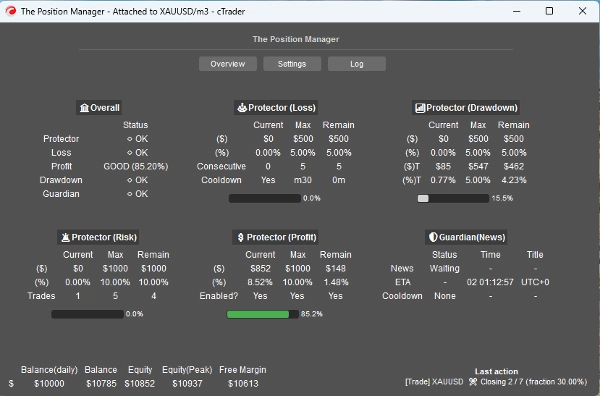
==== La Gestión de Posiciones ====
- ¿Modo Headless? => Las funciones disponibles en este modo son:
-
- Protector de Portafolio
-
- Todas las funciones están disponibles.
- Guardian Trading
-
- El filtro de noticias está deshabilitado si el Modo Headless => ENCENDIDO.
- Ganancia Móvil
-
- Para cualquier símbolo, las posiciones no deben tener Take Profit.
- Cierres Parciales
-
- Para cualquier símbolo, las posiciones deben tener Take Profit o Stop Loss
=> Headless APAGADO (modo UI)
- Modo Instancia:
-
- Gestor => Solo una instancia debe ser añadida.
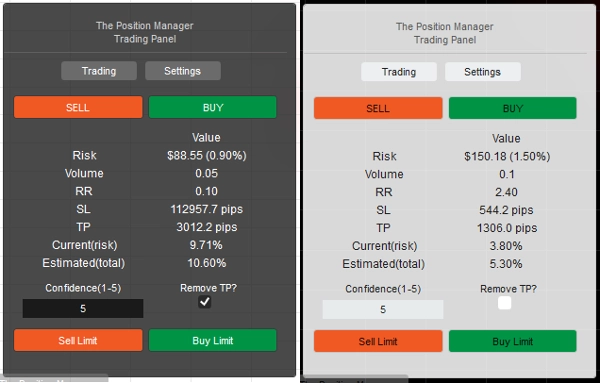
- Trading => Panel de trading puro (módulo Gestor de Riesgos), puede añadir múltiples instancias.
- Ambos => Solo una instancia debe ser añadida:
-
- Gestor se mostrará como ventana.
- Trading se mostrará en el gráfico.
- Tipo/Posición del Panel: Autoexplicativo
- Almacenamiento Por:
-
- Use Broker para guardar/cargar la misma configuración en cada reinicio.
- Use Broker_Symbol si quiere usar la configuración de cada símbolo como una especie de “perfil de riesgo”.
=> Headless APAGADO/ENCENDIDO - Localmente
- ¿Permitir Modo Mensaje?
-
- Autoexplicativo
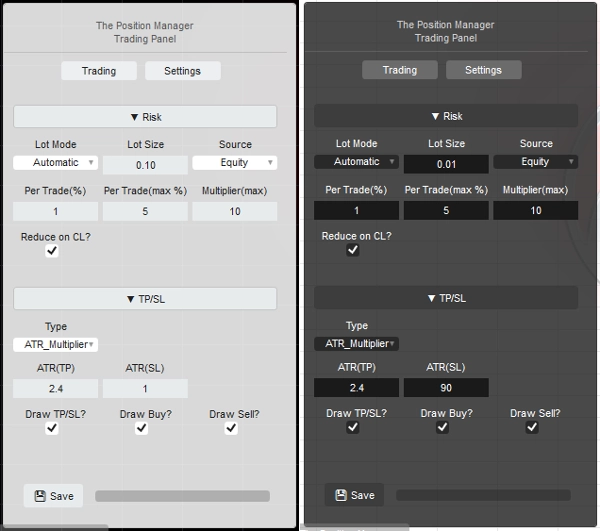
- Al usar [Trading, Ambos] Modo Instancia, cambie el “TP/SL => Tipo” a “Pips” en la configuración del panel para que el TP/SL pueda ser establecido por el mensaje.
- ¿Permitir Trading por Mensajes?
-
- Permitir abrir posiciones mediante los mensajes.
- Si Modo Headless ENCENDIDO, la configuración del Gestor de Riesgos no es posible.
- Si Modo Headless APAGADO, al usar [Trading, Ambos] Modo Instancia, puede configurar el Módulo Gestor de Riesgos como desee.
=> Headless ENCENDIDO / Cuenta General
- Breakeven Mínimo(%):
-
- Para cada posición, cuando la lógica de Breakeven se ejecute mediante Ganancia Móvil/Parcial, en lugar de mover el SL justo al Precio de Entrada (lo que conduce a PnL negativo).
- El SL se moverá x% hacia adelante al Precio de Entrada.
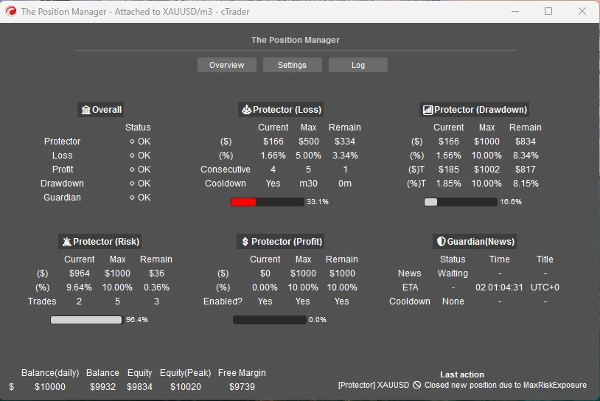
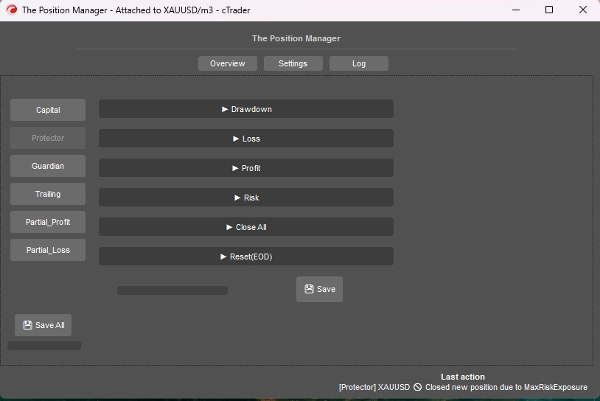
=> Headless ENCENDIDO / Protector de Drawdown
- Modo Drawdown:
-
- Diario => Basado en el Balance del Día
- Móvil => Basado en el Pico de Capital
- Tipo de Drawdown:
-
- Porcentaje => % del Balance del Día, ideal para crecimiento dinámico.
- Fijo => Cantidad fija, ideal para reglas estrictas
- Drawdown Máximo => % o fijo (autoexplicativo)
=> Headless ENCENDIDO / Protector de Pérdidas
- Fuente de Pérdidas: => Actualmente, basado solo en “Balance del Día”.
-
- Si el Capital cae por debajo del Balance del Día, entonces se activará/contará.
- Tipo de Pérdida:
-
- Porcentaje => % del Balance del Día, ideal para crecimiento dinámico.
- Fijo => Cantidad fija, ideal para reglas estrictas
- Pérdida Máxima Diaria² => % o fijo (autoexplicativo)
- Pérdidas Consecutivas(CL):
-
- Habilitar cierre de posiciones cuando ocurren pérdidas consecutivas.
- Conteo Consecutivo:
-
- Autoexplicativo
- Tiempo de Enfriamiento para Reiniciar(CL):
-
- Tiempo de enfriamiento para reiniciar el conteo y permitir abrir nuevas posiciones.
=> Headless ENCENDIDO / Protector de Ganancias
- ¿Habilitar Límite de Ganancias? => Autoexplicativo
-
- Una vez alcanzado el Máximo de Ganancias, se cerrarán nuevas posiciones.
- Fuente de Ganancias: => Siempre basado en el Balance del Día
- Tipo de Ganancias:
-
- Porcentaje => % del Balance del Día, ideal para crecimiento dinámico.
- Fijo => Cantidad fija, ideal para reglas estrictas
- Ganancia Máxima² => % o fijo (autoexplicativo)
=> Headless ENCENDIDO / Protector de Riesgo
- Exposición Total(%):
-
- También considera posiciones que están en Breakeven.
- Total de Operaciones Abiertas:
-
- Nuevas posiciones se cerrarán si el Conteo Total es igual a Total de Operaciones Abiertas
=> Headless ENCENDIDO / Protector CerrarTodo
- ¿Cerrar al Final del Día? => Cierra todas las posiciones al final del día
- ¿Cerrar al Final de la Semana? => Cierra todas las posiciones al final de la semana (viernes), usa las horas del final del día como referencia.
=> Headless ENCENDIDO / Protector Reiniciar(EOD)
- Hora para “reiniciar” el seguimiento del pico de capital, así como la lógica de CerrarTodo ejecutada, si aplica.
- Reinicio (Hora) => 0h - 23h
- Reinicio (Minuto) => 0m – 59m
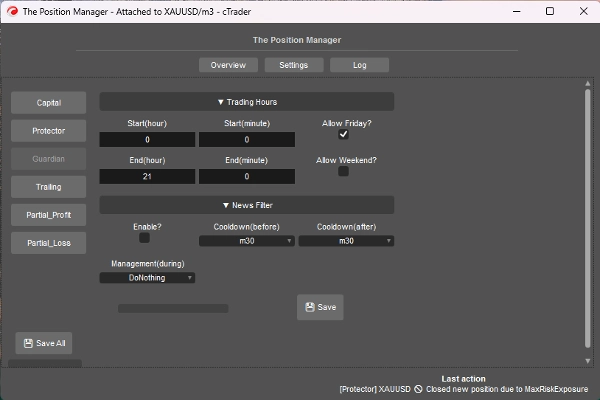
=> Headless ENCENDIDO / Guardian
- Las posiciones abiertas fuera del Horario de Trading o Día Permitido se cerrarán automáticamente.
-
- Inicio/Fin (Hora) => 0h – 23h
- Inicio/Fin (Minuto) => 0m – 59m
- ¿Permitir Viernes? => Autoexplicativo
- ¿Permitir Fin de Semana? (cripto) => Autoexplicativo
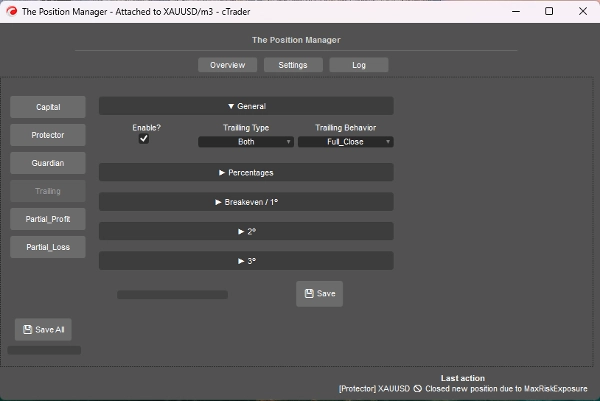
=> Headless ENCENDIDO / Ganancia Móvil
- Es un Take Profit basado en el capital
- ¿Habilitar?
-
- Para posiciones sin TP, ideal para posiciones que siguen la tendencia.
- => Tipo:
-
- Porcentaje => % puro de capital
- Drawdown => Basado en el concepto de DD móvil (Pico de Capital), piense en términos de retrocesos/retracción del precio.
- Ambos => El comportamiento Partial_Close está habilitado por defecto:
-
- Tipo porcentaje para parciales.
- Tipo drawdown para salida completa.
- Comportamiento:
-
- Cierre Completo:
-
- Una vez alcanzado el % objetivo de capital, cierre todas las posiciones sin TP.
- Además, cuando se alcanza la mitad del % objetivo de capital, el SL se mueve a Breakeven.
- Cierre Parcial:
-
- Habilitar cierres parciales.
- Tenga en cuenta => Si el tamaño de la posición (lote) es demasiado pequeño para cierre parcial, la posición se cerrará completamente.
- Ganancia Mínima(%):
-
- La ganancia mínima para activar la lógica móvil.
- => Cierre Completo en(%):
-
- Solo para comportamiento “Cierre Completo”.
- => [Ambos] Cierre por Drawdown(%):
-
- Solo para tipo “Ambos” .
- => ¿SL Inteligente [% solo]?"
-
- Solo para tipo “Porcentaje” .
- Es bastante similar al tipo Drawdown, pero más reactivo usando SL móvil
- Parcial 1(%) / Parcial 2(%)
-
- % objetivo de capital para ejecutar los parciales (Porcentaje o Ambos)
- Siempre verifique si el tipo móvil es Porcentaje o Drawdown
- Parcial 1(% orden) / Parcial 2(% orden)
-
- Autoexplicativo
- => Cierre 3(%):
-
- % objetivo de capital para cerrar completamente las posiciones sin TP.
- Solo para tipos Porcentaje o Drawdown .
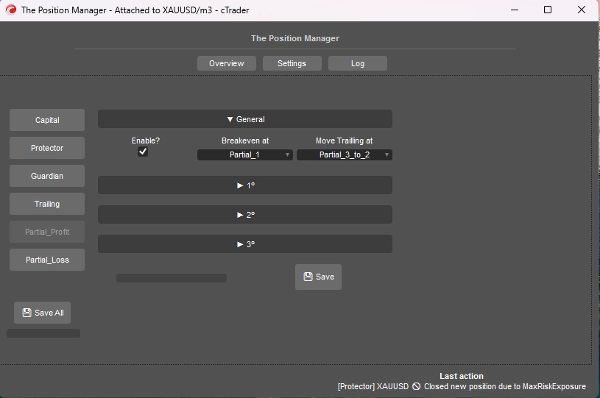
=> Headless ENCENDIDO / Ganancia Parcial
- ¿Habilitar?
-
- Para posiciones con TP, ideal para posiciones de day-trading o scalping.
- El Precio de Entrada será el 0%
- El Take Profit será el 100%
- Los Precios Parciales se calcularán basándose en este enfoque.
- Breakeven en:
-
- Autoexplicativo, mueve el SL a BE cuando se activa el Parcial seleccionado.
- => Mover Trailing en:
-
- Autoexplicativo, mueve el SL al Precio Parcial anterior cuando se activa el Parcial seleccionado.
- Tenga en cuenta => Asegúrese de que el Parcial 2º o 3º esté activado.
- Parcial 1(%) /
Parcial 2(%) /
Parcial 3(%) -
- Porcentajes entre PrecioEntrada y TakeProfit.
- => ¿Habilitar 2º?
=> ¿Habilitar 3º? -
- Autoexplicativo
- Parcial 1(% orden) /
Parcial 2(% orden) /
Parcial 3(% orden) -
- Autoexplicativo
=> Headless ENCENDIDO / Pérdida Parcial
- ¿Habilitar?
-
- Para posiciones con SL, ideal para limitar pérdidas de operaciones perdedoras que pueden volver a la dirección.
- El Precio de Entrada será el 0%
- El Stop loss será el 100%
- Los Precios Parciales se calcularán basándose en este enfoque.
- Parcial 1(%) /
Parcial 2(%) /
Parcial 3(%) -
- Porcentajes entre PrecioEntrada y StopLoss.
- => ¿Habilitar 2º?
=> ¿Habilitar 3º? -
- Autoexplicativo
- Parcial 1(% orden) /
Parcial 2(% orden) /
Parcial 3(% orden) -
- Autoexplicativo
====================================================
Para Desarrolladores => Plug-and-Play para cualquier estrategia a través de Mensajes/suscripciones de cTrader Algo.
- Para sistemas semi o totalmente automatizados:
- Semi: Las órdenes aún las abrimos nosotros, pero:
-
- SL y TP se establecen mediante Mensajes/suscripciones.
- Totalmente: Las señales de órdenes se envían mediante Mensajes/suscripciones a “El Gestor de Posiciones”
-
- La configuración del “Gestor de Riesgos” puede no estar disponible en este enfoque.
Es bastante sencillo, solo necesita enviar la señal usando la siguiente clase:
public class TradeSignal
{
public string Symbol { get; set; }
public TradeType Direction { get; set; }
public double StopLossPips { get; set; }
public double? TakeProfitPips { get; set; } // null = sin TP
public string StrategyId { get; set; }
public double? EntryPrice { get; set; } // null = mercado, de lo contrario orden límite.
public DateTime Timestamp { get; set; }
public int Confidence { get; set; } // 1–5
}
Luego:
Messages.Send("ThePositionManager", signal);
Ejemplo corto:
TradeSignal signal = new()
{
Symbol = Symbol.Name,
Direction = TradeType.Buy,
StopLossPips = 1500,
TakeProfitPips = 3000,
StrategyId = "MyStrategy",
Confidence = 5
};
Messages.Send("ThePositionManager", signal);
Resumen
Key features include four main modules: Portfolio Protector, Guardian Trading, Risk Manager (for manual or semi-automated trading), and Trade Manager (supporting trailing take profit and partial take profit/stop loss). The tool supports intelligent scaling and portfolio protection across Desktop, Mobile, and Web platforms, with a Headless mode option for managing positions remotely via cTrader Cloud.
For traders, it offers configurable risk controls such as daily and trailing drawdown limits, profit caps, exposure limits, and automated position closing based on trading hours or drawdown thresholds. Trailing profit and partial profit/loss management allow dynamic adjustment of stop loss and take profit levels to optimize trade exits.
Developers can integrate The Position Manager with automated strategies by sending trade signals via messages, enabling semi or fully automated order management with customizable stop loss and take profit settings.
The tool supports saving settings by broker or symbol, and includes detailed parameters for break-even management, risk exposure, and partial close orders, making it adaptable to various account sizes and trading styles.
Valoraciones de clientes
5 | 0 % | |
4 | 67 % | |
3 | 33 % | |
2 | 0 % | |
1 | 0 % |
Conversación
Preguntas frecuentes













Precio