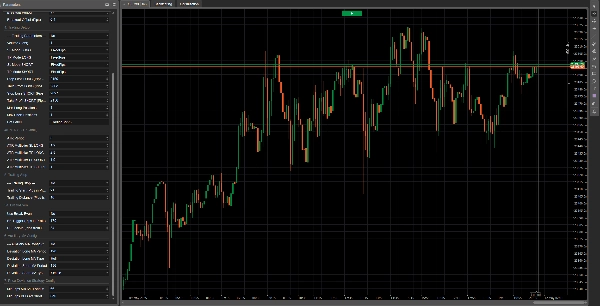

คำอธิบาย
Ema Up&Down 2025: พันธมิตรเชิงกลยุทธ์ของคุณในตลาด
คุณพร้อมที่จะยกระดับการเทรดอัลกอริทึมของคุณไปสู่ระดับใหม่หรือยัง? Ema Up&Down 2025 สำหรับ cTrader ไม่ใช่แค่ cBot ธรรมดา; มันคือพลังเชิงกลยุทธ์ที่แท้จริงที่ออกแบบมาเพื่อมอบความยืดหยุ่น การควบคุม และการจัดการความเสี่ยงขั้นสูงให้กับคุณ ลืมชั่วโมงที่ต้องเฝ้าดูกราฟไปได้เลย: ให้ Ema Up&Down 2025 ทำงานแทนคุณด้วยความแม่นยำระดับศัลยกรรม
ทำไม Ema Up&Down 2025 ถึงโดดเด่น:
- กลยุทธ์หลายแบบ การควบคุมเพียงหนึ่งเดียว: อย่าผูกมัดตัวเองกับวิธีเดียว! Ema Up&Down 2025 ให้คุณควบคุมด้วยสามกลยุทธ์การเข้าแบบปรับแต่งและผสมผสานได้:
-
- MA Crossover: ใช้พลังของการตัดกันของค่าเฉลี่ยเคลื่อนที่ (EMA, SMA, ฯลฯ) ซึ่งเป็นคลาสสิกที่ไม่เคยล้าสมัยสำหรับการระบุแนวโน้ม
- Breakout: จับการเคลื่อนไหวของตลาดที่รุนแรงด้วยการเข้าอย่างแม่นยำเมื่อราคาทะลุระดับสำคัญ
- Price Deviation: ใช้ประโยชน์จากการเบี่ยงเบนของราคาออกจากค่าเฉลี่ยเคลื่อนที่ เหมาะสำหรับกลยุทธ์การกลับสู่ค่าเฉลี่ยหรือการต่อเนื่องหลังการดึงกลับ เลือกโหมดการดำเนินการที่คุณชอบ –
OnBarCloseสำหรับการยืนยันที่มั่นคง หรือOnEveryTickสำหรับการตอบสนองทันที
- การจัดการความเสี่ยงระดับมืออาชีพ:
-
- หยุดขาดทุนและทำกำไรแบบไดนามิก: ปรับการป้องกันและเป้าหมายของคุณด้วย SL/TP คงที่ในหน่วยพิปส์หรืออิงตามความผันผวนของตลาดจริงด้วย ATR พร้อมตัวคูณแยกสำหรับการเทรดแบบ Long และ Short
- Trailing Stop อัจฉริยะ: เมื่อการเทรดมีกำไร (โดย
TrailingStartPips) บอทจะเปิดใช้งาน Trailing Stop ที่ติดตามราคาด้วยระยะทางที่คุณกำหนด (TrailingDistancePips) ปกป้องกำไรและเพิ่มศักยภาพของแต่ละการดำเนินการ - Break-Even อัตโนมัติ: เมื่อถึงกำไรที่กำหนด (
BreakEvenTriggerPips) บอทจะย้าย Stop Loss ไปยังจุดเบรกอีเวน (พร้อมเพิ่มเล็กน้อยBreakEvenExtraPips) ทำให้การเทรดของคุณปลอดภัยจากความเสี่ยง
- การตั้งค่าที่ลึกซึ้งและเข้าใจง่าย: ทุกแง่มุมของบอทอยู่ภายใต้การควบคุมของคุณด้วยแผงพารามิเตอร์ที่ครอบคลุมและจัดระเบียบอย่างดี กำหนดปริมาณ ช่วงเวลาของตัวบ่งชี้ ประเภทค่าเฉลี่ยเคลื่อนที่ (รวมถึง MA เสริมสำหรับกลยุทธ์เบี่ยงเบนราคา) และรายละเอียดทุกอย่างของการจัดการการเทรดของคุณ
- สร้างมาเพื่อประสิทธิภาพ:
-
- ตรรกะการเริ่มต้นที่ปรับแต่งแล้ว: ตัวบ่งชี้จะถูกโหลดเฉพาะเมื่อจำเป็นเท่านั้น เพื่อให้มั่นใจในประสิทธิภาพสูงสุด
- โค้ดที่สะอาดและมีคอมเมนต์: สำหรับผู้ที่ชอบเข้าใจสิ่งที่เกิดขึ้น "ใต้ฝากระโปรง" โค้ดถูกจัดโครงสร้างอย่างชัดเจนและมีตรรกะ
- ข้อเสนอแนะที่ละเอียด: ทุกการกระทำของบอท ตั้งแต่การเปิดคำสั่งจนถึงการจัดการ SL/TP และ Trailing Stop ถูกติดตามด้วยข้อความล็อกที่ชัดเจน ช่วยให้คุณติดตามทุกการเคลื่อนไหว
หมายเหตุสำคัญเกี่ยวกับการปรับแต่ง:
โปรดทราบว่าเวอร์ชันนี้ของ Ema Up&Down 2025 เป็นเครื่องมือที่ทรงพลังและยืดหยุ่นที่ให้มาโดยไม่มีการปรับแต่งล่วงหน้าสำหรับสินทรัพย์หรือสภาพตลาดเฉพาะ ซึ่งให้คุณมีอิสระเต็มที่ในการทดสอบและปรับแต่งให้เหมาะกับเครื่องมือที่คุณชื่นชอบ ข่าวดี! เวอร์ชันที่ปรับแต่งสำหรับสินทรัพย์ต่างๆ จะพร้อมให้ใช้งานเร็วๆ นี้ หากคุณกำลังมองหา การปรับแต่งเฉพาะตามความต้องการ ที่เหมาะกับกลยุทธ์การเทรดหรือสินทรัพย์เฉพาะของคุณ อย่าลังเลที่จะ ติดต่อเรา!
Ema Up&Down 2025 เหมาะสำหรับ:
- เทรดเดอร์ที่ต้องการบอทที่หลากหลายและสามารถปรับตัวเข้ากับสภาพตลาดต่างๆ ได้ และพร้อมที่จะทำการปรับแต่งด้วยตนเอง
- นักพัฒนาที่ต้องการฐานที่มั่นคงและมีโครงสร้างดีเพื่อสร้างการปรับแต่งเพิ่มเติม
- ใครก็ตามที่ต้องการทำให้กลยุทธ์ของตนเป็นอัตโนมัติด้วยการควบคุมความเสี่ยงและกระบวนการปรับแต่งในระดับสูง
ด้วย Ema Up&Down 2025 คุณไม่ได้แค่ทำให้การเทรดเป็นอัตโนมัติ; คุณกำลังนำวิสัยทัศน์เชิงกลยุทธ์ที่ครบถ้วนมาใช้ เตรียมพร้อมที่จะค้นพบวิธีใหม่ในการจัดการตลาด ด้วยผู้ช่วยที่ไม่เคยหลับและทำงานอย่างไม่รู้จักเหน็ดเหนื่อยเพื่อเป้าหมายของคุณ
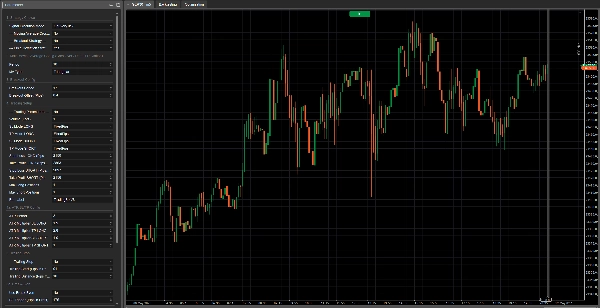
นี่คือคำอธิบายของแต่ละพารามิเตอร์:
กลุ่มที่ 1: การเลือกกลยุทธ์
โหมดการดำเนินการสัญญาณ-
- ชื่อแสดง: โหมดการดำเนินการสัญญาณ
- ค่าปริยาย:
OnBarClose - คำอธิบาย: กำหนดเวลาที่บอทจะประเมินสัญญาณการเทรดและอาจเปิดตำแหน่ง
-
OnBarClose: ตรวจสอบสัญญาณเฉพาะเมื่อแท่งเทียนปิด วิธีนี้รอการยืนยันจากแท่งเทียนก่อนดำเนินการOnEveryTick: ตรวจสอบสัญญาณทุกครั้งที่มีการเปลี่ยนแปลงราคา วิธีนี้ตอบสนองเร็วกว่าแต่สัญญาณอาจเกิดจากการเคลื่อนไหวของราคาที่ยังไม่ได้รับการยืนยันจากการปิดแท่งเทียน
--- กลยุทธ์ Moving Average Crossover ---(พารามิเตอร์จริง:UseMACrossoverStrategy)-
- ชื่อแสดง: --- กลยุทธ์ Moving Average Crossover ---
- ค่าปริยาย:
true(เปิดใช้งาน) - คำอธิบาย: สวิตช์ง่ายๆ (true/false) หากตั้งเป็น
trueบอทจะใช้กลยุทธ์ moving average crossover เพื่อสร้างสัญญาณซื้อหรือขาย
--- กลยุทธ์ Breakout ---(พารามิเตอร์จริง:UseBreakoutStrategy)-
- ชื่อแสดง: --- กลยุทธ์ Breakout ---
- ค่าปริยาย:
false(ปิดใช้งาน) - คำอธิบาย: สวิตช์ (true/false) หากตั้งเป็น
trueบอทจะเปิดใช้งานกลยุทธ์ breakout ซึ่งพยายามเข้าเทรดเมื่อราคาทะลุสูงสุดล่าสุดหรือต่ำสุดล่าสุด
--- กลยุทธ์ Price Deviation ---(พารามิเตอร์จริง:UsePriceDeviationStrategy)-
- ชื่อแสดง: --- กลยุทธ์ Price Deviation ---
- ค่าปริยาย:
false(ปิดใช้งาน) - คำอธิบาย: สวิตช์ (true/false) หากตั้งเป็น
trueบอทจะใช้กลยุทธ์ที่อิงจากการเบี่ยงเบนของราคาจากค่าเฉลี่ยเคลื่อนที่
กลุ่มที่ 2: การตั้งค่า Moving Average หลัก (Crossover / Deviation เริ่มต้น)
พารามิเตอร์เหล่านี้ใช้กับค่าเฉลี่ยเคลื่อนที่ที่ใช้โดยกลยุทธ์ "Moving Average Crossover" และถ้าไม่ได้ระบุไว้เป็นอย่างอื่น โดยกลยุทธ์ "Price Deviation"
ช่วงเวลา-
- ชื่อแสดง: ช่วงเวลา
- ค่าปริยาย: 20
- ค่าต่ำสุด: 1
- คำอธิบาย: กำหนดจำนวนแท่งเทียนก่อนหน้าที่ใช้ในการคำนวณค่าเฉลี่ยเคลื่อนที่หลัก ช่วงเวลาที่ยาวกว่าจะทำให้ค่าเฉลี่ยเคลื่อนที่เรียบและตอบสนองช้าลง ช่วงเวลาที่สั้นกว่าจะทำให้ตอบสนองเร็วขึ้น
ประเภท MA-
- ชื่อแสดง: ประเภท MA
- ค่าปริยาย:
Simple(ค่าเฉลี่ยเคลื่อนที่แบบง่าย - SMA) - คำอธิบาย: ระบุประเภทของค่าเฉลี่ยเคลื่อนที่ที่ใช้ ตัวเลือกทั่วไปได้แก่:
-
Simple (SMA): คำนวณค่าเฉลี่ยเลขคณิตของราคาปิดExponential (EMA): ให้ความสำคัญกับราคาล่าสุดมากกว่า ทำให้ตอบสนองเร็วกว่า SMAWeighted (WMA): คล้ายกับ EMA โดยให้น้ำหนักลดลงตามลำดับเวลา- ประเภทอื่นๆ อาจมีให้เลือกขึ้นอยู่กับแพลตฟอร์ม (เช่น Smoothed, Hull)
กลุ่มที่ 3: การตั้งค่า Breakout
พารามิเตอร์เหล่านี้เฉพาะสำหรับ "กลยุทธ์ Breakout"
ช่วงเวลา Breakout-
- ชื่อแสดง: ช่วงเวลา Breakout
- ค่าปริยาย: 20
- ค่าต่ำสุด: 2
- คำอธิบาย: กำหนดจำนวนแท่งเทียนก่อนหน้า (ไม่รวมสองแท่งสุดท้าย) ที่ใช้ค้นหาค่าสูงสุดและต่ำสุด บอทจะพยายามเข้าเทรดเมื่อราคาทะลุระดับเหล่านี้
ค่าเบี่ยงเบน Breakout (พิปส์)-
- ชื่อแสดง: ค่าเบี่ยงเบน Breakout (พิปส์)
- ค่าปริยาย: 1.0
- ค่าต่ำสุด: 0.0
- ขั้นตอน: 0.1
- คำอธิบาย: ค่าพิปส์ที่เพิ่มไปยังค่าสูงสุด (สำหรับสัญญาณซื้อ) หรือหักออกจากค่าต่ำสุด (สำหรับสัญญาณขาย) ของ "ช่วงเวลา Breakout" เพื่อใช้เป็นบัฟเฟอร์หรือกรองสัญญาณหลอกที่อยู่ใกล้ระดับสุดขีดมากเกินไป ค่าเบี่ยงเบน 0 หมายถึงสัญญาณจะถูกทริกเกอร์เมื่อราคาทะลุระดับนั้นพอดี
กลุ่มที่ 4: การตั้งค่าเทรด
PlaceholderTrading-
- ชื่อแสดง: --- พารามิเตอร์การเทรด --- (ชื่อพารามิเตอร์จริงในโค้ดคือ
PlaceholderTradingแต่กลุ่มนี้ถูกตั้งชื่อว่า "--- พารามิเตอร์การเทรด ---") - คำอธิบาย: พารามิเตอร์บูลีนนี้ (
true/false) มีอยู่ในโค้ดแต่ดูเหมือนไม่มีการใช้งานโดยตรงในตรรกะการเทรด อาจเป็นส่วนที่เหลือจากเวอร์ชันก่อนหน้าหรือเป็นที่ว่างสำหรับฟังก์ชันในอนาคต ในบริบทปัจจุบัน การเปลี่ยนแปลงนี้ไม่ควรส่งผลต่อพฤติกรรมของบอท
- ชื่อแสดง: --- พารามิเตอร์การเทรด --- (ชื่อพารามิเตอร์จริงในโค้ดคือ
ปริมาณ (ล็อต)โหมด SL LONG/โหมด TP LONG/โหมด SL SHORT/โหมด TP SHORT-
- ชื่อแสดง: โหมด SL LONG, โหมด TP LONG, โหมด SL SHORT, โหมด TP SHORT
- ค่าปริยาย:
FixedPipsสำหรับทั้งหมด - คำอธิบาย: กำหนดวิธีการคำนวณ Stop Loss (SL) และ Take Profit (TP) สำหรับตำแหน่ง Long (ซื้อ) และ Short (ขาย)
-
FixedPips: SL/TP จะถูกตั้งที่จำนวนพิปส์คงที่จากราคาที่เข้าเทรด (กำหนดในพารามิเตอร์ถัดไป)ATR: SL/TP จะถูกคำนวณแบบไดนามิกตาม Average True Range (ATR) คูณด้วยตัวคูณที่กำหนด (ตั้งค่าในกลุ่มพารามิเตอร์ "ATR SL/TP Config")
Stop Loss LONG (พิปส์ - ถ้าคงที่)/Take Profit LONG (พิปส์ - ถ้าคงที่)/Stop Loss SHORT (พิปส์ - ถ้าคงที่)/Take Profit SHORT (พิปส์ - ถ้าคงที่)-
- ชื่อแสดง: Stop Loss LONG (พิปส์ - ถ้าคงที่), Take Profit LONG (พิปส์ - ถ้าคงที่), ฯลฯ
- ค่าปริยาย: SL 20 พิปส์, TP 40 พิปส์ สำหรับ Long และ Short
- ค่าต่ำสุด: 0
- คำอธิบาย: หากโหมด SL/TP ที่เกี่ยวข้องตั้งเป็น
FixedPipsพารามิเตอร์เหล่านี้กำหนดระยะห่างในพิปส์สำหรับ Stop Loss หรือ Take Profit ค่า 0 หมายความว่าจะไม่ตั้ง SL หรือ TP นั้น (ถ้าโหมดเป็น FixedPips)
ตำแหน่ง Long สูงสุด/ตำแหน่ง Short สูงสุด-
- ชื่อแสดง: ตำแหน่ง Long สูงสุด, ตำแหน่ง Short สูงสุด
- ค่าปริยาย: 1 สำหรับทั้งสอง
- ค่าต่ำสุด: 1
- คำอธิบาย: จำนวนตำแหน่ง Long (ซื้อ) หรือ Short (ขาย) สูงสุดที่บอทสามารถเปิดพร้อมกันได้สำหรับเครื่องมือและกรอบเวลานี้
ป้ายชื่อบอท-
- ชื่อแสดง: ป้ายชื่อบอท
- ค่าปริยาย: "TradingBotV8" (คุณอาจต้องการเปลี่ยนเป็น "Ema Up&Down 2025")
- คำอธิบาย: ป้ายข้อความที่ใช้ระบุตำแหน่งที่เปิดโดยอินสแตนซ์บอทนี้ มีประโยชน์สำหรับแยกการเทรดของบอทนี้ออกจากบอทอื่นหรือการเทรดด้วยตนเอง โดยเฉพาะในล็อกและการจัดการตำแหน่ง (เช่น สำหรับ Trailing Stop และ Break-Even)
กลุ่มที่ 4a: การตั้งค่า ATR SL/TP
พารามิเตอร์เหล่านี้เกี่ยวข้องเฉพาะเมื่อโหมด SL/TP ใดโหมดหนึ่ง (สำหรับ Long หรือ Short) ตั้งเป็น ATR.
ช่วงเวลา ATR-
- ชื่อแสดง: ช่วงเวลา ATR
- ค่าปริยาย: 14
- ค่าต่ำสุด: 1
- คำอธิบาย: จำนวนแท่งเทียนที่ใช้ในการคำนวณตัวบ่งชี้ Average True Range (ATR) ซึ่งวัดความผันผวนของตลาด
ตัวคูณ ATR SL LONG/ตัวคูณ ATR TP LONG/ตัวคูณ ATR SL SHORT/ตัวคูณ ATR TP SHORT-
- ชื่อแสดง: ตัวคูณ ATR SL LONG, ตัวคูณ ATR TP LONG, ฯลฯ
- ค่าปริยาย: SL 1.5, TP 3.0 สำหรับ Long และ Short
- ค่าต่ำสุด: 0.1
- ขั้นตอน: 0.1
- คำอธิบาย: ตัวคูณที่ใช้คูณค่าของ ATR เพื่อกำหนดระยะห่างของ Stop Loss หรือ Take Profit ในหน่วยพิปส์ เช่น ถ้า ATR เท่ากับ 10 พิปส์ และ
ตัวคูณ ATR SL LONGเป็น 1.5 Stop Loss สำหรับตำแหน่ง Long จะถูกตั้งที่ 15 พิปส์ (10 * 1.5) จากราคาที่เข้าเทรด
กลุ่มที่ 5: Trailing Stop
--- Trailing Stop ---(พารามิเตอร์จริง:UseTrailingStop)-
- ชื่อแสดง: --- Trailing Stop ---
- ค่าปริยาย:
false(ปิดใช้งาน) - คำอธิบาย: สวิตช์ (true/false) หากตั้งเป็น
trueบอทจะเปิดใช้งานฟังก์ชัน Trailing Stop สำหรับตำแหน่งที่เปิดอยู่
จุดเริ่มต้น Trailing (พิปส์ในกำไร)-
- ชื่อแสดง: จุดเริ่มต้น Trailing (พิปส์ในกำไร)
- ค่าปริยาย: 10
- ค่าต่ำสุด: 1
- คำอธิบาย: จำนวนพิปส์ในกำไรที่ตำแหน่งต้องถึงก่อนที่ Trailing Stop จะเริ่มทำงาน
ระยะ Trailing (พิปส์จากราคา)-
- ชื่อแสดง: ระยะ Trailing (พิปส์จากราคา)
- ค่าปริยาย: 10
- ค่าต่ำสุด: 1
- คำอธิบาย: เมื่อเปิดใช้งาน Stop Loss จะถูกตั้งไว้ที่ระยะนี้ในหน่วยพิปส์จากราคาตลาดที่ดีที่สุดที่ทำได้ (จาก Bid สำหรับตำแหน่ง Long, จาก Ask สำหรับตำแหน่ง Short)
กลุ่มที่ 5a: Break-Even
ใช้ Break-Even-
- ชื่อแสดง: ใช้ Break-Even
- ค่าปริยาย:
false(ปิดใช้งาน) - คำอธิบาย: สวิตช์ (true/false) หากตั้งเป็น
trueบอทจะเปิดใช้งานฟังก์ชัน Break-Even
ทริกเกอร์ BE (พิปส์ในกำไร)-
- ชื่อแสดง: ทริกเกอร์ BE (พิปส์ในกำไร)
- ค่าปริยาย: 15
- ค่าต่ำสุด: 1
- คำอธิบาย: จำนวนพิปส์ในกำไรที่ตำแหน่งต้องถึงก่อนที่ Stop Loss จะถูกย้ายไปยังจุดเบรกอีเวน (หรือติดลบเล็กน้อย)
ล็อกอิน BE (พิปส์จากราคาที่เข้าเทรด)-
- ชื่อแสดง: ล็อกอิน BE (พิปส์จากราคาที่เข้าเทรด)
- ค่าปริยาย: 1
- ค่าต่ำสุด: 0
- คำอธิบาย: จำนวนพิปส์ เกิน ราคาที่เข้าเทรดซึ่ง Stop Loss จะถูกตั้งเมื่อเปิดใช้งาน Break-Even เช่น ถ้าค่าคือ 1 SL จะถูกย้ายไปที่ "ราคาที่เข้าเทรด + 1 พิปส์" สำหรับตำแหน่ง Long หรือ "ราคาที่เข้าเทรด - 1 พิปส์" สำหรับตำแหน่ง Short ค่า 0 หมายถึงย้ายไปที่ราคาที่เข้าเทรดพอดี
กลุ่มที่ 6: การตั้งค่า MA เสริม (สำหรับกลยุทธ์ Price Deviation)
พารามิเตอร์เหล่านี้เกี่ยวข้องเฉพาะเมื่อ "กลยุทธ์ Price Deviation" เปิดใช้งาน (UsePriceDeviationStrategy = true) และคุณเลือกใช้ค่าเฉลี่ยเคลื่อนที่แยกต่างหากสำหรับกลยุทธ์นี้ (UseSeparateMAForDeviation = true)
UseSeparateMAForDeviation-
- ชื่อแสดง: UseSeparateMAForDeviation
- ค่าปริยาย:
false - คำอธิบาย: สวิตช์ (true/false) ถ้า
false(ค่าปริยาย) กลยุทธ์เบี่ยงเบนราคาจะใช้ค่าเฉลี่ยเคลื่อนที่หลัก (ตั้งค่าในกลุ่มที่ 2) ถ้าtrueจะใช้ค่าเฉลี่ยเคลื่อนที่แยกสำหรับสัญญาณ Long และ Short ซึ่งตั้งค่าด้วยพารามิเตอร์ในกลุ่มนี้
ช่วงเวลา MA Long Deviation/ประเภท MA Long Deviation-
- ชื่อแสดง: ช่วงเวลา MA Long Deviation, ประเภท MA Long Deviation
- ค่าปริยาย: ช่วงเวลา 20, ประเภท
Simple - คำอธิบาย: ช่วงเวลาและประเภทของค่าเฉลี่ยเคลื่อนที่ที่ใช้ประเมินสัญญาณซื้อ (Long) ในกลยุทธ์เบี่ยงเบนราคา เฉพาะเมื่อ
UseSeparateMAForDeviationเป็นtrue.
ช่วงเวลา MA Short Deviation/ประเภท MA Short Deviation-
- ชื่อแสดง: ช่วงเวลา MA Short Deviation, ประเภท MA Short Deviation
- ค่าปริยาย: ช่วงเวลา 20, ประเภท
Simple - คำอธิบาย: ช่วงเวลาและประเภทของค่าเฉลี่ยเคลื่อนที่ที่ใช้ประเมินสัญญาณขาย (Short) ในกลยุทธ์เบี่ยงเบนราคา เฉพาะเมื่อ
UseSeparateMAForDeviationเป็นtrue.
กลุ่มที่ 7: การตั้งค่ากลยุทธ์ Price Deviation
พารามิเตอร์เหล่านี้เกี่ยวข้องเฉพาะเมื่อ "กลยุทธ์ Price Deviation" เปิดใช้งาน (UsePriceDeviationStrategy = true)
พิปส์ขั้นต่ำ เหนือ MA Long สำหรับซื้อ-
- ชื่อแสดง: พิปส์ขั้นต่ำ เหนือ MA Long สำหรับซื้อ
- ค่าปริยาย: 10.0
- ค่าต่ำสุด: 0.0
- ขั้นตอน: 0.1
- คำอธิบาย: สำหรับกลยุทธ์เบี่ยงเบนราคา จำนวนพิปส์ขั้นต่ำที่ราคาปัจจุบัน (Ask) ต้องอยู่ เหนือ ค่าเฉลี่ยเคลื่อนที่ที่เกี่ยวข้อง (หลักหรือ
DeviationLongMA) เพื่อสร้างสัญญาณซื้อ
พิปส์ขั้นต่ำ ต่ำกว่า MA Short สำหรับขาย-
- ชื่อแสดง: พิปส์ขั้นต่ำ ต่ำกว่า MA Short สำหรับขาย
- ค่าปริยาย: 10.0
- ค่าต่ำสุด: 0.0
- ขั้นตอน: 0.1
- คำอธิบาย: สำหรับกลยุทธ์เบี่ยงเบนราคา จำนวนพิปส์ขั้นต่ำที่ราคาปัจจุบัน (Bid) ต้องอยู่ ต่ำกว่า ค่าเฉลี่ยเคลื่อนที่ที่เกี่ยวข้อง (หลักหรือ
DeviationShortMA) เพื่อสร้างสัญญาณขาย
สรุป
The bot features professional-grade risk management tools, including dynamic Stop Loss (SL) and Take Profit (TP) settings configurable as fixed pip distances or based on market volatility using the Average True Range (ATR) indicator with adjustable multipliers for long and short positions. It supports intelligent trailing stops that activate after a defined profit threshold and automatic break-even functionality to secure trades once a specified profit level is reached.
EMA Up&Down 2025 provides deep configurability through a comprehensive parameter panel, allowing users to define trade volumes, indicator periods, moving average types (Simple, Exponential, Weighted, etc.), and detailed trade management settings. The bot is optimized for efficiency, loading indicators only as needed, with clean, commented code and detailed logging of all trading actions.
This version is unoptimized for specific assets or market conditions, enabling users to tailor and optimize it for their preferred instruments. It is suitable for traders seeking adaptable automation, developers wanting a solid foundation for customization, and anyone requiring precise control over risk and strategy optimization.
การสนทนา
รีวิวจากลูกค้า
5 | 50 % | |
4 | 50 % | |
3 | 0 % | |
2 | 0 % | |
1 | 0 % |