![Trading product for [Fx4U]Risk & Reward Trading Tool Pro cBot Forex Signal, image 1](https://cdn.ctrader.com/image/webp/e26324ec-9547-4365-a38e-ccd0e7c4d86f_31374)
![Trading product for [Fx4U]Risk & Reward Trading Tool Pro cBot Forex Signal, image 2](https://cdn.ctrader.com/image/webp/b39abd48-eefe-40d1-b5fc-2e6386f54a71_31375)
![Trading product for [Fx4U]Risk & Reward Trading Tool Pro cBot Forex Signal, image 3](https://cdn.ctrader.com/image/webp/67aa0c0c-8c57-48a7-9162-ad929ad7a475_31376)
![Trading product for [Fx4U]Risk & Reward Trading Tool Pro cBot Forex Signal, image 4](https://cdn.ctrader.com/image/webp/e3992ca9-7ae3-4710-9ddd-d3b38a430fc6_31377)
![Trading product for [Fx4U]Risk & Reward Trading Tool Pro cBot Forex Signal, image 5](https://cdn.ctrader.com/image/webp/3708b80a-d8a6-4ed1-aa3e-621594a534d9_31378)
![Trading product for [Fx4U]Risk & Reward Trading Tool Pro cBot Forex Signal, image 6](https://cdn.ctrader.com/image/webp/02d28981-4163-48c7-8fdb-f47c6e94e0d6_31379)
คำอธิบาย
เวอร์ชันล่าสุดได้รับการอัปเดตที่ลิงก์ด้านล่าง:
https://ctrader.com/products/2100 (cbot)
https://ctrader.com/products/2101 (indicator)
นี่คือเครื่องมือที่ช่วยให้นักเทรดเปิด/ปิดคำสั่ง/แก้ไขคำสั่งได้อย่างรวดเร็วด้วยการคลิกเพียงครั้งเดียว เครื่องมือนี้ได้คำนวณจำนวนล็อตโดยอิงจากจำนวนความเสี่ยงสำหรับแต่ละคำสั่งและ StopLoss ที่คุณเลือกแล้ว สามารถทำงานได้ทั้งในโหมดเรียลไทม์สำหรับการเทรดสดและในโหมดทดสอบย้อนหลังเพื่อทดสอบกลยุทธ์ของคุณ
หมายเหตุสำคัญ:
- "ปุ่มสีน้ำเงิน" คือปุ่มเปลี่ยนสถานะ (Market Order => Limit Order => Stop Order => Market Order; Buy => Sell => Buy)
- "ปุ่มสีแดง" คือปุ่ม "ดำเนินการ" => เพื่อเปิดคำสั่ง - ใช้ปุ่ม "Open New Order"; เพื่อปิดสถานะ - ใช้ปุ่ม "Close Position" หรือ "Close All"; เพื่อยกเลิกคำสั่งรอดำเนินการ - ใช้ปุ่ม "Cancel Order" หรือ "Close All"
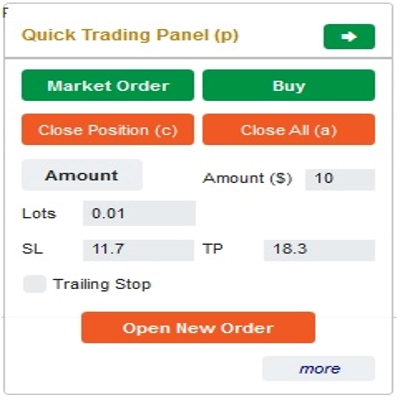
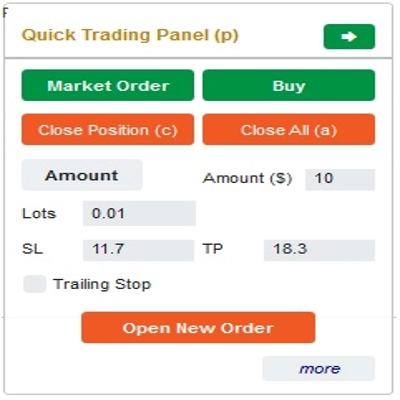
ใน “Quick Trading Panel”:
เพื่อเปลี่ยนระหว่างคำสั่ง BUY และ SELL คุณสามารถลากเส้น StopLoss บนแผนภูมิขึ้นหรือลงจากเส้น Entry
– คุณสามารถเปิดและปิดทั้งคำสั่งตลาดและคำสั่ง Limit หรือ Stop ได้
– คุณสามารถปรับจำนวนคำสั่งเป็น %Balance หรือจำนวนคำสั่งคงที่สำหรับแต่ละคำสั่ง โดยอิงจากจำนวนนี้และ StopLoss ที่คุณเลือก บอทจะคำนวณจำนวนล็อตที่จะเปิดคำสั่งโดยอัตโนมัติ
– คุณสามารถแก้ไข StopLoss, TakeProfit หรือ Entry Price (สำหรับคำสั่งรอดำเนินการ) โดยการเปลี่ยนตัวเลข SL, TP หรือ Range ใน “Quick Trading Panel” หรือการลากเส้นแนวนอนบนแผนภูมิ
– SL, TP และ Range (สำหรับคำสั่งรอดำเนินการ) คำนวณเป็น Pips ขณะที่ Expiry(นาที) คำนวณเป็นนาที (ถ้าคุณไม่ใช้ Expiry ให้ปล่อยเป็น 0 หรือเว้นว่างไว้)
ใน “Quick Modifying Panel”:
– ในแผงนี้คุณสามารถปิดคำสั่งหรือแก้ไขพารามิเตอร์คำสั่ง เช่น StopLoss (ในราคา), TakeProfit (ในราคา), TrailingStop หรือ Range (ใน Pips) และ Expiry (ในนาที)
(โปรดทราบว่า StopLoss และ TakeProfit ในแผงนี้คือราคาที่คุณตั้งใจจะย้ายไป)
– ในแผงนี้คุณยังสามารถเปลี่ยน StopLoss, TakeProfit หรือ Range(ใน Pips) โดยตัวเลขในแผงหรือโดยการลากเส้นแนวนอนบนแผนภูมิไปยังตำแหน่งที่ต้องการ
– คุณสามารถสลับไปมาระหว่างคำสั่งเพื่อแสดงพารามิเตอร์ของคำสั่งเหล่านั้นบนแผง
หมายเหตุ: ตัวเลขในสี่เหลี่ยมสีเหลืองคือหมายเลข ID ของคำสั่งที่ถูกเลือกเพื่อแก้ไข
ขอให้คุณเทรดสำเร็จ!
สรุป
The interface includes a Quick Trading Panel where users can toggle between buy and sell orders by adjusting the stop loss line on the chart. Users can specify order amounts as a percentage of their balance or as fixed values. StopLoss, TakeProfit, and entry prices for pending orders can be edited either numerically or by dragging lines on the chart. Parameters such as SL, TP, and range are measured in pips, while expiry times are set in minutes.
A Quick Modifying Panel allows users to close orders or adjust order parameters including StopLoss, TakeProfit, TrailingStop, range, and expiry. Changes can be made by entering values or dragging chart lines. The panel also enables switching between orders to view and edit their details.
This tool operates in both real-time trading and backtesting modes, supporting multiple forex symbols including EURUSD, GBPUSD, USDJPY, and XAUUSD (gold). It is intended to streamline risk and reward management in forex trading environments.
การสนทนา
รีวิวจากลูกค้า
5 | 33 % | |
4 | 33 % | |
3 | 33 % | |
2 | 0 % | |
1 | 0 % |
!["[Fx4U] GBPUSD - Price Action" โลโก้](https://cdn.ctrader.com/image/webp/d80b34fc-da3c-4f01-a321-456450665649_26190)
!["[Fx4U] CADJPY - Price Action" โลโก้](https://cdn.ctrader.com/image/webp/1ba81247-b6b7-4f3c-a297-fa3eb1d57fe1_26195)

!["[Fx4U] AUDCHF - Price Action" โลโก้](https://cdn.ctrader.com/image/webp/0a22e9aa-c83b-42cd-b0b8-c1a2da593207_26148)

!["[Fx4U] EURAUD - Price Action" โลโก้](https://cdn.ctrader.com/image/webp/baf8dde4-1ef3-4beb-8ae2-0fed8320f65d_26177)