Descrizione
⚡ IMMORTAL DUO SWEEP CRAFT v2.1
Gold + Nasdaq on autopilot. 4 strategies, 1 cBot, any broker.
No martingale. No grid. No averaging down. Fixed SL and TP on every trade.
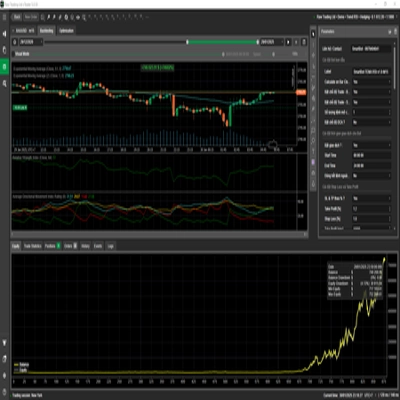
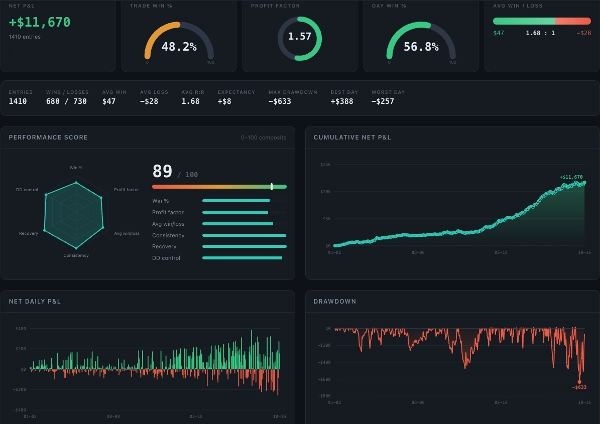
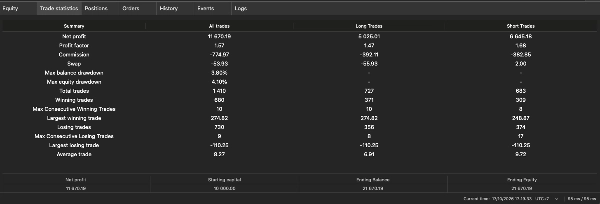
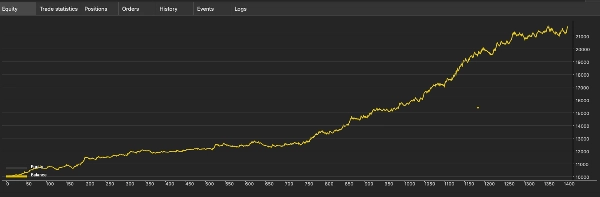
📈 BACKTEST: Jan 2025 → Oct 2026 · IC Markets spread · $10K start
💰 Net profit
+$11,670 (+117%)
🛡️ Max drawdown
4.1%
📊 Profit factor
📅 Winning days
56.8%
⚖️ Average win / loss
1.68 : 1 ($47 / −$28)
🔻 Worst day
−$257 (−2.6%)
🗓️ Losing months
2 of 22
🧠 4 STRATEGIES, ONE ENGINE
- Immortal Gold (M30): trend entries with a VWAP filter
- NQ Europe ORB (M15): breakout of the European-session range
- Gold Sweep (M5): liquidity-sweep reversals at session highs and lows
- Craft (H1): two gold trend legs riding the big moves
Gold and Nasdaq rarely lose on the same day, which gives a smoother equity curve.
🌍 PLUG & PLAY ON ANY cTRADER BROKER
✔ Finds symbols automatically: XAUUSD, XAUUSD+, GOLD, NAS100, US100, USTEC, NDXUSD…
✔ Correct sizing on every contract size. Tested on 6 brokers.
✔ Auto-sizing from $1K to $200K+: set once, it follows your balance.
🏆 BUILT FOR PROP FIRMS
✔ Daily loss and profit stop in % of balance
✔ Max drawdown stop, which shuts the bot down before a breach
✔ Stops for the day after an NQ win, so profits aren’t given back
✔ No-hedge mode for firms that ban hedging
✔ Manual-trade lock blocks impulsive manual trades
✔ Per-asset risk budget for “max risk per trade” rules
🔑 PLANS: Monthly · 3 months · 6 months · Unlimited
📌 Recommended: $5K+ (works from $1K at higher relative risk because of broker minimum lots)
⚠️ Results shown are backtests and don’t guarantee future performance. Like any real strategy, it has losing weeks and months. Trade only with money you can afford to risk.
📘 IMMORTAL DUO SWEEP CRAFT v2.1: QUICK START GUIDE
✅ 1. Install (2 minutes)
- Buy or subscribe, then open cTrader → Algo → cBots. The bot appears in your list.
- Open any chart: XAUUSD, NAS100, any timeframe. The bot doesn’t trade the chart; it finds Gold and Nasdaq by itself.
- Click Add Instance → Start. It runs on both cTrader Desktop and cTrader Cloud.
✅ 2. Check the start-up log
Open the Log tab and confirm:
Gold symbol: XAUUSD (auto…)andNQ symbol: NAS100 (auto…). Your broker’s names may differ, for example XAUUSD+ or USTEC.[SIZE] … Gold … lotsand[NQ] Sizing: $… per point. These show the actual trade size.Account guard: loss 2% = -$… | profit stop 1.5% = +$…
If you see “symbol not found”, type your broker’s exact symbol name in Gold symbol or NQ symbol.
✅ 3. The only settings most users need
SettingDefaultWhat it means
Size mode
Auto (per 100K)
All sizes are written for a 100K account and scale to your balance automatically.
Gold size
Standard lots per 100K (0.12 = 12 oz).
NQ size
$7 per point
Nasdaq risk per index point, per 100K.
Combined daily loss
2%
Closes everything and pauses until the next day.
Daily profit stop
1.5%
Locks in a good day.
Max drawdown stop
8%
Closes everything and stops the bot.
Start balance for max DD
0
Set this to your account’s starting balance, for example 100000.
👉 Want more or less risk? Change Gold size and NQ size by the same factor. For example, ×1.5 means gold 0.18 and NQ $10.5.
✅ 4. Prop-firm setup
- Daily loss 2% works under a typical 3–5% daily limit.
- Max DD stop: set it 2% tighter than your firm’s limit (firm 10% → set 8%).
- Firm bans hedging? Set No-hedge mode = NoOpposite.
- Don’t want manual trades? Set Manual-trade lock = ON. ⚠️ Only use this if no other bot runs on the account.
- Daily reset: 05:00 Bangkok (22:00 UTC), the same as most firms’ daily snapshot.
✅ 5. Small accounts (1K–5K)
- Brokers have a minimum lot (0.01), so small accounts trade the minimum. The log shows
below the broker minimum … using the minimum. - This means higher % risk per trade than on larger accounts. Recommended: 5K+.
- To skip trades below the minimum instead, set “If size is below broker minimum” = SkipTrade.
✅ 6. What to expect
- About 2–4 trades a day across gold and Nasdaq.
- Gold is flat on weekends and during the daily close (15:30–17:00 NY).
- After a winning NQ trade, no new trades open for the rest of the day. That’s normal.
- Losing weeks happen. Judge it over months, not days.
✅ 7. Do & Don’t
✔ Run it on a VPS or cTrader Cloud so it’s always on.
✔ Run one instance per account.
✘ Don’t close the bot’s trades by hand. That’s the most common reason live results fall below the backtest.
✘ Don’t run two copies on the same account, or every trade opens twice.
🆘 Troubleshooting
ProblemFix
“Symbol not found”
Type the exact symbol name from Market Watch.
Sweep or Craft “NOT started”
Your account is netting. Use a hedging account, or set No-hedge mode.
No trades for hours
Normal. Check the log for “flat window”, “GUARD LOCK” or “NQ WIN STOP”.
Bot stopped by itself
The max drawdown stop was hit. Check the log line “MAX DRAWDOWN STOP”.
Questions? Message me through the cTrader Store. Include your broker, account size and the first 20 lines of your log.
Disclaimer
Trading involves risk. Past performance does not guarantee future results.
Riepilogo
The bot’s strategies include:
- Immortal Gold (M30): trend entries filtered by VWAP.
- NQ Europe ORB (M15): breakout trades based on the European session range.
- Gold Sweep (M5): liquidity sweep reversals at session highs and lows.
- Craft (H1): capturing two gold trend legs during major moves.
IDSC V2.1 automatically detects broker-specific symbols and adjusts trade sizes according to account balance, supporting balances from $1,000 to over $200,000. It includes risk management features such as daily loss and profit stops, max drawdown limits, no-hedge mode, and manual trade locks, making it suitable for prop firm requirements.
Backtesting on IC Markets from January 2025 to October 2026 showed a net profit of +117%, max drawdown of 4.1%, profit factor of 1.57, and a winning day rate of 56.8%. The bot typically executes 2–4 trades daily and pauses trading after a winning Nasdaq trade to preserve profits.
Installation involves adding the cBot to any chart; it runs on both cTrader Desktop and cTrader Cloud. Recommended minimum balance is $5,000 due to broker minimum lot sizes.