
Descripción
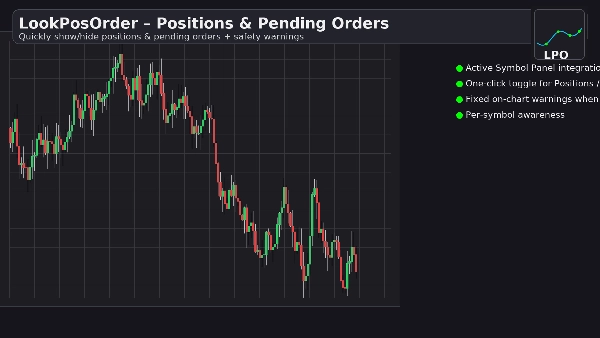
LookPosOrder te ayuda a evitar sorpresas costosas al facilitar mostrar u ocultar Posiciones y Órdenes Pendientes—y al advertirte claramente cuando algo está oculto para el símbolo actual.
Qué hace
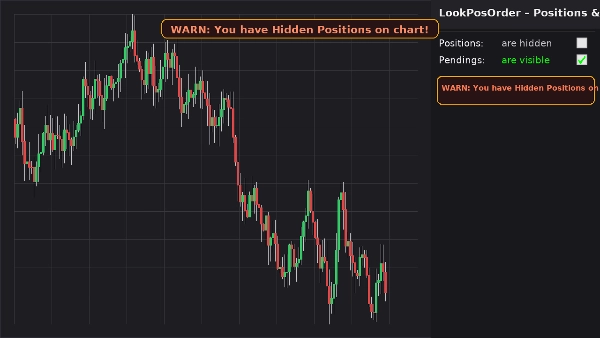
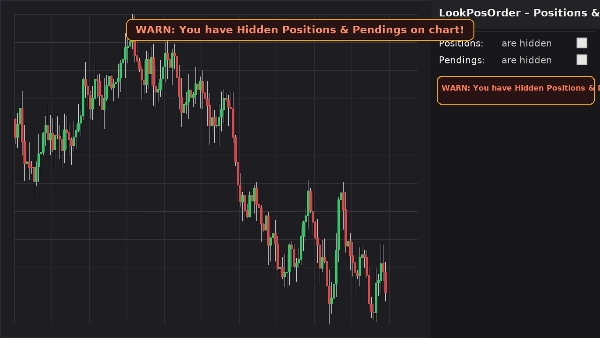
- Agrega un bloque de control limpio en el Panel de Símbolo Activo (ASP) con dos casillas de verificación:
-
- Posiciones: visibles / ocultas
- Pendientes: visibles / ocultas
- Muestra un banner de advertencia fijo en el gráfico (no se mueve al desplazar o hacer zoom) si existen elementos ocultos para el símbolo actual.
- Refleja la misma advertencia en línea en el bloque ASP.
- Recuerda tus preferencias por símbolo.
Por qué a los traders les encanta
- Evita errores: nunca olvides que algo está oculto en tu gráfico.
- Cambio rápido: sin necesidad de buscar en los menús del gráfico.
- Conciencia por símbolo: solo advierte cuando el símbolo actual realmente tiene elementos ocultos.
- Ligero y limpio: interfaz mínima, respuesta instantánea.
Características clave
- Integración con el Panel de Símbolo Activo
- Conmutadores de un clic para Posiciones y Órdenes Pendientes
- Banner de advertencia fijo en el gráfico cuando existen elementos ocultos
- Advertencia en línea dentro del bloque ASP
- Conciencia por símbolo (filtra posiciones/órdenes al símbolo actual)
- Persistencia de configuraciones (por símbolo)
- Funciona junto con la Configuración de Pantalla nativa (se sincroniza automáticamente si se cambia desde el menú del gráfico)
Requisitos
- cTrader 5.4.9 o superior recomendado
- Plataforma de escritorio
Instalación
- Descarga el archivo del plugin.
- Abre cTrader → Automatizar → Plugins → Importar.
- Activa el Plugin LookPosOrder.
- Abre un gráfico, selecciona el símbolo y usa el bloque LookPosOrder en el ASP derecho.
Cómo usar
- Activa o desactiva Posiciones y Pendientes mediante las casillas de verificación.
- Si algo está oculto y existe para el símbolo actual, verás una advertencia:
-
- “ADVERTENCIA: ¡Tienes Posiciones Ocultas en el gráfico!”
- “ADVERTENCIA: ¡Tienes Pendientes Ocultos en el gráfico!”
- “ADVERTENCIA: ¡Tienes Posiciones y Pendientes Ocultos en el gráfico!”
Preguntas frecuentes
P: ¿El plugin cambia mis órdenes o posiciones?
R: No. Solo alterna la visibilidad del gráfico usando la Configuración de Pantalla nativa.
P: ¿Me advertirá sobre otros símbolos?
R: No. Las advertencias solo se muestran cuando el símbolo actual tiene elementos ocultos.
P: ¿Qué pasa si cambio la visibilidad desde el menú del gráfico?
R: El plugin sincroniza automáticamente las casillas de verificación y las advertencias.
P: ¿Impacto en el rendimiento?
R: Insignificante. Es una superposición de interfaz ligera y un bloque ASP.
Reembolso
- Reembolsos: garantía de devolución de dinero de 14 días si el plugin no funciona como se describe en tu configuración.
Privacidad
El plugin no recopila ni transmite datos personales. Solo interactúa con el gráfico local y la interfaz de cTrader.
Resumen
Conversación
Valoraciones de clientes
5 | 100 % | |
4 | 0 % | |
3 | 0 % | |
2 | 0 % | |
1 | 0 % |