![Trading product for Gaussian Channel [Iridio Capital] Chỉ báo BTCUSD Signal, image 1](https://cdn.ctrader.com/image/webp/2c4f9ca9-4e9b-476d-b5a6-787c8095032b_61546)
![Trading product for Gaussian Channel [Iridio Capital] Chỉ báo BTCUSD Signal, image 2](https://cdn.ctrader.com/image/webp/ec813869-e811-4734-99a4-2059f47fcfd0_61545)
![Trading product for Gaussian Channel [Iridio Capital] Chỉ báo BTCUSD Signal, image 3](https://cdn.ctrader.com/image/webp/b37468c1-e550-4aef-bd19-529f4940409f_41961)
![Trading product for Gaussian Channel [Iridio Capital] Chỉ báo BTCUSD Signal, image 4](https://cdn.ctrader.com/image/webp/3f23aafc-2ba3-4316-becf-bed38d9862f4_41962)
Mô tả
MÔ TẢ CHI TIẾT
Kênh Gaussian [DW] – Bộ Lọc Xu Hướng Thích Ứng với Dải Biến Động cho cTrader
Một bản chuyển cTrader trung thực của chỉ báo Kênh Gaussian nổi tiếng của DonovanWall. Lớp phủ này áp dụng bộ lọc Gaussian IIR đa cực (Đáp ứng xung vô hạn) lên dữ liệu giá, tạo ra một đường xu hướng cực kỳ mượt mà được bao quanh bởi các dải dựa trên biến động — tất cả với màu sắc động chuyển đổi giữa xanh lá và đỏ khi hướng xu hướng thay đổi.
Bộ lọc Gaussian về mặt toán học vượt trội hơn so với các trung bình động tiêu chuẩn: mỗi cực bổ sung tăng bậc làm mượt, dần loại bỏ nhiễu tần số cao trong khi vẫn giữ nguyên tín hiệu xu hướng cơ bản với sự méo mó tối thiểu.
🔬 CÁCH HOẠT ĐỘNG
Bộ Lọc Gaussian (Bộ Máy Cốt Lõi)
Trung tâm của chỉ báo này là việc triển khai bộ lọc Gaussian IIR của John Ehlers. Thay vì trung bình động đơn giản, bộ lọc áp dụng một hạt nhân làm mượt theo hàm mũ nhiều lần liên tiếp (mỗi lần gọi là một "cực"). Kết quả là một đường phản hồi gần như chính xác phân phối Gaussian thực sự trong miền tần số.
Hệ số làm mượt (alpha) được lấy từ chu kỳ lấy mẫu bạn chọn. Nó được tính toán bằng công thức của Ehlers dựa trên cosin của tần số góc và một hệ số hiệu chỉnh cho số cực. Phương trình bộ lọc đệ quy sử dụng hệ số nhị thức (tam giác Pascal) để kết hợp các giá trị bộ lọc trước đó — tạo ra phản hồi Gaussian đa cực chính xác về mặt toán học.
Về mặt thực tiễn: nhiều cực hơn nghĩa là đầu ra mượt hơn với độ trễ ít hơn trên mỗi đơn vị làm mượt so với việc chồng các trung bình động đơn giản.
Dải Biến Động (Kênh)
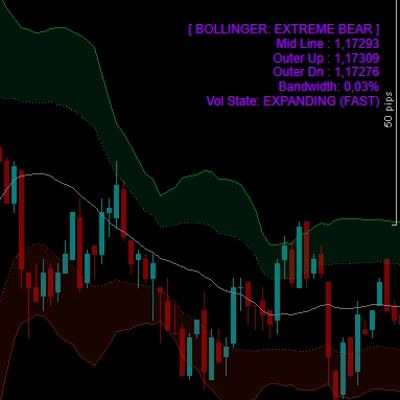
Các dải trên và dưới được xây dựng bằng cách áp dụng cùng bộ lọc Gaussian lên True Range, sau đó cộng/trừ TR đã lọc nhân với một hệ số có thể cấu hình. Điều này tạo ra một kênh mở rộng động trong điều kiện biến động cao và co lại trong thị trường yên tĩnh — tương tự như Dải Bollinger nhưng với bao bọc mượt mà hơn và ít nhiễu hơn.
Màu Sắc Động
Đường trung tâm và cả hai dải thay đổi màu dựa trên hướng của bộ lọc: xanh khi bộ lọc đang tăng, đỏ khi nó giảm. Các chuyển đổi màu được xử lý liền mạch — cả chuỗi màu đi ra và vào đều được vẽ trên thanh chuyển tiếp để tránh khoảng trống hình ảnh giữa các đoạn.
⚡ CHẾ ĐỘ ĐẶC BIỆT
Chế Độ Giảm Độ Trễ
Các bộ lọc Gaussian tiêu chuẩn tạo ra độ trễ pha tỷ lệ với độ mạnh làm mượt của chúng. Khi bật Chế Độ Giảm Độ Trễ, chỉ báo sẽ tiền xử lý chuỗi đầu vào bằng cách thêm hiệu số giữa giá trị hiện tại và giá trị cách N thanh trước (với N là độ trễ tính toán). Điều này hiệu quả dự đoán trước đầu vào, giảm đáng kể độ trễ của bộ lọc trong khi vẫn giữ hầu hết các đặc tính làm mượt.
Chế Độ Phản Ứng Nhanh
Khi bật, đầu ra cuối cùng được lấy trung bình giữa bộ lọc N cực đầy đủ và bộ lọc 1 cực. Phiên bản 1 cực phản ứng nhanh hơn (với nhiều nhiễu hơn), trong khi phiên bản N cực mượt hơn (với độ trễ nhiều hơn). Việc pha trộn chúng tạo ra sự thỏa hiệp: phản ứng nhanh hơn với các thay đổi xu hướng mà không hoàn toàn hy sinh độ mượt.
Cả hai chế độ có thể kết hợp để đạt độ phản hồi tối đa, hoặc tắt để có đầu ra Gaussian thuần khiết và mượt mà nhất.
📊 NHỮNG GÌ BẠN THẤY TRÊN BIỂU ĐỒ
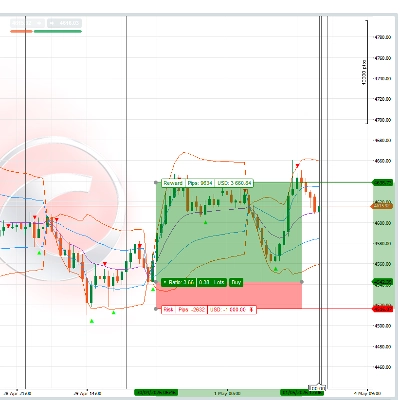
- Đường Trung Tâm — Giá đã lọc Gaussian (HLC3), được vẽ màu xanh khi tăng và đỏ khi giảm. Đây là tham chiếu xu hướng chính của bạn.
- Dải Trên — Đường trung tâm cộng với True Range đã lọc Gaussian nhân với hệ số. Hoạt động như vùng kháng cự/ quá mua động.
- Dải Dưới — Đường trung tâm trừ True Range đã lọc Gaussian nhân với hệ số. Hoạt động như vùng hỗ trợ/ quá bán động.
- Chuyển Màu — Các chuyển đổi liền mạch giữa các đoạn tăng (xanh) và giảm (đỏ), không có khoảng trống hay chồng chéo khi đổi hướng.
📈 CÁCH SỬ DỤNG
Xác Định Xu Hướng Sử dụng ngay lập tức nhất: khi kênh màu xanh, xu hướng tăng; khi đỏ, xu hướng giảm. Các chuyển đổi màu đánh dấu khả năng đảo chiều xu hướng. Điều này thay thế nhiều hệ thống giao cắt trung bình động bằng một tín hiệu duy nhất, rõ ràng hơn.
Hỗ Trợ/Kháng Cự từ Các Dải Trong xu hướng tăng, dải dưới hoạt động như hỗ trợ động — các đợt hồi giá chạm hoặc gần nó là các điểm vào lệnh mua tiềm năng. Trong xu hướng giảm, dải trên hoạt động như kháng cự động — các đợt tăng giá chạm vào đó là điểm vào lệnh bán tiềm năng.
Xác Nhận Phá Vỡ Khi giá đóng cửa ngoài kênh (trên dải trên hoặc dưới dải dưới), nó báo hiệu động lượng mạnh. Kết hợp với phân tích khối lượng hoặc cấu trúc thị trường để xác nhận các giao dịch phá vỡ.
Lọc Các Tín Hiệu Khác Sử dụng Kênh Gaussian như bộ lọc định hướng: chỉ thực hiện các thiết lập mua từ các chỉ báo khác khi kênh màu xanh, và thiết lập bán khi nó màu đỏ. Điều này giảm đáng kể các tín hiệu sai từ các dao động và công cụ dựa trên mẫu hình.
Điều Chỉnh Tham Số
- Chu kỳ lấy mẫu thấp hơn (ví dụ, 50–80) cho giao dịch lướt sóng trong ngày trên M1–M15.
- Mặc định 144 hoạt động tốt trên M30–H4 cho giao dịch swing.
- Giá trị cao hơn (200+) trên Daily/Weekly cho giao dịch vị thế và xác định xu hướng vĩ mô.
- Tăng số Cực (5–7) để có đầu ra cực kỳ mượt trên các công cụ nhiều nhiễu. Giảm (2–3) để lọc nhanh hơn, phản ứng nhanh hơn.
- Điều chỉnh Hệ số TR để mở rộng (1.5–2.0) hoặc thu hẹp (0.8–1.2) kênh phù hợp với hồ sơ biến động của công cụ.
💡 MẸO
- Bắt đầu với các giá trị mặc định (4 cực, chu kỳ 144, hệ số 1.414) — chúng được hiệu chỉnh tốt cho hầu hết các cặp forex trên H1–H4.
- Bật Chế Độ Giảm Độ Trễ nếu bạn thấy bộ lọc bị trễ quá nhiều so với các biến động mạnh, nhưng lưu ý nó có thể gây ra hiện tượng vượt mức nhẹ.
- Bật Chế Độ Phản Ứng Nhanh khi bạn muốn chuyển đổi màu nhanh hơn mà không giảm số cực.
- Kết hợp cả hai chế độ cho độ phản hồi tối đa — hữu ích trên các khung thời gian thấp nhưng có thể giảm chất lượng lọc trên các khung cao hơn.
- Hệ số 1.414 không phải ngẫu nhiên — nó bằng căn bậc hai của 2, một giá trị được rút ra từ nghiên cứu gốc của Ehlers về độ rộng băng tần tối ưu cho nhiễu phân phối Gaussian.
⚠️ TỪ CHỐI TRÁCH NHIỆM
Chỉ báo này là công cụ phân tích kỹ thuật được thiết kế để xác định xu hướng và trực quan hóa biến động. Nó không tạo ra tín hiệu mua/bán tự động và không nên dùng làm cơ sở duy nhất cho quyết định giao dịch. Luôn sử dụng quản lý rủi ro hợp lý và kết hợp với phân tích của riêng bạn. Hiệu suất trong quá khứ không đảm bảo kết quả tương lai. Giao dịch có rủi ro mất vốn đáng kể.
Tóm tắt
The filter uses John Ehlers' implementation, which applies exponential smoothing multiple times to approximate a Gaussian distribution, reducing noise while preserving trend signals with minimal lag. The indicator features dynamic color changes: green when the trend is rising and red when falling, with seamless transitions to indicate trend direction shifts.
Two special modes enhance responsiveness: Reduced Lag mode anticipates input to minimize filter delay, and Fast Response mode blends outputs from different poles for quicker reaction to trend changes. Both can be combined or used separately.
Traders use the Gaussian Channel for trend identification, support/resistance detection, breakout confirmation, and as a directional filter for other signals. Parameters such as sampling period, number of poles, and True Range multiplier can be adjusted to suit different instruments and timeframes, from scalping to position trading.
Đánh giá của khách hàng
5 | 67 % | |
4 | 33 % | |
3 | 0 % | |
2 | 0 % | |
1 | 0 % |

![Logo "Custom Timeframes [Iridio Capital]"](https://cdn.ctrader.com/image/webp/4d75a920-23c7-4fea-a7b5-594a9d067f2e_63286)
![Logo "Trend Angle Indicator [Iridio Capital]"](https://cdn.ctrader.com/image/webp/75f1045e-ef06-4d88-8208-bc347c788992_61558)
![Logo "Smart Money Concepts (SMC) [Iridio Capital]"](https://cdn.ctrader.com/image/webp/b4b5414d-a5ca-44b7-a947-e28eca44a218_61548)
![Logo "High-Low Divergence [Iridio Capital]"](https://cdn.ctrader.com/image/webp/10a9e91b-243a-43f6-bbfe-7376bad5a214_61554)
![Logo "Wyckoff Toolkit [Iridio Capital]"](https://cdn.ctrader.com/image/webp/5318c788-91ef-4297-bca6-4ce73b1516a8_61556)
![Logo "Session Volume Profile (SVP) [Iridio Capital]"](https://cdn.ctrader.com/image/webp/b058beb7-b143-45f3-87d0-8c524c00b203_61552)
![Logo "Inverse Fair Value Gap (iFVG) [Iridio Capital]"](https://cdn.ctrader.com/image/webp/314e3224-d85e-48a4-9111-a2b0baaf3477_61527)
![Logo "Forecast Indicator [Iridio Capital]"](https://cdn.ctrader.com/image/webp/0115b1cf-e645-41d0-88db-5919a94116aa_61550)


![Logo "[Hamster-Coder] Pivot Points MTF"](https://cdn.ctrader.com/image/webp/4c143e5a-309c-40e3-a578-f04d1e133ffa_31159)