present
가입하고 첫 구매 시 $50 할인을 받으세요
Trading product for Trend is your friend - cBot cBot Position Sizer TP Manager, image 1
Trend is your friend - cBot
cBot
FP Markets에서 테스트함
버전 1.0, Mar 2026
Windows, Mac, Mobile, Web
28%
ROI
5.27
손익비
4.56%
최대 낙폭
Trading product for Trend is your friend - cBot cBot Position Sizer TP Manager, image 2
Trading product for Trend is your friend - cBot cBot Position Sizer TP Manager, image 3
Trading product for Trend is your friend - cBot cBot Position Sizer TP Manager, image 4
Trading product for Trend is your friend - cBot cBot Position Sizer TP Manager, image 5
Trading product for Trend is your friend - cBot cBot Position Sizer TP Manager, image 6
Trading product for Trend is your friend - cBot cBot Position Sizer TP Manager, image 7
Trading product for Trend is your friend - cBot cBot Position Sizer TP Manager, image 8
100
판매
193
무료 설치

설명

Trend Is Your Friend cBot — Advanced Multi-Strategy Trading Robot for cTrader


A professional-grade trading algorithm that combines Grid, Pyramid,

Scalping, and Swing Trading into one configurable system.

For beginners, scalpers, swing traders, and professionals.

The companion chart tool, "Trend is your friend cBot - Indicator" (MA bands, other-timeframe bands, daily pivots), is available for free on the cGuru cTrader Store profile. Video tutorials and showcases:

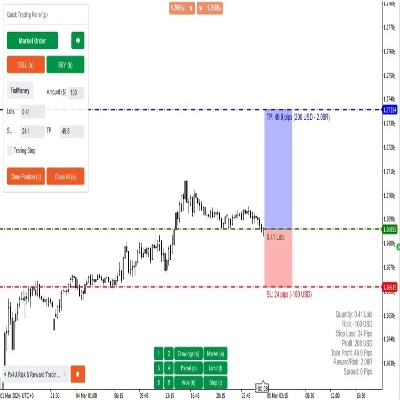
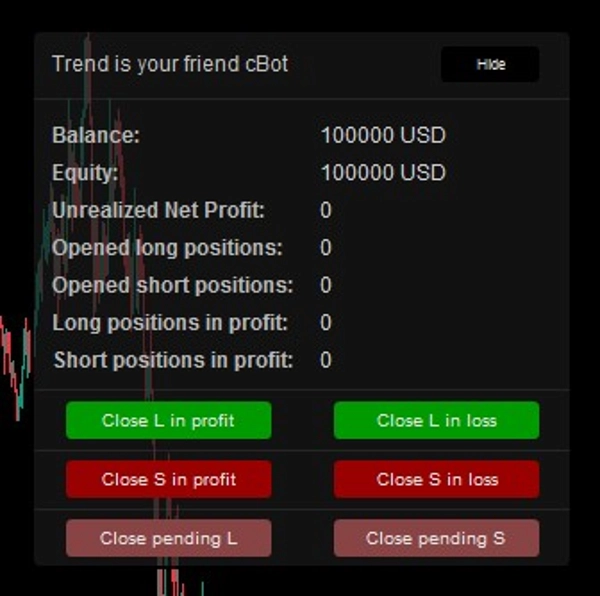
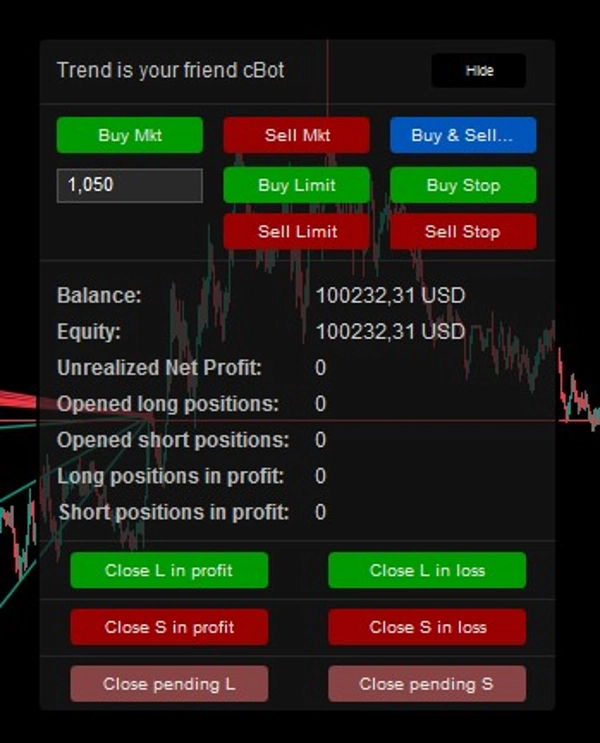
Manual Mode — Control Panel


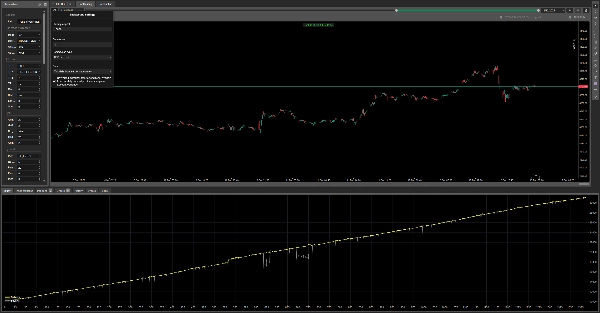
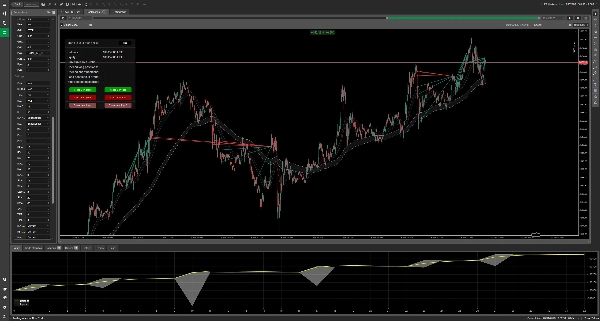
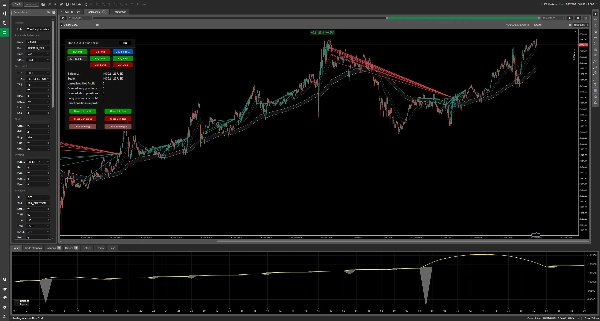
AUDCAD — H4 — Backtest from 01.01.2023 to 01.02.2026


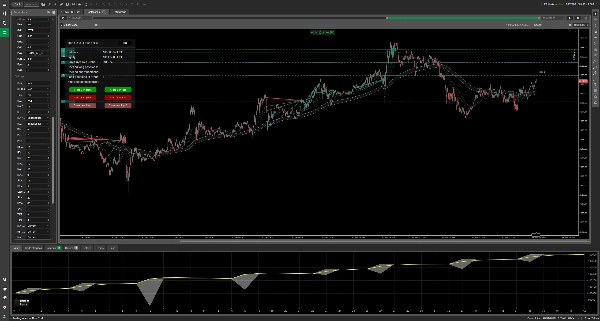
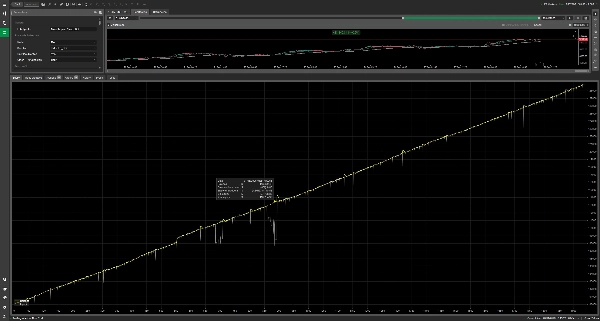
XAUUSD — M5 — Backtest from 01.01.2025 to 01.02.2026


Free visual helper available on my cTrader Store profile:

"Trend is your friend cBot — Indicator"

https://ctrader.com/products/3283

Trend is your friend is a multi-strategy trading robot for cTrader. It combines nine entry engines with grid averaging, pyramiding and basket-level take profit and stop-loss management in a single tool. You can let it trade automatically, run it as a semi-automatic assistant that only manages what you open from its panel, or mix both — automatic entries on one direction and manual control on the other.


Every building block is optional and independently configurable: which signal opens the first position, how many averaging positions may follow it, how their volume grows, where profits and losses are realised, and during which hours the robot is allowed to enter. All of this is configured through 84 parameters grouped into nine sections — a full reference follows the overview.


HOW THE BOT TRADES

Entries. The selected Mode decides what triggers the first position: a touch of a moving average, an MA cross, a daily pivot level, an RSI, MACD or Stochastic condition, a series of same-colour candles, a fixed time of day, or a manual click on the panel. Direction settings decide whether the robot trades long, short, one side at a time, both sides at once, or simply the side whose condition fired. Optional trend filters (own-timeframe MA alignment and a second-timeframe MA filter) and volatility/distance filters (MA channel width, ATR range, trading window) can block weak entries.


Grid averaging. When price moves against the initial position, the grid adds averaging positions: below the last fill for longs, above it for shorts. The distance starts at Grid level pips and can widen geometrically with each level. A same-candle restriction prevents stacking several grid orders on one fast candle, and per-direction caps (0 disables a side) limit the worst case.


Pyramiding. The pyramid does the opposite: it adds in the direction of the profit while the initial position is in profit. STANDARD mode adds after every fixed favourable distance; RE_ENTRY adds on a fresh entry signal of the same kind that started the trade, with a minimum number of bars between additions.


Exits. Profit and loss are managed on the whole basket, not per position: a monetary target, a "share of positions in profit" rule, a combination of both, or fixed price levels per direction. On the loss side you get a static monetary basket stop, an optional MA-based trailing stop that only ever tightens, an MA-cross exit, and fixed loss price levels per direction. After any basket close the robot can pause before re-entering.


Sizing. The first order uses a fixed lot or a size derived from the account balance. Grid and pyramid positions each have their own sizing scheme: same as the first order, step increases, martingale multiplication, or a fixed lot. Every calculated size is clamped to the broker's minimum and maximum and rounded down to the broker's volume step.


PARAMETER REFERENCE

[General]

• Label prefix — text tag written into the label of every position and order this cBot opens ("Initial", "Grid", "Pyramid", "Manual"). The cBot uses it to recognise and manage only its own trades, so different instances or manual trades stay separate.


[Run mode & direction]

• Mode — the entry engine: MA (price touches the selected moving average within the allowed distance), MA_CROSS (fast/slow MA cross), PIVOT (daily pivot support/resistance levels), RSI (oversold/overbought), MACD (MACD/signal line cross), STOCHASTIC (oscillator levels), SAME_CANDLE_SERIE (N consecutive same-colour candles), TIME (fixed hour and minute), MANUAL (no automatic entries; open trades from the panel — the bot still manages them).

• Direction — LONG (buys only), SHORT (sells only), LONG_OR_SHORT (long or short, never both at once), BOTH_AT_ONCE (independent long and short baskets), TRIGGER_SIDE (the robot opens the side whose signal condition was met).

• Only MA direction — trend gate for entries: longs only when the fast MA is above the slow MA, shorts only when it is below.

• Other TF MA direction — the same trend check on a second timeframe (with OFF option); entries require both timeframes to agree.


[Take profit]

• TP type — what closes a basket in profit: USD (monetary target), PERCENT (a required share of positions in profit), USD_OR_PERCENT (monetary target first, percentage rule later — see below).

• TP scope — PER_DIRECTION (long and short baskets evaluated and closed separately) or GLOBAL (all positions treated as one basket).

• TP $ — basket profit in account currency that triggers closing (despite the name, the account currency is used, not necessarily USD).

• TP % of grids in profit — the percentage of open basket positions that must have positive net profit for the basket to be closed (PERCENT mode).

• Min number of grid orders to close by % — how many grid/pyramid positions must exist before the percentage rule takes over in USD_OR_PERCENT mode.

• Disable $ TP when min grid orders opened — once that minimum is reached, the monetary target is switched off and only the percentage rule closes the basket.

• Long price level global TP (0 - disable) — a fixed price at which all long positions are closed in profit; 0 disables.

• Short price level global TP (0 - disable) — a fixed price at which all short positions are closed in profit; 0 disables.


[Grid]

• Grid level pips — base distance in pips between averaging entries.

• Grid level martingale multiplier — widens each next step: distance = base × multiplier ^ level. 1.0 keeps equal spacing; 2.0 doubles it every level.

• No grid on same candle — allows at most one grid position per candle, which prevents dense stacking during fast moves.

• Grid orders short (0 - disable) — maximum short grid positions; 0 disables the short grid entirely.

• Grid orders long (0 - disable) — maximum long grid positions; 0 disables the long grid entirely.


[Pyramid]

• Pyramid mode run — STANDARD (adds a position every time the price has moved Pyramid level pips in the trade's favour) or RE_ENTRY (adds on a new signal of the same type as the original entry).

• Re-entry min bars — minimum number of candles between pyramid re-entries (RE_ENTRY mode).

• Pyramid level pips — the favourable distance in pips that triggers the next pyramid addition (STANDARD mode).

• Pyramid orders short (0 - disable) — maximum short pyramid positions; 0 disables.

• Pyramid orders long (0 - disable) — maximum long pyramid positions; 0 disables.


[Protection]

• SL mode — OFF (no basket stop), STATIC (close the basket at a fixed monetary loss) or STATIC_AND_TRAILING (static stop plus an MA-based trailing stop).

• Static SL scope — PER_DIRECTION (long and short baskets stopped separately) or GLOBAL (one combined loss limit).

• Static SL $ — basket loss in account currency that closes the basket (account currency, not necessarily USD).

• Trailing SL trigger pips — how far price must travel away from the reference MA (in pips) before the trailing stop activates.

• Trailing SL pips — offset of the trailing level from the reference MA; negative values place the stop closer to price. Once set, the level only moves in the favourable direction — it never loosens.

• Trailing SL trigger wave — FAST or SLOW moving average used as the trailing reference.

• MA SL — OFF, FAST or SLOW: closes all positions of a direction when price crosses the chosen moving average.

• Pause on close minutes (0 - disable) — a cooldown in minutes after a basket close (TP/SL/trailing) during which no new entries are opened; prevents instant re-entry into the same move.

• Long price level global SL (0 - disable) — a fixed price at which all long positions are closed at a loss; 0 disables.

• Short price level global SL (0 - disable) — a fixed price at which all short positions are closed at a loss; 0 disables.


[Volume]

• First order fix lot — the initial position size in lots when balance-based sizing is off.

• Keep first order vol to balance ratio — instead of the fixed value, the initial size is derived from the account balance, the pip value and the grid spacing, so the first order scales with the account (clamped to broker limits).

• Grid volume type — how grid position sizes evolve: SAME_AS_ORDER (always as the first order), STEP (grow by a fixed amount per level), MARTINGALE (multiply per level), FIX_LOT (one fixed size for all grid positions).

• Grid step volume — lots added per grid level in STEP mode.

• Grid martingale multiplier — size multiplier per grid level in MARTINGALE mode (2.0 doubles each level).

• Grid fix lot — fixed lot size for all grid positions in FIX_LOT mode.

• Pyramid volume type — the same four schemes for pyramid positions.

• Pyramid step volume — lots added per pyramid level in STEP mode.

• Pyramid martingale multiplier — size multiplier per pyramid level in MARTINGALE mode.

• Pyramid fix lot — fixed lot size for all pyramid positions in FIX_LOT mode.


[Settings]

• Control panel — shows or hides the on-chart control panel (see CHART PANEL below).

• BE line — draws the break-even line: the volume-weighted average entry price of the current basket, drawn separately for long and short.

• TSL line — draws the current trailing-stop level on the chart (STATIC_AND_TRAILING mode only).

• MA modes channel interaction — which moving average (FAST or SLOW) drives MA-mode entries. The MA is computed on High prices for the long side and Low prices for the short side, forming a channel around price.

• MA fast period — period of the fast moving average.

• MA slow period — period of the slow moving average.

• MA fast type — smoothing type of the fast MA (Simple, Exponential, Weighted, Wilder and other cTrader types).

• MA slow type — smoothing type of the slow MA.

• Distance from MA pips — how far price may be from the selected MA for a touch entry to still count. 0 means "exactly at the MA" (with 1 pip of tolerance); larger values accept entries further away.

• Pivot start L — which daily pivot level starts the long grid: PP, S1, S2 or S3.

• Pivot start S — which daily pivot level starts the short grid: PP, R1, R2 or R3.

• RSI periods — RSI calculation period.

• RSI buy level — RSI below this value opens longs (standard 30).

• RSI sell level — RSI above this value opens shorts (standard 70).

• MACD fast period — fast MACD line period.

• MACD slow period — slow MACD line period.

• MACD smoothing — signal line smoothing period.

• Stochastic %K periods — %K line calculation period.

• Stochastic %K slowing — %K line smoothing.

• Stochastic %D periods — %D signal line period.

• Stochastic buy level — Stochastic below this value opens longs (standard 20).

• Stochastic sell level — Stochastic above this value opens shorts (standard 80).

• SAME CANDLE SERIE mode length — how many consecutive same-colour candles are required for the entry (bullish series for long, bearish for short).

• TIME mode hour — the hour of the timed entry in TIME mode.

• TIME mode minute — the minute of the timed entry in TIME mode.

• MA timeframe — calculation timeframe for both moving averages (Current or any higher timeframe).

• RSI timeframe — calculation timeframe for RSI.

• MACD timeframe — calculation timeframe for MACD.

• STOCHASTIC timeframe — calculation timeframe for Stochastic.

• Min MA waves distance pips filter — blocks entries while the fast–slow MA distance (channel width) is below this many pips; filters out flat, choppy markets.

• Max MA waves distance pips filter — blocks entries while the channel is wider than this; filters markets where the trend has already stretched too far.

• Min ATR filter — blocks entries when current ATR volatility is below this value.

• Max ATR filter — blocks entries when ATR is above this value.


[Timer]

• Open trades in certain hour — enables a daily trading window; outside it no new entries are opened (existing positions are still managed).

• From hour — window start hour.

• From minute — window start minute.

• To hour — window end hour.

• To minute — window end minute.

• Timezone difference hours — offset between broker server time and your local time, applied so the window matches your clock.

• Close all after end — closes all cBot positions when the window ends.

• Wait for BE after end — instead of closing immediately at the window end, waits until the basket reaches break-even, then closes.


CHART PANEL

The panel shows live account data: balance, equity, unrealized net profit, the number of opened long and short positions, and how many of each are in profit. Trading controls:

• Buy Mkt / Sell Mkt — manual market entries with the panel lot size; such positions are labelled like bot trades and are managed by the bot.

• Buy Limit / Buy Stop / Sell Limit / Sell Stop — manual pending orders with a typed lot size.

• Buy & Sell Mkt (blue button) — despite the label, this is a panic close: it closes ALL positions opened by this cBot on the symbol.

• Close L/S in profit / Close L/S in loss — selective closing of profitable or losing positions per direction.

• Close pending L/S — cancels pending orders per direction.

• Hide/Show — collapses or expands the panel.


CHART LINES

With positions open, the bot can draw the break-even line (BE line), the trailing-stop line (TSL line) and the configured global price-level TP/SL lines. These are computed management levels, not broker orders — treat them as visualisation, not as guaranteed execution prices.


UNDERSTANDING TAKE PROFIT

Monetary thresholds ("TP $", "Static SL $") are compared against the summed net profit of the basket and use the account currency, despite the USD/$ labels. PERCENT mode counts how many basket positions currently have positive net profit and closes the basket when the required share is reached — this is a relative condition, not an account-return target, and a basket closed by it can still be at an overall loss. A single-position basket always uses the monetary target. USD_OR_PERCENT applies the monetary target until the "minimum grid orders" condition (with its disabling switch enabled) is met, then the percentage rule takes over.


EXECUTION & RECOVERY

Trading logic runs on every tick: existing positions are managed first (basket TP/SL, price levels, session end, trailing), then new entries are evaluated per the selected mode; trend caches refresh on each new bar and the position list is periodically re-synchronised with the platform. After a terminal or connection restart the bot recovers its open positions by label. All stop/TP logic is executed by the running cBot — no protective orders are attached broker-side, so the terminal must stay running and connected for exits to happen. Gaps, slippage and rejected closes can result in exits away from the intended level.


IMPORTANT RISK NOTES

Grid averaging increases exposure as price moves against you, and martingale volume schemes multiply that effect — drawdown can grow quickly and margin can run out. The default SL mode is OFF. These defaults are a configuration choice, not a safety feature: choose limits deliberately. Backtest your settings and run them on a demo account before trading real funds. Past or simulated results never guarantee future performance.


PUBLISHER

cGuru: https://ctrader.com/profile/cGuru


For informational and educational purposes only. Not investment advice or a guarantee of trading results.

요약

AI 요약
Trend is your friend cBot is an advanced multi-strategy trading robot designed for the cTrader platform. It integrates Grid, Pyramid, Scalping, and Swing trading methods into a single configurable system suitable for beginners, scalpers, swing traders, and professionals. The bot supports manual mode with an on-chart control panel for direct trade management, including market and pending orders, position closing, and account statistics.

Key features include nine entry modes based on technical indicators and price action: Moving Average (MA), MA Cross, Pivot levels, RSI, MACD, Stochastic, consecutive same-direction candles, time-based entries, and manual control. Direction modes allow trading long, short, both simultaneously, or triggered sides.

Grid logic averages losing positions by opening additional orders at configurable distances, while Pyramid logic adds to winning positions either at fixed profit intervals or on new signals. Protection mechanisms include static and trailing stops, MA-based stops, price-level stops, and pause timers.

Volume models support fixed lots, martingale, step increases, or matching order size. Filters include ATR volatility, MA distance, multi-timeframe confirmation, trading hours, and trend direction locks. Visual aids display break-even, trailing stop loss, global take profit/stop loss lines, and profit/loss labels.

Backtests cover multiple instruments and timeframes, with recommended minimum balance and risk parameters provided. The bot supports various order types and risk models, making it adaptable for different trading styles and risk management preferences.

트레이딩 프로필
트레이딩 스타일
데이 트레이딩
전략 유형
추세
분석 유형
알고리즘
거래 빈도
높음
최소 권장 잔고
$100
거래당 위험
100%
차트 기간
5분
백테스트 레버리지
1:500
일일 낙폭 한도
5%
프랍 트레이딩 회사 규정 부합
위험 관리
위험 모델
고정 랏
고정 위험 비율
변동성 기반
평가금 기반
동적
지원되는 주문 유형
시장
Limit
Stop
Stop Limit
최대 수량 (랏)
10000
지원되는 위험 통제
손절매
이익실현
추적 손절매
손익분기
평가금 손절매
일일 한도
최대 낙폭 한도
세션 필터
스프레드 필터
뉴스 필터

고객 리뷰

0.0
리뷰: 0
고객 리뷰
이 상품에 대한 리뷰가 아직 없습니다. 이미 사용해 보셨나요? 다른 사람들에게 가장 먼저 소개해 주세요!

상담

자주 묻는 질문(FAQ)

Position Sizer
TP Manager
RSI
SL Manager
ATR
MACD
Trailing Stop Manager
트레이딩 봇, 지표, 플러그인 등 cTrader Store에서 제공되는 상품은 제3자 개발자에 의해 제공되며, 이는 단순히 정보 및 기술적 접근을 목적으로 제공된 것입니다. cTrader Store는 중개인이 아니며, 투자 조언, 개인별 추천 또는 향후 성과에 대한 어떠한 보장도 제공하지 않습니다.

이 작성자의 상품 더 보기

지표
AI
ATR
+27
Trend Is Your Friend cBot - INDICATOR - Professional Grid, Pyramid, Swing & Scalp Trading Indicator
지표
AI
ATR
+27
Supertrend Indicator
지표
AI
ATR
+27
Nadaraya-Watson Envelope Indicator
지표
AI
ATR
+27
Supertrend Indicator
cBot
AI
ATR
+27
RSI Simple Grid cBot - grid trading strategy with RSI (Relative Strength Index) signals
26.8%
ROI
4.41
손익비
지표
AI
ATR
+26
MacD Custom Indicator-Multiple Time Frame
지표
AI
ATR
+27
Market Cipher B
지표
AI
ATR
+19
Market Cipher A
cBot
AI
ATR
+27
SmartHedge cBot - Your Trading Companion
1.26
손익비
지표
EMA
SMA
+3
MACD indicator modeled after TradingView, featuring a 4-color momentum histogram, sound/pop-up crossover alerts.
지표
RSI
SMA
+1
TradingView RSI replica for cTrader with dynamic gradients, automatic divergence detection, and alerts.

좋아하실 만한 다른 항목

cBot
EL mejor bot para pasar cuenta de fondeo
cBot
ATR
Risk/Reward
+1
Ten-strategy XAUUSD portfolio cBot with automatic equal-risk allocation and professional analytics.
1.39
손익비
cBot
EMA
RSI
+5
NAS100 M5 trading bot with HTF filters, advanced entry validation, risk control, and ready strategy profiles.
21.7%
ROI
2.13
손익비
cBot
ATR
Channel
+5
3 in 1 Earn While Asleep come with 3 intergraded modes, Scalper mode, Day trader mode and Investor mode
1.4
손익비
cBot
Balanced
AI Trading
+5
Automated cTrader bot: dynamic trendlines meet AI sentiment — nine filters, smart pyramiding, complete risk control,
2
손익비
cBot
AI
Grid
+3
HFT SuperFund Pro+
"AI BTC cbot" 로고
실시간 통계
4.2
(4)
$199
/
$299
cBot
AI
BTCUSD
+1
AI-Powered Bitcoin Trading Robot for cTrader – Smart, Fast, and Fully Automated
3.12
손익비
cBot
XAUUSD
Breakout
+2
XAUUSD Daily
2.16
손익비
cBot
Risk/Reward
Prop Firm Fit
+5
Institutional Nasdaq execution desk. 1-click auto R:R, Macro Radar, Spread Shield & strict Risk Guardian.
cBot
EMA
Spread Filter
+5
RiskShield Trader is a next-generation trading bot built for precision, risk control, and capital protection.
839%
ROI
1.8
손익비
cBot
AI
ATR
+8
The Three Musketeers Special Bot , Try Default Setting before making any changes Please ENJOY!!
10.9%
ROI
2.8
손익비
cBot
Forex
EURUSD
+1
EURUSD M2 # 24% PER MONTH
cBot
AI
XAUUSD
+1
AI-Powered Gold Trading Robot for cTrader – Smart, Fast, and Fully Automated
8.1%
ROI
3.66
손익비
cBot
ATR
Aggressive
+5
8 unique strategies, +434.98% in 2.5Y at -17.46% DD. No grid no martingale. For your own capital. Verify free. REAL EDGE
1.57
손익비
cBot
ATR
Aggressive
+5
11 unique strategies, +156.13% in 2.5Y at -8.48% DD. No grid no martingale. For your own capital. Verify free. REAL EDGE
2.33
손익비
cBot
ATR
RSI
+5
The need_money_cBot is a proffessional cBot designed for disciplined, rule-based trading with enormous revenue
1.3
손익비
cBot
AI
RSI
+3
Velocity AI — The Intelligent Adaptive Grid A next-generation grid system that reacts dynamically to market volatility.
cBot
ATR
No Overtrading
+3
Intelligent negotiations and analysis Voice-based price action !
21.2%
ROI
3
손익비

가격

100
판매
193
무료 설치