.png)


SmartHedge Bot
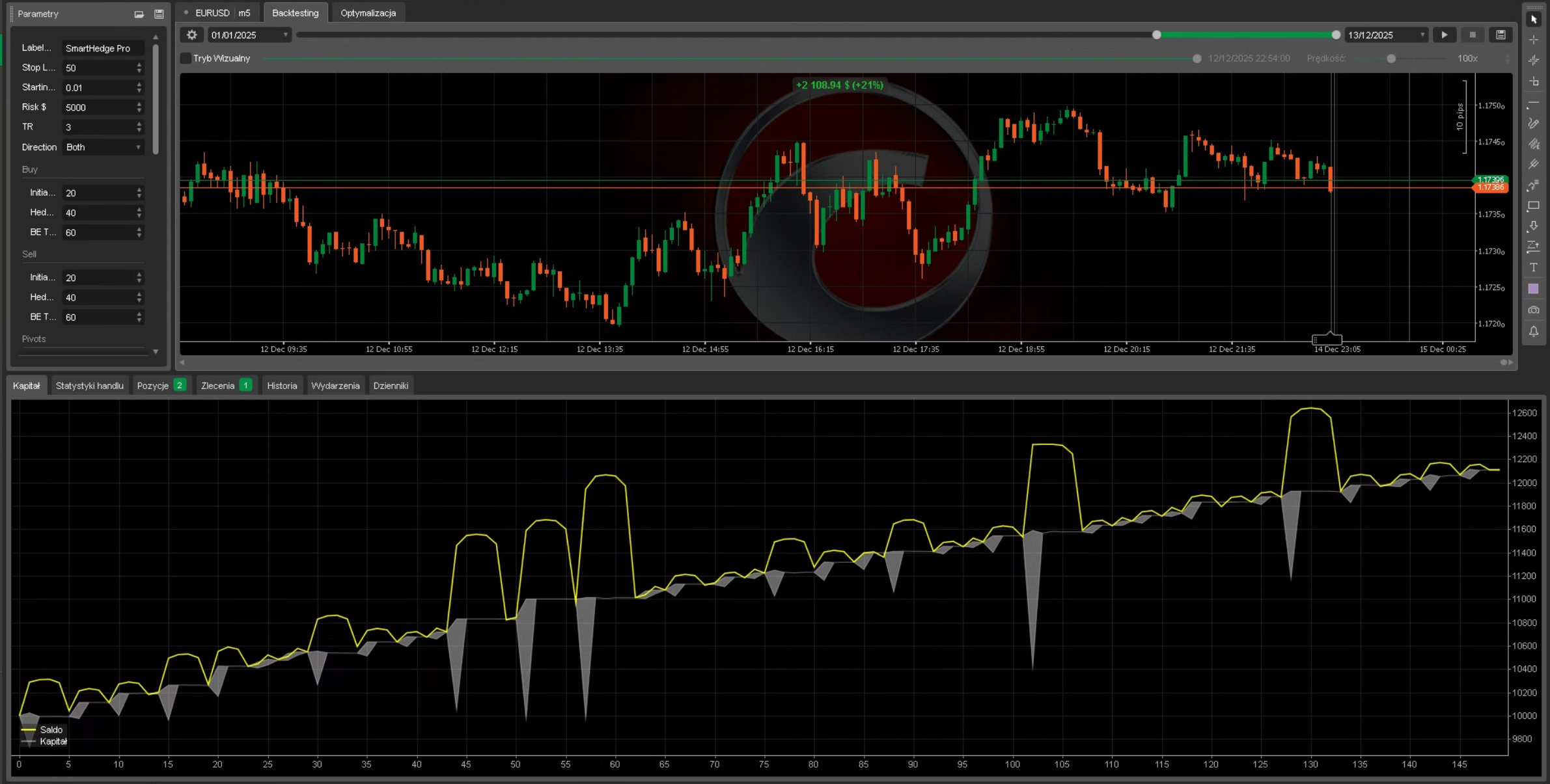
Elevate your trading game with SmartHedge Bot, a cutting-edge cAlgo trading robot designed for traders who demand precision, flexibility, and consistent profitability. Whether you're a seasoned trader or just starting out, SmartHedge Bot combines advanced technical analysis with intelligent risk management to navigate the markets with confidence.
Why Choose SmartHedge Bot?
Sophisticated Trading Logic: Harness the power of multiple indicators—Bollinger Bands, RSI, Welles Wilder Smoothing, and Pivot Points—to identify high-probability trade entries. Customize your strategy with adjustable parameters to suit any market condition.
Dynamic Hedging System: Protect your capital with SmartHedge Bot's innovative hedging mechanism. Automatically place counter-trades to mitigate risk, with customizable profit targets and stop-loss settings for both buy and sell cycles.
Precision Risk Management: Set your risk tolerance with a Safety Stop feature that closes all positions if losses exceed your predefined threshold. Break-even triggers ensure your profits are locked in when trades move in your favor.
Time-Based Trading: Optimize performance with configurable trading hours, allowing you to focus on specific market sessions or avoid high-volatility periods.
User-Friendly Customization: Tailor every aspect of the robot, from lot sizes and profit targets to indicator settings and trade direction (Buy, Sell, or Both). The intuitive interface makes setup a breeze.
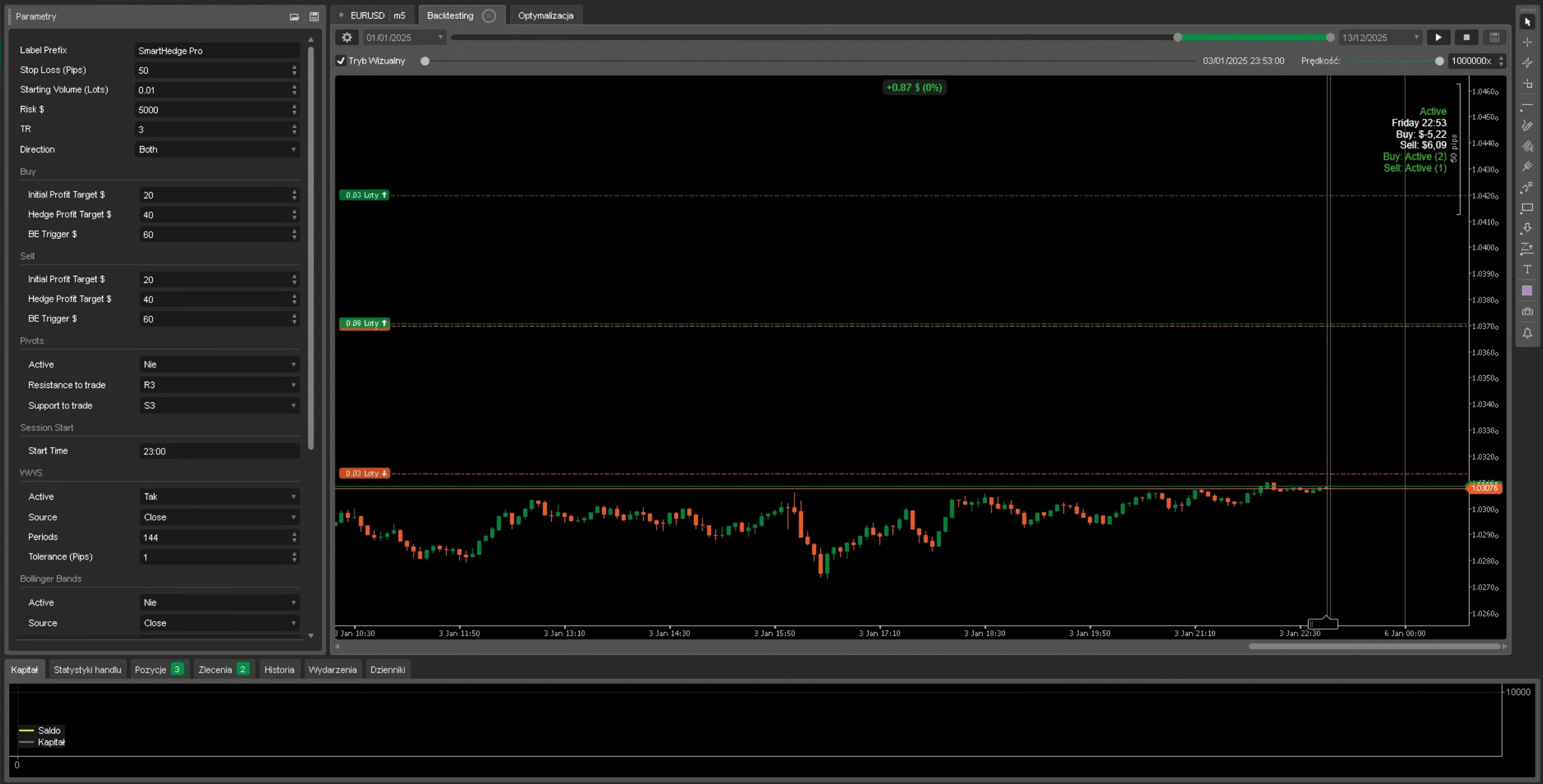
Real-Time Insights: Stay informed with live profit tracking and visual feedback displayed directly on your chart, ensuring you're always in control.
Key Features
- Multi-Indicator Strategy: Combine RSI, Bollinger Bands, Pivot Points, and Welles Wilder Smoothing for robust trade signals.
- Flexible Trade Direction: Choose to trade Buy, Sell, or Both, adapting to your market outlook.
- Hedge Profit Targeting: Set distinct profit goals for initial and hedged positions, maximizing returns while minimizing risk.
- Pivot Point Trading: Capitalize on key support and resistance levels (R1, R2, R3, S1, S2, S3) for precise entries.
- Automated Break-Even: Automatically adjust stop-loss to break-even when profit thresholds are met, securing your gains.
- Session Control: Trade only during your preferred hours with customizable start and end times.
- Safety Stop Protection: Safeguard your account with a user-defined maximum loss limit.
Who Is SmartHedge Bot For?
- Active Traders: Take advantage of automated precision to execute trades based on technical signals.
- Risk-Conscious Investors: Benefit from built-in hedging and safety stops to protect your capital.
- Strategy Enthusiasts: Experiment with customizable settings to craft the perfect trading system.
- Busy Professionals: Let SmartHedge Bot handle the markets while you focus on what matters most.
🚀 Quick Start Guide
Step 1: Attach the Bot
1. Open cTrader platform
2. Navigate to the chart of your preferred trading instrument (e.g., EURUSD, XAUUSD)
3. Drag SmartHedge Bot from the Algo section onto your chart
4. The bot will display "Not Active" until properly configured
Step 2: Enable at Least One Indicator
Important: The bot will NOT trade unless at least one indicator is activated!
Choose one or more entry triggers:
- RSI: Set "Active" to True → Bot enters Buy when RSI drops below Oversold level, Sell when RSI rises above Overbought level
- Bollinger Bands: Set "Active" to True → Bot enters Buy at lower band touch, Sell at upper band touch
- Pivot Points: Set "Active" to True → Bot enters Buy at Support levels, Sell at Resistance levels
- WWS (Welles Wilder Smoothing): Set "Active" to True → Bot enters when price is within tolerance of the WWS line
Step 3: Configure Basic Parameters
| Parameter | Description | Recommended Starting Value |
| Stop Loss (Pips) | Distance for hedge orders | 10-20 pips (adjust per instrument) |
| Starting Volume | Initial lot size | 0.01-0.1 (based on account size) |
| Initial Profit Target $ | Target for single position | $5-20 |
| Hedge Profit Target $ | Target when hedging active | $5-10 |
| Risk $ (Safety Stop) | Maximum allowed loss | 1-2% of account |
| TR (Trade Ratio) | Hedge volume multiplier | 1.5 (default) |
Step 4: Optional - Enable Time Filter
If you want the bot to trade only during specific hours:
1. Set "Enable" to True in Time On/Off group
2. Enter Start Time (e.g., "08:00")
3. Enter End Time (e.g., "16:00")
📊 Understanding the Display Panel
When running, SmartHedge Bot shows real-time information in the top-right corner:
Active / Not Active ← Trading status
Monday 14:30 ← Current day and time
Buy: $12.50 ← Current Buy cycle profit
Sell: $-3.20 ← Current Sell cycle profit
Buy: Active (2) ← Buy cycle state (position count)
Sell: Idle (0) ← Sell cycle state (position count)
Cycle States Explained:
- 🟢 Active (Green) - Cycle is running with open positions
- 🟡 BreakEvenMode (Yellow) - Break-even triggered, stop-loss moved to entry
- ⚪ Idle (Gray) - No positions, waiting for entry signal
⚙️ Recommended Settings by Instrument
Forex Majors (EURUSD, GBPUSD, USDJPY)
- Stop Loss: 10-15 pips
- Starting Volume: 0.01-0.05 lots
- Initial Profit Target: $10-20
- Recommended Indicators: RSI + Bollinger Bands
Gold (XAUUSD)
- Stop Loss: 50-100 pips
- Starting Volume: 0.01 lots
- Initial Profit Target: $20-50
- Recommended Indicators: Pivot Points + RSI
Indices (US30, NAS100)
- Stop Loss: 20-50 pips
- Starting Volume: 0.1-0.5 lots
- Initial Profit Target: $20-50
- Recommended Indicators: Bollinger Bands + WWS
❓ Frequently Asked Questions
Q: The bot is running but not opening any trades. Why?
A: Check these common issues:
1. No indicator is active - Enable at least one indicator (RSI, BB, Pivots, or WWS)
2. Time filter is blocking - If Time On/Off is enabled, ensure current time is within the trading window
3. Entry conditions not met - The price must reach the indicator trigger level (e.g., RSI must drop below Oversold level)
4. Direction setting - If set to "Buy" only, the bot won't open Sell trades even if conditions are met
Q: What does "Both" direction mean?
A: When Direction is set to "Both", the bot opens simultaneous Buy and Sell positions when entry conditions are met. Each direction runs as an independent cycle with its own profit target.
Q: How does the hedging work?
A: When a position moves against you by the Stop Loss distance, instead of closing at a loss, the bot opens a larger counter-position (multiplied by TR ratio). This creates a "hedge" that can profit when price reverses.
Q: What is the TR (Trade Ratio) parameter?
A: TR determines the volume multiplier for hedge positions. With TR = 1.5 and initial volume of 0.1 lots:
- First hedge = 0.15 lots
- Second hedge = 0.225 lots
- And so on...
Q: Can I run the bot on multiple charts?
A: Yes! Each instance uses a unique label based on Symbol + Timeframe. You can run SmartHedge Bot on multiple instruments simultaneously.
⚠️ Risk Warning
- Always test on a demo account first
- Start with minimal lot sizes
- Set appropriate Safety Stop based on your risk tolerance
- The hedging system can accumulate multiple positions - ensure sufficient margin
- Past performance does not guarantee future results
📞 Support
Have questions or need help? Use the Discussion tab on this product page to:
- Ask configuration questions
- Report issues
- Share your experiences
- Request features
I actively monitor and respond to all inquiries.
5 | 100 % | |
4 | 0 % | |
3 | 0 % | |
2 | 0 % | |
1 | 0 % |


.png)


.jpg)


.png)