شعار "QX RiskShield"
QX RiskShield
صورة "QX RiskShield" المحملة
34.67M
حجم التداول
194.81K
الربح بالبيب
9
المبيعات
214
التثبيتات المجانية

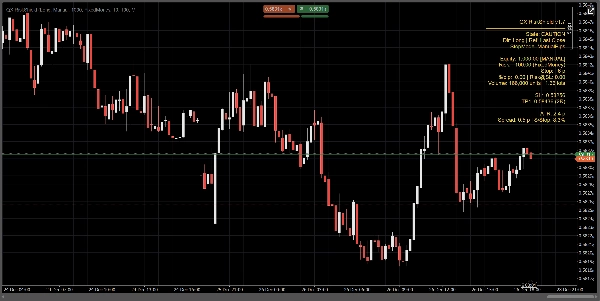
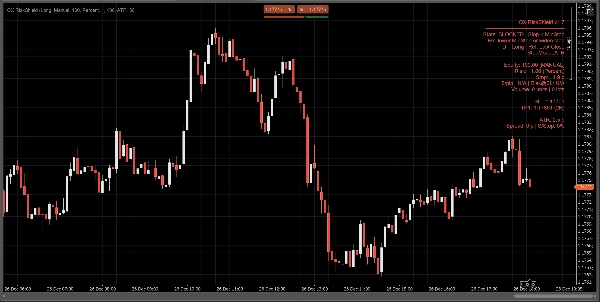
QX RiskShield is an on-chart risk calculator that converts your stop distance into exact position size (Units and Lots), plus SL/TP price levels based on your R:R targets. It is designed for fast decision-making with minimal chart clutter.


This is an indicator only. It does not place orders.


What you see:

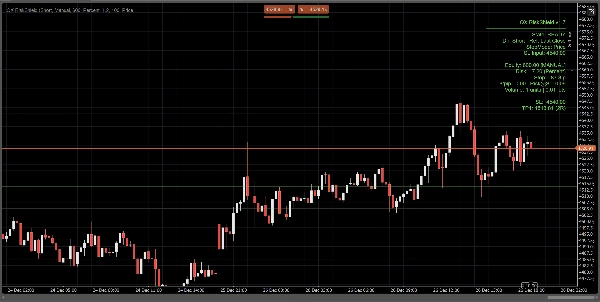
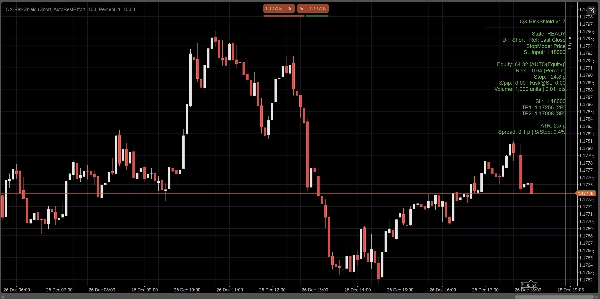
A compact panel shows, at a glance:

  • State: READY / CAUTION / BLOCKED
  • Equity source: Manual or Auto (best effort, fallback-safe)
  • Risk amount: % of equity or fixed money risk
  • Stop distance: in pips
  • Position size: Units + Lots (normalized to broker constraints)
  • $/pip and Risk@SL (estimated risk at the stop)
  • SL / TP1 / TP2 price levels (based on your RR targets)
  • Optional Entry / SL / TP lines on chart for visual reference

All calculations are based on the Last Close (stable, no intrabar flicker).


Stop modes:

Choose how your stop is defined:

1) Manual Pips

Set a fixed stop distance in pips.


2) ATR Stop

Stop distance = ATR(pips) × ATR k.

Useful for volatility-adaptive sizing across symbols.


3) Price Stop

Set the exact SL price (best for discretionary trading).

RiskShield converts that price distance into pips and sizes position accordingly.


State logic (no confusion):

RiskShield uses clear states so users immediately understand what is happening:


READY

Inputs are valid. Position sizing is available.


CAUTION

Sizing is valid, but RiskShield detected a tight stop vs ATR.

This is a warning, not a block.


BLOCKED

Sizing is intentionally disabled when rules are unsafe or invalid, such as:

  • Stop below the minimum stop threshold
  • SL price on the wrong side of the reference price
  • Spread too high relative to stop (Spread/Stop %)
  • Volume would be below broker minimum
  • Symbol pip/lot data not available

A short “Fix” hint can be shown (optional) to correct inputs quickly.


How traders use QX RiskShield (simple workflow)

  1. Attach QX RiskShield to your chart.
  2. Select Trade Direction (Long or Short).
  3. Choose your Risk Type:
    • Percent of equity, or
    • Fixed money risk per trade
  4. Choose Stop Mode:
    • Manual pips, ATR, or SL Price
  5. Read the output:
    • Use Units/Lots for your order size
    • Use SL/TP levels as your reference prices
  6. If the panel shows CAUTION, consider widening the stop or using ATR mode.
  7. If the panel shows BLOCKED, adjust the inputs until READY.


UI options (built for clean charts):

  • Panel Mode: Simple or Pro
  • Panel Density: Normal or Compact (for minimal text)
  • Show Suggested Fix: On/Off
  • Show Lines: On/Off
  • Show Entry Line: On/Off
  • Panel alignment controls and update throttling for performance


Performance and stability:

  • Uses Last Close for calculations. No repainting behavior.
  • Update throttle to reduce CPU usage on busy workspaces.
  • Defensive handling for symbol data, broker constraints, and missing account fields.


Important notes:

  • QX RiskShield is a decision-support tool, not financial advice.
  • Results depend on your broker symbol specifications (pip value, lot size, minimum volume, etc.).
  • Auto equity is best effort. If the platform restricts access, RiskShield safely falls back to manual equity.


Ideal for:

  • FX Majors and index traders
  • Prop firm style risk rules
  • Scalpers and day traders who want fast sizing with strict safety checks
  • Traders who prefer price-based SL but still want automated sizing


Trade with control. Size with precision.

Indicator profile
0.0
التقييمات: 0
تقييمات العملاء
لا توجد تقييمات لهذا المنتج حتى الآن. هل جرَّبته بالفعل؟ كن أول من يخبر الآخرين!
BTCUSD
Forex
Signal
Breakout
RSI
Indices
EURUSD
Commodities
GBPUSD
NZDUSD
Fibonacci
MACD
Bollinger
ZigZag
Scalping
ATR
Supertrend
Crypto
Grid
AI
XAUUSD
NAS100
USDJPY
Products available through cTrader Store, including trading bots, indicators and plugins, are provided by third-party developers and made available for informational and technical access purposes only. cTrader Store is not a broker and does not provide investment advice, personal recommendations or any guarantee of future performance.

المزيد من هذا المؤلف

Free educational Renko cBot made to help traders learn how Renko automation works and to showcase my development style.
Multi-timeframe heatmap scoring Direction, Strength & Volatility at a glance!
QX SessionBox ORB: Session boxes + ORB levels + clean dashboard with optional closed-candle breakout signals.
SMC without the mess: Clean structure + auto-managing FVGs + MTF panel. Hard-right-edge, step size-based for any symbol.
Multi-timeframe market-state dashboard: Score (-100..+100) + UP/NEUT/DN per TF, with optional closed-candle arrows.
Real-time multi-asset correlation matrix with 5 themes, Δ% performance tracking, and full customization. Up to 12 symbol
Candle pressure overlay for cTrader. Instantly read close strength, directional bias, and momentum quality.
Pivot Points (Classic/Fibo/Camarilla/Woodie) with price zones, multi-timeframe confluence (D/W/M) and smart alerts.
Liquidity sweeps without clutter. Equal highs/lows pools, sweeps + reclaim, filters + compact panel. StepSize-based.
Session Volume Profile + Composite. POC/VAH/VAL, Focus/Solo. Fast, clean, no ghosts, live-ready.
Learn candlestick patterns with live signals, objective rules, context notes, and an interactive quiz training mode.

قد يعجبك أيضًا

Pattern Detector With Signal Buy and Sell
volumen perfile
This is a tool to help traders open orders/close orders/modify orders quickly with just one click
Plots the equilibrium price levels based on previous daily highs and lows.
ICT Order Block Advanced
The KDJ oscillator display consists of 3 lines (K, D and J - hence the name of the display) and 2 levels.
Draws support and resistance on all pairs.
Detecting reversal zones + multidimensional mapping of support and resistance "Golden Levels.
شعار "Order Flow Ticks v2.0"
4.3
(21)
مجاني
Order Flow Ticks v2.0
ZLSMA: Zero-lag trend indicator! Catch trends fast with customizable settings. Boost your trading precision.
Tracks NY, London, Tokyo, Sydney sessions with custom visuals, and a real-time expanding range box and breakout High/Low
🚀 Simplify Your Trading Decisions With Powerful Technical Analysis.
شعار "XY Bar Info Panel v1.5"
5.0
(2)
مجاني
Overlay panel showing bar date/time, OHLC, tick Volume, percent change, and market session - fully customizable.
Anchored VWAP
Perfect for traders who demand a clear overview of multiple timeframes at a glance.
Editions: Free (core VWAP + bands) · Pro (multi‑VWAP, click‑to‑anchor, alerts).
Auto-marks key Highs/Lows. Spot swing points & market structure instantly. Fully customizable for any timeframe.
34.67M
حجم التداول
194.81K
الربح بالبيب
9
المبيعات
214
التثبيتات المجانية