

QX SessionBox ORB
Gösterge
4 satın almalar
Sürüm 1.0, Dec 2025
Windows, Mac
4.6
Değerlendirmeler: 3
41.97M
İşlem hacmi
208.53K
Kazanılan pip
14
Satışlar
704
Ücretsiz yüklemeler
Açıklama
QX SessionBox ORB, cTrader için temiz bir oturum + Açılış Aralığı (ORB) üst bilgisi.
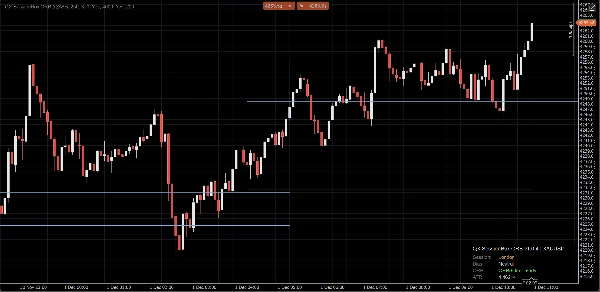
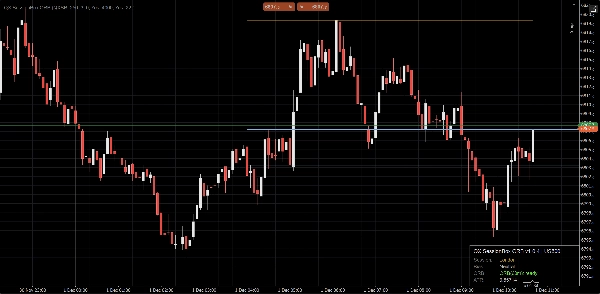
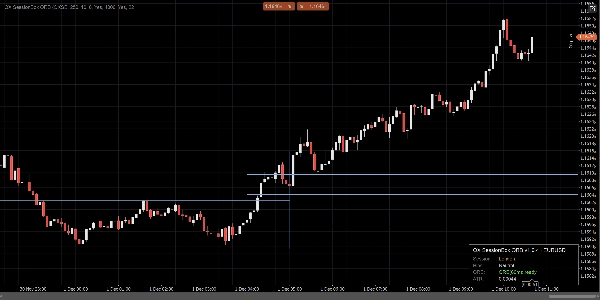
Asya, Londra ve NY'yi minimum grafik karmaşası ile vurgular, ilk X dakika için Açılış Aralığını oluşturur ve ORB Yüksek/Düşük seviyelerini nesnel günlük içi yapı olarak görünür tutar. Kompakt bir panel, oturum durumunu ve eğilimini gösterir, böylece bağlamı saniyeler içinde okuyabilirsiniz.
Neler elde edersiniz
- Asya / Londra / NY oturum kutuları (özel zaman aralıkları + renkler)
- Açılış Aralığı (ORB) için ilk ORB Dakikaları
- ORB Yüksek / ORB Düşük çizgileri (özel renk, genişlik ve stil)
- İsteğe bağlı ORB kutusu (aralık vurgusu)
- Kompakt gösterge paneli (oturum, ORB durumu, eğilim, ATR)
- İsteğe bağlı kırılma onayları (sadece kapanan mum, stabil)
İsteğe bağlı gelişmiş mod
- Çakışan oturum desteği (isteğe bağlı)
-
- Oturum saatleri çakıştığında birden fazla oturum kutusu çizin
- Birincil oturum paneli, sinyalleri ve ORB referans çizgilerini kontrol eder (ayar yapılabilir)
Nasıl kullanılır (basit iş akışı)
- Grafiğinize QX SessionBox ORB ekleyin.
- Oturum saatlerinize uyacak şekilde Oturum UTC Ofseti ayarlayın.
- Seçin ORB Dakikaları (yaygın: 15, 30, 60).
- ORB oluşturulurken, panel oluşturuluyor. Sonrasında hazır olur.
- ORB seviyelerini yapı olarak kullanın:
-
- Fiyat ORB Yüksek'in üzerinde: oturum için yükseliş baskısı
- Fiyat ORB Düşük'ün altında: oturum için düşüş baskısı
- Fiyat ORB içinde: aralık davranışı (bağlam önemlidir)
- (İsteğe bağlı) Etkinleştir Sinyal Çizimleri:
-
- CrossOnly (varsayılan): mum ORB sınırının ötesinde kapanır
- Durum: fiyatın yükseliş/düşüş durumuna geçişini onaylar
- (İsteğe bağlı) Etkinleştir ATR Filtresi zayıf kırılmaları azaltmak için (ATR k ana hassasiyet kontrolünüzdür).
Gerçek grafikler için tasarlandı
- Kapanan mum mantığı stabilite ve netlik için (bar içi titreme yok)
- Sınırlı güncellemeler daha düşük CPU kullanımı için
- Son Oturumları Tut kargaşayı önlemek için
- Geçmiş başlatma yeni oturumları hızlıca doldurma seçeneği
- Temiz sağ kenar davranışı (grafik germe hileleri yok)
Notlar
- Bu bir görsel karar destek aracıdır. İşlem yapmaz ve finansal tavsiye değildir.
- Oturumlar UTC + manuel ofset kullanır (DST otomasyonu yok).
- Geçmiş çizim uzunluğu Bootstrap Bars ve Son Oturumları Tut ile kontrol edilir.
- “Oturumu görün. Aralığı işaretleyin. Kırılmayı netlikle işlem yapın.”
Parametre vurguları (hızlı)
- ORB Dakikaları: açılış aralığı pencere uzunluğu
- ORB Çizgi Rengi / Genişliği / Stili: ORB Yüksek/Düşük görünümü
- ATR Filtresi + ATR k Kullanımı: kırılma katılığı kontrolü
- Sinyal Modu: CrossOnly (temiz) veya Durum (daha görsel)
- Çakışan Oturumlara İzin Ver: saatler çakıştığında çoklu oturum kutuları
- Son Oturumları Tut: grafikte kaç geçmiş oturum kalır
- Güncelleme Sınırlaması (ms): performans ve yanıt verme dengesi
Özet
AI summary
QX SessionBox ORB is an indicator for cTrader that visually overlays trading sessions and Opening Range Breakout (ORB) levels on price charts. It highlights the Asia, London, and New York sessions with customizable time ranges and colors, minimizing chart clutter. The indicator builds the Opening Range for a user-defined number of minutes and displays ORB High and Low lines as key intraday structure levels, with adjustable appearance settings.
A compact dashboard panel provides real-time session status, ORB readiness, bias, and Average True Range (ATR) information for quick context assessment. Optional features include an ORB range highlight box, closed-candle breakout confirmation signals, and an ATR filter to reduce false breakouts. An advanced mode supports overlapping sessions, allowing multiple session boxes to display when session times overlap, with configurable primary session control.
Designed for stability and efficiency, QX SessionBox ORB uses closed-candle logic to avoid intrabar flicker, throttled updates for lower CPU usage, and options to keep a set number of past sessions visible. Users set session UTC offsets manually and can customize parameters such as ORB minutes, signal modes, and update frequency. The tool serves as a visual decision-support aid for intraday breakout trading across various markets including Forex, indices, commodities, and cryptocurrencies.
A compact dashboard panel provides real-time session status, ORB readiness, bias, and Average True Range (ATR) information for quick context assessment. Optional features include an ORB range highlight box, closed-candle breakout confirmation signals, and an ATR filter to reduce false breakouts. An advanced mode supports overlapping sessions, allowing multiple session boxes to display when session times overlap, with configurable primary session control.
Designed for stability and efficiency, QX SessionBox ORB uses closed-candle logic to avoid intrabar flicker, throttled updates for lower CPU usage, and options to keep a set number of past sessions visible. Users set session UTC offsets manually and can customize parameters such as ORB minutes, signal modes, and update frequency. The tool serves as a visual decision-support aid for intraday breakout trading across various markets including Forex, indices, commodities, and cryptocurrencies.
Gösterge profili
Müşteri değerlendirmeleri
4.6
Değerlendirmeler: 3
5 | 67 % | |
4 | 33 % | |
3 | 0 % | |
2 | 0 % | |
1 | 0 % |
Müşteri değerlendirmeleri
Tartışma
SSS
BTCUSD
Forex
Signal
Breakout
Indices
EURUSD
Commodities
GBPUSD
NZDUSD
RSI
Bollinger
Fibonacci
Scalping
Grid
Stocks
AI
XAUUSD
NAS100
ATR
USDJPY
VWAP
cTrader Store üzerinden erişilebilen işlem botları, göstergeler ve eklentiler gibi ürünler, üçüncü taraf sağlayıcılar tarafından sağlanır ve yalnızca bilgilendirme ve teknik erişim amaçlarıyla sunulur. cTrader Store bir broker değildir ve yatırım tavsiyesi, kişisel öneriler vermez veya gelecekteki performansı garanti etmez.



















Fiyat
41.97M
İşlem hacmi
208.53K
Kazanılan pip
14
Satışlar
704
Ücretsiz yüklemeler