Penerangan
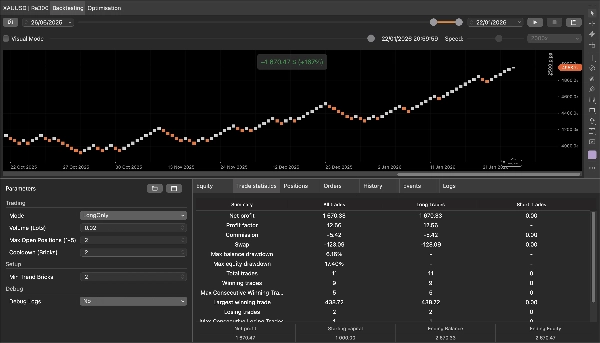
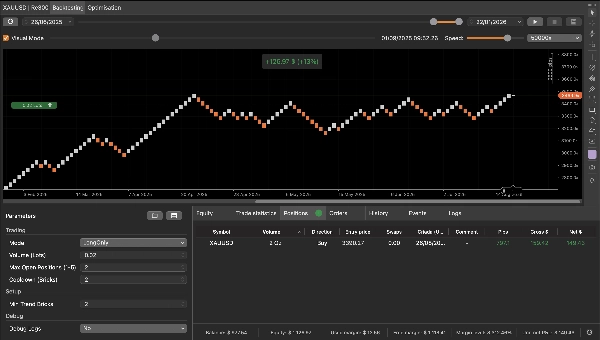
QX Renko 3Plus (Percuma | Bot Renko Pendidikan)
Robot ini bermula dari permintaan mudah: seorang rakan ingin memahami, secara praktikal, bagaimana cBot boleh mengesan persediaan dan melaksanakan kemasukan/keluaran pada carta Renko. Saya membina logik ringkas, bersih, dan mudah diaudit khusus untuk tujuan pendidikan. Kini saya menerbitkan versi percuma ini di cTrader Store atas sebab yang sama: untuk membantu anda belajar Renko dan mempamerkan kerja saya sebagai pembangun.
Apa yang ia lakukan (dalam satu ayat)
Ia mencari trend pendek (3+ batu bata warna sama), menunggu tepat 1 pullback batu bata, dan masuk pada batu bata sambungan; ia keluar pada batu bata bertentangan pertama.
Bagaimana ia berfungsi pada Renko (langkah demi langkah)
1) Pengesanan streak trend
- Pada setiap batu bata yang ditutup, bot memeriksa sama ada batu bata itu NAIK atau TURUN.
- Ia mengira batu bata berturut-turut dalam arah yang sama.
- Apabila mencapai Min Trend Bricks (lalai: 3), ia mengaktifkan persediaan dalam arah itu.
Contoh (bullish): NAIK, NAIK, NAIK → persediaan diaktifkan untuk long.
2) Pullback adalah wajib (TEPAT 1 batu bata)
Selepas pengaktifan:
- Bot memerlukan **satu—dan hanya satu—**batu bata dalam arah bertentangan (pullback).
- Jika ia mendapat 2 atau lebih batu bata pullback, persediaan itu dibatalkan dan bot menunggu urutan 3+ baru sekali lagi.
Contoh (bullish): NAIK, NAIK, NAIK (diaktifkan) → TURUN (pullback = 1) ✅
Jika menjadi TURUN, TURUN (pullback > 1) ❌ dibatalkan.
3) Kemasukan pada sambungan
- Selepas pullback tunggal, batu bata seterusnya mesti kembali ke arah yang diaktifkan (sambungan).
- Apabila batu bata sambungan itu ditutup, bot melaksanakan kemasukan pasaran.
Contoh (bullish): NAIK, NAIK, NAIK (diaktifkan) → TURUN (pullback) → NAIK (sambungan) → MASUK BELI
5) Peraturan keluar mudah dan pendidikan
- Jika batu bata ditutup bertentangan dengan arah terbuka, bot menutup posisi untuk sisi itu:
-
- Sebuah TURUN batu bata menutup posisi BELI.
- Sebuah NAIK batu bata menutup posisi JUAL.
Ini sengaja dibuat mudah supaya anda dapat melihat dengan jelas bagaimana keluar “bertentangan pertama” berkelakuan pada Renko.
Parameter utama
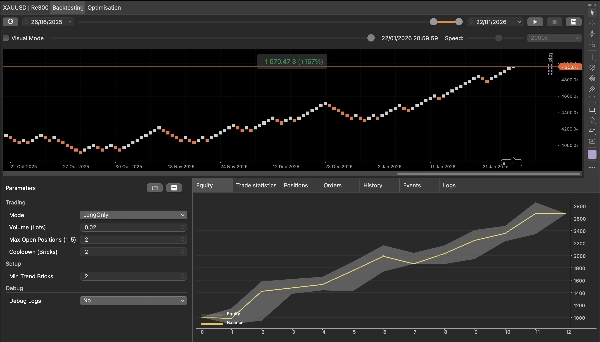
Perdagangan
- Mod: Kedua-dua / LongOnly / ShortOnly
- Isipadu (Lot): saiz pesanan dalam lot
- Maksimum Posisi Terbuka: posisi serentak maksimum (label sama)
- Cooldown (Batu Bata): jumlah minimum batu bata antara kemasukan dalam arah yang sama
Persediaan
- Min Trend Bricks: batu bata berturut-turut minimum untuk mengaktifkan persediaan
Debug
- Log Debug: mengaktifkan log terperinci yang menunjukkan pengaktifan, pengiraan pullback, pembatalan, blok, dan kemasukan.
Nota penting (gunakan dengan cara yang betul)
- Gunakan pada carta Renko. Saiz batu bata ditentukan oleh tetapan carta anda.
- Bot bertindak pada batu bata yang ditutup sahaja (mengelakkan isyarat semasa batu bata masih terbentuk).
- Ini adalah alat pendidikan: logik sengaja minimum untuk pembelajaran dan audit.
- Bukan nasihat kewangan. Sentiasa uji dalam demo/backtest sebelum live.
Siapa yang sesuai
- Sesiapa yang belajar Renko dan corak sambungan trend.
- Pedagang yang mahukan contoh bersih persediaan mesin-negeri (diaktifkan → pullback → sambungan).
- Pembangun yang mahukan pelaksanaan rujukan mudah dan selamat kompilasi.
Ringkasan
The bot operates exclusively on closed bricks to avoid premature signals and includes configurable parameters such as trading mode (both long and short, long only, or short only), order volume, maximum open positions, cooldown period between entries, and minimum trend bricks to arm setups. Debug logs can be enabled to track the bot’s decision-making process, including arming, pullback counting, cancellations, and entries.
QX Renko 3 Plus serves as a practical tool for traders learning Renko chart automation, developers seeking a clean, compile-safe example of a state-machine setup, and anyone interested in understanding trend continuation strategies on Renko charts. It supports various markets including forex, indices, commodities, and cryptocurrencies, as indicated by its relevant tags.
Ulasan pelanggan
5 | 0 % | |
4 | 100 % | |
3 | 0 % | |
2 | 0 % | |
1 | 0 % |