Beschreibung
QX SmartStructure (QX SS)
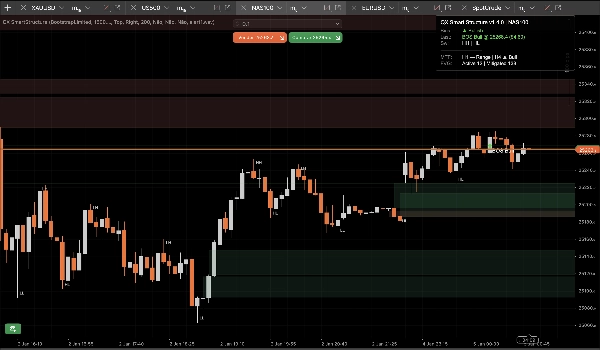
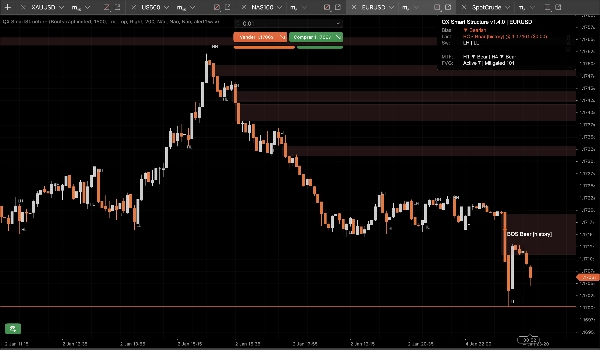
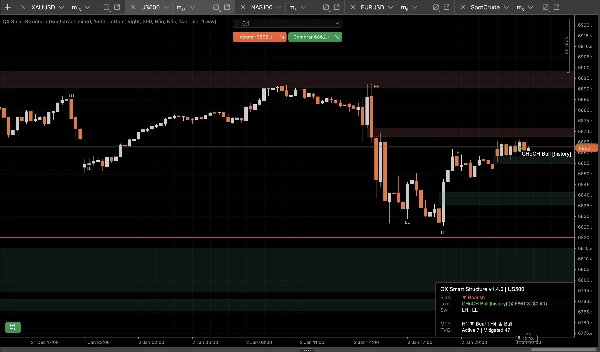
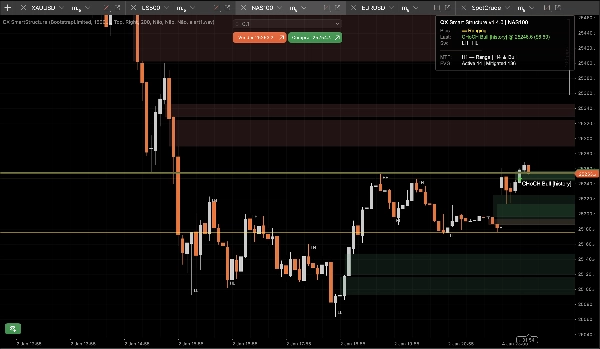
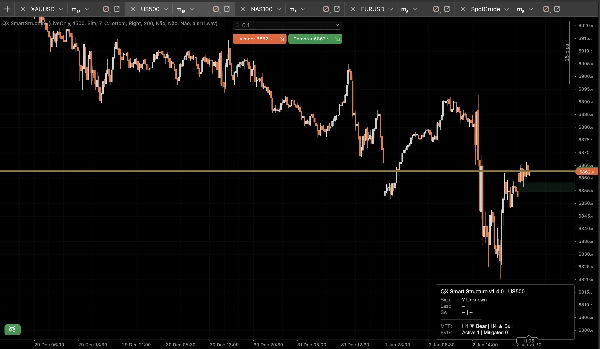
QX SmartStructure (QX SS) ist ein leichtgewichtiges, hart-rechts-kantiges SMC-Overlay für cTrader. Es zeigt die aktuelle Struktur, BOS/CHoCH-Brüche, gefilterte + automatisch verwaltete FVG-Zonen und ein kompaktes H1/H4 MTF-Bias-Panel, damit Sie aufhören, Zeitrahmen zu wechseln.
Nur Visualisierungstool. Es führt keine Trades aus.
Was es zeigt
1) Saubere Marktstruktur (hart-rechts-kantig)
- Swing-Bezeichnungen: HH / HL / LH / LL
- Schlüsselebenen: letzter bestätigter Swing-Hochpunkt und letzter bestätigter Swing-Tiefpunkt
- Bruchereignisse: BOS / CHoCH mit Stärke (Stark vs Schwach)
- Anzeigemodi:
-
- NurAktiv (minimal)
- NeuesteSwings (kontrollierter Kontext)
2) FVG-Zonen, die unter Kontrolle bleiben
- Bullische und bärische FVG-Rechtecke
- Minimale FVG-Größe (Schritte) Filter entfernt Mikro-Lücken automatisch
- 50% Milderungsregel (Docht-basiert): eine Zone wird gemildert, wenn der Preis ihr Halb-Level erreicht
- Lebenszyklus:
-
- Automatisches Ausblenden Gemilderter = EIN für das sauberste Chart
- AUS behält gemilderte Zonen als „Geister“-Kontext (geringere Deckkraft)
- Harte Obergrenzen verhindern Objekt-Spam über lange Sitzungen (gespeichert/gezeichnet/rechts erweitert)
3) MTF Bias Panel (H1 / H4)
Ein kompaktes Panel zeigt:
- Aktuelle Zeitrahmen-Tendenz: Bullisch / Bärisch / Seitwärts / Unbekannt
- Letztes Ereignis: BOS/CHoCH, Richtung, Stärke
- Optionale Schnappschüsse: H1-Tendenz und H4-Tendenz
4) Optionale Sound-Alarme
Nur-Sound-Alarme für Brüche, mit:
- Optionale Warnung bei schwachen Brüchen
- Benutzerdefinierter Sound-Dateiname
Der StepSize-Vorteil (FX, Gold, Indizes)
Die meisten Struktur-Tools versagen, wenn Sie Symbole wechseln, weil sie annehmen, dass „Pips“ überall dasselbe bedeuten.
QX SS verwendet StepSize als universelle Einheit: TickSize → PipSize → Digits-Fallback
Konvertiere jede Distanz in Schritte
Schritte = Preisabstand ÷ TickSize
Beispiele (übliche Tick-Größen):
- EURUSD TickSize 0.00001: 1 Pip (0.00010) = 10 Schritte
- XAUUSD TickSize 0.01: $0,10 = 10 Schritte, $1,00 = 100 Schritte
- Indizes variieren je nach Broker:
Wo man TickSize findet
- In cTrader Automate: Symbol.TickSize (QX SS liest es sicher aus)
- Im Plattform-UI: Symbol-Spezifikationspanel (Market Watch Symbolinfo)
Empfohlene minimale FVG-Größe (Schritte)
Dies sind praktische Startwerte, keine universelle Wahrheit. Volatilität und Sitzung sind wichtig.
M15 (Standard-Workflow)
- EURUSD: 20–40 Schritte (≈ 2–4 Pips wenn TickSize = 0.00001)
- XAUUSD: 30–120 Schritte (≈ $0,30–$1,20 wenn TickSize = 0.01)
- US500 / NAS100: wähle eine sinnvolle Bewegung in Punkten, dann konvertiere:
M5 (ja, es ändert sich)
M5 zeigt mehr Mikro-Lücken. Wenn Sie dieselben MinFVGSteps beibehalten, filtern Sie zu viel heraus.
Typische Anpassung: MinFVGSteps um ~30–50% reduzieren gegenüber Ihrem M15-Wert, dann neu abstimmen.
„Seitwärtsbewegung“ ist kein Fehler!
Die Tendenz wird Seitwärts wenn die jüngsten Swing-Hochs/-Tiefs nicht klar als HH+HL oder LH+LL ausgerichtet sind.
In Seitwärtsbewegungen lügt ein Tool, das „Bullisch“ für immer bleibt. QX SS ist von Natur aus konservativ.
Voreinstellungen (Startpunkte)
Voreinstellung A: „M15 Ausgewogen“ (empfohlenes Standard)
- Swing-Stärke (M15=7): 7
- Bruchtyp: Close
- Nur Bestätigte: true
- Anzeigemodus: NeuesteSwings
- Anzahl der neuesten Swings: 30
- Minimale FVG-Größe (Schritte): EURUSD 25 | XAUUSD 60 | Indizes 15 (dann abstimmen)
- Automatisches Ausblenden Gemilderter: true
- Maximal gezeichnete FVG: 30
- Rechtsbalken erweitern: 50
- MTF H1 anzeigen: true
- MTF H4 anzeigen: true
Voreinstellung B: „M15 Sauberes Chart“
- Anzeigemodus: NurAktiv
- Swing-Bezeichnungen anzeigen: false
- Automatisches Ausblenden Gemilderter: true
- Maximal gezeichnete FVG: 15–20
- (Den Rest von Voreinstellung A beibehalten)
Voreinstellung C: „M5 Scalp-Kontext“
- Swing-Stärke: 5–6
- Bruchtyp: Beliebig
- Nur Bestätigte: true (streng starten)
- Schwache Brüche anzeigen: false
- Minimale FVG-Größe (Schritte): ~50–70% von Ihrem M15-Wert
- Anzahl der neuesten Swings: 20–30
- Rechtsbalken erweitern: 30–50
cBot / Automatisierungsintegration (was QX SS bereitstellt)
QX SmartStructure stellt 3 interne Serien für cBots bereit:
- BiasSeries: 1 bullisch, -1 bärisch, 0 sonst
- BreakSignalSeries: 1 bullischer Bruch, -1 bärischer Bruch, 0 sonst
- BreakLevelSeries: Preisniveau auf Ereignis-Bar, NaN sonst (sauberer Wächter)
Stabilität und Leistung (v1.5.1+)
Entwickelt für Multi-Chart-Setups und lange Sitzungen:
- Verarbeitet nur bei neuen geschlossenen Bars
- UI-Updates werden durch UI Throttle (ms) gedrosselt, um CPU niedrig zu halten
- Kontrollierte Objektanzahlen und Beschneidungsgrenzen verhindern Chart-Spam
- Erkennt echte „harte Reloads“ sicher (Zeitrahmen/Symbol/Verlauf neu laden) und baut Zustand ohne Drift wieder auf
Neue Sicherheitsoptionen (v1.5.1+)
Ungültig bei Gap-Sprung (Standard EIN)
Wenn der Preis Lücken aufweist und über eine FVG-Zone springt, ohne sie zu berühren (Wochenende/News-Öffnung), wird die Zone als Ungültig durch Gap markiert, anstatt aktiv zu bleiben.
Dies verhindert, dass veraltete Zonen nach heftigen Öffnungen im Chart verbleiben.
Vollständiges Löschen der Serien beim Neuaufbau (Standard AUS)
Beim harten Neuaufbau wird optional der gesamte Verlauf der bereitgestellten Ausgabeserien gelöscht, um maximale Konsistenz bei Backtests/Exporten zu gewährleisten.
Behalte AUS für beste Leistung bei großen Verläufen. Schalte EIN nur für tiefgehende Backtesting-Workflows ein, die vollständige historische Integrität benötigen.
Empfohlene Standardeinstellungen
- Ungültig bei Gap-Sprung: Ja (EIN)
- Vollständiges Löschen der Serien beim Neuaufbau: Nein (AUS)
Haftungsausschluss
Dieses Tool dient nur zur Visualisierung und Entscheidungsunterstützung. Trading ist riskant. Verwenden Sie stets Ihr eigenes Risikomanagement.
Zusammenfassung
It automatically detects and manages Fair Value Gap (FVG) zones, filtering out micro-gaps based on a configurable minimum size measured in steps, a universal unit derived from the symbol’s TickSize. The indicator applies a 50% mitigation rule to mark zones as mitigated when price reaches their midpoint, with options to auto-hide or display mitigated zones as ghosted.
QX SmartStructure includes a compact multi-timeframe (MTF) bias panel showing current timeframe bias (Bullish, Bearish, Ranging, or Unknown) and recent break events for H1 and H4 timeframes. Optional sound alerts notify users of break events, including weak breaks.
The tool supports various markets such as Forex, commodities (e.g., gold), indices, and cryptocurrencies by adapting to symbol-specific TickSize values. It exposes internal data series for integration with cBots and is optimized for performance with controlled object counts and throttled updates. The indicator does not place trades and is intended for decision support only.
Kundenbewertungen
5 | 75 % | |
4 | 25 % | |
3 | 0 % | |
2 | 0 % | |
1 | 0 % |