
LT Flexible Volume Profile
مؤشر
13 عمليات الشراء
الإصدار 1.0، Sep 2024
Windows, Mac
5.0
التقييمات: 3

منذ 25/09/2024
38
المبيعات
الوصف
ملاحظة: تم الاختبار على cTrader لنظام ويندوز فقط.
ملف الحجم
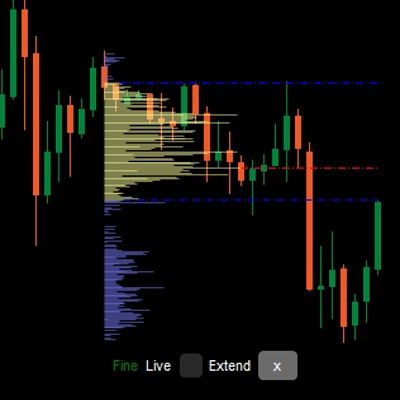
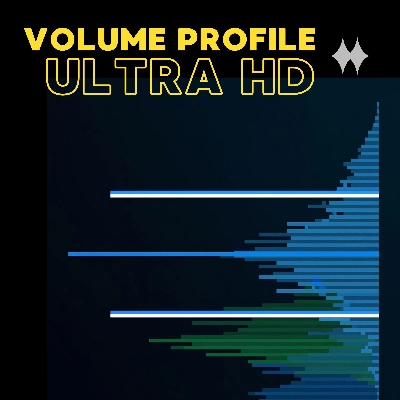
رسم ملف عمودي في مخطط السعر لإظهار عند أي سعر يوجد حجم أكبر/أقل (اهتمام التداول).
مؤشر ملف الحجم المرن
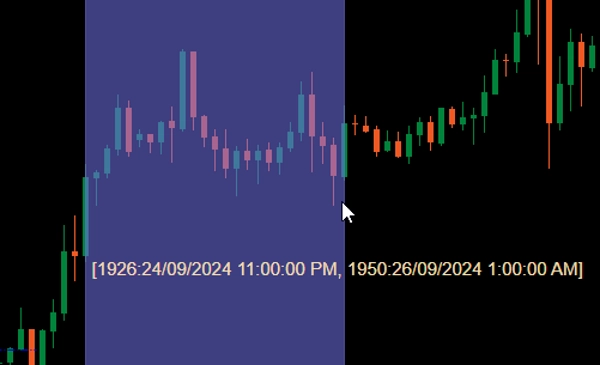
عند إضافته إلى مخططك، اسحب بالماوس الأيسر مع الضغط على Ctrl على منطقة في مخطط السعر لرسم الملف لتلك المنطقة.
لأجل الأداء، سيتم رسم الملف في حالتين:
- الملف الخشن: سيستخدم المؤشر الإطار الزمني المحدد بواسطة CoarseTF (الافتراضي m5) لتحميل معلومات الحجم، وهذا عادةً سريع. أثناء عرض الملف الخشن، سيتم تحميل الملف الدقيق في الخلفية.
- الملف الدقيق: ملف أكثر دقة، يستخدم الإطار الزمني المحدد بواسطة FineTF (الافتراضي m1)، لكن يمكنك ضبطه على الأدق (t1 - تِك واحد). مع ذلك، إذا كنت تعرض مخططًا يوميًا أو لفترة أطول، فإن ضبط الإطار الزمني على التِك سيزيد من وقت التحميل.
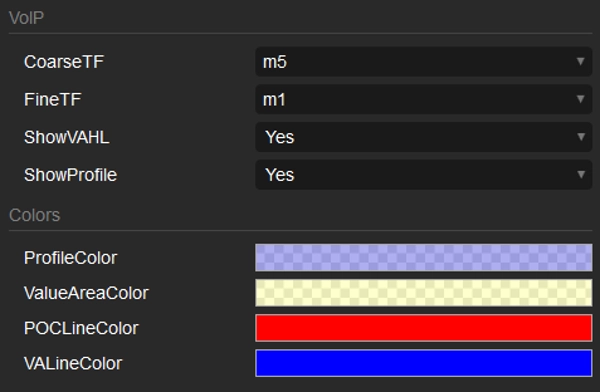
المعلمات
- CoarseTF: الإطار الزمني للبيانات الخشنة (الافتراضي m5).
- FineTF: الإطار الزمني للبيانات الدقيقة (الافتراضي m1).
- ShowVAHL: يعرض VAH (قمة منطقة القيمة) و VAL (قاع منطقة القيمة).
- ShowProfile: إذا كانت نعم، يعرض الملف الكامل، وإلا يعرض فقط VAH و VAL و POC (نقطة التحكم).
- Colors: تخصيص الألوان.
كيفية الاستخدام
بعد إضافة المؤشر إلى مخطط السعر الخاص بك، استخدم سحب الماوس الأيسر مع Ctrl لتحديد المنطقة في المخطط التي ترغب في رسم الملف لها، وهذا كل شيء.
بعد عرض الملف، سترى بعض المعلومات/التحكم في أسفل الملف:
- خشن/دقيق: حالة الملف.
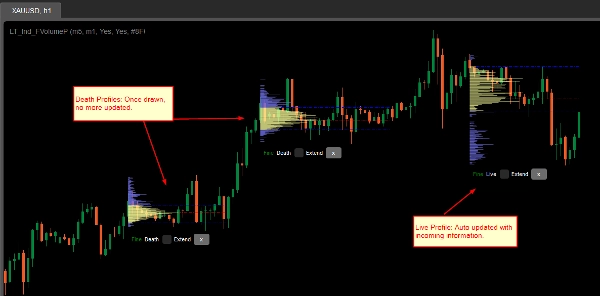
- ميت/حي: إذا كان ملفك يغطي الشمعة الأخيرة، فهو ملف حي ويتم تحديثه تلقائيًا بالمعلومات الواردة.
- مربع التمديد: ضع علامة لتمديد خطوط VAH و VAL و POC إلى الشمعة الأخيرة
- زر x: انقر لإزالة الملف من المخطط.
الملخص
AI summary
LT Flexible Volume Profile is a volume profile indicator designed for use on price charts, primarily tested on cTrader Windows. It visually represents trading volume distribution across price levels within a selected chart area, highlighting where trading interest is higher or lower.
Users activate the profile by holding Ctrl and dragging the mouse over a desired chart region. The indicator operates in two modes for performance optimization: a Coarse profile using a configurable timeframe (default 5 minutes) for faster loading, and a Fine profile using a finer timeframe (default 1 minute, with an option down to single ticks) for more precise volume data.
Key parameters include:
- CoarseTF and FineTF: timeframes for coarse and fine volume data aggregation.
- ShowVAHL: toggles display of Value Area High (VAH) and Value Area Low (VAL).
- ShowProfile: controls whether the full profile or only key levels (VAH, VAL, Point of Control) are shown.
- Colors: customizable color settings.
After rendering, the profile provides status indicators (Coarse/Fine, Live/Dead), options to extend VAH, VAL, and POC lines to the latest bar, and the ability to remove the profile. This tool supports detailed volume analysis to assist traders in identifying significant price levels based on traded volume.
Users activate the profile by holding Ctrl and dragging the mouse over a desired chart region. The indicator operates in two modes for performance optimization: a Coarse profile using a configurable timeframe (default 5 minutes) for faster loading, and a Fine profile using a finer timeframe (default 1 minute, with an option down to single ticks) for more precise volume data.
Key parameters include:
- CoarseTF and FineTF: timeframes for coarse and fine volume data aggregation.
- ShowVAHL: toggles display of Value Area High (VAH) and Value Area Low (VAL).
- ShowProfile: controls whether the full profile or only key levels (VAH, VAL, Point of Control) are shown.
- Colors: customizable color settings.
After rendering, the profile provides status indicators (Coarse/Fine, Live/Dead), options to extend VAH, VAL, and POC lines to the latest bar, and the ability to remove the profile. This tool supports detailed volume analysis to assist traders in identifying significant price levels based on traded volume.
ملف تعريف المؤشر
تقييمات العملاء
5.0
التقييمات: 3
5 | 100 % | |
4 | 0 % | |
3 | 0 % | |
2 | 0 % | |
1 | 0 % |
تقييمات العملاء
October 1, 2024
Sensible product to test around volume based context. The useful part is checking participation, value areas and pressure, with the numbers checked before scaling. I would review 20 reactions near POC or VWAP before trusting the read. The data helps most when price action confirms the same zone.
September 30, 2024
September 30, 2024
Good tool for patience if the trader wants it adds useful information behind the price move. It works best as support, not a final decision maker. Volume context is stronger when POC, VWAP and value area agree across 2 sessions. volume alone can be noisy without price action.
مناقشة
الأسئلة الشائعة
Forex
يتم توفير المنتجات المتاحة من خلال cTrader Store، بما في ذلك روبوتات التداول والمؤشرات والإضافات، من قبل مطوري الطرف الثالث وإتاحتها لأغراض الوصول المعلوماتي والفني فقط. cTrader Store ليس وسيطًا ولا يقدم نصائح استثمارية أو توصيات شخصية أو أي ضمان للأداء المستقبلي.


![شعار "[CB] Pivot Points Pro"](https://cdn.ctrader.com/image/webp/43463c82-67b0-4f10-a4ba-901bba091d81_32594)

السعر
منذ 25/09/2024
38
المبيعات