

الوصف
| ALL IN ONE TRADING PRO|
## ما هو هذا المؤشر؟
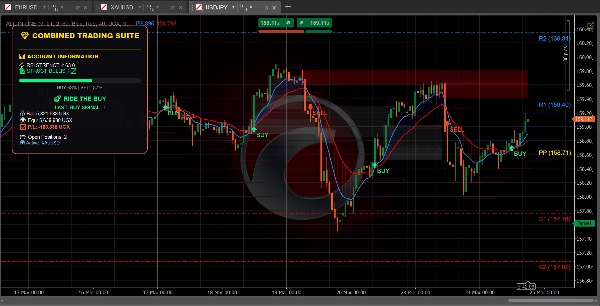
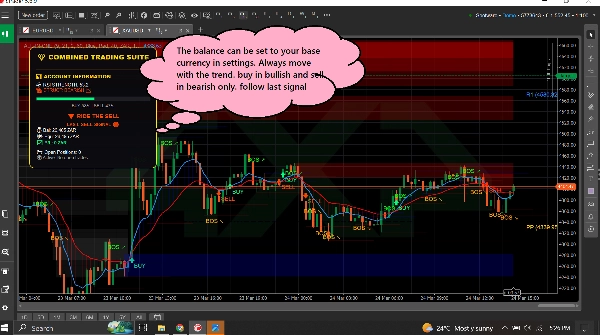
يضع هذا المؤشر **ثلاث أدوات تداول مفيدة** على الرسم البياني الخاص بك في وقت واحد. فكر فيه كما لو كان لديك ثلاثة متداولين خبراء يعطونك رأيهم في نفس الوقت
=====================================================
## الأدوات الثلاثة
### 1. لوحة الاتجاه (متتبع الاتجاه)
**ما يفعله:** يخبرك باتجاه حركة السوق ومدى قوة الحركة.
**ما تراه:**
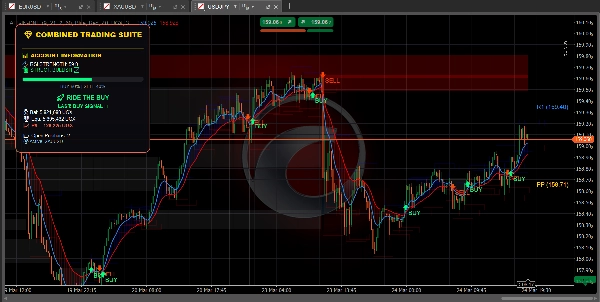
- **الخط الأزرق** = المتوسط المتحرك السريع (الاتجاه قصير الأجل)
- **الخط الأحمر** = المتوسط المتحرك البطيء (الاتجاه طويل الأجل)
- **السحابة الزرقاء** = اتجاه صاعد (السعر يرتفع)
- **السحابة الحمراء** = اتجاه هابط (السعر ينخفض)
- **السهم الأخضر** = يظهر إشارة شراء
- **السهم الأحمر** = يظهر إشارة بيع
- **شريط RSI** = يظهر إذا كان السوق في حالة شراء مفرط (مرتفع جدًا) أو بيع مفرط (منخفض جدًا)
========================================================
**كما يعرض:**
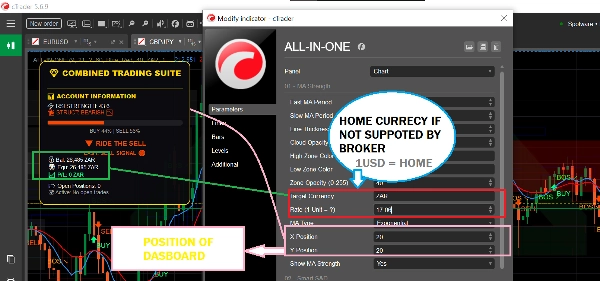
- رصيد حسابك والأرباح/الخسائر
- عدد المراكز المفتوحة لديك
- نصائح بسيطة مثل "آمن للشراء" أو "استمر في الشراء"
============================================================
### 2. مناطق العرض والطلب (محدد المستوى الرئيسي)
**ما يفعله:** يجد مستويات سعر مهمة حيث قد ينعكس السوق أو يتوقف.
**ما تراه:**
- **الصناديق الزرقاء** = مناطق الطلب (مناطق تدخل فيها المشترين - جيدة للشراء)
- **الصناديق الحمراء** = مناطق العرض (مناطق يدخل فيها البائعون - جيدة للبيع)
- **الصناديق الرمادية** = مناطق تم اختبارها (أقل موثوقية)
============================================================
**كيفية الاستخدام:**
- السعر ينخفض نحو صندوق أزرق؟ انظر للشراء
- السعر يرتفع نحو صندوق أحمر؟ انظر للبيع
- الصناديق الجديدة (الزاهية) تعمل أفضل من الرمادية
============================================================
**كما يعرض:**
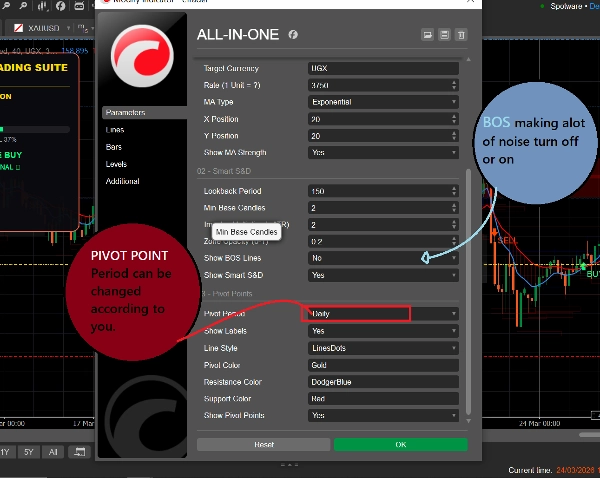
- **BOS ↗** = السوق اخترق للأعلى، قد يستمر الاتجاه صاعدًا
- **BOS ↘** = السوق اخترق للأسفل، قد يستمر الاتجاه هابطًا
============================================================
### 3. نقاط المحور (مستويات الدعم والمقاومة)
**ما يفعله:** يحسب مستويات سعر تلقائية حيث غالبًا ما يتوقف السوق أو ينقلب.
**ما تراه:**
- **الخط الذهبي** = نقطة المحور (المستوى المركزي)
- **الخطوط الزرقاء** = مستويات المقاومة (قد ينخفض السعر هنا)
- **الخطوط الحمراء** = مستويات الدعم (قد يرتفع السعر هنا)
============================================================
**يمكنك الاختيار:**
- **يومي** = تتغير المستويات مرة واحدة يوميًا
- **أسبوعي** = تتغير المستويات مرة واحدة أسبوعيًا
- **شهري** = تتغير المستويات مرة واحدة شهريًا
- **15 دقيقة** = تتغير المستويات كل 15 دقيقة (جيد للتداول السريع)
============================================================
## كيفية استخدامه (ببساطة)
### للعثور على صفقة شراء:
1. انتظر حتى يصل السعر إلى **صندوق طلب أزرق**
2. تحقق مما إذا كان خط المتوسط المتحرك الأزرق فوق الخط الأحمر (اتجاه صاعد)
3. يجب اتباع الإشارات فقط إذا كان السوق في الاتجاه الصحيح
============================================================
### للعثور على صفقة بيع:
1. انتظر حتى يصل السعر إلى **صندوق عرض أحمر**
2. تحقق مما إذا كان خط المتوسط المتحرك الأحمر فوق الخط الأزرق (اتجاه هابط)
3. يجب اتباع الإشارات فقط إذا كان السوق في الاتجاه الصحيح
============================================================
### للعثور على صفقات سريعة:
1. استخدم نقاط المحور لمدة 15 دقيقة لمستويات دقيقة
2. راقب أسهم BOS لاتجاه الاتجاه
3. تحقق من لوحة المعلومات لقوة السوق
4. قم بإجراء الصفقات التي تتطابق مع الاتجاه
============================================================
## ماذا تعني كل الألوان
| اللون | ماذا يعني |
| 🟦 أزرق | إشارات صعودية / شراء / مناطق الطلب / نقاط المقاومة |
| 🔴 أحمر | إشارات هبوطية / بيع / مناطق العرض / نقاط الدعم |
| 🟨 ذهبي | نقطة المحور (المستوى المركزي) |
| ⚪ رمادي | مناطق تم اختبارها (تم زيارتها بالفعل) |
| 🟢 سهم أخضر | إشارة شراء |
| 🔴 سهم أحمر | إشارة بيع |
============================================================
## إعدادات بسيطة للمبتدئين
============================================================
### للتداول السريع (سكالبينج):
- فترة المحور: **15 دقيقة**
- المتوسط المتحرك السريع: **5**
- المتوسط المتحرك البطيء: **13**
- تشغيل: جميع الأدوات الثلاثة
============================================================
### للتداول اليومي:
- فترة المحور: **يومي**
- المتوسط المتحرك السريع: **9**
- المتوسط المتحرك البطيء: **21**
- تشغيل: جميع الأدوات الثلاثة
============================================================
### للتداول طويل الأجل:
- فترة المحور: **أسبوعي**
- المتوسط المتحرك السريع: **21**
- المتوسط المتحرك البطيء: **55**
- تشغيل: لوحة الاتجاه + نقاط المحور
=========================================================
## قاعدة واحدة لتتذكرها
=========================================================
**لا تتداول عندما تختلف الأدوات!**
إذا قالت لوحة المعلومات شراء، لكن السعر عند منطقة عرض حمراء - انتظر وضوحًا.
إذا قالت لوحة المعلومات بيع، لكن السعر عند منطقة طلب زرقاء - انتظر وضوحًا.
أفضل الصفقات تحدث عندما تشير جميع الأدوات في نفس الاتجاه.
============================================================
## بداية سريعة
1. أضف المؤشر إلى الرسم البياني الخاص بك
2. احتفظ بجميع الإعدادات على الوضع الافتراضي للبدء
3. راقب كيف يتصرف السعر عند الصناديق والخطوط الملونة
4. بعد بضعة أيام، قم بضبط الإعدادات لتتناسب مع أسلوبك
5. استخدم لوحة المعلومات لمراقبة حسابك في الوقت الحقيقي
============================================================
هذا كل شيء! ثلاث أدوات، مؤشر واحد، تداول بسيط.
الملخص
1. Trend Dashboard: Displays short-term (blue line) and long-term (red line) moving averages, colored clouds indicating uptrend (blue) or downtrend (red), buy (green arrow) and sell (red arrow) signals, and an RSI bar showing overbought or oversold conditions. It also shows account balance, open positions, and simple text advice.
2. Supply & Demand Zones: Highlights important price levels with blue boxes for demand zones (buying areas), red boxes for supply zones (selling areas), and gray boxes for tested zones (less reliable). It includes breakout signals (BOS arrows) indicating potential trend continuation.
3. Pivot Points: Automatically calculates support and resistance levels with a gold pivot point line, blue resistance lines, and red support lines. Users can select pivot periods from 15-minute to monthly intervals for different trading styles.
The indicator supports multiple markets including Forex, Crypto, Stocks, and Indices, and provides visual signals such as crossovers, breakouts, and level touches. It is designed for various trading styles, from scalping to long-term trading, with recommended settings for each. The tool emphasizes trading only when all three components align in direction to improve trade clarity and consistency.
تقييمات العملاء
5 | 100 % | |
4 | 0 % | |
3 | 0 % | |
2 | 0 % | |
1 | 0 % |
مناقشة
الأسئلة الشائعة
المزيد من هذا المؤلف








![شعار "[Stellar Strategies] VBO"](https://cdn.ctrader.com/image/webp/f034c012-94d4-445a-a01b-febd1cdedaef_36944)



السعر